Different Router and Switch: A Practical Side-by-Side Guide
Compare routers and switches side-by-side: roles, use cases, and buying guidance for home networks. Learn when to choose an all-in-one device or add a dedicated switch for growing wired ports.


In most home networks, a single router with an integrated switch handles both routing and local network connectivity, but a separate switch becomes valuable as you add more wired devices. The key decision is whether you need simple Wi-Fi and a few Ethernet ports or scalable wired growth with greater control. This guide helps you compare the two paths and decide which setup fits your home or small office.
Different Router vs Switch: Core Concepts
In networking, a router and a switch are two different devices that serve distinct purposes. Understanding the difference between a router and a switch begins with the phrase different router and switch. A router is a gateway that connects your home network to the internet, routes traffic between networks, and provides features like NAT and DHCP. A switch, on the other hand, lives inside the local network, connecting multiple devices so they can communicate efficiently. When you combine them in a home setup, you typically use a router to handle WAN connectivity and a switch to expand the number of wired ports. This foundational distinction matters for performance, security, and scalability. In practical terms, think of a router as the traffic cop at the network edge and a switch as the highway connection inside your LAN. For homeowners weighing upgrades, this difference guides every subsequent choice.
The Historical Context and Why the Distinction Matters
To appreciate why the two devices exist side by side, consider how networks evolved. Early networks relied on simple hubs and bridges, then expanded with switches to improve collision domains and efficiency. Routers emerged to connect multiple networks and enable internet access, while switches concentrated traffic within a single network segment. The modern home often blends both roles, making the distinction critical for understanding capacity, security, and maintenance. When evaluating a setup, keep in mind that the phrase different router and switch captures not just hardware, but a design philosophy: consolidate functions where feasible, and segment them where necessary. WiFi Router Help’s analysis shows that homeowners who treat these devices as complementary assets tend to achieve stronger performance and better long-term scalability.
The Router: Primary Functions and How It Routes Traffic
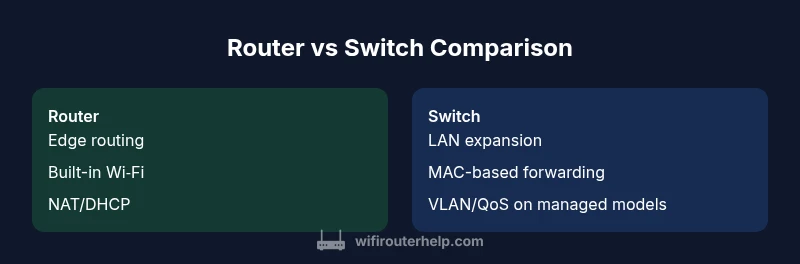
A router is fundamentally the gateway between your internal network and the wider internet. It performs routing, NAT (to translate private IPs to a public address), DHCP (to assign IPs to devices), and often firewall duties. A modern home router may also provide built-in Wi-Fi, parental controls, guest networks, and basic QoS to favor certain applications. The router makes decisions about where traffic should go, based on destination IPs, routing tables, and, in some cases, dynamic routing protocols. In the context of different router and switch, the router’s primary job is edge management—handling inbound and outbound traffic—and creating an addressable boundary for your home.
The Switch: Layer 2 and Beyond
A switch’s main job is to move packets between devices on a local area network. Historically, switches operate at Layer 2 (the data link layer) and use MAC addresses to forward traffic efficiently. A simple unmanaged switch provides plug-and-play expansion of available Ethernet ports, while a managed switch adds VLANs, QoS rules, port mirroring, and more granular control. The important distinction is that a switch does not typically route between networks; it creates efficient, deterministic paths within a single network segment. When combined with a router, a robust switch increases total wired capacity and allows for network segmentation, which is especially valuable in busy home offices.
When a Built-in Switch Might Not Suffice
For small apartments or households with a modest number of wired devices (consoles, smart TVs, desktop PCs), a router with a built-in switch is often more than enough. However, as you add devices like network-attached storage, printers, or an array of wired access points, you may quickly outgrow the built-in ports. In these scenarios, a dedicated switch—or even a small stack of switches—provides scalable expansion. If you value granular control, a managed switch unlocks features such as VLAN segmentation and port-based access control, which are difficult to replicate with a single all-in-one device. The decision hinges on current needs and future plans, not just present requirements.
Wiring, Topology, and Physical Layout
A practical home network benefits from a clean topology: a central router connected to the internet, with switches placed strategically to minimize cable runs while maximizing performance. A star topology helps reduce collisions and simplifies troubleshooting. Use Cat6 or higher Ethernet for wired connections to ensure stable throughput and future-proofing. When evaluating different router and switch options, consider how many rooms require wired access, whether you’ll place switches near power sources, and how much space you can allocate for equipment. A well-planned layout reduces bottlenecks and makes maintenance easier over time.
Performance, Throughput, and QoS Impacts
Performance in this context comes from both hardware capabilities and network configuration. The router’s CPU and memory influence routing throughput and VPN performance, while the switch’s port count and switching capacity determine how many devices can communicate efficiently at once. QoS policies help you prioritize latency-sensitive traffic such as gaming or video conferencing, even when multiple devices are in use. A key takeaway when comparing different router and switch configurations is to align hardware with your expected load: more simultaneous wireless users, more wired devices, or a combination of both will steer you toward higher-capacity hardware and more sophisticated configurations.
Managed vs Unmanaged Switches: Practical Guidance
Choosing between a managed and unmanaged switch depends on your goals. Unmanaged switches are simple, reliable, and ideal for basic expansion without configuration overhead. Managed switches offer VLANs for traffic separation, QoS for prioritization, and advanced monitoring for troubleshooting. If you’re running a home lab, streaming-heavy household, or a small office, a managed switch can provide long-term value by enabling better control and isolation of devices. WiFi Router Help recommends starting with an unmanaged switch for straightforward setups, then upgrading to a managed model if you outgrow basic needs.
Security, Privacy, and Network Segmentation
Security considerations rise as you introduce more wired devices and more complex topologies. VLANs provide logical separation between devices or groups, which can limit the spread of breaches and improve privacy. The router’s firewall and NAT settings remain central, but a modular switch with VLAN capabilities can add a second line of defense by isolating traffic. Always keep firmware up to date and document your network segments so troubleshooting remains straightforward. The overarching principle is clear: security benefits grow when you design the network with explicit boundaries rather than relying on one device to do everything.
A Step-by-Step Buying Framework Based on Use Case
- Define your use case: apartment, family home, or small office. 2) Tally wired device count and growth expectations. 3) Decide whether you need VLANs, guest networks, or VPN support. 4) Weigh a combined router-solution against a dedicated switch path. 5) Consider future upgrades and resale value. 6) Check compatibility with existing gear (modems, access points). The guiding principle remains: weigh the immediate simplicity of a single device against the long-term flexibility of modular networking. In many scenarios, a router with built-in switch works well for small homes, but when you scale, a separate switch often proves worth the extra planning. WiFi Router Help’s framework highlights the balance between convenience and control, nudging you toward a configuration that minimizes future rework while meeting current needs.
Troubleshooting Common Scenarios and Pitfalls
Common issues include IP address conflicts, misconfigured VLANs, and inconsistent QoS rules. If devices fail to obtain an IP, verify DHCP settings on the router and ensure the switch hasn’t inadvertently blocked broadcast traffic. When using VLANs, confirm that inter-VLAN routing is enabled on the router and that switch ports are assigned to the correct VLANs. Poor cable quality or aging ports can also cause slowdowns; run throughput tests across a few representative devices to identify bottlenecks. Remember to document changes and maintain a clear labeling system for cables. A well-documented setup reduces downtime and makes future expansions more predictable.
Real-World Scenarios: From a Small Apartment to a Home Office
In a small apartment with 2–4 wired devices and multiple wireless clients, a modern router with a few Ethernet ports often suffices. For a larger family home with several desktops, gaming consoles, a NAS, and multiple access points, a dedicated switch (and perhaps a managed one) becomes advantageous to keep traffic organized and predictable. In a home office or small business environment, you’ll typically push for higher port counts, VLAN-based segmentation, and robust QoS to guarantee performance for critical tasks. The bottom line is that the different router and switch decision hinges on scale, features, and future growth. The WiFi Router Help team encourages readers to map device counts, expected traffic patterns, and growth plans before purchasing.
Comparison
| Feature | Single-device router with built-in switch | Dedicated router + standalone switch |
|---|---|---|
| Ports (LAN) | Typically 4-8 ports on the built-in switch | Port count depends on the chosen switch (8, 16, 24+, often modular) |
| Management | Unified management via router interface | Separate management for router and switch; potential for dual interfaces |
| Expansion potential | Limited by router's internal ports | Highly scalable with additional switches |
| Security features | Router firewall/NAT; basic QoS | VLANs on managed switches; more granular controls |
| Space & power | One device; fewer cables | Two devices require more space and outlets |
| Cost | Often lower upfront for a single unit | Can be higher upfront but modular for growth |
| Best for | Small homes, simplicity | Larger homes, offices, or tech-heavy setups |
Benefits
- Simpler to manage for small networks
- Cost-effective for minimal setups
- Fewer cables and devices to maintain
- Quicker installation with a single device
- Unified firmware reduces compatibility issues
The Bad
- Less scalable for growing wired needs
- Limited advanced features without a dedicated switch
- Single point of failure if the router dies
- Potentially higher long-term cost if upgrades are frequent
For most homes, a router with a built-in switch is the better default; a separate switch wins when you need more ports or greater network control.
Choose a combined router-switch when you want simplicity and compact setup. Opt for a dedicated switch if you anticipate growth, heavy wired devices, or the need for VLANs and advanced QoS for precise traffic management.
People Also Ask
What is the main difference between a router and a switch?
A router connects your local network to the internet and routes traffic between networks, while a switch connects multiple devices within the same local network to enable communication. The two work together in most home setups, with the router handling internet access and the switch expanding wired ports.
A router connects you to the internet, and a switch connects devices inside your home network.
Can I replace both with a single device?
Yes in many cases. Modern gateways combine routing, switching, firewall, and Wi‑Fi in one box. For larger networks or advanced controls, a separate switch may still be preferable.
Yes—one device can do it all, but separate gear can be better for growth.
What is a managed switch and why would I need one?
A managed switch offers VLANs, QoS, monitoring, and port-level controls. It’s useful when you need traffic segmentation, prioritization, or detailed troubleshooting in a growing network.
If you need traffic control and visibility, a managed switch is worth it; otherwise, start with unmanaged.
Is a PoE switch better than a regular switch?
PoE provides power over Ethernet for devices like access points and cameras, reducing clutter from power adapters. A PoE switch is beneficial if you have compatible devices and want fewer power drops.
PoE is handy for wireless APs and cameras, but requires PoE-capable gear.
What signs indicate I need more wired ports?
If you notice many devices lacking Ethernet ports or experiencing congestion with wired devices, upgrading with a larger switch or additional switches improves performance.
If you’re running out of ports or seeing slow wired devices, you probably need more ports.
Are there security risks adding a separate switch?
Security risks come mainly from misconfiguration. Use VLANs to isolate traffic and keep firmware updated. A well-planned setup reduces exposure.
Not inherently risky, just be careful with VLANs and updates.
What to Remember
- Assess your wired port needs before buying
- Prefer a single device for small homes; add a switch for growth
- Use VLANs and QoS when you require traffic segmentation
- Keep firmware updated and document your topology
- Plan for future expansion to avoid rework