Is upgrading router worth it: a practical side-by-side comparison
Explore whether upgrading your router is worth it with a clear, data-driven comparison. Weigh speed, coverage, security, and cost to decide if a new router fits your home's needs.


Is upgrading router worth it for your home? For most households, upgrading is worth it if you routinely hit dead zones, stream in 4K, or have many smart devices. Modern routers with Wi-Fi 6/6E bring faster speeds, stronger reliability, and longer security support. If your current network meets your needs, you can delay; the decision hinges on pain points and budget.
Is upgrading router worth it in 2026? Context and questions
The question is not a simple yes-or-no choice. It hinges on real-world usage, home layout, and device load. According to WiFi Router Help, many homeowners underestimate how a single gear upgrade can ripple through the entire network, improving latency, stability, and ease of management. If your family streams in 4K, participates in online gaming, or relies on dozens of smart devices, the scale tips toward an upgrade. Yet if your speeds and coverage are already acceptable and devices are few, upgrading may feel like a discretionary expense. In this section we outline the practical criteria people use to decide, from room-to-room coverage to the number of devices in the household, and translate those criteria into a concrete upgrade plan.
Understanding the core choice: upgrade vs. stay
Upgrading typically means moving from an older router to a newer model that supports the latest wireless standards, faster internal processors, more memory for handling multiple streams, and richer firmware. Staying with your current router preserves your budget and avoids setup work, but may leave you with stale security protections and slower performance on new devices. The core difference is not just speed, but the reliability, security, and future-proofing that newer hardware and software provide. This section explains how these factors translate into everyday benefits for most homes.
Practical signals you may be ready to upgrade
- Persistent dead zones in large or multi-story homes
- More than a handful of connected devices (phones, laptops, smart TVs, IoT)
- Repeated buffering during peak usage hours or while gaming
- Your router is several years old and no longer receives regular firmware updates
- Your ISP is pushing higher speeds that your current hardware struggles to deliver
If several signals apply, upgrading becomes more compelling. If not, you can often delay and monitor performance with targeted tweaks before buying.
Core differences you should expect after an upgrade
A newer router typically means stronger throughput, better handling of simultaneous connections, and improved security. Features such as adaptive QoS, better beamforming, MU-MIMO support, and OFDMA help distribute bandwidth more fairly among devices. You also gain longer product lifecycles, more robust parental controls, easier app-based management, and quicker firmware patches. Understanding these differences helps you quantify the value of upgrading beyond nominal speed tests.
Wireless standards explained: Wi‑Fi 5 vs Wi‑Fi 6/6E and why it matters
Wi‑Fi 5 (802.11ac) delivered solid performance for many years, but Wi‑Fi 6 (802.11ax) and the newer Wi‑Fi 6E introduce efficiencies that matter in busy homes. The improvements include better handling of multiple devices, lower latency, and higher peak speeds in realistic conditions. Upgrading to a Wi‑Fi 6/6E router is not a guaranteed miracle for every home, but it often yields noticeable gains when you have many devices or live in a dense apartment complex. The key is ensuring your devices can take advantage of the new standard, and that your ISP plan is not bottlenecking the connection.
Coverage and reliability: signal, interference, and placement
Coverage depends on more than router power alone. Antenna design, band steering, channel selection, and placement all influence signal reach. A newer router often brings better antennas and smarter band management, so placing the device centrally and away from obstructions can unlock more consistent coverage. If you face persistent dead zones, a mesh system or a higher-end router with strong multi‑band support can dramatically improve reliability without increasing complexity.
Features that deliver value: security, QoS, guest networks, and parental controls
Modern routers ship with WPA3 security, automatic firmware updates, and advanced features that improve user experience. QoS (Quality of Service) prioritizes bandwidth for critical tasks like video calls or gaming, while guest networks help keep your main network secure when visitors are connected. Parental controls and device scheduling provide practical ways to manage time online. These features often justify the purchase beyond raw speed, especially for households with children or work-from-home needs.
Cost considerations: total cost of ownership and price anchors
Upgrading brings upfront costs that vary by model and retailer. A realistic range for a quality modern router is broader than a single price tag, and you should consider long-term value: extended security support, firmware longevity, and the potential to reduce expenses elsewhere (such as mesh extenders or professional setup). If you factor in these long-term gains, the upgrade can be worthwhile for households with rising device counts or streaming demands. For tighter budgets, a mid-range model can still deliver meaningful improvements without a steep initial investment.
Setup and migration: step-by-step when you upgrade
Preparation matters. Step one is to verify compatibility with your Internet service plan and any existing modem (bridge mode vs. router mode). Step two is to map your home’s coverage to identify routing sweet spots. Step three is to update firmware on the new device immediately after setup, then reconfigure key features (QoS, guest network, parental controls). Step four is to test speeds in multiple rooms and adjust placement as needed. If you use a modem-router combo from your ISP, you may need to put the ISP device in bridge mode to avoid double NAT, which can complicate configuration. A careful, staged approach minimizes downtime and ensures a smooth transition.
Future-proofing and firmware: long-term benefits
A newer router is generally designed with longer software support windows in mind. Regular firmware updates patch security flaws and add features that improve performance over time. While no device is future-proof forever, a modern router positioned for at least several years of service with ongoing support offers a practical guard against obsolescence. This is a core reason homeowners choose to upgrade, especially when they expect to add new smart devices or upgrade to faster internet tiers in the near term.
Practical decision framework: how to decide for your home
Start with a simple scoring framework: list your current pain points, count the number of devices, and estimate peak usage times. Assign a value to each factor, then weigh the total against the upfront cost of a new router and potential setup effort. If your score exceeds a threshold, upgrading provides tangible value. Use a staged approach: test a mid-range upgrade first, then decide whether to invest in top-tier hardware or a complementary mesh system for larger homes. The framework keeps the decision grounded in your realities rather than an abstract speed number.
Next steps and a guided plan
If you decide to upgrade, create a short vendor and model shortlist, focusing on compatibility with your existing modem and the features that matter most (security, QoS, and ease of management). Schedule a staged rollout and verify performance improvements in high-usage rooms. If you opt to stay with your current router, outline a maintenance plan: keep firmware up to date, monitor device performance, and consider targeted replacements (extenders or new devices) if specific pain points persist. Either path should be guided by concrete home realities rather than generic benchmarks.
Comparison
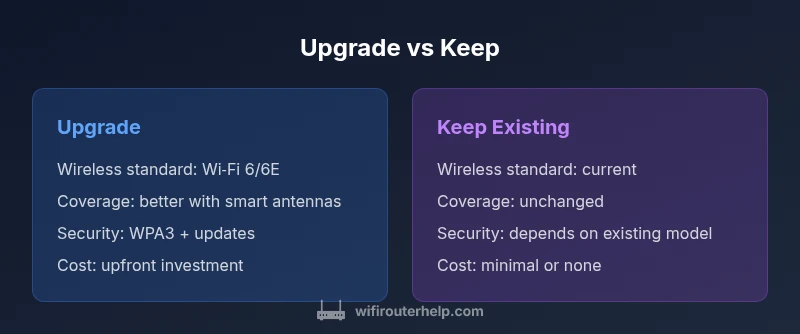
| Feature | Upgrade to a newer router | Keep using current router |
|---|---|---|
| Wireless standard support | Wi‑Fi 6/6E capable; better efficiency with multiple devices | Legacy standard (Wi‑Fi 4/5/6) depending on the model |
| Coverage potential | Improved range with newer antennas and smarter beamforming | Current coverage limited by existing hardware and placement |
| Security & firmware updates | Regular firmware updates and stronger default security (WPA3) | Firmware updates depend on vendor; may be less frequent |
| Smart features & management | Advanced QoS, parental controls, app-based setup, guest networks | Fewer built-in management features; may require manual tweaks |
| Initial cost | $60-$300 upfront (varies by model and features) | 0 upfront if you keep using the existing device |
| Best for | Medium-to-large homes with many devices and high usage | Smaller spaces or budget-conscious setups with lighter loads |
Benefits
- Faster, more reliable networks for busy households
- Stronger security and longer support life
- Better coverage with modern hardware
- Future-proofing for new devices and workloads
The Bad
- Upfront cost and potential setup time
- Not all existing devices benefit equally
- Possible compatibility considerations with ISP modems
Upgrade is worth it for most homes, especially with growing device counts and demanding workloads
If you stream 4K, gaming online, or manage many smart devices, upgrading delivers tangible gains. If your current speeds and coverage are already meeting needs, you can postpone and reassess after monitoring performance for a few weeks.
People Also Ask
What qualifies as a router upgrade?
A router upgrade typically means moving to a device with newer wireless standards (Wi‑Fi 6/6E or newer), a faster CPU, more memory, and updated security features. It often includes enhanced management tools and better handling of multiple devices. The decision hinges on your current performance gaps and future needs.
An upgrade means getting a newer router with the latest wireless standard, better performance, and modern security features.
How do I know if my home needs a new router?
Check for persistent dead zones, buffering during peak times, and a growing number of connected devices. If your current router cannot keep up with your household demand or receives infrequent firmware updates, a new model is often worthwhile.
Look for dead zones, lag during gaming, or many devices. If these show up, it might be time for an upgrade.
Will upgrading require a new modem or ISP changes?
In many setups you can connect a new router to your existing modem in bridge mode if needed. Some ISPs provide modem-router combos that complicate upgrades. Always verify compatibility and plan for potential configuration adjustments.
Usually you can keep your current modem and just add a new router, but some setups require changes.
Is Wi‑Fi 6/6E worth it for most homes?
For households with multiple devices, streaming, and online gaming, Wi‑Fi 6/6E offers noticeable improvements in speed and efficiency. If you have fewer devices or your current performance is sufficient, the benefit may be smaller.
If you have many devices and want better performance, Wi‑Fi 6/6E helps a lot.
How long does setup usually take?
A typical upgrade takes 30–60 minutes, including unboxing, initial configuration, firmware updates, and testing. A mesh system can take longer to optimize but often yields easier coverage tuning for larger homes.
Plan about an hour for setup, plus some time for testing and placement tweaks.
Are there risks upgrading in the middle of a contract?
Upgrading generally does not affect your ISP contract. You may need to adjust bridge settings or port forwarding, but most users experience a smoother transition with basic planning. If you rely on a specific ISP feature, verify compatibility before switching.
No big contract risk, but check compatibility with your ISP setup.
What to Remember
- Assess pain points and device load before buying
- Match features to home size and layout
- Consider total cost of ownership, not just upfront price
- Plan a smooth migration with compatibility checks
- Prioritize future-proofing features like Wi-Fi 6/6E and WPA3