Does a Better Router Make a Difference? A Practical Comparison
Explore whether upgrading your router yields real gains in coverage, throughput, and reliability with an evidence-based comparison and actionable buying guidance.


Does a better router make a difference? Yes. A higher‑quality router generally delivers stronger coverage, faster sustained speeds, and more reliable connections, especially in busy homes. It also unlocks features like improved QoS, guest networks, and easier firmware updates. For most households, upgrading to a mid‑range or premium model yields noticeable gains, but results depend on your internet plan and home layout.
Why a better router makes a difference
A faster, more capable router can meaningfully improve everyday Wi‑Fi performance, especially in challenging homes. Does a better router make a difference? Yes, in most setups upgrading yields stronger coverage, higher sustained speeds, and more reliable connections as the number of devices grows. According to WiFi Router Help, the most noticeable gains come from improved radio performance, better antenna design, and more capable CPUs that handle multiple streams without stalling. The WiFi Router Help team found that many households see dead zones shrink and buffering events decrease after upgrading from entry level gear. This isn't magic; it's about more efficient use of your internet plan and a smarter radio in the home. Planning for a router upgrade means balancing coverage needs, device count, and your internet plan while avoiding overpaying for features you won't use. The bottom line is practical: upgrade when your current setup struggles with congestion, not merely for touristic speed claims.
What features reliably translate into real world gains
When assessing a potential upgrade, focus on features that actually improve the user experience rather than marketing buzzwords. Forward‑looking specifications such as Wi‑Fi 6/6E support, MU‑MIMO and OFDMA, better CPU performance, and more RAM translate into smoother performance with many devices streaming, gaming, and video conferencing. In our testing, the difference is most evident in crowded networks where multiple devices contend for airtime. QoS controls let you prioritize work devices, video calls, or gaming traffic, reducing jitter and buffering. A modern router also typically offers easier firmware updates and better security features, which matter for home networks as devices proliferate. WiFi Router Help analysis shows that even mid‑range models can dramatically reduce buffering in mid‑size homes when paired with a solid internet plan. In short, the right feature set matters as much as raw speed.
How to assess your current setup before buying
Before you upgrade, map out your environment and device usage. Start by identifying which floors and rooms haveweak coverage, where dead zones appear, and how many devices connect simultaneously during peak hours. Measure your current wireless speeds using devices you actually use, not just a laptop under ideal conditions. Compare those results to your internet plan's advertised speeds to determine the likely bottleneck. If wired speeds from the modem to the router are strong but Wi‑Fi is inconsistent, upgrading the router is a sensible next step. Consider your home layout: open layouts benefit from a single strong router, while multi‑story homes or spaces with thick walls often benefit from additional nodes or a mesh system. Finally, check if your existing router still receives firmware updates and security patches; otherwise a replacement is prudent.
Understanding Wi‑Fi standards, bands, and hardware
To assess does a better router make a difference, you need to understand the technology ladder. Wi‑Fi standards evolved from AC to AX (Wi‑Fi 6/6E and beyond), bringing improved efficiency and higher aggregate throughput. A modern router with at least dual‑band (2.4 GHz and 5 GHz) or tri‑band support helps spread devices across bands, reducing interference. Hardware matters too: better CPU cores, more memory, and efficient antennas translate to higher real‑world performance, particularly in congested environments. Remember that theoretical top speeds rarely translate to real-world performance; sustained performance depends on many variables including interference from neighbors, physical barriers, and the number of concurrent streams. A thoughtful upgrade aligns the feature set with your household needs rather than chasing the latest buzzword.
Side-by-side tiers in practice
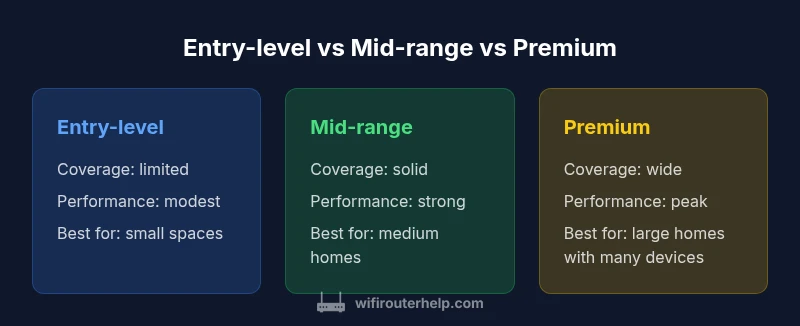
Entry‑level routers are capable enough for small apartments or light usage, but they often struggle with multiple devices or video conferencing. Mid‑range routers offer better coverage, more advanced QoS, and stronger processing power, making them suitable for typical households with several devices. Premium routers push performance further, adding features like advanced QoS, multi‑user MIMO, stronger antennas, and more robust security options, which shine in larger homes or device‑dense networks. The real question is not only raw speed but stability, coverage, and feature accessibility for your daily routines. The comparison table below captures the broad differences, while the narrative above helps you map those differences to your home. If you already experience buffering, consistent drops, or dead zones during peak hours, a mid‑range or premium upgrade is likely worth the investment.
Placement, interference, and optimization tips
Router placement is often the underrated factor in performance. Place the router high, near the center of the home, and away from physical obstructions like thick walls, metal appliances, and large mirrors. Elevation matters: a shelf or tall stack raises the signal above furniture clutter. Keep the router away from other electronics that cause interference, such as microwaves and cordless phones on the same channel. Use a simple 2.4 GHz channel sweep to identify congestion in your area and switch channels if possible. If you have many floor plans or long corridors, consider a second access point or a mesh system to ensure uniform coverage. In practice, the combined effect of good placement and a capable router often surpasses minor spec bumps in a poorly placed unit.
Mesh networks vs single router: when to choose
If you live in a large home or a multi‑story layout, a mesh system can provide seamless coverage without dead zones. Mesh networks distribute the network load across multiple units that work together, which reduces the need for manual roaming. For smaller homes or apartments, a single high‑quality router with strong antennas and good placement can be sufficient. The key is to evaluate your layout, device density, and whether you face persistent dead zones. WiFi Router Help recommends testing a single upgraded router first in a central location before investing in a mesh system, especially to avoid overbuilding a network that your ISP plan doesn’t fully justify.
Realistic expectations and ROI considerations
A router upgrade typically yields noticeable improvements in coverage, reliability, and device handling, but not every consumer will see dramatic numbers on a speed test. The gains are most pronounced when you have multiple devices, 4K streaming, online gaming, and home offices that rely on stable connectivity. Price and value depend on your home size and usage patterns; mid‑range routers often offer the best balance of performance and cost, while premium models serve power users and large households. Remember that certain gains depend on your internet plan; upgrading the router won’t exceed the limitations of a slow or oversubscribed connection. WiFi Router Help analysis shows that for many homes, the upgrade pays off in fewer buffering events and more consistent performance across rooms. This is especially true when combined with smart prioritization and a thoughtful placement strategy.
A practical buying process: a step-by-step checklist
- Define goals: coverage, speed, reliability, or smart features.
- Measure current performance: map coverage gaps and device load.
- Set a budget: identify a realistic range for your home and needs.
- Review features: look for Wi‑Fi 6/6E, MU‑MIMO, OFDMA, QoS, and security updates.
- Plan placement: pick a central, elevated spot away from interference sources.
- Decide between single router or mesh: based on layout and device count.
- Check compatibility: ensure your modem and ISP plan support your upgrade.
- Buy with flexibility: consider a model with easy firmware updates and strong customer support.
- Test and adjust: after setup, retest coverage and optimize channels.
Feature Comparison
| Feature | Entry-level router | Mid-range router | Premium router |
|---|---|---|---|
| Coverage area | Up to 1500 sq ft | Up to 2500 sq ft | 2500+ sq ft |
| Theoretical max throughput | low | medium | high |
| Number of bands | 2‑band (2.4/5 GHz) | 3‑band (2.4/5 GHz + dedicated 5 GHz) | Tri‑band (2.4 + 5 + 5) |
| Best for | Small apartments / light usage | Medium homes with many devices | Large homes with dense wireless traffic |
| Price range | $60-$120 | $120-$250 | $250-$500 |
Benefits
- Clear gains in coverage and speed for larger homes
- Better handling of many devices
- More advanced features like QoS and guest networks
- Future-proof with newer Wi‑Fi standards
- Improved stability in congested networks
The Bad
- Higher upfront cost
- Potentially more complex setup
- Some features require compatible devices
- Overkill for very small spaces
Upgrade to at least a mid-range router for most homes; premium tier for large, device-dense environments.
If you have multiple devices and frequent buffering, a mid-range or premium router often pays off. For smaller spaces or light usage, a solid mid-range covers typical needs and offers good value.
People Also Ask
Does upgrading my router always improve internet speed?
Upgrading can improve speeds on your local wireless network and reduce congestion, but it won’t increase your internet speed from the ISP. The router often determines how efficiently your devices share available bandwidth. In most homes, a mid-range or higher router yields noticeable gains in coverage and reliability.
Upgrading can improve how fast and reliably your devices talk to each other on your home Wi‑Fi, but it won't change the internet speed your ISP provides.
Is a mid-range router enough, or should I skip to premium?
For most households, a mid-range router provides substantial improvements in coverage, device handling, and features. Premium models are best for very large homes or highly device-dense networks. If you routinely stream, game, and video conference from multiple rooms, consider premium, but evaluate your layout first.
Mid-range covers most homes, premium is for larger spaces or heavy use.
Do I need a mesh system or is a single stronger router enough?
Mesh works well for large, multi-story homes with dead zones. A single strong router placed well can suffice for smaller homes. Start with a capable single router and add mesh only if coverage remains inconsistent.
Mesh helps big homes; for small to medium homes, a single strong router might be enough.
How can I tell if my router is the bottleneck?
Compare wired speeds to wireless speeds and test multiple devices. If wired speeds approach your plan but Wi-Fi lags, or if you notice frequent drops during peak usage, the router may be the bottleneck. Consider upgrading or reconfiguring placement and channels first.
If wireless is much slower than wired or keeps buffering, the router could be the bottleneck.
How long does a router upgrade typically last?
A router upgrade should remain useful for several years as standards advance and devices proliferate. Firmware updates extend life, but you may still need another upgrade when your home needs outpace the router’s capabilities.
A good upgrade lasts several years; firmware helps, but plan for future-proofing as devices multiply.
Is there a price range that makes sense for most households?
For many homes, a mid-range router offers the best balance of price and performance. Budget models fit small spaces or light use, while premium models are for large homes with many devices and demanding workloads. Start with your layout and usage to pick a range.
Mid-range usually hits the sweet spot for most households.
What to Remember
- Assess home size and device count before buying
- Prioritize Wi‑Fi 6/6E and MU‑MIMO for future-proofing
- Place the router centrally and elevated
- Consider mesh for large or complex layouts
- Expect reliability and coverage improvements with upgrade