Does a More Expensive Router Work Better? A Practical Comparison
Explore whether paying more for a router yields real speed, coverage, and reliability gains. This objective guide compares premium vs mid-range routers and offers practical setup tips to maximize performance in typical home networks.


Does a more expensive router work better? In many homes, the answer is not a simple yes or no. The most noticeable gains come from crowded Wi‑Fi environments, large homes, or demanding tasks. WiFi Router Help finds that price usually correlates with features and firmware longevity, but performance improvements depend on where you live, how you use Wi-Fi, and your ISP plan.
How price maps to performance: what the numbers actually show
When you ask whether a more expensive router works better, you’re really asking if higher cost translates into measurable gains. In controlled tests, premium devices often deliver stronger signal stability, broader multi‑band coverage, and more consistent throughput under load. But the real world is messy: walls, furniture, and competing networks create interference that can erase incremental gains. The phrase does a more expensive router work better appears frequently in lab reports, yet in everyday use, the answer depends on your home layout, the number of connected devices, and the types of activities you run (gaming, 4K streaming, video conferencing). According to WiFi Router Help, households with simple setups rarely need premium hardware unless there is persistent congestion or a growing device footprint. The central question remains: how do you balance price with the actual needs of your network and budget?
Why price tags rise: features that often justify premium costs
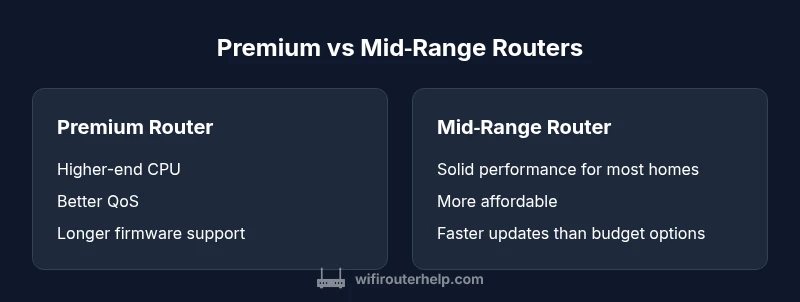
Manufacturers price routers at different tiers based on CPU speed, memory, number of radios, and architectural choices like tri‑band configurations or MU‑MIMO. Higher prices often unlock firmware longevity, advanced QoS, more robust parental controls, and easier management with smart home ecosystems. If you are upgrading from a very old router, the perceived improvement might be dramatic, as older devices typically struggle with newer technologies and security standards. However, in smaller homes with minimal interference, the premium features may sit idle, producing less noticeable improvements. WiFi Router Help notes that the biggest bang for the buck tends to come from devices that enhance reliability and management rather than sheer theoretical speed.
The real‑world speed story: lab numbers vs living rooms
Manufacturers test routers in optimized labs that minimize interference and maximize signal. In real homes, though, throughput can drop by a factor of 2–4 depending on wall density, hallway layout, and the number of devices streaming concurrently. A more expensive router can still win in crowded environments by offering better load handling and smarter channel management, but your actual internet plan is a limiting factor. If your plan provides 500 Mbps or 1 Gbps, you might see the largest gains only if your router can consistently sustain high throughput across multiple devices. If you’re on a slower plan, a mid‑range router may deliver nearly identical experiences for most household tasks. The key is to map your needs to the hardware capabilities and consider what you truly will use the extra headroom for.
Coverage, interference, and the size of your home
Coverage is not just about transmitting power; it’s about how signals propagate through walls and furniture. Large homes with multiple floors often benefit from better antenna design, beamforming, and sometimes mesh support. Expensive routers with more antennas and smarter radios can maintain usable signal deeper into rooms, but this advantage shrinks in homes with open layouts or near repeaters. WiFi Router Help emphasizes that you should measure your actual coverage with a reliable speed test tool and identify dead zones before deciding to up‑price the hardware. A mid‑range router paired with a proper placement strategy can outperform a premium model placed suboptimally.
The hardware that matters: CPU, memory, and radios
Performance scales with processing power and memory when you are running complex QoS rules or multiple guest networks. A stronger processor helps with congestion management, faster firmware updates, and smoother multitasking. More RAM reduces buffering during peak loads. Radios (2.4 GHz vs 5 GHz) and band steering capabilities influence sustained performance more than raw labeling. In practice, you’ll notice tangible benefits when the router handles many devices or supports new standards like Wi‑Fi 6/6E. Still, the presence of a modern standard doesn’t guarantee speed improvements in a cluttered environment. The real differentiator is how well the hardware and software work together under your typical load.
Features that often justify a premium: QoS, security, and ecosystem integrations
Premium routers commonly include advanced QoS settings, robust security features, and better support lifecycles. If you rely on real‑time applications (gaming, video calls, online work), the ability to prioritize traffic and protect devices can offer measurable value. Additional features like built‑in VPN support, improved parental controls, and seamless updates over longer periods can represent meaningful advantages for households with higher security concerns or remote work requirements. WiFi Router Help suggests evaluating both practical benefits and the ongoing cost of ownership when deciding whether the added features justify the higher price.
When it makes sense to pay more: user profiles and home layouts
Premium routers are often worth considering for tech enthusiasts who enjoy tinkering, for households with heavy streaming across multiple rooms, or for homes with challenging layouts where consistent coverage matters. If you frequently stream 4K/8K content, game online with friends, or manage a large number of smart devices, paying a premium for hardware reliability and firmware longevity can reduce frustration over time. However, if your needs are modest—checking email, browsing the web, streaming a single 1080p video—the incremental gains may not be worth the extra cost. The WiFi Router Help team encourages calibrating expectations and testing a setup before committing to a premium option.
How to assess value: a practical decision framework
To decide whether does a more expensive router work better for you, start with your current performance. Run speed tests at multiple points in your home and note areas with poor coverage. Compare these results against the capabilities of a mid-range model that could deliver similar results in your environment. Then, estimate total cost of ownership, including firmware updates and potential future compatibility. If the premium device offers upgrades that translate into real improvements in your most frequent tasks, the extra price may be justified. Otherwise, a well‑chosen mid-range router with thoughtful placement can be the most sensible solution. WiFi Router Help advocates a careful, data‑driven approach rather than assuming a higher price automatically equals superior performance.
Practical setup: maximize any router’s potential regardless of price
Positioning, channel selection, firmware updates, and device management all influence outcomes more predictably than the sticker price. Start with optimal placement away from obstructions and routers that share the same channel. Use wired backhaul if possible to stabilize the network. Enable QoS rules focused on the devices or applications that need priority. Update firmware from the manufacturer’s site and review security settings. If you need to extend coverage, a mesh solution can offer consistent performance across a larger area than a single premium router. In many homes, smart placement and basic optimization yield more noticeable improvements than upgrading to the newest flagship model.
Comparison
| Feature | premium router | mid-range router |
|---|---|---|
| Price range | $250-$500 | $100-$250 |
| Theoretical max throughput | Higher peak specs (often marketing-labeled) | Solid sustained performance in many homes |
| Real-world throughput under load | Better at handling multiple streams in optimal conditions | Usually adequate for average households |
| Coverage and antennas | More antennas, advanced beamforming, better long-range reach | Good coverage with proper placement; fewer antennas may still perform well in smaller spaces |
| Firmware lifecycle | Longer support window and more frequent updates | Moderate support with timely updates |
| Features and QoS | Advanced QoS, security features, ecosystem integrations | Essential QoS and security with straightforward setup |
| Best for | Tech enthusiasts, large homes, heavy multitasking | Budget-conscious buyers, smaller homes, standard usage |
Benefits
- Potentially longer firmware support and security updates
- Better QoS and prioritization for demanding apps
- Stronger hardware for multitasking and future-proofing
- Enhanced management features and ecosystem compatibility
- Higher resale value if you upgrade again later
The Bad
- Higher upfront cost
- Diminishing returns for small or interference-free homes
- More complex setup and configuration
- Firmware bloat can complicate maintenance
Mid-range routers often deliver the best value for most homes; premium models shine in high‑interference, large, device-dense environments.
Choose premium if you face persistent congestion or need long firmware support. Otherwise, a quality mid-range router typically meets real‑world needs with fewer financial risks.
People Also Ask
Is a more expensive router always worth the extra cost?
No. A more expensive router is only worth it if your home environment and usage demand features like robust QoS, longer firmware support, or better coverage. For many households, a solid mid-range model delivers comparable daily performance.
Not always. It’s worth it mainly when you have high interference or lots of devices; otherwise a mid-range router often suffices.
Do expensive routers actually provide faster speeds in real life?
Faster speeds are possible, but not guaranteed. Real-world performance depends on plan speed, home layout, and interference. Premium routers may sustain higher throughput under load, but the gains blend with other network limits.
They can help with sustained throughput under load, but your actual speed still depends on your internet plan and home environment.
What features justify premium prices?
Key features include advanced QoS, better security and update lifecycles, multi-band support, and smarter channel management. If these translate to your daily tasks—gaming, videoconferencing, or a busy smart-home—the price can be justified.
Look for strong QoS, security updates, and long firmware support; these often justify higher costs for busy networks.
Will a premium router improve Wi‑Fi in a large home?
Often yes, especially if the layout causes dead zones or interference. Premium models usually offer better coverage features and more flexible deployment options, but a well‑placed mid-range router or a mesh system can also cover large homes effectively.
In large homes, premium models or mesh systems often help, but placement and layout matter just as much.
How should I test whether upgrading helps my network?
Benchmark your current setup with speed tests in key rooms, then compare after upgrading. Look for improvements in areas where you previously saw slowdowns and evaluate whether the price is justified by these gains.
Test in the places you use Wi‑Fi most; compare before and after to judge value.
Are mesh networks always better than upgrading a single router?
Not always. A modern single high‑quality router can outperform an older mesh kit in some scenarios, while a mesh system excels for sprawling homes with many dead zones. Consider layout, device count, and budget when choosing.
Mesh can help in big homes with dead spots, but your exact layout determines whether it beats a single premium router.
What to Remember
- Assess real-world needs before upgrading the router hardware
- Prioritize placement and setup over price alone
- Consider firmware lifecycle and feature set when weighing value
- If you have a large home or heavy interference, a premium model may pay off
- A well‑placed mid-range router often matches the performance that most households require