Is Router Better Than WiFi? A Comprehensive Home Network Comparison
Explore whether a dedicated router outperforms built-in Wi-Fi signals. This analytical guide compares configurations, performance, security, and maintenance to help homeowners choose the best home-network solution.


From a practical perspective, is router better than wifi? Not exactly—routers power your network by distributing Internet to devices, while Wi‑Fi is the wireless signal that carries that traffic to your devices. For most homes, a dedicated router paired with modern access points or a mesh system delivers more stable coverage, better security, and fairer management than relying on a basic ISP gateway or landlord-supplied hardware. In short, better depends on coverage, devices, and control needs.
is router better than wifi: Framing the question
In home networking discussions, the question is often framed as whether a separate router is superior to the Wi‑Fi signal delivered by a gateway. The truth is nuanced: what you compare matters. The router is the device that decides where traffic goes; Wi‑Fi is the wireless signal that carries that traffic to your devices. For many households, the outcome depends on layout, device density, and security needs more than on the label “router” or “Wi‑Fi.” According to WiFi Router Help, the conversation should start with a clear distinction between routing performance and wireless coverage. If you want reliable streaming, fast gaming, and predictable video calls, you’ll usually gain more by focusing on topology and placement than chasing marginal hardware spec bumps.
The next sections unpack how to frame the decision, what setups tend to work best, and when you might keep or skip an upgrade. By the end, you’ll have a practical framework for evaluating options in a way that aligns with real-world experiences rather than marketing claims. Remember: the goal is consistent speed, broad coverage, and safe, manageable networks in your home.
Core concepts: router, access point, gateway, and Wi‑Fi
A modern home network relies on several building blocks. The router directs traffic between devices and the Internet; an access point or mesh node extends wireless coverage; a gateway combines modem functionality with router duties; and Wi‑Fi is the wireless standard that carries data between devices and the router. Understanding these roles helps explain why the simple question is not simply “is router better than wifi” but rather “how should these components be arranged for my space?”
In practice, your network relies on three layers: the physical connection (modem, fiber ONT, or cable modem), the routing device (router), and the wireless distribution (Wi‑Fi access points or mesh nodes). Placement, channel selection, and firmware quality all influence results far more than the bare existence of a router or Wi‑Fi. If you’re following best practices, you’ll optimize one layer at a time and measure improvements with real usage patterns. As noted by industry guides and WiFi Router Help's guidance, the best solution matches your home’s size, device mix, and future plans, not just a one-size-fits-all label.
How setups differ: gateway-integrated Wi‑Fi vs dedicated router
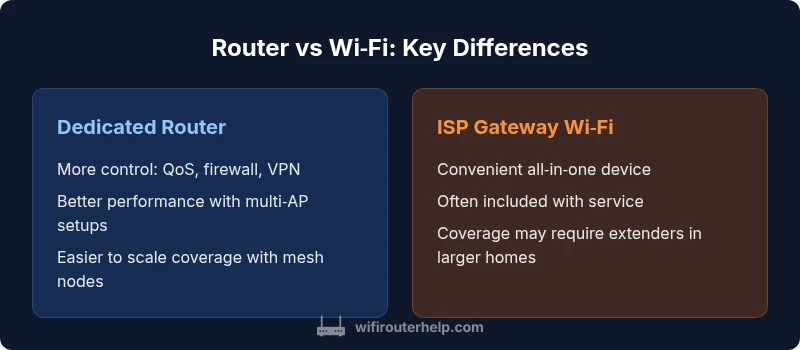
ISP-provided gateways integrate a modem, router, and Wi‑Fi in one box. They are convenient and space-efficient but often offer limited customization and slower performance under heavy load. A dedicated router, paired with separate access points or a mesh system, emphasizes control, advanced features, and scalability. This modular approach tends to deliver stronger long‑term value for growing households, particularly when you add smart home devices, gaming consoles, or multiple streaming clients.
With a standalone router, you can fine tune settings such as QoS, traffic shaping, firewall rules, guest networks, and parental controls. You can also upgrade components over time—moving from a basic model to a high‑performance device, and then adding mesh nodes as your space expands. For renters or homeowners with straightforward needs, the gateway option may suffice, but the ability to optimize through modular components often translates into a better experience in real life.
Performance considerations: throughput, latency, and interference
Performance is not determined by a single device alone. A reputable router with fast firmware and proper QoS settings can improve latency and throughput, especially when multiple devices, streaming, and gaming are active. Wi‑Fi performance is also affected by channel interference, distance, and physical walls. The distinction between router power and Wi‑Fi signal quality becomes apparent when the network demands exceed what a basic gateway can handle.
Be mindful that wireless speed is a function of both the router’s capabilities and the path the signal travels. A high‑quality router with robust antenna design can deliver strong 5 GHz performance for nearby devices, while a mesh system can provide more even coverage for distant corners of a home. Real-world tests show improvements when the router fan stays quiet and the device doesn’t throttle under heat or firmware load. These factors matter more than the product name on the box.
Coverage strategies: placement, extenders, and mesh networks
Coverage is the practical bottleneck in many homes. Even the best router loses effectiveness if placed poorly. Strategically position the main router high on a central shelf, away from obstructions, and oriented toward high‑traffic areas. For larger spaces, mesh systems or well‑placed extenders provide more uniform coverage and reduce dead zones. Mesh nodes operate as a single network with seamless handoffs, improving user experience in multi‑room environments.
When choosing coverage solutions, consider the physical layout of your home, the number of floors, and the type of activities you support—streaming 4K, online gaming, or video conferencing. Some setups favor satellite extenders; others benefit more from a true mesh system that maintains consistent network identity. In all cases, keep SSIDs unified where possible to minimize device re‑attachments and ensure stable roaming between nodes.
Security and maintenance: firmware, updates, and configurations
Security improves with regular firmware updates, strong passwords, and thoughtful segmentation of devices. A dedicated router provides granular controls—guest networks, VLANs, parental controls, and detailed logging. Built‑in Wi‑Fi devices may lag on updates or be restricted by the vendor’s roadmap. Regularly monitor your network and implement a backup plan in case of a failure.
Additionally, ensure your router’s firewall is enabled, disable remote management when not needed, and use unique passwords for each device and your admin interface. Consider enabling automatic updates for critical security patches and establish a routine to review connected devices and permissions every few months. Remember that a well‑maintained network reduces risk and improves reliability.
Quick decision framework: should you upgrade or adjust now?
Start with a baseline: assess current speed, coverage, and device count. If you experience buffering, frequent drops, or dead zones, upgrading to a better router and adding APs or a mesh system is worth considering. If your space is small, a strong gateway with a strategic placement can suffice. The goal is reliable coverage with manageable complexity.
Use a simple decision tree: (1) Are there dead spots? (2) Do you need advanced controls? (3) Is your budget flexible? (4) Will your Internet plan change soon? Answering these questions guides whether a full router-to-mesh upgrade is worth it now or later.
Long‑term considerations: compatibility, future‑proofing, and cost
Investing in a dedicated router or mesh setup often pays off over time through better support and feature sets. Consider whether your planned devices, smart home gear, and future Internet speeds justify an upgrade. Keep in mind that the cheaper option may incur higher long‑term costs in the form of coverage gaps or more extensive troubleshooting later. Evaluate warranties, Community support, and ongoing software updates when selecting devices. A thoughtful approach minimizes risk while maximizing network stability.
is router better than wifi: caveats and edge cases
No single solution fits every home. In apartments or small houses with light usage, a strong gateway can be perfectly adequate. In large homes, multi‑story layouts, or tech‑savvy households, a dedicated router paired with APs or a mesh system often provides the most reliable performance and flexibility. Always test in real usage scenarios before and after changes to confirm improvements.
Comparison
| Feature | Dedicated Router + Access Points / Mesh | ISP Gateway with Built-in Wi‑Fi |
|---|---|---|
| Coverage / Range | Typically broader and more uniform with placement and mesh | Often limited by the gateway's Wi‑Fi radio and device count |
| Control / Customization | High control: QoS, firewall, VLANs, guest networks | Limited controls; vendor-specific settings; basic security |
| Performance / Latency | Higher headroom for concurrent devices; scalable | Usually adequate for light to moderate use; can bottleneck with many devices |
| Upgrade Path / Scalability | Easily upgrade to newer routers or add mesh nodes | Typically fixed to the gateway's capabilities; upgrades require replacement |
| Cost / Value (typical ranges) | Router + AP/mesh: $60-$350 upfront plus potential add-ons | ISP gateway: often included in service; extra extenders cost separately |
| Best For | Large homes, power users, gaming, smart homes | Small apartments, minimal maintenance, cost-conscious |
Benefits
- Better performance and scalability with dedicated hardware
- More granular control over security, QoS, and features
- Easier to extend coverage with APs or mesh
- Long-term value with upgrade paths
The Bad
- Higher upfront cost and more complex setup
- Potentially steeper learning curve for advanced features
- More devices to manage and troubleshoot
- Requires periodic firmware maintenance
Dedicated router-based setups generally offer better long-term performance and control, especially in larger homes.
If you value performance, security, and scalability, upgrade to a dedicated router or mesh system. For compact spaces or budget-conscious users, a strong ISP gateway can be enough, but expect limitations in coverage and customization.
People Also Ask
What is the primary difference between a router and Wi‑Fi?
The router directs traffic between devices and the Internet, while Wi‑Fi is the wireless signal that carries data to your devices. They work together, but one handles routing and the other handles wireless delivery.
Think of the router as traffic control and Wi‑Fi as the air that carries data—both are essential for a functional home network.
Can I use a separate router with my ISP gateway?
Yes. In many setups you can place a third‑party router behind your ISP gateway. Depending on your provider, you may use bridge mode or DMZ to optimize performance while keeping required functionality.
Yes, you can, but you may need to adjust settings like bridge mode to avoid double NAT.
Is a mesh network always better than a single router?
Mesh systems improve coverage in large or multi‑story homes but add cost and setup complexity. For small spaces, a strong single router may be sufficient.
Mesh helps when you have dead zones; for small apartments, one good router often does the job.
What security features should I look for in a router?
Look for WPA3, guest networks, automatic updates, firewall protections, and the option to segment devices with VLANs for safer networks.
Make sure the router supports up‑to‑date encryption and automatic firmware updates.
How often should I update router firmware?
Check for updates monthly or enable automatic updates. If you notice unusual activity, perform a manual check and consider a reset if needed.
Set updates to automatic if possible and check quarterly.
Do I need a professional to set up a complex network?
Most homes can set up a reliable network using guides and built‑in assistants. A professional may help for unusually large or intricate layouts.
Usually not necessary, unless the space is very large or you have strict uptime requirements.
What to Remember
- Assess coverage needs before upgrading.
- A router plus mesh often outperforms gateways.
- Security improves with regular firmware updates.
- Choose a scalable setup for future speeds.