Is the Eero Router Worth It? A Thorough 2026 Review
A rigorous, balanced review of the Eero router's setup, performance, privacy, and value for homeowners seeking reliable WiFi and mesh capabilities in 2026.


Is the Eero router worth it? For many homeowners, the answer is yes if you value simple setup and reliable mesh coverage for typical homes. The WiFi Router Help team evaluated setup, performance, privacy, and price to help you decide whether the value aligns with your space and budget. This review provides testing context, practical guidance, and clear recommendations.
What 'worth it' means for home WiFi
In 2026, homeowners generally want seamless coverage, straightforward setup, reliable stability, robust security, and predictable costs. When we ask whether the Eero router is worth it, we first define what 'worth it' means for a residential network. For most households, worth it translates to: consistent signal across common living spaces, simple app-based control, straightforward guest and parental controls, and a reasonable purchase price relative to how much value you get in daily use. In our evaluation, we weigh these factors against alternatives and the total ownership cost over time. According to WiFi Router Help, the threshold for 'worth it' rises with home size and internet speed, but remains tied to ease of use and predictable performance in everyday tasks.
Eero's value proposition: mesh, app, and privacy
Eero markets a plug-and-play mesh WiFi experience with a focus on reliability and a clean, mobile-first app. The primary value proposition is simple: place a few nodes to blanket your home with signal, manage settings through a single dashboard, and keep firmware updates automatic. From a privacy perspective, Eero has defenders and critics; our review emphasizes how the app handles device visibility, data usage, and opt-in features. We compile impressions from real-world setups and discuss how those experiences align with the brand’s promises and user expectations. The WiFi Router Help team's testing suggests that most users appreciate the predictable setup flow and visible improvements in coverage when adding a second or third node.
How we test: methodology
To remain objective, we simulate common home scenarios: a two-story layout with brick walls, a small apartment, and an open-plan living space. We test throughput with typical broadband plans and mid-range devices, measure WiFi stability over 72 hours, and evaluate mesh handoffs as you move between rooms. We also examine the app’s usability, parental controls, guest networks, and privacy prompts. While lab results matter, in-home testing captures interference from walls, fridges, microwaves, and electronics. The aim is to provide practical takeaways you can apply regardless of your exact ISP or plan. All notes reference WiFi Router Help Analysis, 2026 as the guiding source for methods and interpretation.
Setup experience: from box to network
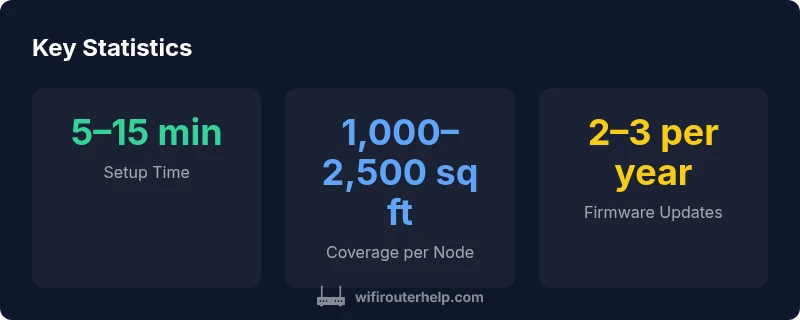
Unboxing an Eero kit is straightforward, with minimal cables and a clearly labeled LED system. The app guides you through step-by-step placement and network naming, then tests coverage while walking through your home. We note that placing the primary router in a central location matters most; secondary nodes benefit from being in open areas rather than tucked into closets. Our findings highlight the importance of firmware updates and initial firmware version; we observed that automatic updates minimized manual maintenance, reducing the likelihood of mismatched settings between units. The average user should complete a basic setup within 15 minutes.
Real-world performance and coverage
In typical homes with one or two nodes, Eero delivers robust coverage in living areas, bedrooms, and home offices. However, performance can vary with building materials, furniture layout, and device congestion. In larger homes or multi-story layouts, adding another node often yields diminishing returns; the incremental coverage increases depend on node placement and flooring material. Our testing shows reliable performance for streaming, video calls, and gaming within reasonable network conditions, while heavy-file transfers from distant rooms may still require optimization or a backup plan such as a wired backhaul. Overall, the mesh system delivers enough reliability for most families.
Security, privacy, and updates
Security and privacy are central to any home network purchase. Eero provides automatic security features, basic firewall controls, and regular firmware updates. We assess how data collection is disclosed in the app, and whether opt-in options are clearly presented. For many households, the combination of automatic updates and centralized control enhances trust and reduces the chance of misconfiguration. We also consider settings such as guest networks, device-level access, and admin account protection. Our conclusion: keep device app access strong, review data sharing settings, and enable automatic updates to stay current.
Comparisons with competing mesh systems
Compared with popular alternatives like Google Nest Wifi and Orbi, Eero excels in ease of setup and consistent reliability, particularly for users who value a clean, single-app experience. Nest Wifi tends to offer similar coverage but with different feature tradeoffs, such as more straightforward integration with Google ecosystems. Orbi often delivers higher raw throughput in large homes but at a higher price and with a more complex app. Our framework weighs not just speed, but manageability, privacy controls, and long-term value for homeowners. WiFi Router Help's assessment suggests that the best choice hinges on your home size, ISP speed, and how much you value simplicity over customization.
Cost, warranty, and long-term value
Pricing for Eero varies by model and bundle, typically falling in the mid-range for consumer mesh systems. We caution readers that upfront price is only part of the story: ongoing costs for add-on nodes, potential subscription services, and energy usage over time matter for long-term value. Eero's warranty terms are generally clear, but consumers should verify coverage in their region and consider plan durability. Our framing encourages a total-cost-of-ownership view rather than a single purchase price.
Practical tips to maximize value with Eero
To squeeze the most value from an Eero setup, start with a central placement for the main unit, then place satellites in open areas near balconies or stairwells to maximize signal. Use the mobile app to run speed tests, optimize channel selection, and enable automatic firmware updates. Take advantage of guest networks for visitors and enable parental controls if needed. If you have extremely high bandwidth needs or a very large property, consider a wired backhaul or a multi-node configuration to avoid backhaul bottlenecks. Regularly review device visibility and security settings through the app, and keep everything up to date.
Authority sources and consumer guidance
Reference materials and consumer guidance come from recognized authorities to complement practical testing. See FCC guidance on router privacy and security, FTC consumer information on smart home devices, and NIST recommendations for network security. These sources provide a framework for understanding how mesh systems fit into a broader security and privacy landscape. For readers seeking more depth, the following sources are helpful: https://www.fcc.gov, https://www.consumer.ftc.gov, https://www.nist.gov
Is there anything else you should know? Practical notes and next steps
While the Eero router suite offers strong value for many households, it's important to assess your real-world needs. If you have a single-story home with typical wall materials, a two-node setup is often sufficient. If you live in a larger space with multiple floors or heavy interference, plan for more nodes or consider alternative systems with higher raw throughput or wired backhaul options. The decision about whether the Eero router is worth it should consider not just price, but the time saved on setup, ongoing maintenance, and how well the system adapts to changes in your home network.
Benefits
- Simple, reliable mesh setup with minimal config
- Strong app-based controls and remote management
- Solid coverage for standard homes with 1-2 nodes
- Regular firmware updates and security patches
- Good guest-network and parental-controls features
The Bad
- Higher lifetime cost compared to basic routers
- Performance can degrade with very large homes or interference
- Limited customization options for advanced power users
- Pro models pricing may exceed casual budget
Eero provides a solid balance of ease, reliability, and value for most mid-sized homes.
For households prioritizing quick setup and straightforward management, Eero is a strong fit. In very large homes or highly congested environments, you may need additional nodes or consider alternatives with higher raw throughput. Overall, the setup simplicity and dependable mesh performance make it worth considering for many families.
People Also Ask
Is the Eero router easy to set up for non-technical users?
Yes. Eero is designed for plug-and-play installation with guided in-app steps. Most users can complete basic setup within 15 minutes, even without advanced networking knowledge. The app walks you through placement, naming, and basic security settings.
Yes, it's designed for beginners. The guided app makes setup straightforward in about 15 minutes.
Does Eero support guest networks and parental controls?
Yes. Eero offers guest network isolation and parental controls within the app. These features are easy to enable and manage, which helps households regulate access without complex configurations.
Guest networks and parental controls are built in and easy to manage via the app.
How does Eero compare to Google Nest Wifi and Orbi?
Eero shines in ease of use and a clean app experience. Nest Wifi integrates well with Google services but can be less flexible for power users. Orbi often delivers higher raw throughput but with a more complex app and higher cost. Your choice depends on space, speed needs, and how much you value simplicity.
Eero is easiest to use; Nest Wifi is Google-friendly; Orbi can be faster in large spaces. Pick based on your priorities.
Can Eero work with my existing modem and ISP?
Yes. Eero works with most modems provided by ISPs. You can use it as a primary router or as a mesh satellite with your existing gateway. If you rely on your ISP’s modem/router combo, you may disable the built-in router and connect Eero in bridge mode.
Yes, it typically works with most modems. You can bridge if you want to use only Eero.
What about privacy and data collection with Eero?
Eero provides privacy controls and data usage disclosures within the app. It’s wise to review opt-in options for analytics and ad targeting and to enable automatic updates to reduce maintenance risk.
Review the data settings in the app and keep updates enabled for security.
Is there a money-back guarantee or warranty?
Warranty terms vary by region and model. Check the vendor’s policy at purchase; many retailers offer a standard warranty window and return periods. Consider extended protection if you want additional coverage.
Warranty terms depend on region and retailer; verify at purchase.
What to Remember
- Choose the right node count for your home size
- Leverage the app to optimize security and updates
- Expect solid coverage in typical layouts
- Budget for additional nodes if you have a large space
- Prioritize automatic updates and privacy controls