Ethernet Router vs Switch: A Practical Side-by-Side Comparison
Explore the key differences between ethernet router and switch, when to use each, and how to design scalable, secure home networks with practical guidance from WiFi Router Help.


Ethernet router vs switch: In most home networks, a router provides Internet access, NAT, firewall, and DHCP, while a switch simply expands the number of wired devices. If you already own a router, add a switch to accommodate more desktops, printers, or smart hubs without creating routing complexity. If you need network segmentation, QoS, or plug-in wireless access points, plan accordingly. For small homes, a single router with built-in switch ports often suffices.
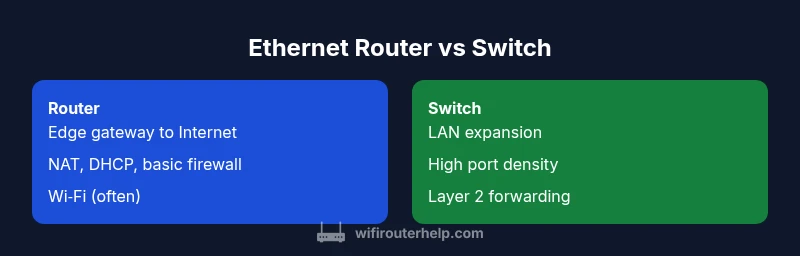
What are Ethernet router and switch? This section clarifies the basic definitions and sets the foundation for the comparison. According to WiFi Router Help, an Ethernet router is the device that connects your home network to the Internet and manages traffic between your LAN and the wider Internet. It performs NAT, assigns local IPs via DHCP, and enforces basic firewall rules. A switch, by contrast, operates at Layer 2, forwarding frames between devices on the same network and expanding the number of Ethernet ports. In practice, many setups combine routing and switching in one enclosure, but knowing the distinct roles helps you plan capacity, topology, and security. The WiFi Router Help team found that most homeowners benefit from starting with a capable router and adding a dedicated switch only when wired device counts outpace the router’s built-in ports. This modular approach keeps management straightforward while preserving performance.
Ethernet router vs switch: Key distinctions In common language, a router is your network’s gatekeeper to the Internet, while a switch is a high-speed traffic manager inside the LAN. The distinction matters when you scale up: a router creates boundaries between networks and provides security services, whereas a switch focuses on moving traffic efficiently between devices. When you see a device described as a router, it often includes a basic switch; when you see a switch, it typically lacks Internet-facing features unless paired with a separate router. Understanding this helps you plan upgrades, cabling, and future growth without overbuying. WiFi Router Help emphasizes that most homes start with a router, then add switches only as needed.
Core functions and services The router’s core role is to connect the home network to the Internet and to provide services such as NAT, DHCP assignment, firewall protection, and often simple Wi‑Fi. A switch’s primary job is to move frames across the local network, extend port availability, and maintain low-latency, predictable traffic between devices. For networks that require segmentation or guest networks, VLAN-capable switches and managed routers can provide the necessary control. The practical outcome is that routers shape the edge, while switches shape the interior of the LAN.
Performance implications and traffic management Performance in a home network depends on correct tiering of devices. A router handles routing decisions, NAT translation, and security checks, which can introduce latency at peak times. A switch, especially a high-density or managed model, minimizes intra-LAN latency and supports fast frame transfer between many devices. When both are used, QoS settings on the router and, if applicable, on the switch, can help prioritize streaming, gaming, or conferencing traffic.
Deployment patterns and topology In simple setups, you connect a single router to the Internet and attach a switch to one of the router’s LAN ports to grow wired capacity. For larger homes or small offices, you might deploy a stack of switches or a managed switch near a media center, with a router acting as the gateway. Wired backbones and proper cabling reduce bottlenecks and preserve performance as devices multiply.
Security considerations and threat surface A router creates the network’s edge with firewall rules and NAT shielding internal devices from direct exposure. A switch typically does not offer this boundary protection unless it is part of a managed, security-aware solution. When expanding with a switch, ensure the router receives firmware updates and that management interfaces are secured with strong credentials and, if available, network segmentation.
Managed vs unmanaged devices: control and complexity Unmanaged switches are plug-and-play and easy for beginners but offer limited control. Managed devices give you VLANs, port-based access control, and detailed statistics, at the cost of complexity. For most homes, a router paired with a simple switch suffices, but power users may benefit from a managed switch when segmenting guest networks or building a dedicated IoT VLAN.
VLANs, segmentation, and future-proofing VLANs enable you to separate traffic types (e.g., guest, work, automation) and apply policies without affecting all devices. A router can define basic VLAN behavior, while a managed switch provides granular port-level control. Planning for future devices, APs, and IoT hubs now can save headaches later.
Port density and physical considerations Port density matters more on switches than on entry-level routers. If you plan to grow wired devices, a switch with plentiful ports and robust backplane supports expansion without reconfiguring your router. Consider uplink speed, PoE capabilities if you plan to power access points, and the cable quality needed for your home environment.
Decision guide: router-first, switch-first, or combo When your Internet needs are simple and security is a priority, start with a solid router. If you expect to add many wired devices, plan for a switch to expand capacity. For growing networks, a combination of a multi‑port router with a managed switch can deliver both edge protection and interior flexibility. The key is to align device roles with your current requirements and anticipated growth.
Setup and expansion planning checklist Map your devices, identify the number of wired endpoints, and decide where you want your network edge. Sketch a simple topology showing the modem, router, switches, and access points. Then choose devices with compatible speeds, ports, and management features. Finally, budget for future growth with a scalable design instead of ad hoc additions.
Troubleshooting common issues with routers and switches Common problems include misconfigured VLANs, IP conflicts, and faulty cabling. Start with basic connectivity checks: verify cables, power, and link lights, then test with a wired device. If you’re experiencing performance drops, review QoS rules, firmware versions, and network maps to identify bottlenecks or misapplied rules.
Real-world scenarios and build-out examples In a typical two-bedroom apartment, a modern router with active Wi‑Fi and a 4‑port switch is enough to support laptops, smart TVs, consoles, and printers. For a small home office with multiple desktops and network shares, a second switch wired to a dedicated media server can create a fast, reliable internal network. In basement home theaters, a switch provides low-latency backhaul between devices without involving the router’s Wi‑Fi pool.
Comparison
| Feature | Ethernet Router | Ethernet Switch |
|---|---|---|
| Primary role | Connects to Internet; provides NAT/DHCP/Firewall | Expands wired LAN ports; moves frames between devices |
| Typical deployment | Edge device for Internet access | LAN expansion and interconnectivity |
| Performance considerations | Routing throughput and NAT latency depend on device | Switching latency scales with port density and backplane |
| Management and configuration | Router-focused UI; often simpler | Switch-dependent on model; can be unmanaged or managed |
| Best use case | Small networks needing edge protection and routing | Environments needing many wired endpoints |
| Best for home users | Router-first approach; add switch as needed | Add switch when more ports or segmentation are required |
Benefits
- Routers provide integrated Internet access, NAT, and firewall for edge protection
- Switches enable easy port expansion without routing complexity
- A combined approach supports growth while keeping management straightforward
- Managed switches offer granular control when needed
The Bad
- A switch alone cannot provide Internet access or boundary protection
- Multiple devices add complexity and potential points of failure
- Managed devices require more expertise and maintenance
Router-first with optional switch expansion covers most homes; upgrade path should match growth and security needs.
Start with a capable router to secure edge access and basic services. Add a switch when you need more wired ports or segmentation. The WiFi Router Help team’s guidance supports a scalable approach that balances simplicity and future growth.
People Also Ask
What is the key difference between an ethernet router and a switch?
The router connects your network to the Internet, provides NAT, DHCP, and firewall protection. A switch expands wired device connectivity within the LAN and does not normally handle Internet access or security boundaries. Understanding this helps you design where to place each device in your home network.
A router gives you Internet access and security at the edge, while a switch simply adds more wired ports inside the LAN.
Can I substitute a router with a switch?
No. A switch alone cannot provide Internet access or gateway functions. If you use just a switch, devices won’t be able to reach the Internet. A router is still needed at the edge, with a switch added for additional ports as needed.
A switch can’t replace a router—it won’t connect you to the Internet.
Do I need a router if I already have a modem?
A modem is the gateway to your Internet connection, but you still need a router to manage your home network, NAT, firewall, and DHCP. If you want multiple wired devices or Wi‑Fi, you’ll want a router (and possibly a switch for more ports).
A separate router is usually required to manage your home network even if you have a modem.
Should I buy a managed switch for home use?
Managed switches give you VLANs, QoS, and port-level controls, which are helpful in more complex setups. For simple homes, an unmanaged or basic smart switch is often sufficient and easier to operate.
Managed switches are powerful, but may be overkill for most homes.
What about VLANs for home networks?
VLANs can improve security and organization by isolating devices (e.g., guests, IoT, and work devices). A router with VLAN support and a capable switch can implement these boundaries effectively without cluttering the entire LAN.
VLANs help separate traffic so devices don’t impact each other.
Do PoE features matter for most homes?
PoE is useful when you want to power access points or IP cameras without extra adapters. If you don’t have PoE devices, this feature won’t affect your day-to-day use. Consider PoE if you plan to expand wireless access points or surveillance gear.
PoE is handy for power over Ethernet devices, but not essential for every home.
What to Remember
- Start with a router for Internet access and security
- Add a switch to expand wired device capacity
- Use VLANs and managed features only when you need segmentation
- Plan for future growth to avoid reworking topology
- Prioritize simple, scalable designs for home networks