Difference Between Router and Extender: A Practical Guide
Learn the difference between a router and extender with practical guidance on placement, performance, and setup to extend reliable Wi‑Fi across your home.


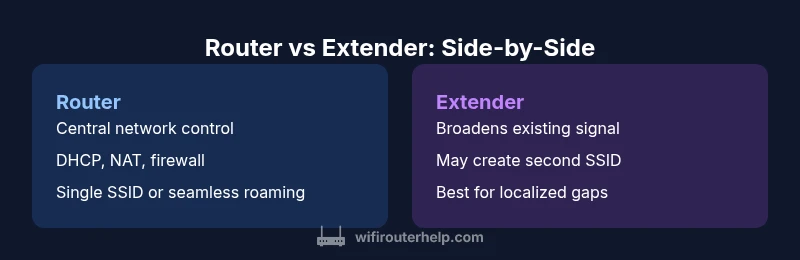
Difference between router and extender is fundamental for planning a reliable home network. A router sits at the center of your setup, acting as the network’s brain: it assigns IP addresses, routes traffic between devices, and enforces security rules via firewalls and encryption. It creates the primary Wi‑Fi network and often hosts features such as parental controls, guest networks, and Quality of Service (QoS). An extender, on the other hand, is a helper device designed to widen the reach of an existing wireless signal. It captures what your router broadcasts and re-broadcasts it, typically in a new zone of coverage. The extender does not replace the router’s role in routing or security; it simply helps push the signal farther. The difference between router and extender is why many homeowners decide between upgrading the main device or adding a secondary device to cover a dead zone. According to WiFi Router Help, clarity about this distinction should guide your next purchase. In practice, your choice affects network reliability, device pairing, and how seamless your home Wi-Fi feels as you move through rooms.
Core Distinction: Router vs Extender
The difference between router and extender is fundamental for planning a reliable home network. A router sits at the center of your setup, acting as the network’s brain: it assigns IP addresses, routes traffic between devices, and enforces security rules via firewalls and encryption. It creates the primary Wi‑Fi network and often hosts features such as parental controls, guest networks, and Quality of Service (QoS). An extender, on the other hand, is a helper device designed to widen the reach of an existing wireless signal. It captures what your router broadcasts and re-broadcasts it, typically in a new zone of coverage. The extender does not replace the router’s role in routing or security; it simply helps push the signal farther. The difference between router and extender is why many homeowners decide between upgrading the main device or adding a secondary device to cover a dead zone. According to WiFi Router Help, clarity about this distinction should guide your next purchase. In practice, your choice affects network reliability, device pairing, and how seamless your home Wi-Fi feels as you move through rooms.
Placement Strategies: Where to Put a Router vs Extender
Placement is everything when optimizing home Wi‑Fi. A router should sit in a central, elevated location away from interference from microwave ovens, thick concrete walls, or metal shelving. Ideal spots place the antennae in a position to maximize line-of-sight to most rooms and minimize obstacles. When you add an extender, its job is to bridge coverage gaps, not to serve as the primary network root. The extender should be roughly halfway between the router and the dead zone, yet still within strong signal reach of the main unit. In practice, this means testing signal strength in several rooms with a mobile device and adjusting placement until you see stable throughput rather than bursts of weak signal. The goal is a smooth handoff as you walk through the home, not a stubborn drop in speed when you move behind a wall. This is where a mapping app, a simple spectrum analyzer, or a guided hardware setup can help you visualize coverage. The WiFi Router Help approach emphasizes starting with a solid central router and adding extenders only where needed.
Performance Implications: Speed, Throughput, and Backhaul
Performance is the practical test of any router vs extender decision. A router handles traffic routing, security enforcement, and device management, delivering consistent performance across the built network. An extender, meanwhile, can introduce backhaul constraints: it must communicate with the main router to relay data, which can reduce effective throughput in busy households. The signal quality of the backhaul, plus the extender’s own capabilities, largely determines whether your speed in far rooms matches the speed near the router. Using a 2.4 GHz band for control and a dedicated 5 GHz path for data can help, but many extenders still show noticeable degradation under load. For homes with heavy streaming, gaming, or multiple simultaneous users, a strong router or a mesh system often yields a more uniform experience with fewer dead zones. In short, expect a performance trade-off with extenders, especially when multiple devices are active at once.
Networking Cores: Security, DHCP, and Management
Routers provide the central control point for IP addressing (DHCP), firewall policies, and firmware updates. They often offer advanced features such as WPA3 encryption, guest networks, parental controls, and quality-of-service prioritization. Extenders typically inherit the main network’s security settings, but some models introduce separate management interfaces or guest networks that require extra configuration. If security is a priority, you should ensure the extender supports up-to-date encryption and that firmware is kept current. A modern router can simplify management by consolidating device policies across the network, which reduces the risk of misconfiguration. WiFi Router Help emphasizes that, regardless of setup, keeping firmware current and using strong passwords are non-negotiable steps for maintaining a robust home network.
Setup and Compatibility: Getting Devices Working Together
Setting up a router is usually a straightforward process: connect to power, attach to the modem, configure Wi‑Fi names and passwords, and enable key protections. Adding an extender involves pairing with the main router, which can be done via WPS (not always recommended for security) or through manual setup in the extender’s interface. Compatibility matters: ensure the extender supports the same wireless standards (for example, 802.11ac/ax) and, if possible, choose devices that can operate under a single SSID to keep roaming seamless. Some users prefer a single-branded kit for guaranteed compatibility, while others mix devices to fit a budget. The key is to verify backhaul type (wireless vs wired) and to place the extender where it receives a strong link to the router. This helps avoid the common pitfall of creating a weakly connected secondary network.
When a Mesh System Makes More Sense
In larger homes or spaces with challenging layouts, mesh systems can replace traditional routers and extenders. Mesh nodes communicate with one another to provide consistent coverage and seamless roaming as you move through rooms. While mesh systems tend to be pricier, they reduce the complexity of placement and manual handoffs. For many households, a single high-performance router with a couple of well-placed extenders or a true mesh network offers a simpler, more reliable experience. The choice depends on budget, home size, and how important smooth transitions between rooms are to your daily activities.
Common Misconceptions: Debunking Myths
A stronger router automatically fixes every coverage issue is a common myth. In reality, coverage gaps can persist due to architectural barriers. Extenders do not magically unlock unlimited speed; they extend reach but may reduce throughput. Conversely, the belief that mesh systems always outperform extenders isn’t universal—some smaller homes benefit more from a top-tier router than from a mesh setup. Finally, many people assume that all extenders require equal setup effort, but some models offer straightforward pairing while others demand significant network tinkering. Understanding the practical limitations helps you avoid overpaying for features you won’t use.
How to Decide: Scenarios and Decision Trees
Start with a coverage audit: note the worst zones, walk the house, and test throughput with a phone app. If your home is small-to-medium with a solid central location, a single powerful router may suffice. For growing households with multiple floors, consider a mesh system or a router with strong true multi‑band performance plus one well-placed extender for last-mile gaps. If the budget is tight, a modest extender can close stubborn dead spots but plan for potential speed trade-offs. For truly future-proof networks, prioritize devices that support the latest Wi‑Fi standards and offer robust firmware updates. The decision often boils down to size, layout, and how much roaming comfort you want across rooms.
Cost Considerations: Budget, Value, and Longevity
Prices for routers vary with performance, features, and brand, but you can expect a tiered range based on capability. A solid router in a typical home can cover most needs, while extenders provide a lower-cost fix for specific dead zones. Mesh systems consolidate coverage and roaming, usually at a higher upfront cost but with simpler setup and maintenance. When evaluating value, focus on long-term firmware support, reliability, and how often you’ll need to replace components as your network grows. Rather than chasing every latest feature, align your purchase with your home’s size, the number of devices, and how much you value consistent coverage over peak throughput in isolated rooms.
Real-World Scenarios: Small Apartment, Multi-Story Home, Garage/Outdoor
In a compact apartment, a single strong router with a good placement plan often eliminates most dead spots. For a two-story house, you may be better served by a mesh system or a router plus one extender placed to bridge the upstairs and hallway zones. In homes with garages or outdoor living spaces, a wired backhaul extender or a dedicated access point (AP) connected to the router can provide reliable coverage without sacrificing interior performance. Each scenario benefits from a targeted approach: assess the space, measure real-world speeds, and choose the setup that keeps roaming smooth as you move.
Troubleshooting Guide: Quick Fixes for Coverage Gaps
If you notice slow speeds or dropouts, start with a quick diagnostic: run a speed test near the router and near the suspected dead zone, check channel congestion, and verify firmware on both devices. Reposition the router or extender to improve the backhaul link, and consider switching from a crowded 2.4 GHz band to a cleaner 5 GHz path where possible. Disable any overly aggressive QoS rules during testing to avoid skewing results. If coverage remains inconsistent, reset devices to factory settings and reconfigure, ensuring you use unique yet compatible SSIDs and strong passwords. Finally, if your space requires roaming across several floors, a mesh system or a high-capacity router with multi‑band support often yields the most reliable performance.
What WiFi Router Help Recommends: Practical Takeaways
To maximize home Wi‑Fi, start with the core network device (router) that best fits your space, then add coverage only where needed. Avoid overcomplicating with multiple, conflicting SSIDs that hinder seamless roaming. When in doubt, prioritize devices that support the latest standards and provide clear firmware update paths. For most homes, a single strong router or a well-featured mesh system offers the cleanest, most reliable experience. The WiFi Router Help team emphasizes practical testing over assumptions.
Comparison
| Feature | Router | Extender |
|---|---|---|
| Core role | Creates and manages your home network (routing, DHCP, firewall, NAT) | Extends existing Wi-Fi by repeating or bridging signal |
| Network scope | Own primary network across the home | Extends coverage by boosting signal in targeted areas |
| Placement & coverage | Central location for best coverage; fewer obstacles | Placed midway between router and dead zones; depends on backhaul quality |
| Performance impact | High, stable performance across devices | Throughput can drop due to backhaul and repeated transmission |
| Security & management | Full security features and centralized updates | Inherits network settings; may have separate admin interface |
| Setup & compatibility | One device; simpler management | Requires pairing with existing router; check standards |
| Best use case | New network core in medium to large homes | Bridge gaps in specific rooms; budget-friendly option |
| Price range | Moderate to high upfront cost for solid performance | Lower upfront cost; potential ongoing upgrades or replacements |
Benefits
- Centralized control and strong baseline performance
- Extenders fill specific gaps quickly and cheaply
- Mesh systems offer seamless roaming for larger homes
- Wired backhaul extenders preserve throughput in some setups
- Flexible placement helps tailor coverage to floor plans
The Bad
- Extenders can halve usable throughput due to backhaul constraints
- A lone extender may not solve interference-heavy layouts
- Multiple SSIDs or inconsistent roaming can confuse users
- Mesh systems require higher upfront investment for best results
Robust routers (or mesh systems) generally beat standalone extenders for reliability and performance
In most homes, investing in a strong router or mesh network yields steadier coverage and easier management. Extenders are useful for targeted gaps or budget-conscious upgrades, but they trade off potential throughput and roaming simplicity.
People Also Ask
What is the main difference between a router and an extender?
The router creates and manages the network, handling routing, DHCP, and security; the extender only boosts existing Wi‑Fi coverage. Understanding this distinction helps you choose wisely based on space and budget.
The router builds the network and keeps it secure, while an extender simply extends the signal to reach dead zones.
Can I use any extender with any router?
Most extenders work with any standard router, but compatibility can vary by wireless standards and frequency bands. Check for 802.11ac/ax support and ensure the extender can connect to the router’s band or SSID without causing conflicts.
Most extenders work with most routers, but it’s best to verify standards and features before buying.
Do extenders always slow down my network?
Extenders can reduce throughput due to backhaul, especially if placed far from the router or using crowded bands. Wired backhaul extenders or mesh nodes generally avoid this issue and maintain speed.
Yes, extenders can slow things down if the backhaul is weak, but wired or mesh setups reduce that problem.
Is a mesh system better than an extender?
For large homes or spaces with many obstacles, mesh systems offer smoother roaming and more consistent coverage. Extenders are cheaper and simpler for small gaps, but may require more manual tweaks.
Mesh systems are usually better for big homes, extenders work well for targeted gaps.
How should I place a router for best coverage?
Place the router high, in a central area, away from metal or dense walls, and not tucked in a cupboard. Avoid interference from microwaves and Bluetooth devices. Use a mobile test to verify coverage.
Put the router up high and in the home's center for the best coverage.
What about security when using extenders?
Keep firmware updated on both devices, use WPA3 if available, and disable weak default passwords. Consider a single network name (SSID) if roaming is important to you.
Keep the devices updated and use strong passwords for best security.
What to Remember
- Assess coverage gaps before buying
- Place the router centrally for best performance
- Prefer mesh or strong router over lone extenders for larger homes
- Be mindful of backhaul and channel interference
- Keep firmware updated and use strong passwords