Router and Extender Combo: A Practical Comparison
Compare a router and extender combo with separate router + extender setups. Learn which option fits your home, from small apartments to multi-story houses, with setup, performance, and cost guidance.


What is a router and extender combo?
A router and extender combo is a single hardware device that handles both routing duties and wireless signal boosting. In practice, you don’t need a separate router and a dedicated extender; the unit provides Wi‑Fi connectivity while also repeating or extending the signal to hard-to-reach corners of your home. Many models support a single seamless network (same SSID) and centralized management through one app, which simplifies setup and ongoing maintenance. For households with straightforward layouts, a combo can deliver reliable coverage with minimal configuration steps. However, because all functionality sits in one box, you may sacrifice some advanced features or per-room customization that dedicated router + extender setups can offer. The key is to balance convenience against the need for granular control and peak throughput in busy networks.
In the broader market, a router and extender combo competes against two primary alternatives: a single powerful router paired with a separate extender, and mesh networking kits that use multiple nodes. The choice influences factors like network-wide features, firmware updates, and how you manage guest access or parental controls. For many users, a one-device solution is a strong starting point, particularly in smaller homes or apartments where signals don’t have to traverse multiple floors. The decision often hinges on your home’s size, wall composition, and the number of devices competing for bandwidth.
Core differences: combo vs separate router + extender
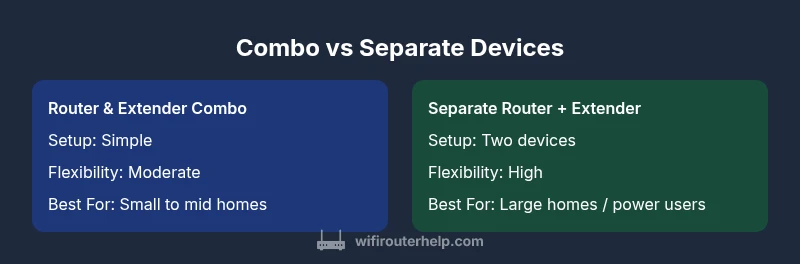
The core distinction is how routing intelligence and signal amplification are organized. A router-and-extender combo centralizes both roles in one box, offering a unified user experience and straightforward setup. In contrast, a separate router + extender arrangement uses two physical devices, often with distinct firmware and management interfaces, which can unlock more advanced customization and potential performance optimization. Mesh systems, another alternative, distribute multiple nodes to cover large or irregular floorplans, sometimes at the cost of higher upfront complexity and price.
Key considerations when choosing between these options include:
- Setup and management: A single device usually means fewer apps, fewer passwords, and quicker onboarding.
- Performance headroom: Separate devices may allow per-device tuning and targeted placement for optimal throughput.
- Scalability: Mesh networks or multi-device ecosystems can handle evolving layouts as your home grows or changes.
- Reliability and troubleshooting: With one box, a problem can impact both routing and range; with two devices, issues may be isolated.
WiFi Router Help analysis shows that for most typical homes, a router and extender combo can deliver consistent performance with minimal configuration, while larger homes or networks with heavy streaming may benefit from a more modular approach.
Real-world performance and home layouts
Performance for a router and extender combo depends heavily on your floorplan and interference sources. In a compact, open-concept space, a single device often provides robust coverage with ample bandwidth for common tasks like streaming HD video, video calls, and casual gaming. In longer, multi-story homes or apartments with thick walls, you may encounter dead zones that a single box cannot fully overcome. In these scenarios, a separate router plus extender or a mesh network can offer more even coverage, with targeted placement to push signal into distant rooms. The signal flow and interference patterns are easier to optimize when you manage two devices, particularly if you can wire one device back to the modem with a dedicated Ethernet path.
For users prioritizing ease of use over peak performance, the combo’s reduced setup steps and single interface are major advantages. It’s common to see strong results for typical households, but power users who push devices with high-speed gaming or 4K streaming across many rooms may notice improvements with a more distributed architecture.
Setup and initial configuration: quick-start guide
Getting up and running with a router and extender combo is faster than layering a separate router and extender. Here’s a practical, step-by-step approach:
- Connect the unit to your modem via the WAN port and power it on.
- Use the included quick setup guide or mobile app to start the initial configuration.
- Create a single Wi‑Fi name (SSID) and strong password, or enable guest access if you need a separate network for visitors.
- Run the auto-setup or manual channel selection to minimize interference.
- Update firmware to the latest version to ensure security and stability.
- Test coverage by walking through your home with a phone or laptop and noting any dead zones.
- Save or export a backup configuration if the app supports it, for quick recovery.
If you want to enhance reliability, consider placing the device centrally, away from thick walls or metal appliances, and avoid settings that might throttle performance for certain applications. Regularly check for firmware updates and review security features such as WPA3 or guest network isolation.
Troubleshooting tip: if you notice inconsistent speeds, try changing the device’s channel or adjusting the transmit power within the admin interface. You can also use wired backhaul if your home has Ethernet runs between floors, which often stabilizes performance without adding another device.
Placement and coverage: optimizing signal
Placement is the single most impactful factor for wireless coverage. For a router and extender combo, start by placing the main unit in a central location away from obstructions and electronic interference. Avoid cramped cabinets and metal appliances that can absorb or reflect signals. If you’re seeing weak signals on the far end of the home, position the extender halfway between the main unit and the farthest corners, ensuring a strong, stable link between devices. In multi-story homes, locating the main unit on the middle floor can often provide better vertical coverage, reducing drop-offs on upper or lower levels.
Angle antennas for best line-of-sight to rooms that require solid performance. If the model supports beamforming, enable it to improve range toward active devices. Consider a wired backhaul (Ethernet) from the main router to the extender when possible, which can significantly boost reliability in challenging layouts. Finally, analyze interference sources like neighbor networks and microwave ovens, and adjust channels accordingly for best throughput.
In some layouts, a second extender or a compact mesh node could bridge stubborn gaps. While a single device offers simplicity, a more distributed approach tends to yield more uniform coverage across irregular spaces, especially in homes with thick walls or stair-step geometry.
Firmware, updates, and security considerations
Regular firmware updates are essential for performance and security. With a router and extender combo, you’ll receive updates for both routing and range-extending features through a single interface. Enable automatic updates if available, but periodically review update details to ensure new features align with your needs. Pay attention to security settings like WPA3, guest network isolation, and firewall rules. Keeping the device current reduces vulnerabilities and improves compatibility with newer devices in your network.
If you opt for a separate router plus extender setup, you’ll want to manage updates for both devices, which can be more involved but also offers finer control over when and how firmware changes are applied. In either scenario, create strong, unique passwords for admin access and Wi‑Fi, and consider enabling two-factor authentication if the device supports it. Finally, document your network settings so you can reproduce them easily after a reset or hardware change.
Troubleshooting common issues
When problems arise, a structured approach helps identify and fix issues quickly. Start with the basics: verify power, confirm the device is connected to the modem, and check that your cables are intact. If devices show weak signal or intermittent drops, experiment with placement, reduce interference, and review channel settings. For combo devices, ensure there’s a solid link between the main unit and the range extension path; for separate devices, test the link between router and extender independently.
If you experience slow speeds, run a speed test near the router and near the far room to verify coverage differences. Disable bandwidth-heavy applications temporarily to measure baseline. Reboot devices, update firmware, and re-check settings. For persistent issues, isolate by swapping out the extender or trying a different device to confirm if the problem lies with hardware, software, or your internet connection.
In edge cases, factory resetting the device and re-running the setup wizard can solve stubborn configuration mismatches. Remember to back up your current configuration before a reset if possible.
Real-world scenarios and decision framework
Every home is unique, so a practical decision framework helps choose between a router and extender combo and a separate router + extender setup. Consider these scenarios:
- Small apartment or single-floor home with open space: A router and extender combo often delivers sufficient coverage with minimal setup.
- Narrow floor plans or walls with high impedance: A combo might still suffice, but placing the device optimally is key; if coverage remains patchy, a second device or mesh solution could help.
- Multi-story homes with busy networks: A separate router plus extender may provide better performance control and more consistent signal across levels.
- Gaming or 4K streaming in several rooms: If you require peak throughput and low latency, a modular approach or mesh network can offer superior performance.
When in doubt, start with a combo as a baseline, monitor your network, and scale up with an extender or mesh as needed. The decision should be guided by actual performance in your space, not only theoretical capabilities.
Final guidance and cost considerations
Cost is a practical factor in choosing between a router and extender combo and a separate setup. A single-device solution may appear cheaper upfront and reduces the number of devices to configure and manage. If your home’s layout is favorable and your internet plan supports the speeds you require, a combo can deliver good value with straightforward deployment. In larger homes or networks with heavy traffic, the cost of adding a second device or expanding to a mesh system can be offset by improved performance and reliability, especially if you factor in potential savings from avoided service calls or repeated wireless problems.
As you plan, think about long-term value: how often will you upgrade, how easily can you scale, and what level of control do you want over features like QoS and guest networks? A measured approach—start with the simplest solution that meets your needs, and upgrade only if your performance falls short in real use. This mindset, plus careful placement and routine maintenance, will maximize the benefit of a router and extender combo or a more distributed architecture in your home network.
Budgeting recommendations from WiFi Router Help emphasize matching device capabilities to your space: prioritize coverage area and device count first, then add throughput-focused hardware if your household’s use cases demand it.
Starter checklist for deployment
- Define your coverage goals (which rooms need strong signal or low latency)
- Measure current speeds in typical usage zones and map dead spots
- Decide between a single-device combo or a two-device setup based on home layout and future needs
- Prepare a placement plan that avoids major interference sources and optimizes line-of-sight
- Create strong admin credentials and enable essential security features
- Plan a firmware update and backup strategy for easy recovery
- Schedule a test run and adjust settings after a 24–48 hour evaluation
- Keep documentation of network name, password, and device IPs for future changes