Difference Between Router and Repeater: A Practical Guide
Learn the key differences between a router and a repeater, why the distinction matters for home networks, and how to choose the right setup for coverage, speed, and reliability.


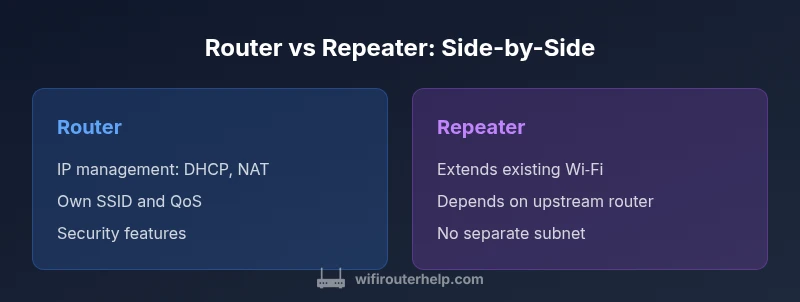
In most homes, a router connects devices to the internet and handles IP addressing, while a repeater only extends wireless coverage without managing network addresses. The key difference lies in how they handle traffic: routers route packets and create a local network, whereas repeaters simply rebroadcast signals. This comparison clarifies when to use each device.
Core Definitions: router vs repeater
The difference between router and repeater is foundational for anyone planning a home network. A router is a central device that creates a local network, assigns IP addresses, and routes traffic between your devices and the internet. It also provides security features such as firewalls and NAT, and it can offer guest networks, QoS controls, and VPN passthrough. A repeater (also called a range extender) is a device that captures an existing wireless signal and rebroadcasts it to widen coverage. Repeaters do not generate IP addresses, typically do not create a separate LAN, and traffic destined for the internet still passes through the main router. This distinction matters: you can improve coverage without complicating IP management, or you can architect a robust, scalable network with centralized control. According to WiFi Router Help, recognizing this difference helps you tailor your approach to your space, your devices, and your performance expectations. In real homes, many people start with a router and only add a repeater when a corridor or upstairs room remains a dead zone.
Comparison
| Feature | Router | Repeater |
|---|---|---|
| IP addressing & DHCP | Provides DHCP server and NAT, creates a local network | Does not provide DHCP/NAT; uses upstream router |
| WAN/Internet sharing | Directly connects devices to the internet via NAT | Relays existing internet connection via the upstream router |
| Subnet creation | Creates its own local network with separate LAN subnet | Does not create separate subnet; extends existing LAN |
| Wireless capability | Supports own SSID(s), multi-band, QoS, firewall features | Extends existing SSID via repeater; may create single extended network |
| Performance under load | Routing overhead; performance depends on hardware | Performance limited by upstream link and RF quality |
| Ease of setup | Relatively straightforward, often auto-configures | Requires connection to an existing network; limited configuration |
| Security features | Full firewall, per-device controls, WPA3 etc. | Limited security options; often no separate firewall per device |
| Ideal use case | New network creation, multi-device management, advanced features | Extending coverage in dead zones without new network management |
Benefits
- Routers enable full network control (DHCP, NAT, firewall)
- Repeaters can quickly improve coverage in hard-to-reach areas
- Routers support advanced features like QoS, guest networks, and VPN passthrough
- Repeaters avoid cabling and keep existing setups simple
The Bad
- Repeaters often degrade throughput on the extended link
- Using a repeater can complicate roaming between networks
- Routers with advanced features can be costly and complex to manage
Router-first with a targeted repeater is the best balance
A router provides the core performance and control your network needs, while a repeater fills isolated gaps. The WiFi Router Help team recommends prioritizing a strong router and reserving repeaters for specific dead zones to preserve speed and reliability.
People Also Ask
What is the main difference between a router and a repeater?
The router creates and manages the local network, assigns IP addresses, and routes traffic to the internet. A repeater extends existing Wi‑Fi coverage by rebroadcasting the signal and does not manage IP addresses or route traffic independently.
A router builds and runs your network; a repeater simply stretches the signal to reach far corners of your home.
Can I use a repeater and a router from the same brand together?
Yes. Many brands support using a repeater alongside a router from the same line. Ensure the repeater is compatible in terms of mode (bridge/extender) and that firmware is up to date for best results.
You can mix them, just keep compatibility and firmware fresh.
Will using a repeater slow down my internet?
Yes, typically the extended link between the repeater and the main router shares the same wireless channel, which can reduce overall throughput, especially if the original signal is weak or obstructed.
Expect some speed loss on the extended path, particularly in busy homes.
What setup works best for a two-story home?
A strong central router with a well-planned extender or a mesh system usually provides the most even coverage across floors. Avoid long single-wan paths and position devices away from thick walls where possible.
Aim for equal coverage on both floors with strategic placement.
How is a repeater different from a mesh system?
A repeater extends a single network, often reducing throughput. A mesh system uses multiple nodes that coordinate to provide seamless roaming and more uniform coverage with higher resilience.
Mesh systems give smoother roaming and better coverage than a single repeater.
Do I need a firewall on a repeater?
Typically no. The main router’s firewall and security settings apply. A repeater extends the network without adding separate security controls for each connected device.
The router handles security; the repeater doesn’t add new firewall rules.
What to Remember
- Assess coverage gaps with a simple survey
- Prioritize a router with solid CPU/RAM and QoS
- Use repeaters only where needed to avoid speed loss
- Consider mesh or access points for larger homes as an upgrade path
- Configure DHCP and SSID settings carefully to avoid conflicts