Mesh Router vs Extender: A Practical Comparison for Home WiFi
A detailed comparison of mesh router systems vs WiFi extenders, covering coverage, backhaul options, setup, performance, and long-term value for home networks.


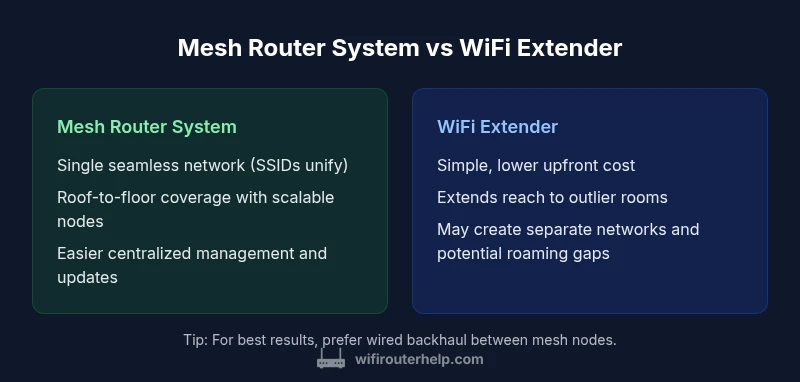
Mesh router systems typically deliver more reliable coverage and seamless roaming for larger homes, while WiFi extenders can be a cost-effective fix for isolated dead zones. The choice depends on home size, layout, and performance needs. This guide compares both options on backhaul, setup, scalability, and long-term value to help you decide quickly.
Understanding the core concepts: mesh router vs extender
In the world of home WiFi, two popular solutions are mesh router systems and traditional WiFi extenders. A mesh system uses multiple nodes that collaborate under a single network, offering a unified SSID and automatic handoff as you move through your home. An extender, sometimes called a range extender, simply amplifies an existing signal and may create a separate network or share the same name depending on setup. The distinction matters because it affects coverage, stability, and ease of use. When you hear the term "mesh router vs extender" in reviews or guides, think of a connected web of nodes vs a single booster that extends the signal outward. For homeowners, the practical goal is reliable nationwide-like coverage inside rooms that once stayed out of reach. WiFi Router Help emphasizes that the right choice aligns with your floor plan, number of devices, and how much you value seamless roaming versus upfront cost.
Coverage, roaming, and backhaul concepts
The heart of the mesh router vs extender decision is how coverage is extended and how devices move between coverage areas. Mesh systems create a single network with three key advantages: uniform coverage, seamless roaming (your device switches between nodes without manual intervention), and centralized management. Extenders extend the existing network by increasing signal reach but can complicate roaming and create multiple networks, which can cause devices to reconnect as you move. Backhaul—the path data takes between nodes or between a router and an extender—plays a crucial role in performance. Mesh systems can use wired backhaul (Ethernet) or high-quality wireless backhaul between nodes, maintaining strong performance even when several devices are active. Extenders usually rely on wireless backhaul and may bottleneck if placed too far from the primary router. In simple terms, if you want a smooth, single-network experience across many rooms, a mesh system excels; if you simply need to push signal into a far corner occasionally, an extender can work.
Setup, placement, and network management: what to expect
Setup complexity matters for most homeowners. A mesh system typically comes with a guided setup that detects neighboring nodes, suggests node placement, and creates a single SSID for all nodes. You’ll often manage settings via a single app, enabling features like guest networks, parental controls, and device prioritization. Extenders require adding a device to your existing network, which may involve choosing a static or dynamic IP, configuring SSIDs, and ensuring the extender is within a reasonable range of the router. This can be simpler in the short term but may require more manual adjustments over time. When evaluating mesh router vs extender, consider whether you value an intuitive app-driven experience or you’re comfortable with more hands-on network tuning.
Performance metrics: speed, latency, and reliability across rooms
Performance is not one size fits all. With a mesh system, you get more consistent speeds across multiple rooms and floors, thanks to the cooperative routing between nodes. Latency tends to be lower on wired backhaul configurations since data hops are shorter and more predictable. Extenders can deliver decent performance, but they often introduce additional hops andPotentially higher latency in areas farther from the main router, especially if the backhaul is wireless. In practical terms, a mesh system reduces the likelihood of dead zones and maintains a steadier experience for video calls, gaming, and streaming in large homes. If your layout includes long hallways, thick walls, or several staircases, mesh networking frequently provides a noticeably smoother experience than a single router plus a basic extender.
Real-world scenarios: tailoring the solution to apartment, ranch, or multi-story homes
An apartment with a compact layout might get by with a single high-quality router or a compact extender; the extra cost of a mesh system may not be justified. A multi-story house with concrete cores or lots of walls typically benefits from a mesh deployment, or multiple extenders carefully placed to avoid signal overlap. In large homes, the mesh approach tends to provide uniform coverage and reduces the number of dead spots, while extenders can be a valid fallback if you’re on a tight budget or your primary concerns are a minimal investment and a quick fix. WiFi Router Help recommends mapping your space and running a simple speed test in key rooms to determine whether a single device, an extender, or a full mesh is needed.
Cost, warranties, and long-term value: pricing dynamics explained
Costs differ sharply between mesh systems and extenders. A basic extender is inexpensive upfront but may require additional devices to cover an entire home. A mesh router system has a higher initial price, but it typically offers better long-term value through scalable expansion, unified management, and fewer network tweaks as you add devices. Warranties and firmware support often align with the ecosystem you choose; mesh systems usually provide centralized updates across all nodes, while extenders depend on the main router’s firmware for some features. In the long run, larger homes and future device expansions often favor mesh networks because of smoother roaming and easier management.
Troubleshooting and common pitfalls: avoiding the most frequent issues
Common mistakes include placing extenders too far from the router, which leads to weak backhaul and poor performance, or using multiple extenders with overlapping channels that create interference. With mesh systems, misplacing nodes can still degrade performance, but the system is generally more forgiving due to automatic routing, provided you use wired backhaul when possible. Another pitfall is assuming more nodes always equal better coverage; excessive nodes increase cost and can introduce unnecessary traffic routing. Start with a well-planned layout and run periodic speed tests in high-traffic rooms to verify stability.
Practical decision framework: a step-by-step choosing guide
To decide between mesh router vs extender, begin by measuring your home size and wall composition, then sketch a rough floor plan. If you have a large, multi-story home with several thick walls, a mesh system is typically the best bet for reliable coverage and smooth roaming. If you live in a smaller apartment or budget is the primary constraint, a quality extender can solve dead zones with less upfront cost. Finally, consider future-proofing: if you anticipate adding devices or moving to higher-speed internet, a mesh scheme scales more gracefully and tends to offer better long-term value. WiFi Router Help’s framework favors a mesh solution for ongoing reliability in diverse home layouts, while extenders remain a practical stopgap for specific, smaller spaces.
Comparison
| Feature | Mesh Router System | WiFi Extender (Range Extender) |
|---|---|---|
| Coverage and roaming | Unified network with seamless roaming across nodes | Extended coverage with potential SSID changes and roaming gaps |
| Backhaul | Wired or high-quality wireless backhaul between nodes | Typically wireless backhaul; may rely on existing WiFi signals |
| Setup and management | App-driven setup with single management interface | Manual setup; sometimes requires multiple apps or dashboards |
| Performance consistency | More uniform speeds across spaces, especially with wired backhaul | Performance can vary by distance from router and placement |
| Cost and scalability | Higher upfront cost but scalable and future-proof | Lower upfront cost; add-ons increase total cost and complexity |
| Best for | Large homes, multi-story layouts, and users needing reliable roaming | Smaller homes or rooms far from router; tight budget |
Benefits
- Seamless roaming with a single network name across the home
- Consistent performance in large spaces thanks to coordinated routing
- Scalability by simply adding nodes or units
- Centralized management and easier firmware updates
- Better long-term value for multi-room layouts
The Bad
- Higher upfront cost compared to a single router or extender
- Some systems lock you into a particular ecosystem
- Overkill for small spaces or single-story apartments
- Requires planning for wired backhaul to maximize performance
Mesh networking is generally the better investment for larger or multi-story homes; extenders are suitable for tight budgets or smaller spaces.
Choose a mesh system when you need reliable whole-home coverage and simple management. Extenders work well for budget-conscious setups or targeted dead zones, but may require more ongoing tweaks.
People Also Ask
What is the main difference between a mesh router and a WiFi extender?
The main difference is network design: a mesh system uses multiple coordinated nodes for a single, seamless network, while a WiFi extender simply boosts the existing signal and can create separate networks. Mesh tends to offer better roaming and coverage in larger homes, whereas extenders can be a cheaper fix for isolated dead zones.
In short, mesh gives you a single, smooth network with roaming across rooms, while extenders extend signal but may complicate roaming.
When should I choose a mesh router over an extender?
Choose a mesh router if you have a large or multi-story home with several dead zones and you want reliable roaming and simple management. Extenders are reasonable for small spaces, tight budgets, or when you only need to push signal to a distant corner occasionally.
Pick mesh for big homes; select an extender for small spaces or quick fixes.
Can you combine mesh with extenders in a hybrid setup?
Yes. Some homes use a mesh backbone with additional extenders to reach particularly stubborn corners. This can work well if the extenders use the same network name and are placed carefully to avoid interference.
A hybrid setup can cover tricky areas, but ensure compatibility and avoid interference.
Is wireless backhaul slower than wired backhaul in mesh setups?
Wireless backhaul can be slower and more variable than wired backhaul, especially with many devices or thick walls. Wired backhaul generally yields the most consistent performance across nodes.
Wired backhaul is usually faster and more reliable than wireless backhaul.
Are mesh systems easy to set up for non-tech-savvy homeowners?
Yes. Most mesh systems emphasize user-friendly apps, guided setup, and automatic optimization. You should still plan node placement to maximize coverage, but the process is designed for non-technical users.
Most people can set up a mesh system with the app-guided steps.
Do mesh networks support gaming and 4K streaming reliably?
Yes, when properly deployed with good backhaul and low-latency paths. Mesh networks can offer consistent speeds and stable connections for gaming and high-definition streams, especially with wired inter-node links.
You can game and stream reliably on a mesh setup if you optimize backhaul.
What to Remember
- Assess home size and layout before choosing a solution
- Prioritize wired backhaul when possible for mesh setups
- Expect higher upfront costs with mesh, but better long-term value
- Use a single network name to maximize seamless roaming
- Plan placement to avoid dead zones and interference