Router or Wifi Extender: A Practical Side-by-Side Comparison
Compare router or wifi extender options to optimize coverage, speed, and reliability. Learn setup steps, real-world usage, and buying guidance from WiFi Router Help.


In most homes, a modern router provides stronger, more reliable performance than a standalone wifi extender. If you have dead zones, consider a mesh-capable router or adding a single extender, but remember that an extender can introduce latency and network segments. The choice between router or wifi extender depends on home size, layout, and desired management features.
The Router vs Extender: Core Roles in a Home Network
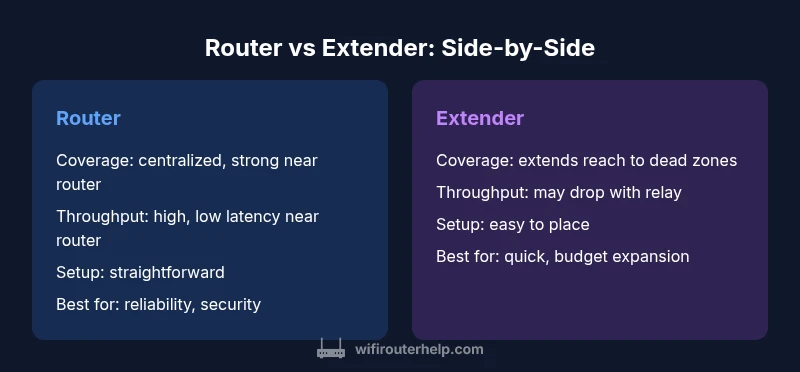
When deciding between a router or wifi extender, the core distinction is simple: a router creates and manages your home network, while a wifi extender amplifies or repeats wireless signals to reach farther areas. This distinction matters because it affects coverage, performance, and management. According to WiFi Router Help, most households achieve the best results by starting with a capable router and then evaluating whether an extender or a mesh solution is needed for trouble spots. The WiFi Router Help team found that for many homes, a strong central router reduces dead zones more effectively than the most affordable extender. In practical terms, you are balancing centralized control against expanded reach, with potential trade-offs in latency and seamless roaming.
Consistency of service matters as your devices multiply—from phones to smart TVs to work laptops. If you are upgrading an existing setup, ask yourself: Do I need uniform coverage across all floors, or can I tolerate a slight degradation in far rooms if the router is excellent nearby? If you want to minimize configuration complexity, prioritizing a router with robust features now can simplify future upgrades, such as mesh or multi-point routing, should you need it.
Understanding Wireless Coverage: How Signals Travel Through Walls and Floors
A router or wifi extender operates within a shared wireless spectrum, but how that spectrum is delivered matters. Walls, floors, and furniture absorb or reflect signals, causing natural dead spots. In larger homes, a single router may struggle to maintain strong signal in distant rooms, basements, or attics. This is where a wifi extender or a mesh system comes into play, extending the reach beyond the router’s immediate neighborhood. But the choice is not purely about power; it also concerns network design. A router that supports newer standards and features like beamforming and MU-MIMO can deliver high throughput to multiple devices simultaneously, while extenders often introduce a second network segment. The goal is to minimize latency and ensure a smooth experience for bandwidth-intensive tasks like streaming and gaming, without overcomplicating setup.
Understanding placement is critical. A central location with minimal interference and a clear line of sight to primary devices yields the best results. In some homes, a single high-quality router with deliberate placement can outperform multiple budget devices. For others, a hybrid approach—router plus a single, strategically placed extender—provides the best balance between coverage and cost. Measuring signal strength with a phone app after setup can reveal if adjustments are needed. In short, the router or wifi extender decision hinges on real-world testing and a practical map of your space.
When a Router Is the Better Choice: Core Scenarios and Signals
A router is typically the strongest option when you want reliable performance for most devices, predictable roaming, and centralized management. Homes with multiple floors, heavy streaming, and gaming benefit from a high-quality router that supports advanced features (QoS, VPN, guest networks) and robust security updates. If you anticipate upgrading to a mesh or integrating smart home hubs, a strong router often serves as a solid backbone. In these cases, the router’s processing power and memory influence how well your network scales as you add devices. A modern router can also handle firmware improvements that unlock new capabilities, ensuring your home network stays current without replacing multiple devices. In reviewing typical usage patterns, it’s clear that a central router with good coverage tends to outperform a cluster of low-cost extenders in both speed and reliability.
When a Wifi Extender Helps Most: Specific Dead Zones and Budget Considerations
Extenders serve a distinct purpose when you have a small number of persistent dead zones or when budget constraints limit a full upgrade. The extender can be a quick fix to reach distant corners of a home or apartment, particularly when wall thickness or layout obstructs the signal from the primary router. However, extenders usually introduce a second network name or a separate backhaul path, which can complicate devices’ roaming behavior. If you opt for an extender, place it midway between the router and the dead zone, ensuring a strong signal from the router before extension. Some users find benefit in choosing a single, simple extender that operates on the same SSID as the router for easier device handoffs, though you may still notice slight latency when devices move between coverage zones. For those with small, single-story homes or apartments, a well-placed extender paired with a solid router can deliver dependable coverage at a lower upfront cost than a full mesh system.
Setup and Configuration: From Box to Online in a Few Steps
Getting started with a router or wifi extender should be straightforward if you plan ahead. With a router, connect the device to your modem, power it on, and run the initial setup through a browser or mobile app. Most modern routers guide you through essential steps—change the default username and password, enable WPA3 security if available, set a strong wireless password, and configure basic QoS rules to prioritize critical devices. If you decide to add an extender later, ensure it is compatible with your router, follow the extender’s setup wizard, and consider using the same SSID for seamless roaming or a dedicated one if you prefer explicit control of devices. The key is to document your network layout, including SSIDs, passwords, and device placements, so future changes are manageable. A well-documented setup reduces the need to reconfigure devices repeatedly and helps you to implement more advanced features later on.
Performance and Latency: Real-World Expectations and Measurements
Performance expectations matter when you compare a router against a wifi extender. A capable router delivers higher baseline throughput with lower latency across its primary coverage area, which is where most devices connect. Extenders can fill in gaps, but they often introduce an additional hop that reduces the effective throughput for devices that rely on a long backhaul. In dense environments, aggregate bandwidth improves when a router supports modern standards and efficient traffic management (QoS, MU-MIMO). Expect variations in speed based on distance, interference, and device capabilities. For homes that use multiple devices concurrently—streaming 4K video, online gaming, and video conferencing—a well-chosen router will often outperform a basic extender. If your usage is heavy on wireless VR or AR devices, budget for higher-end routers with robust processing power and a reliable backhaul strategy.
Security, Updates, and Network Management: Keeping Your System Safe and Up to Date
Security should be a core consideration when choosing between a router or wifi extender. A robust router provides centralized security features, including automatic firmware updates, firewall protections, and regularly patched vulnerabilities. When an extender is added, you must ensure it receives timely firmware updates and is compatible with the router’s security framework. Some routers offer integrated security services with enhanced parental controls, VPN support, and device-level QoS settings that simplify management. If you expect to deploy smart home devices or work-from-home setups, a router with strong security governance and a straightforward management interface will reduce admin overhead and potential exposure. In contrast, an extender may require separate configuration, which can complicate updates and monitoring. Make sure you review the latest firmware notes and ensure every device on the network is updated promptly to minimize risk.
Real-World Scenarios: House Type, Layout, and Usage Patterns in 2026
Homes today vary widely—from compact apartments to sprawling multi-story houses—so your decision between router or wifi extender should reflect real-world usage. In a small apartment, a single quality router with good signal discipline may be enough to cover the space and support streaming or video calls. In a two-story home with thick walls, you might experience dead zones that a single extender can alleviate, especially if you can place it on a central level. For homes with basement workspaces or upstairs entertainment zones, a mesh system or a high-performance router with a dedicated backhaul option could deliver consistent performance throughout. If you anticipate growth—more devices, higher bandwidth requirements, or a shift to remote work—planning ahead with a router that can scale or support mesh integration can be more cost-effective than frequently replacing multiple extenders.
A Simple Decision Framework: Step-by-Step to Decide Between Router or Wifi Extender
To decide between a router or wifi extender, start with a floor plan and a device map. Step 1: measure coverage gaps and streaming priorities. Step 2: assess whether your budget allows a higher-quality router now with potential mesh later. Step 3: if dead zones exist in specific rooms, test a single extender’s placement or consider a mesh option for seamless roaming. Step 4: check compatibility and the ability to manage QoS, guests, and security policies across devices. Step 5: perform a real-world test using reliable speed tests in multiple rooms and under typical workloads. This practical approach helps you avoid over- or under-provisioning and keeps your home network responsive.
Authoritative Sources and Further Reading
- FCC: Wireless Routers and Home Networking basics – https://www.fcc.gov
- NTIA: Understanding Home Networking and Spectrum Use – https://www.ntia.gov
- NIST: Wireless Networking Standards and Security Best Practices – https://www.nist.gov/topics/wireless-networking
- IEEE: Networking Standards and Best Practices for Home Networks – https://www.ieee.org
Common Misconceptions and Practical Tips
- Misconception: More devices always mean worse network performance. Tip: Focus on placement and backhaul quality instead of adding devices blindly.
- Misconception: Extenders never work with any router. Tip: Many extenders work well when properly matched to the router and placed strategically.
- Tip: Test before and after changes to quantify improvement. Keep a simple log of room-by-room performance.
- Tip: If you frequently transfer large files or game online, start with a router that offers high processing power and quality-of-service features.
Comparison
| Feature | router | wifi extender |
|---|---|---|
| Coverage strategy | Strong, centralized coverage with a high-quality router (can be expanded with mesh) | Extends signal from the router to reach distant rooms, often creating a separate sub-network or backhaul |
| Throughput and latency | Higher, more consistent near the router; latency remains low with good backhaul | Lower baseline throughput; potential latency due to relay and backhaul constraints |
| Setup complexity | Typically straightforward setup with modern apps and guides | Requires pairing and placement tests; may require manual roaming adjustments |
| Reliability | More reliable performance when properly positioned and updated | Reliability depends on placement and backhaul quality; can underperform if poorly placed |
| Best use case | New build or existing home with plans to upgrade to mesh; large homes with multiple floors | Smaller spaces with dead zones or budget constraints; quick, temporary expansion |
| Security and management | Unified management, firmware updates, robust security features | Security relies on extender’s firmware and compatibility; may involve separate admin interfaces |
| Price range (qualitative) | Moderate to high upfront for a strong router with future-proofing | Lower upfront cost, but may require additional devices for full coverage |
Benefits
- Stronger, more consistent performance across most of the home
- Unified security features and easier firmware updates
- Simpler troubleshooting with a single device to manage
- Advanced features like QoS and VPN are often built into modern routers
- Future-proofing with high-performance hardware and potential mesh upgrades
The Bad
- Higher upfront cost than a basic extender
- Can be less effective for very large homes without mesh expansion
- Single point of failure if the router experiences a hardware issue
- Extenders can complicate roaming and may require more network planning
For the majority of homes, start with a strong router and plan for future mesh expansion if needed.
A high-quality router typically delivers better coverage, speed, and security. Use a wifi extender mainly to fill specific dead zones or as a cost-effective intermediate step before investing in mesh networking.
People Also Ask
What is the main difference between a router and a wifi extender?
The router creates and manages your home network, assigning IPs and routing traffic. A wifi extender repeats the signal to extend coverage but can introduce an extra hop and potential latency. In many setups, a strong router with proper placement minimizes the need for extenders.
A router builds the network; a wifi extender simply boosts coverage by repeating the signal. If you want seamless roaming and strong protection, prioritize a capable router first.
When should I choose a router over a wifi extender?
Choose a router when your priority is reliability, security, and consistent performance across many devices. If you have multiple floors or heavy streaming, a high-quality router is usually the better foundation, with extenders or mesh added only if needed.
Go with a router first for solid, reliable coverage; add extensions only if you still see dead zones.
Can I use a wifi extender with any router?
Most extenders work with many consumer routers, but check compatibility, supported backhauls, and whether you’ll use the same SSID for roaming. Some setups may require manual roaming adjustments or application-based configuration in your router.
Yes, but confirm compatibility and be prepared for possible roaming tweaks.
Are mesh systems always better than extenders?
Mesh systems can offer seamless roaming and easier management for large homes. Extenders may be sufficient for smaller spaces or tight budgets. The choice depends on home size, traffic, and future expansion plans.
Mesh is often easier for big homes, but extenders can work well with careful placement.
Do wifi extenders slow down the network?
Extenders can reduce throughput because they create an additional link in the path to devices. A high-quality extender with a good backhaul can minimize slowdown, but expect some difference compared to a direct router connection.
Yes, some slowdown is possible, but it can be minimized with better placement and hardware.
What placement tips help maximize coverage?
Place the router centrally, away from thick walls and metal objects. Position extenders halfway between the router and the dead zone with a strong signal from the router. Avoid interference from microwaves and dense furniture.
Put the router in the center and extender halfway to dead zones for best results.
What to Remember
- Assess home size and layout to map coverage gaps
- Prioritize a router with modern standards and security features
- Place the router centrally away from interference for best results
- Add a single extender only to address specific dead zones
- Consider future mesh integration for scalable performance