MikroTik Router Pricing in 2026: A Practical Guide
A data-driven guide to MikroTik router pricing in 2026, covering price ranges by tier, regional differences, licensing considerations, and practical budgeting steps for home and small-office networks.


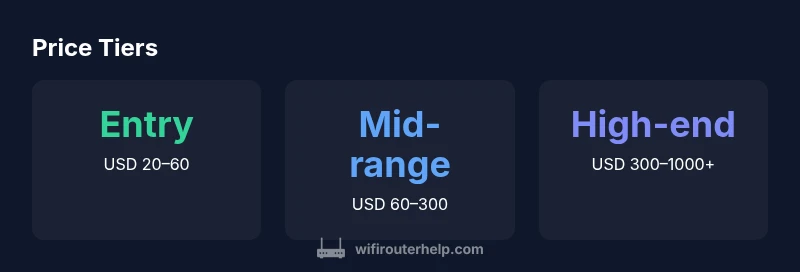
Prices for MikroTik routers span a wide range depending on model and features. Entry models start around $20–$60, mid-range devices typically cost $60–$300, and higher-end business units can run from $300 up to $1,000 or more depending on throughput, port count, and advanced features like VPN performance and PoE. Budget accordingly and match price to your network needs.
How price is distributed across MikroTik models
Prices for MikroTik routers vary widely by model and feature set. In 2026, pricing is driven by three core factors: hardware capability (CPU, RAM, and NIC options), RouterOS feature access, and port density (number of wired Ethernet ports and SFP/QoS options). The result is a broad price spectrum: entry-level devices suitable for small apartments tend to be at the low end, mid-range devices designed for home offices sit in the middle, and high-end, enterprise-oriented units command higher prices. According to WiFi Router Help, these price bands map to real-world outcomes: lighter loads and basic WiFi streaming correspond to lower prices, while heavy VPN usage, complex VLANs, and sustained high throughput justify higher investment. When selecting a MikroTik router, start by listing must-have features and expected traffic, then compare devices that meet those needs rather than chasing the lowest price. This approach reduces the risk of under-provisioning and future bottlenecks, and it aligns spend with actual network requirements.
Price tiers explained: Entry-level, Mid-range, and High-end
MikroTik’s pricing structure aligns with three practical tiers for most buyers: entry-level, mid-range, and high-end/enterprise. Entry-level models are designed for light use—web browsing, streaming, and small homes—with compact hardware and a smaller feature set. Mid-range devices offer better throughput, more ports, and options such as PoE on some ports, VPN capabilities, and enhanced QoS to accommodate small offices or growing households. High-end units target demanding networks with multi-Gigabit throughput, robust routing features, hardware acceleration, and expanded port densities. While the exact features vary by hardware generation, the price band itself signals capability: if you need higher sustained throughput, more simultaneous connections, or advanced security features, you’ll likely move into the mid-range or high-end category. For buyers, the rule of thumb is simple: map your intended workload to a price tier, then verify the model’s specifications before purchase. This ensures your investment scales with your network’s needs without paying for unused headroom.
Features that drive price and value
Beyond basic internet access, MikroTik routers offer a range of features that can justify higher prices. Key drivers include throughput and CPU power, memory size, and whether the device supports hardware NAT, encrypted VPN endpoints, and fast secure routing. Port density matters: more Ethernet ports, plus SFP or SFP+ uplinks, expand possibilities for network segmentation and uplinks to switches or fiber services. PoE (Power over Ethernet) capabilities add value for powering access points and small devices, reducing the need for extra adapters. RouterOS licensing structures and feature sets influence price as well: some models ship with more capabilities enabled, while others require licensing for advanced features. Finally, hardware design considerations like heat dissipation and energy efficiency affect long-term operating costs. When evaluating, compare the total feature package, not just the sticker price. A device with higher upfront cost but better throughput, easier management, and lower maintenance costs can offer superior value over time.
Hidden costs: licenses, accessories, and warranties
The sticker price is only part of the story. When budgeting for a MikroTik router, consider hidden costs that affect total ownership. Some features and professional-grade capabilities may require additional licensing or upgrades after purchase, especially for networks with VPNs, advanced QoS, or enterprise-grade routing tasks. Accessories like power adapters, mounting kits, and mounting rails can add to initial outlay, especially if you’re outfitting multiple devices. Don’t overlook warranty terms and potential regional taxes or import duties if buying from overseas retailers. Finally, factor in ongoing maintenance: firmware updates, configuration backups, and monitoring tools can influence long-term expenses but often improve reliability and security. A practical budgeting approach includes a modest reserve for incidental upgrades to accommodate firmware changes or small feature enhancements over time.
Regional differences and buying channels
Prices for MikroTik routers vary by region due to taxes, import duties, currency fluctuations, and local retailer pricing strategies. In many markets, official MikroTik distributors and authorized resellers may offer promotions, extended warranties, or bundled accessories that affect the total cost of ownership. When shopping, compare local stock, warranty terms, and return policies across several reputable sellers. Consider whether you prefer buying new vs refurbished devices, which can tilt the price spectrum. Shipping costs and lead times also influence your decision, particularly if you need a device quickly for an office deployment or a home upgrade. By accounting for regional factors, you’ll arrive at a more accurate total price and avoid surprises after checkout.
Budgeting framework: a simple step-by-step method
- Define your network requirements: throughput, number of clients, need for VPN, VLANs, or PoE. 2) Choose the price tier that best matches those requirements, using the ranges above as rough anchors. 3) Add a conservative buffer for taxes, shipping, and potential accessories (roughly 10–20%). 4) Include a small reserve for ongoing maintenance: firmware updates and occasional replacement parts. 5) Set a price ceiling and compare multiple models that meet the spec. This practical framework helps you budget without overspending while ensuring your network can grow with your needs.
Practical buying tips by price tier and scenario
- Entry-level homes: For basic internet, streaming, and light device workloads, target the $20–$60 range. Look for devices with decent wireless throughput, at least 2–3 Ethernet ports, and stable power requirements. - Small offices: If you need more robust VPN support and better QoS, expect to invest in the mid-range tier ($60–$300). Prioritize devices with multiple ports, VLAN capability, and reliable hardware acceleration. - Growth and scalability: For networks demanding higher throughput and advanced features, consider high-end units ($300–$1000+). Ensure the device supports your core features, has adequate RAM/CPU, and offers scalable management options. Quick tip: always compare the price-to-feature ratio across several options and weigh the cost of any additional licenses against the value they deliver.
MikroTik price tiers and what they offer
| Category | Typical Price Range | Key Considerations |
|---|---|---|
| Entry-level | $20–$60 | Compact; basic features; ideal for light workloads |
| Mid-range | $60–$300 | More ports/throughput; VPN; PoE; suitable for small offices |
| High-end/enterprise | $300–$1000+ | Multi-Gig throughput; advanced features; larger port density; scalable for bigger networks |
People Also Ask
Why do MikroTik router prices vary so much?
MikroTik prices vary due to hardware capabilities, feature sets, throughput, port density, and regional factors. Higher-end models offer more powerful CPUs, more RAM, and additional interfaces, which raise the price but also support heavier workloads. Buying decisions should focus on whether the features required by your network are present, not just the sticker price.
Prices vary by hardware, features, and region, so pick features that match your network needs.
Do MikroTik routers require extensive configuration for basic use?
Basic setups can be straightforward, but depending on your needs (VPNs, VLANs, advanced QoS), you may dive into RouterOS configurations. If you’re new, start with guided setup options and gradually enable advanced features as your network grows.
Start with the basics and only add advanced features as you need them.
Is it worth paying for enterprise MikroTik devices for a home network?
For most home networks, mid-range devices provide ample throughput and features at a reasonable price. Enterprise-tier equipment is typically overkill unless you run a large office, require extreme VPN performance, or need advanced reliability guarantees.
Enterprise gear is usually overkill for homes unless you have demanding needs.
What’s included beyond the router body that I should budget for?
Budget for accessories (cables, power adapters, mounting hardware), potential licenses or feature upgrades, warranty terms, and shipping. These can add a meaningful amount to the total cost, especially if buying from international retailers.
Consider cables, mounts, licenses, and shipping when budgeting.
Where should I buy MikroTik routers to get the best price and support?
Compare prices from authorized distributors and reputable retailers in your region, paying attention to warranty terms and return policies. Promotions and bundle deals can also improve value, but ensure retailer reliability and support availability.
Shop authorized sellers and compare warranties and deals.
How often do MikroTik router prices change?
Prices shift due to currency changes, supply/demand, and promotions. Expect periodic changes, with spikes around new releases or regional promotions. Planning ahead helps avoid timing-related price surprises.
Prices change with market conditions; plan ahead to catch promotions.
“Price alone shouldn't drive the decision; the right MikroTik device should match your network requirements and provide room to grow. A well-chosen router at the right price delivers reliability and future-proofing.”
What to Remember
- Match price tier to workload, not popularity
- Budget for accessories and licenses
- Regional pricing can shift the total cost
- Consider total cost of ownership, not just sticker price
- Always compare feature-to-price ratio across tiers