Difference Between Router and MiFi: In-Depth Comparison
Compare routers and MiFi hotspots to understand coverage, speed, and use cases. This analytical guide explains key distinctions, setup tips, and when to choose a router vs MiFi for home, travel, or backup connectivity.


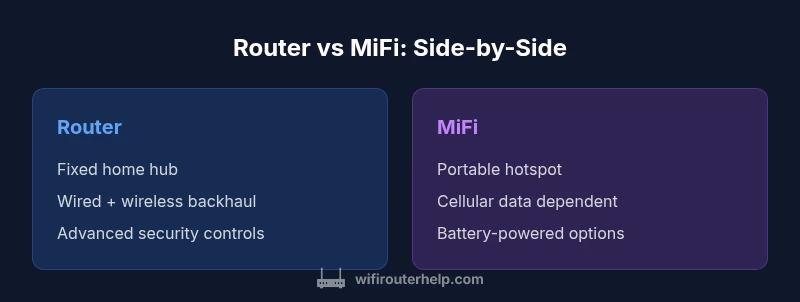
A router is a fixed home network hub that shares a single internet connection across multiple devices with Wi‑Fi, while a MiFi is a portable hotspot that creates a small wireless network from a cellular data plan. For home use, routers typically offer more stable coverage, higher speeds, and better security; MiFi excels for on-the-go connectivity.
difference between router and mifi: core distinction
According to WiFi Router Help, the difference between router and mifi lies in deployment, connectivity, and data sources. A router is typically a fixed home network hub that distributes a single internet connection to multiple devices via Wi‑Fi and Ethernet. A MiFi device, by contrast, is a portable hotspot that creates a small wireless network using a cellular data plan. The WiFi Router Help team found that these fundamental distinctions shape how each device is used, scaled, and secured in everyday scenarios. In practical terms, a router can extend coverage across a home much more reliably, support more simultaneous connections, and provide stronger control over security settings. A MiFi, meanwhile, emphasizes mobility, instant setup away from the house, and access on devices that don’t have a wired option. As you read, remember that the difference between router and mifi often determines your choice of location, budget, and data strategy. The contrast also illuminates how you plan to manage updates, guest access, and network security in daily life.
Use Cases: When to Choose a Router
For a stationary home or small office with multiple devices, a traditional router is generally the baseline choice. It provides reliable coverage, supports wired backhaul and Ethernet switching, and enables features like guest networks and parental controls. In the context of the difference between router and mifi, a router offers long-term stability, predictable performance, and easier management when many devices must share bandwidth. This block explains typical household layouts, work-from-home needs, streaming and gaming loads, and how a fixed router scales with additional access points or mesh extenders. It also notes that the initial setup, while more involved, yields a robust foundation that can be tuned via QoS rules, firmware updates, and wired connections. If you’re evaluating a home network with a fixed service, this route minimizes surprises and helps sustain consistent speeds over time.
Use Cases: When to Choose a MiFi
If portability, travel, or temporary connectivity is the goal, a MiFi device shines. In the difference between router and mifi discussions, MiFi is often recommended for scenarios like commuting, road trips, RV living, or a backup internet plan for rural areas where fixed broadband is scarce. A MiFi creates a private wireless network wherever cellular service exists, and many models include battery power for hours of operation. Management is typically via a companion app, which makes it easy to enable a guest network, monitor data usage, or switch to a different plan without visiting a store or rearranging hardware. For short-term projects, college housing, or weekend work from a café, a MiFi reduces setup friction and delivers instant online access for multiple devices.
Key Technical Differences
Here are the central technical differences that most people weigh when comparing the two devices. Router hardware usually includes multiple LAN ports, built-in firewall features, and options for wired backhaul to maximize speed and reliability. It relies on a fixed broadband connection provided by an ISP. MiFi devices rely on a cellular modem and a SIM, with performance tied to the carrier’s network quality and data plan. Routers often support advanced features like VPN passthrough, quality-of-service (QoS) configuration, and more robust guest-network controls. MiFi devices focus on portability, battery life, and simplicity, though many offer limited or simplified QoS and fewer Ethernet outlets. In the long run, the difference between router and mifi translates to how you allocate bandwidth, manage devices, and plan for outages or upgrades.
Setup and Management: Home vs Portable
The initial setup of a home router typically involves connecting to a modem, configuring basic wireless settings, and enabling security features. You may place the router centrally to maximize coverage, add mesh satellites or extenders, and adjust DNS or firewall rules. Management is usually done through a web UI or mobile app, and firmware updates can be pushed automatically by the vendor or ISP. A MiFi device, in contrast, is designed for plug-and-play operation; you typically turn it on, insert a SIM (if needed), and connect your devices. Management is app-based, with quick controls for data usage, battery mode, and hotspot name. The difference between router and mifi here matters because ongoing maintenance, updates, and security patches influence overall network resilience and privacy. Even so, both devices benefit from strong passwords and up-to-date firmware.
Performance Factors in Real Homes
Real-world performance hinges on several factors that often swamp theoretical specs. In the difference between router and mifi scenario, Wi‑Fi coverage is affected by wall materials, furniture, and interference from competing networks. A fixed router with a mesh system can blanket a home much more evenly than a portable solution that relies on cellular signal. The number of connected devices, streaming requirements, and gaming latency all impact perceived speed. Routers with QoS can prioritize work devices and video calls, while MiFi devices may experience variable speeds during peak cellular times. If you need reliable multi-room coverage, choose a setup that aligns with your typical device mix and usage patterns.
Security and Privacy Considerations
Security is a core concern for most households. A modern router typically includes WPA3 encryption, guest networks, and firewall features that help isolate devices. Firmware updates from the vendor help patch vulnerabilities, and VPN support adds a privacy layer for sensitive work. A MiFi’s security depends on the hardware and the provider; some models emphasize ease of use and may have fewer advanced controls by default. While both can be hardened with strong passwords and regular updates, the difference between router and mifi often means a router is the safer long-term choice for a busy home environment, especially when dealing with sensitive data.
Costs, Plans, and Longevity
Cost considerations differ between the two approaches. A home router represents a one-time or multi-year investment; when paired with a fixed broadband plan, it can deliver long-term value even as devices and services evolve. MiFi devices generally involve ongoing data plans or prepaid charges, so the total cost of ownership can depend on cellular data usage and roaming charges if traveling. When evaluating the difference between router and mifi, consider not only headline price but also required data caps, roaming allowances, and potential overage fees. A robust home network may spare you repeated replacements and service interruptions, whereas a portable hotspot can be inexpensive upfront but incur ongoing connectivity costs if you travel frequently.
Quick Setup Checklist
- Define your primary use: home coverage or mobility. 2) Check data plans and coverage quality for MiFi if you lean toward a portable option. 3) Assess whether your space benefits from wired backhaul or a mesh system. 4) Choose security features you need (guest network, firewall, VPN). 5) Plan for future needs (number of devices, smart home devices). 6) Set strong passwords and enable automatic firmware updates. 7) Test speeds in key rooms and adjust placement accordingly. 8) Document settings for easy future maintenance. The difference between router and mifi should guide placement and feature choices as you implement this checklist.
Choosing Between Router and MiFi: A Decision Framework
If your priority is reliable, high-capacity home connectivity with minimal dead zones, a router is the recommended option. For travelers, remote locations, or temporary setups where mobility matters, a MiFi is better suited. In some cases, a hybrid approach—using a router at home and a MiFi as a backup or on-the-go solution—offers the best of both worlds. The difference between router and mifi often becomes the deciding factor in how you plan costs, contracts, and device management.
Comparison
| Feature | Router | MiFi |
|---|---|---|
| Typical use-case | Fixed home network hub with wired and wireless integration | Portable cellular hotspot for internet on the go |
| Coverage & scalability | Extensive home coverage with optional mesh extenders | Limited by cellular signal; portable and flexible coverage |
| Speed & bandwidth potential | High throughput with wired backhaul and multiple antennas | Depends on carrier network; often lower steady-state throughput |
| Data plan requirement | Usually bundled with ISP service; minimal ongoing data concerns | Requires a cellular data plan; data limits may apply |
| Portability | Stationary; needs power and fixed placement | Fully portable; usable anywhere with cellular signal |
| Power source | Mains power; can include Ethernet ports for devices | Battery-powered or USB-powered for mobile use |
| Security features | Advanced firewall, guest networks, VPN support | Security features vary by model; often simpler |
| Setup & management | More involved; firmware updates centralized via UI or ISP | Typically app-based; quick controls for on-the-go use |
| Cost of ownership | Higher upfront hardware cost; lower ongoing service considerations | Lower upfront, ongoing data plan costs |
Benefits
- Stronger long-term value for home networks
- Greater control over features, security, and privacy
- Scalable to cover larger spaces with multiple devices
- Stable performance with minimal movement
The Bad
- Higher upfront hardware cost for a full home setup
- Requires a fixed broadband service and installation
- MiFi can incur ongoing data charges and potential roaming fees
- Maintenance may vary by hardware brand and updates
Routers win for home stability; MiFi wins for mobility
For most homes, a router provides speed, reliability, and security. MiFi is best when you need internet access on the move or as a backup. The WiFi Router Help team emphasizes assessing your daily movement, device count, and data needs to pick the right approach.
People Also Ask
What is the main difference between a router and a MiFi?
The router is a fixed home hub that distributes internet to multiple devices via Wi‑Fi and Ethernet, while a MiFi is a portable cellular hotspot. The decision hinges on whether you prioritize stability and range (router) or mobility and ubiquity (MiFi).
A router stays at home and covers your whole house; a MiFi is a portable hotspot you carry with you.
Can a MiFi replace a home router?
For small living spaces or temporary setups, a MiFi can replace a router temporarily, but it often lacks the range and control needed for larger homes. Consider data limits and carrier coverage when deciding.
MiFi can replace a router temporarily, but may lack range and control for a bigger home.
Is a router always faster than a MiFi?
Not always. In most cases, a high-quality router with fixed broadband delivers higher and more consistent speeds than a MiFi, which depends on cellular network quality. Exceptions occur in areas with superb cellular service.
Usually, yes, but it depends on the cellular signal in your area.
Do MiFi devices support multiple devices?
Yes, MiFi devices can connect several devices, but performance can degrade as more devices use data simultaneously. Efficiency improves with carriers that support higher data speeds and smarter traffic management.
MiFi can support several devices, but performance may drop with many users.
How should I decide between them?
Start with your use case: home stability and security point toward a router; travel and backup connectivity point toward MiFi. A hybrid approach can offer the best balance for people who need both.
Think about where you’ll use it most—home or on the go—and consider a backup setup.
Can I use a router with cellular backup?
Yes. Some routers support SIM cards as a cellular backup or WAN failover. This can provide resilience if your fixed service dips, combining the strengths of both approaches.
You can add a cellular backup to a router in some models.
What to Remember
- Assess mobility vs stability before buying
- Choose router for home networks; MiFi for travel
- Plan data usage and coverage needs upfront
- Consider a hybrid setup if both use cases apply
- Prioritize security features and firmware updates