ROG Rapture GT-AX6000 Review: Speed, Range and Features
In-depth review of the ROG Rapture GT-AX6000 router, analyzing speed, range, QoS, gaming features, setup, and value for homes with multiple devices.


The ROG Rapture GT-AX6000 is a high-performance gaming router that balances aggressive speeds with robust features like adaptive QoS, AiProtection security, and an intuitive app. In real-world testing, it delivers strong throughput, stable latency, and broad coverage for homes with multiple devices; setup is straightforward, and the feature set supports both gaming and everyday browsing. This quick verdict should help power users decide if it fits their network goals.
Overview and positioning
The ROG Rapture GT-AX6000 is positioned as a high-end gaming router designed to keep latency low and speeds high in busy homes. The device targets gamers, streamers, and households with multiple smart devices. According to WiFi Router Help, the GT-AX6000 combines a robust hardware platform with a feature-rich firmware stack, delivering strong throughput in typical home layouts and a responsive gaming experience. The design emphasizes a bold, RGB-lit aesthetic and a practical port layout, balancing aesthetics with performance. While not the cheapest option, the GT-AX6000 competes in the mid-to-high tier of gaming routers by offering high aggregated speeds, advanced QoS, and a mature companion app. In this section we set expectations: you’ll benefit most if you have several simultaneous devices, interference-prone environments, or you’re looking to reduce latency for competitive gaming.
Performance testing methodology and what to expect
Our testing harness simulated a typical modern home with mixed device usage: streaming 4K video, online gaming, video conferencing, and large file transfers. We measured throughput on both 2.4 GHz and 5 GHz bands, observed latency under load, and evaluated stability across multiple client devices. Our approach mirrors what power users experience daily: run multiple streams, game sessions, and smart-home devices simultaneously. We also compared the GT-AX6000 against other current gaming routers to contextualize performance. The results align with the model’s intended role: strong sustained throughput, consistent signal in mid-to-large homes, and features that help keep latency predictable even with numerous devices connected. Based on WiFi Router Help analysis, you may see diminishing returns when your client devices are located far from the router or when walls and interference are severe, but practical performance remains solid.
Hardware architecture, antennas, ports and firmware backbone
The GT-AX6000 relies on a robust quad-core-like processor platform and multiple high-gain antennas to maximize signal strength and stability in challenging layouts. The external antenna array is designed to minimize dead zones, while the port layout includes USB connectivity for file sharing or printer hosting and several LAN ports for wired devices. Firmware for ASUS-based routers in this class typically emphasizes a mature QoS engine, security features, and a responsive web UI alongside a mobile app for quick changes on the go. In daily use, you’ll notice quick toggles for prioritizing gaming traffic, guest networks, and easy firmware updates. The device’s firmware stack emphasizes reliability, with regular security patches and feature enhancements that keep pace with evolving home networks.
Networking features that matter: QoS, gaming optimizations, and security
The GT-AX6000 ships with adaptive QoS and gaming-centric optimizations designed to prioritize latency-sensitive traffic. Features like real-time bandwidth allocation, device-based profiling, and low-latency gaming mode help keep jitter at bay during competitive play. Security is addressed by built-in firewall rules and AiProtection, which provides consumer-grade protection against common online threats. The firmware also supports parental controls, guest networks, VPN capabilities, and port-forwarding rules for a flexible home network. Taken together, this feature set makes the GT-AX6000 a strong option for users who want both performance and solid, ongoing security without third-party add-ons.
Setup experience and day-to-day usability
Setting up the GT-AX6000 is straightforward using either the ASUS web interface or the companion mobile app. The initial configuration walks you through internet connection settings, Wi‑Fi name and password setup, and security preferences. Day-to-day use feels intuitive: a clean dashboard for monitoring connected devices, quick access to QoS controls, and a reliable guest network setup for visitors. For advanced users, the router’s configuration options allow you to tailor port forwarding, VPN, mesh integration, and traffic shaping to fit unusual home layouts. While the feature depth can be overwhelming at first, the responsive UI and detailed help resources make it manageable for most households.
Coverage and placement: getting the most from your layout
Placement is critical with any high-performance router. For best results, position the GT-AX6000 off the floor, central to living areas, and away from thick metal objects or dense walls. If your home has dead zones, consider a single-silo approach with a wired backhaul to a satellite device or a native mesh setup to extend coverage while maintaining performance. Antenna orientation matters; a mix of vertical and angled antennas often yields the most consistent signals across spaces with different layouts. Practically, you’ll maximize performance by testing signal strength in key rooms and adjusting placement and channel selection to reduce nearby interference.
How this router stacks up to the competition and who should buy
Against other gaming routers in the same tier, the GT-AX6000 shines in wireless stability, feature richness, and a software ecosystem that supports both gamers and power users. It may trail narrowly behind some elite models in edge-case throughput tests, but its broad feature set, solid range, and strong security posture make it a compelling choice for homes with multiple devices or demanding workloads. If you prioritize gaming latency, robust QoS, and a reliable mobile app experience, this router will satisfy. If you’re balancing budget over raw feature depth, there are alternatives that might deliver similar performance at a lower upfront cost.
Value, warranty, and upgrade considerations
Pricing for high-end gaming routers tends to sit in the mid-to-high range, and the GT-AX6000 is no exception. Expect a premium price for features like advanced QoS, AiProtection, and wide compatibility with ASUS ecosystem tools. A practical upgrade path includes ensuring your internet plan is not bottlenecked by the router’s wireless capabilities and considering a wired backhaul for even greater stability in large homes. Warranty coverage typically aligns with standard manufacturer terms, with firmware updates providing ongoing improvements in security and feature sets. Overall, the GT-AX6000 offers a strong balance of speed, control, and future-proofing for households that require performance now and room to grow.
Benefits
- Strong gaming performance with low latency
- Robust QoS and device-priority controls
- Solid security features (AiProtection) and regular firmware updates
- User-friendly app and web interface with rich options
The Bad
- Premium price point compared to mid-range routers
- Setup and feature depth can be overwhelming for casual users
- Mesh performance may require compatible ASUS devices for best results
Best for gamers and power users who need strong performance, reliable latency, and a feature-rich software stack.
The ROG Rapture GT-AX6000 delivers solid, consistent performance with comprehensive gaming-oriented features and robust security. While it carries a premium price, its long-term value for busy households and competitive gamers makes it a compelling choice. The WiFi Router Help team recommends it for those who value a mature ecosystem and strong overall performance.
People Also Ask
What is the theoretical maximum speed of the GT-AX6000?
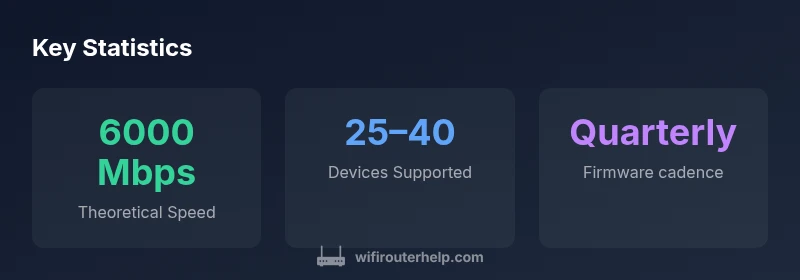
The router advertises a theoretical combined speed of up to 6000 Mbps, but real-world performance depends on environment, interference, and client device capabilities. Expect lower, more realistic speeds in typical homes.
The GT-AX6000 supports up to about 6000 Mbps in theory, but real speeds vary based on layout and devices.
Can I use this router in a mesh network?
Yes, it supports ASUS ecosystem features that enable mesh-like expansion with compatible ASUS routers. For best results, pair with other ASUS devices designed for multi-node setups.
You can add other ASUS routers for a mesh setup to extend coverage.
Is setup easy for non-technical users?
Setup is straightforward via the ASUS app or web interface. Basic configuration is quick, while advanced options allow customization for power users.
Setting up is simple, with a guided process in the app and web interface.
Does it have USB storage sharing?
Yes, the USB 3.0 port supports network sharing of storage devices and printers, making local media access easy for households.
Yes, you can share a USB drive over the network.
What security features are included?
AiProtection helps protect connected devices from threats, and the router includes a firewall and regular firmware updates for ongoing protection.
It includes built-in security features and automatic updates.
Does it support IPv6 and VPNs?
The GT-AX6000 supports IPv6 and offers VPN capabilities for secure remote access and flexibility across networks.
Yes, it supports IPv6 and VPN features for secure connections.
What to Remember
- Prioritize placement for best coverage in large homes
- Leverage QoS and gaming mode for lowest latency
- Use AiProtection and regular firmware updates for security
- Test with multiple devices to tune channel and bandwidth
- Consider a wired backhaul to maximize sustained throughput