Router Audit Tool: A Step-by-Step Guide for Home Networks
Learn how to use a router audit tool to find vulnerabilities, misconfigurations, and performance gaps. This step-by-step guide covers installation, scanning firmware and ports, interpreting results, and remediation for a safer, faster home network.


Using a router audit tool, you will systematically scan your home network for vulnerabilities, misconfigurations, and performance gaps. This quick guide shows how to install the tool, run checks on firmware, open ports, DNS leaks, and QoS, and interpret results to harden your setup. Requirements include a computer, a valid admin login to your router, and permission to audit the network.
What is a router audit tool?
A router audit tool is software designed to assess your home network by examining the router’s firmware, configuration, and live traffic. It helps identify security gaps, weak passwords, exposed ports, DNS and privacy leaks, and misconfigured QoS rules. According to WiFi Router Help, using such a tool provides a repeatable, auditable process that improves both security and performance. By centralizing checks in one interface, you can compare results over time and demonstrate due diligence to household users. The tool typically runs on a computer and connects to your router via the local network, often using a secure, authenticated session. The goal is not to replace professional audits but to empower homeowners to spot obvious issues quickly and with confidence.
Why a router audit tool matters for security and performance
In today’s home networks, attackers continuously probe devices for weaknesses. A router audit tool helps you move from reactive troubleshooting to proactive defense. Regular audits can reveal outdated firmware, weak admin passwords, open administrative interfaces exposed to the internet, and insecure UPnP configurations. Beyond security, audits illuminate performance bottlenecks, improper QoS rules that throttle essential devices, and DNS settings that leak information to external resolvers. WiFi Router Help emphasizes that a disciplined auditing routine reduces incident response time and strengthens overall privacy. For households with smart devices, a tool offers visibility across many endpoints, reducing blind spots that manual checks often miss.
How to choose the right router audit tool
There isn’t a single “best” tool for every home; the right choice balances features, ease of use, and cost. Look for clear scanning options (firmware, open ports, DNS, QoS, firewall settings), safe default configurations, and readable, actionable reports. Compatibility with your router’s brand and model matters, as some tools optimize checks for specific firmware families. Favor tools that provide audit templates, allow export of findings, and generate remediation steps. Community support, documented safety guidelines, and ongoing updates are also important. As you evaluate tools, consider a trial period to verify that results align with your home network goals. The goal is transparency, reproducibility, and low overhead for ongoing maintenance.
Preparing to audit: prerequisites and planning
Before starting, inventory all network devices connected to the router, including smart home hubs and IoT gadgets. Back up current router settings to recover quickly if a remediation step breaks something. Ensure you have administrator access to the router and that you’re authorized to audit the network. Create a quiet maintenance window to minimize disruption, and disable any devices that might interfere with scans (such as backup VPN clients) if needed. Collect credentials securely and avoid saving sensitive data in plain text. Finally, decide on a scope: which IP ranges, subnets, or devices will be included in this audit.
Audit workflow overview: high-level steps
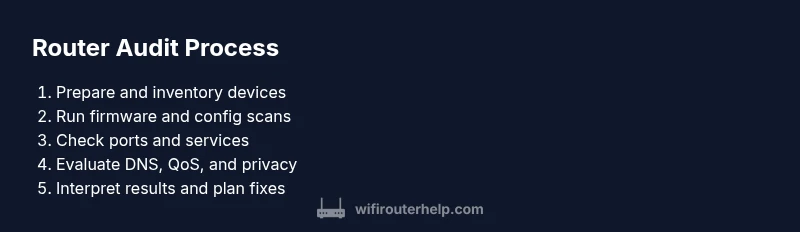
A well-structured audit follows a repeatable workflow: (1) establish baseline credentials and access; (2) run firmware and configuration scans; (3) perform port and service discovery; (4) review DNS and privacy settings; (5) test QoS and device prioritization; (6) interpret results and prioritize fixes; (7) implement changes in a controlled manner; (8) document findings and plan a follow-up audit. Each step should be documented, with clear owners and deadlines. This section provides the mental model for the hands-on steps that follow, ensuring you stay focused on high-impact items first.
Interpreting results and remediation prioritization
Audit results come with a mix of critical and lower-priority items. Start with issues that expose the network to external attackers: weak admin passwords, exposed remote management interfaces, and outdated firmware. Next, address misconfigurations that enable eavesdropping or data leakage, such as insecure DNS or UPnP exposures. Prioritize remediation by risk score, impact, and ease of fix. For each finding, write a concise remediation plan, assign ownership, and set a deadline. Use versioned backups of the router configuration after each major change to track progress and enable rollback if needed.
Common pitfalls and safety considerations
Auditing a home router can cause temporary outages if changes affect connectivity. Always back up settings before applying fixes, and test after each step. Do not disable security controls without a plan; if you must, document a rollback strategy. Some tools cause high CPU load during scans; run them during off-peak times or in a controlled window to avoid interrupting real-time devices. Ensure you operate within legal boundaries and only audit networks you own or have explicit permission to test. Finally, avoid revealing sensitive results in unsecured channels; store audit logs securely and delete them when no longer needed.
Automation, reporting, and scaling audits across devices
As comfort grows, you can automate routine checks using scheduled scans and policy-based remediation suggestions. Generate summarized reports for household members, highlighting fixed issues and recommended steps. When your home expands (new devices or additional subnets), extend the audit scope and adjust baseline expectations. Consider integrating the audit outputs with a simple ticketing or note-taking system to track progress, timelines, and responsible users. Automation should simplify maintenance, not complicate it.
Maintenance and ongoing hygiene: after-action reviews
After completing an audit, review what worked well and what didn’t to refine your process. Schedule quarterly audits or align with major firmware release cycles to maintain a secure posture. Maintain an inventory of devices and update credentials as needed. Periodically test backup configurations and disaster recovery steps. By treating the router audit as an ongoing practice rather than a one-off task, you preserve a resilient home network over time.
Tools & Materials
- Computer with internet access(Windows/macOS/Linux; ensure admin rights if needed)
- Router admin login credentials(Username and password with required privileges)
- Router audit tool software(Select a reputable tool compatible with your router)
- Secure storage for audit logs(Use an encrypted folder or password manager export)
- Backup method for router config(Export current settings before changes; optional but recommended)
Steps
Estimated time: 60-90 minutes
- 1
Prepare your environment
Gather credentials, confirm authorization, and map your network. Create a maintenance window and back up current router settings. This upfront planning reduces surprises during testing.
Tip: Double-check that you have admin access and that you’re auditing only devices you own. - 2
Install and configure the audit tool
Download and install the router audit tool on your computer. Configure the scan profile to include firmware, port exposure, DNS, and QoS checks.
Tip: Run a short test scan first to confirm connectivity and basic reporting. - 3
Securely connect to the router
Connect over the LAN with a wired or secure Wi‑Fi connection. Use the router’s admin interface via HTTPS and verify certificate warnings are addressed.
Tip: Prefer a wired connection to avoid interruptions during scans. - 4
Run firmware and configuration scans
Execute firmware version checks, vulnerability databases, and configuration reviews (admin paths, remote access, UPnP). Collect baseline results for comparison.
Tip: Note any devices with outdated firmware and plan remediation steps. - 5
Check open ports and services
Enumerate ports exposed to the internet or on the local network. Identify services that are unnecessary or misconfigured and assess potential risks.
Tip: Disable unnecessary services and close nonessential ports where possible. - 6
Evaluate DNS, privacy, and QoS
Review DNS provider settings for privacy and potential leaks. Inspect QoS rules to ensure critical devices get appropriate bandwidth.
Tip: Avoid relying solely on default settings; document any changes with rationale. - 7
Interpret results and prioritize fixes
Rank findings by risk and impact. Create a remediation plan with owners and deadlines.
Tip: Start with high-risk issues that affect external exposure and device authentication. - 8
Apply changes and verify
Implement fixes in a controlled manner and re-run scans to confirm success. Verify that devices reconnect and network stability remains intact.
Tip: Keep a rollback plan handy in case a change disrupts service. - 9
Document and schedule follow-up
Archive findings and decisions. Schedule the next audit and create a simple report for household awareness.
Tip: Regular audits build long-term resilience and user confidence.
People Also Ask
What is a router audit tool?
A router audit tool analyzes your router’s firmware, configuration, and traffic to identify security gaps and performance issues. It provides structured checks and reports to guide remediation.
A router audit tool analyzes your router to find security gaps and performance issues, then gives you a plan to fix them.
Is it legal to audit my own home network?
Yes, auditing your own home network is generally legal provided you have authorization for all devices on that network. Avoid testing networks you do not own or have explicit permission to test.
Yes, as long as you own or have permission to test the network, auditing is legal.
Do I need technical expertise to use a router audit tool?
Basic networking knowledge helps, but many tools offer guided wizards and reports that are approachable for beginners. Expect to learn as you go and consult documentation for more advanced features.
Some background helps, but many tools guide you with step-by-step prompts and reports.
How often should I run router audits?
Aim for quarterly audits, or after major firmware updates and changes to your network. Regular scans catch emerging risks before they become problems.
Quarterly audits are a solid practice, plus after big updates.
Which tool is best for beginners?
Look for tools with clear dashboards, prebuilt templates, and safety warnings. Start with a free trial or a basic plan to build confidence before upgrading.
Choose a tool with friendly visuals and templates, and try a free tier first.
Will auditing disrupt my network?
Scans can momentarily impact performance, especially during port checks or vulnerability tests. Schedule audits when devices aren’t in heavy use and monitor connectivity.
It can cause short-lived slowdowns; plan during lower usage times.
Watch Video
What to Remember
- Learn what a router audit tool does and why it matters.
- Follow a repeatable workflow: plan, scan, interpret, remediate, and document.
- Prioritize fixes by risk and impact, starting with external exposure.
- Maintain ongoing hygiene with periodic, automated audits.