Is Router the Same as MiFi? A Practical Comparison
Is router the same as MiFi? Explore a detailed, practical comparison of traditional home routers and portable MiFi hotspots, covering connectivity, coverage, setup, and costs to decide what fits your needs.


Is router the same as MiFi? In short, no. A traditional router lives at home and uses a fixed broadband connection to distribute Wi‑Fi to devices, while MiFi is a portable hotspot that shares cellular data. This guide explains the key differences in connectivity, coverage, setup, and long-term costs so you can choose what's right for your needs.
is router the same as mifi
According to WiFi Router Help, is router the same as mifi is a commonly asked question among homeowners and travelers. The short answer is no, but the longer answer matters for choosing the right device for your space and data needs. This block lays out the core distinctions between a traditional home router and a MiFi hotspot, including how each device connects to the internet, how you share that connection, and what you should expect for coverage, security, and long-term costs.
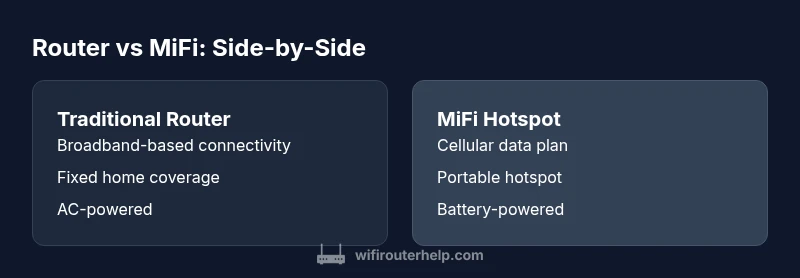
- Definition of a router: sits between your broadband modem and internal network; distributes traffic to wired and wireless clients; typically AC-powered; uses standard Wi‑Fi technology to cover a home or office.
- Definition of MiFi: a compact hotspot that shares a cellular connection with multiple devices; typically battery-powered; relies on a cellular plan; coverage is bound by cellular signal strength.
WiFi Router Help's analysis shows that these devices serve different roles; the right choice depends on whether you need fixed home coverage or portability. The following sections explore the key differences and practical implications for setup and security.
Core differences: connectivity sources and device form factor
Traditional home routers usually connect to a fixed broadband line via a modem and create a local network for devices in a home or small office. In contrast, MiFi hotspots rely on cellular networks and provide a portable Wi‑Fi signal to nearby devices. The form factor matters: a router is designed for a stationary, predictable environment, while MiFi devices prioritize mobility and compactness. From a security perspective, both can offer robust firewall features, but MiFi often emphasizes simple, quick setup for travelers. For households that already have broadband, a router is typically the most reliable backbone; for on-the-go work or travel, MiFi enables connectivity without relying on a traditional tethered connection.
Coverage, mobility, and use-case alignment
Coverage is a function of device strength and location. A fixed home router can blanket an entire apartment or house with fewer dead zones, provided placement is optimized and the signal from the broadband modem is strong. MiFi coverage, by contrast, fluctuates with cellular signal strength and carrier capabilities, which can vary by region and building materials. If your priority is working from a cafe or a remote site, a MiFi can be a practical solution. If your priority is streaming, gaming, or supporting multiple simultaneous devices at home, a router-backed network usually offers more consistent performance and easier scalability.
Setup, security, and firmware considerations
Setting up a home router typically involves connecting to a modem, configuring SSIDs, enabling WPA3 or WPA2 encryption, and possibly enabling guest networks. Regular firmware updates strengthen security and performance. A MiFi hotspot setup is often simpler: insert the SIM, power on, and connect; security features are usually straightforward but may be less customizable. Both device types benefit from changing default passwords, enabling network isolation for guests, and keeping firmware up to date. The WiFi Router Help team recommends validating your device’s security settings and monitoring connected devices to prevent unauthorized access.
Data plans, usage caps, and cost considerations
Cost considerations differ markedly. A traditional router relies on a fixed broadband plan with a monthly fee that covers data usage within a single residence. A MiFi hotspot requires a cellular data plan, which may include caps, throttling, or overage charges. For households with high data needs, a fixed broadband plan combined with a router generally offers better value and predictable costs. For travelers or remote workers with limited home coverage, a MiFi can be cost-effective by avoiding a separate home internet service—but data overages or high-speed tier costs can accumulate if usage is heavy.
Performance expectations: speed, latency, and reliability
In general, a home router connected to a wired broadband service can offer higher sustained speeds, lower latency, and more stable performance for multiple devices. MiFi performance is contingent on cellular network conditions, which may introduce variability and higher latency during peak times or in areas with weaker signal. For gaming or real-time collaboration, a router with a strong wired backbone tends to deliver a smoother experience. For casual browsing or occasional video calls on the go, MiFi remains a flexible option. The key is matching expectations to the available network backbone.
Which scenarios favor which device? a practical decision framework
If you primarily need reliable home coverage with many devices and wired connections, a traditional router is typically the best choice. If you require connectivity while traveling or in areas without fixed broadband, a MiFi hotspot can be indispensable. WiFi Router Help recommends evaluating your mobility needs, data usage patterns, and budget before buying. In some cases, households combine both: a fixed router for home use and a compact MiFi for travel. This dual approach provides stability at home and flexibility on the road.
Interoperability with existing devices and networks
Routers and MiFi devices must integrate with your devices and your internet plan. Some modern routers support SIM slots for failover in case of broadband outages, blending the best of both worlds. MiFi devices can connect to a range of tablets, laptops, and phones, but compatibility with multiple devices can be constrained by the hotspot’s data plan and device limits. When evaluating options, check whether your preferred devices require specific network bands or features (MIMO, beamforming, or QoS) and verify that your plan supports the routes you intend to use.
A practical decision framework for buyers: step-by-step considerations
- Define the primary use case: home streaming and gaming vs. mobile work and travel. 2) Assess coverage needs: does your space require broad, stable Wi‑Fi or can you tolerate some variability in exchange for portability? 3) Review data plans and costs: how many devices will connect, and what data limits apply? 4) Consider future needs: will you expand home networking or demand more mobility later? 5) Check security features and firmware updates: prioritize devices with strong encryption and an easy update path. 6) Decide on a budget: fixed broadband plus router typically offers predictable costs, while MiFi can be cheaper upfront but more variable over time. The ultimate choice is to align the device with your daily routines and environment.
Authorities and references
For further reading and official guidance, consider these sources:
- https://www.fcc.gov
- https://www.nist.gov
- https://www.cisa.gov
Security best practices for both devices
Regardless of device type, adopt common security best practices: change default admin passwords, use strong WPA3 on your Wi‑Fi, enable guest networks to isolate visitors, regularly apply firmware updates, and monitor connected clients. If you use a MiFi, limit the number of devices sharing the hotspot and set a strong unlock method on the hotspot itself. For a home router, enable a firewall, disable remote management unless needed, and review port forwarding rules periodically.
Practical steps to choose today
- List your most frequent scenarios (home streaming, remote work, travel) and map them to router or MiFi strengths.
- Compare total cost of ownership over 1–2 years, including hardware, service plans, and data usage.
- Consider a hybrid approach if mobility and home stability are both important.
- Read product specs for security features, QoS, and firmware update frequency to avoid hidden costs.
Comparison
| Feature | Traditional home router | MiFi portable hotspot |
|---|---|---|
| Connectivity sources | Broadband modem/ISP connection | Cellular data from SIM/eSIM |
| Portability | Stationary in home/office | High portability; pocket-sized |
| Network coverage range | Typically broad coverage in a fixed space | Coverage depends on cellular signal and carrier |
| Setup complexity | Moderate: configure modem, SSID, and security | Simple: insert SIM, power on, share hotspot |
| Data plans | Fixed broadband plan with predictable limits | Cellular data plan with possible caps or throttling |
| Power source | AC-powered | Battery-powered or rechargeable |
| Security features | Firewall, NAT, guest networks; firmware updates vary | Built-in hotspot security; updates depend on device |
| Best for | Fixed home networks with many devices | Mobility, travel, or where fixed broadband is unavailable |
Benefits
- Reliable, fixed home coverage with strong throughput
- No reliance on cellular data for home use
- Better support for multiple wired devices
- Easier to manage and upgrade for long-term use
- Structured pricing for home internet is predictable
The Bad
- Higher upfront equipment cost for some setups
- Less portable and not suitable for travel
- Dependent on an ISP and fixed broadband service
- MiFi can be cheaper upfront if mobility is the priority but may incur data overages
Fixed home routers win for in-house performance; MiFi shines for mobility
Choose a traditional router for stable home coverage and multi-device support. Pick MiFi if you need reliable internet on the move and in locations without fixed broadband.
People Also Ask
What is the main difference between a router and MiFi?
A router distributes a home network via fixed broadband, while MiFi provides portable Wi‑Fi using cellular data. The choice depends on whether you prioritize home stability or mobility.
Routers power your home network with fixed broadband, while MiFi gives you portable Wi‑Fi using cellular data.
Do you need a SIM card for a MiFi?
Yes. Most MiFi hotspots require a SIM (or eSIM) to access cellular networks. Plans vary by carrier and region.
Yes, most MiFi devices need a SIM to connect to cellular networks.
Can a router work without a traditional broadband connection?
A router by itself cannot provide internet without a modem or another WAN source. Some gateways combine router and modem functions, but you still need a internet source.
No, you still need a broadband or other internet source to feed a router.
Which is cheaper long-term: router or MiFi?
It depends on data usage and location. Home broadband plans are often predictable, while MiFi data plans can add up if you stream or travel frequently.
Costs depend on data use and location; fixed broadband is usually predictable, roaming MiFi can vary with data needs.
Is MiFi secure for sensitive work?
MiFi devices can be secure if you enable strong passwords and keep firmware updated, but security features may be less robust than a well-managed home router.
You can secure MiFi, but a home router with stronger controls often offers deeper security options.
Can you combine both for best of both worlds?
Yes. Many households use a fixed router for home networking and a MiFi for travel or when fixed broadband is unavailable.
You can use both: a router at home and a MiFi when you’re on the move.