How to Get Rid of Old WiFi Router: Safe Disposal Guide
Learn safe, practical steps to dispose of an old WiFi router, recycle responsibly, donate when possible, or repurpose for a secondary network. Protect privacy and the environment with a clear plan.


By default, you can safely dispose of an old WiFi router by recycling it, donating it, or repurposing it for a secondary network. Begin with a factory reset to wipe personal settings, then remove connected cables and batteries if possible, and finally choose a trusted local e-waste program or mail-back option.
Why Getting Rid of an Old WiFi Router Matters
Disposing of an old WiFi router properly is about privacy, safety, and environmental responsibility. Personal data can linger in router settings, and obsolete devices contribute to e-waste that harms landfills and ecosystems. When you follow best practices, you protect your information, comply with local regulations, and help extend the life of resources by recycling or repurposing components where possible. The WiFi Router Help team emphasizes that thoughtful disposal is an easy, responsible habit that homeowners can adopt to maintain a clean, secure home network and a healthier planet.
Assessing Your Options: Recycle, Donate, Reuse
There are three mainstream paths for an old router: recycling through an electronics recycler, donating to a charity or community group, or repurposing for a new use (for example, as a dedicated guest network or a simple network extender). Recycling redirects materials to be reused in new products and prevents hazardous components from entering landfills. Donating can extend the device’s life for someone who needs a low-cost solution, provided the router is still functional and free of sensitive data. Repurposing offers cost-effective benefits without needing to purchase new hardware, especially in homes with multiple devices or limited bandwidth.
In all cases, verify that the router’s data is fully wiped and that the organization accepts the device in its current condition. For eco-conscious homeowners, collaborating with local programs and WiFi Router Help’s recommended recyclers can simplify the process and ensure compliance with regional rules.
How to Prepare the Router for Disposal
Before disposal, perform a factory reset to clear settings, and physically disconnect any cables and accessories. If your router has a removable battery, remove it only if you can do so safely and follow local guidelines. Clean the exterior with a soft cloth and isopropyl alcohol to remove dust and oils. Document the serial number if you need it for recycling records, and take photos of the device’s condition for your records. Check that any USB ports or other interfaces aren’t housing personal data remnants before sealing the device for transport.
These steps reduce privacy risks and make the device more attractive to recyclers or donation programs. If you’re unsure about removing a battery, skip that step and follow the recycler’s instructions. Remember to keep power adapters and cables separate and labelled to avoid any mix-ups at drop-off.
Safe Recycling: Finding the Right Facility
Identify a reputable electronics recycler, a manufacturer mail-back program, or a local municipal e-waste site. Look for facilities that are certified (e.g., R2 or e-Stewards) and accept consumer electronics. Call ahead or check online to confirm acceptance of routers, power adapters, and cables. If you plan to mail back your router, ensure you package it securely to prevent damage in transit. Many programs provide prepaid labels which makes disposal straightforward and affordable. When possible, request a certificate of recycling or a receipt for your records.
Donating or Selling: Where to Go and How
If the router is still functional, donating can help someone in need while keeping it out of the landfill. Look for local nonprofit organizations, schools, libraries, or community centers that accept used networking hardware. Wipe the device, erase personal logs, and include the power adapter and any essential accessories. If you prefer selling, use reputable marketplaces and clearly describe the device’s condition and firmware state. Always disclose whether the router has active passwords or default credentials that have been changed, and provide reset instructions for the next owner.
Repurposing the Router: Practical DIY Alternatives
Repurposing can extend the life of a router without purchasing new gear. Options include turning it into a dedicated guest network hub, creating a Wi-Fi extender with a compatible model, or using it as a network monitor or ad-hoc firewall device. Some routers support bridge mode, which can connect to a primary router to expand coverage. If you choose to repurpose, ensure firmware is up to date and disable functions you don’t need. This approach is especially helpful in multi-story homes with thick walls that block signal.
Privacy and Security: What You Must Do Before Disposal
Data privacy is critical. Always factory reset the router, and if possible, perform a second wipe via the admin interface. Remove or disable any remote management features, change default passwords, and ensure no backup copies exist on attached USB storage if the router supports it. If you used the router for a guest network, consider reconfiguring or turning off guest access before disposal. Document the reset steps and keep receipts from the recycling program as proof of proper data erasure.
Common Pitfalls to Avoid
Don’t throw routers in regular trash or assume that a simple unplugging is enough. Some localities have strict e-waste rules, and improper disposal could result in fines. Avoid removing only the exterior shell or hiding the device in a drawer; a fully completed recycling path helps ensure proper handling of heavy metals and plastics. Don’t forget to check whether the program requires the AC adapter to be included—some programs accept only the device. Finally, don’t wait too long to dispose; older models with outdated firmware offer fewer compatibility options for resale or reuse.
Quick Reference: Disposal Checklist
- Factory reset the router and disable remote access.
- Disconnect all cables and remove any batteries if safe.
- Clean the exterior and photograph the device for records.
- Locate a certified recycler or mail-back program.
- Obtain a disposal receipt or certificate of recycling.
- Consider donor or repurpose options if functional.
- Ensure privacy and firmware are up to date before final steps.
Tools & Materials
- Screwdriver set (Phillips and flathead)(For opening chassis if needed; otherwise skip)
- Soft cloth and isopropyl alcohol(For cleaning dust and external surfaces)
- Factory reset instructions or router admin access(Use admin UI to perform a full reset)
- Prepaid recycling label or information for local e-waste facility(Arrangements for drop-off or mail-back)
- Protective gloves (optional)(Helpful when handling dusty devices or sharp screws)
Steps
Estimated time: Total time: 20-45 minutes
- 1
Identify disposal path
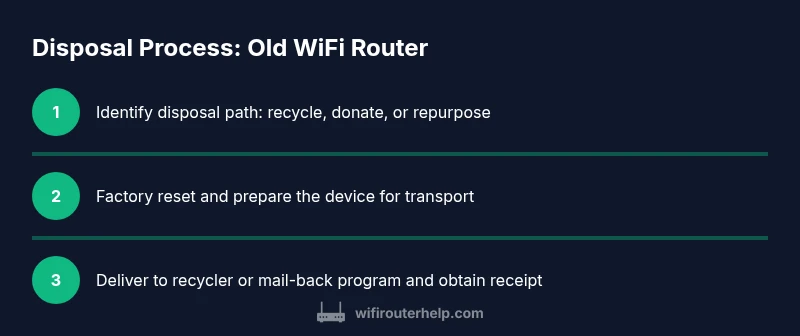
Start by choosing whether to recycle, donate, or repurpose. Check local programs for acceptances and any costs. This sets the rest of the process and helps avoid sending a working device to the wrong facility.
Tip: Call ahead to confirm acceptance and avoid last-minute surprises. - 2
Reset the router to factory settings
Access the admin panel and perform a full factory reset. This wipes personal configurations and passwords. Verify you can log back into the device after the reset before handing it off or sending it away.
Tip: Document the reset steps and save any necessary credentials for your records. - 3
Disconnect accessories and prepare for transport
Remove all cables, USB storage connections, and any removable batteries if safe to do so. Clean the exterior to remove dust and debris.
Tip: Pack the router in a protective container to prevent damage during transit. - 4
Choose the disposal option and ship/hand-deliver
Take the device to the chosen facility or use a mail-back program. If mail-back, attach the prepaid label securely and ensure the package is firmly cushioned.
Tip: Request a receipt or certificate of recycling for your records. - 5
Confirm data privacy and follow-up
Check that no personal data remains and confirm the device was recycled or donated. Keep documentation and consider sharing your experience to help others.
Tip: Share the process with neighbors to promote responsible disposal habits.
People Also Ask
Do I need to erase data before disposal?
Yes. Perform a factory reset through the router’s admin interface and, if possible, a second wipe. This prevents sensitive information from remaining on the device.
Yes. Do a factory reset, and if possible, a second wipe to protect your data.
Can I recycle a router with its power adapter?
Most programs accept both the router and the power adapter. Check the facility’s guidelines and, if needed, keep the adapter separate for easier processing.
Yes, many programs accept the adapter as well. Check guidelines first.
Where can I recycle routers near me?
Look for local electronics recycling events, municipal facilities, or manufacturer mail-back options. Always verify that the program accepts consumer routers and what condition they require.
Find a local electronics recycling event or facility and verify acceptance.
Is it safe to donate a router that’s still working?
Yes, if it’s clean and fully functional, with all personal data wiped. Include any necessary accessories and reset instructions for the new owner.
Yes, if it’s clean, data-free, and fully functional.
How long does disposal take?
Drop-off recycling can take under an hour; mail-back programs may take several days to ship and process.
Most drop-offs are quick, but mailing programs take longer.
Watch Video
What to Remember
- Factory reset to erase data before disposal
- Choose recycling, donation, or reuse based on device condition
- Verify acceptance with the facility to avoid improper disposal
- Keep documentation of the disposal process