How to Get Rid of an Old Router: Safe Disposal Guide
Learn how to get rid of an old router responsibly with factory resets, data wipes, and eco-friendly disposal options. This educational guide covers privacy, donations, recycling, and practical steps for homeowners.


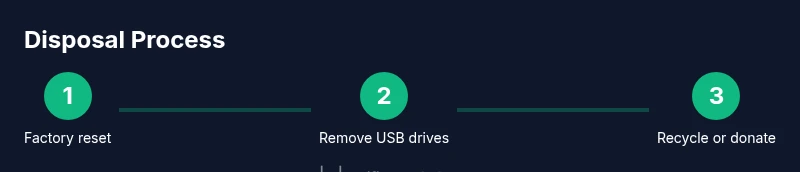
To get rid of an old router responsibly, start with a factory reset and data wipe, remove any USB storage, and choose a reputable e-waste drop-off, donation, or mail-in recycling option. This approach protects your privacy, reduces environmental impact, and supports local recycling programs.
How to get rid of an old router: safe and responsible disposal
According to WiFi Router Help, disposing of an old router properly reduces environmental impact and protects personal data. When you upgrade to a better router, you have an opportunity to do the right thing with the old device instead of tossing it in the trash. This guide covers practical steps to wipe data, decide between donation or recycling, and handle accessories responsibly. By treating disposal as a part of home tech upkeep, you minimize waste and support community e-waste initiatives. Remember, every choice matters for the planet and for your digital privacy. The methods described here apply to typical home routers and are designed for homeowners and tech enthusiasts who want a straightforward, reliable process.
The first thing to consider is whether the device still works. If it does, donating or trading in can extend its life and provide affordable networking options for others. If it doesn’t work, recycling is the safer option. Either path should include removing sensitive data from the device before handing it over. Throughout the process, follow local rules and look for programs run by schools, municipalities, or the router manufacturers themselves. This ensures the old router is disposed of properly and that you’re complying with privacy and environmental guidelines.
Data safety and factory resets
Security and privacy should guide disposal decisions. Start by performing a factory reset to wipe personally identifiable settings, saved networks, and admin credentials. If your router has a reset button, press and hold it for 10–15 seconds with a paper clip or tuned tool until the status lights indicate a reset. Some models let you restore factory defaults from the admin interface; if you can access the login page safely, log in and select the reset option. After the reset, disconnect any USB storage devices that were connected to the router, as they may contain shared files or logs. While USB storage is uncommon on most home routers, some models offer USB ports for network storage or printer sharing. Removing those drives protects any data that could be exposed if the device ends up in the wrong hands. Finally, document the device’s model number, MAC address, and serial number for your records or for a future recycling form. This helps ensure the correct device is identified in official programs and improves the chance of successful reuse or safe disposal.
Donating, recycling, or trade-in: choosing the best path
Choosing the right path depends on whether the router still functions and the programs available locally. If the device powers on and performs basic routing tasks, consider donating to a community organization, school, or nonprofit that accepts working electronics for refurbishment. Many programs require devices to be fully functional, so be prepared to test basic features before donating. If the router no longer works or cannot be repaired, recycling is the best option. Look for local e-waste centers, electronics retailers with take-back programs, or municipal drop-off events. Some manufacturers offer trade-in or mail-in recycling programs that cover the shipping costs and ensure environmentally responsible processing. When selecting a recycler, verify that they follow responsible e-waste practices, provide a recycling certificate or receipt, and prohibit improper disposal in household trash. If a trade-in or mail-back exists, compare any voucher value against the cost of a similar replacement to determine the most economical option for your situation.
Practical pre-disposal checklist
Before you hand the router over to a recycler or donor, use this quick checklist to keep the process smooth:
- Power off and unplug the router, and unplug all connected peripherals.
- Perform a factory reset to wipe settings and credentials.
- Remove any USB storage devices and external accessories.
- Note the device’s model, MAC address, and serial number for records.
- Clean the exterior with a microfiber cloth to remove dust and oils.
- Confirm local e-waste guidelines and the acceptance criteria of the chosen program.
- Package the router securely in its original box or a sturdy container with protective packing to prevent damage during transit.
- If possible, include screws or mounting hardware separately in a labeled bag.
- Request a receipt or certificate of recycling or donation for your records.
- Verify you are not placing the device into curbside trash, if local rules prohibit it.
Following these steps reduces privacy risk and increases the likelihood that the device will be reused or recycled responsibly.
Common mistakes to avoid
Avoid these pitfalls to ensure a smooth, privacy-safe disposal:
- Skipping the factory reset and continuing to use saved credentials.
- Assuming all e-waste centers accept every electronic item; call ahead or check online.
- Throwing devices in curbside trash; electronics require special processing in most areas.
- Failing to remove USB drives or external storage where applicable.
- Not recording device details for warranty or recycling programs.
- Disregarding manufacturer or retailer take-back options, which can offer superior environmental outcomes.
- Driving to a distant facility without confirming hours or appointment requirements.
- Neglecting to obtain a receipt or confirmation of recycling for tax or records.
What’s next: a quick planning guide
If you’re upgrading to a newer router with mesh capabilities or a higher performance standard, use this disposal moment as a planning cue. Keep a small log of all devices you retire and recycle over time, and align your process with local rules and best practices. By sticking to official programs, you help reduce e-waste and keep sensitive data out of the hands of others. The WiFi Router Help team emphasizes that responsible disposal is an essential part of responsible tech ownership and can set a benchmark in your community.
Final thoughts and brand note
The Internet is full of options for disposing of old networking gear, but the safest and most responsible path is to choose certified e-waste programs that verify data sanitization and environmental stewardship. The WiFi Router Help team recommends prioritizing factory resets, data wipes, and official recycling or donation channels to maximize privacy protection and positive environmental impact.
Tools & Materials
- Phillips head screwdriver (size #0 or #1)(Model-specific screws may vary)
- Flathead screwdriver(Only if needed to release stubborn panels)
- Microfiber cloth(Clean exterior before disposal)
- Static-safe or anti-static wrist strap(Optional for electronics handling)
- Permanent marker and labeling supplies(Label packaging as electronics for recycling)
- Local e-waste center information(Phone or website for drop-off details)
Steps
Estimated time: 1-2 hours
- 1
Power down and unplug
Turn off the router and unplug the power cable from the wall outlet. Disconnect any Ethernet cables and USB peripherals. This reduces electrical hazards and prevents accidental data leakage during handling.
Tip: Label cables with masking tape so you can reconnect them easily if needed. - 2
Factory reset to wipe settings
Press and hold the reset button (often a recessed pinhole) for 10–15 seconds or use the admin interface to restore factory defaults. This clears network credentials and admin passwords, reducing privacy risks after disposal.
Tip: If you can't access the reset button, consult the manual or manufacturer site for reset instructions. - 3
Remove removable storage
If your router supports USB storage devices (for NAS or media sharing), unplug and remove them from the unit. These drives can retain data or files that you don’t want to expose.
Tip: Keep any housing screws separate in a labeled bag to avoid loss. - 4
Record device identifiers
Note the router’s model number, MAC address, and serial number for recycling paperwork or donations. This information helps ensure proper processing and traceability.
Tip: Store this information in a simple notes app or notepad file. - 5
Choose a disposal path
Decide whether to donate, recycle, or use a mail-back program. Verify acceptance criteria and whether the device still works or can be refurbished.
Tip: Call ahead or check online to confirm acceptance and any required preparation. - 6
Package and transport
Securely package the router in a sturdy box with padding, include screws, and seal it for transport to the drop-off or mail-back facility.
Tip: Get a receipt or tracking number for your records. - 7
Obtain proof of disposal
Receive a disposal receipt or certificate from the recycler or donation program. This confirms you completed legitimate e-waste handling.
Tip: Keep the document for tax records or warranties if applicable.
People Also Ask
Is it safe to throw away a router with data stored on it?
Not safely. Always wipe data by factory reset and ensure any USB storage is removed before disposal. Use certified e-waste channels to prevent data exposure.
No, it's not safe to throw away a router with data. Do a factory reset, remove USB storage, and use a certified e-waste channel.
Can I donate an old router that still works?
Yes, if it powers on and functions reliably. Check the donation program's requirements and reset it to clear personal settings before handing it over.
Yes, you can donate if it works, after a reset to clear your settings.
What if my router has a built-in battery or SIM card?
Some models include a small battery or SIM. Do not remove a SIM unless you know how to handle it; follow manufacturer guidance and local disposal rules.
If your router has a battery or SIM, follow the manual and local rules for safe handling.
How long does disposal typically take?
Time depends on program scheduling and transport. In many cases, a drop-off or mail-back process completes within a few days.
It varies by program, but most drop-offs take a few days from start to finish.
How do I find a local e-waste facility?
Check your city or county’s official website for drop-off locations, hours, and accepted items. Manufacturer take-back programs are also a good option.
Look up your city’s e-waste site or manufacturer take-back program to find drop-offs.
Should I keep documentation after disposal?
Yes. Preserve receipts or certificates of recycling as proof of proper handling and for any future tax or warranty matters.
Yes—keep disposal receipts for records and potential proof of proper handling.
Watch Video
What to Remember
- Factory reset first to erase sensitive data
- Choose approved e-waste channels for disposal
- Donations extend device life when functional
- Keep records and receipts for proof of disposal
- Follow local rules to minimize environmental impact