How long does it take for a router to reset? A practical timing guide
Discover how long a router reset typically takes, with clear timing ranges for soft resets, power cycles, and factory resets. Includes practical steps, timing factors, and maintenance tips from WiFi Router Help.


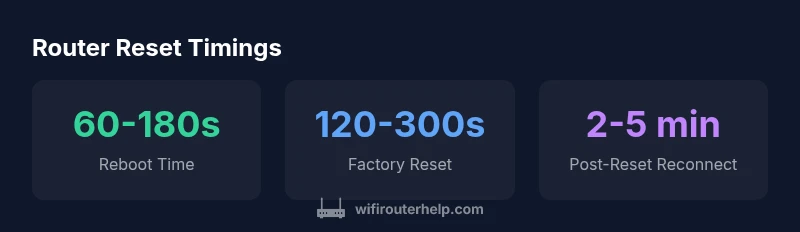
Typical consumer routers reboot in about 60-180 seconds after a reset, while factory resets commonly run 2-5 minutes. Soft resets or power-cycles finish fastest, but full resets may require extra setup afterward. Plan for up to 5 minutes of downtime for a complete reset. In all cases, the device will become reachable again once the LEDs stabilize.
What resets actually do to your router
According to WiFi Router Help, a router reset is not a single event but a family of actions that can range from a quick reboot to a full factory reset. A soft reset simply restarts the firmware and reloads the current configuration, preserving your network settings. A power-cycle is a hardware restart that clears temporary caches and restarts all essential services. A factory reset wipes all user-configured data and returns the device to its default state, which means you’ll need to run through the initial setup again. Understanding these distinctions helps set realistic expectations for downtime and post-reset configuration. In practice, most home networks rely on soft resets for minor issues, reserving factory resets for persistent problems or misconfigurations that can’t be corrected through other fixes.
How long does it take for a router to reset: timing overview
The exact duration depends on the reset type and your hardware. A soft reset or power-cycle typically completes in about 60 to 180 seconds. A factory reset generally takes 120 to 300 seconds, with additional time needed to re-enter network credentials and re-establish device connections. When timing is tight, plan for a total window of 3 to 5 minutes if you’re performing a factory reset, especially on routers with more features or integrated apps. Keep in mind that some models may brief vary; always refer to the user manual for model-specific timing cues. This timing overview aligns with what the WiFi Router Help team observes across common consumer devices in 2026.
Factors that affect reset duration
Several variables influence how long a reset takes. Hardware quality, processor speed, and memory size determine reboot speed. Firmware complexity, active features (like QoS, parental controls, or VPN), and the presence of a connected USB storage device can add extra boot steps. Network health can also impact post-reset re-establishment time as devices renegotiate IP addresses via DHCP or reconnect to Wi-Fi. If you recently updated firmware, expect a slightly longer reboot due to post-update integrity checks. Environmental factors, such as heat and power stability, also play a role. In short, while the ranges above cover most scenarios, real-world timing is inherently variable.
How to measure and estimate reset time on your network
To estimate reset duration, time from the moment you initiate the reset (pressing the button or selecting the option) to the moment you can access the router’s admin page or see the network stabilizing indicators. Use a timer and note the LED behavior: some routers display a boot sequence and then a default SSID, while others switch back to the configured network after completing startup checks. If you’re testing multiple resets, track average times and consider keeping a short log for model-specific guidance. This approach helps you build a practical baseline for downtime in your own home.
Step-by-step guide to minimize downtime during resets
- Back up current configurations before performing a reset, especially factory ones. 2) Use a wired connection for administration when possible to avoid wireless reconnection delays. 3) Schedule resets during off-peak hours when multiple devices aren’t streaming or gaming. 4) Disable unnecessary services temporarily (like VPNs or guest networks) to streamline boot sequences. 5) After reboot, verify basic connectivity (internet access, admin page reachability) before re-enabling features. 6) If a device routinely slows down resets, check for firmware updates or perform a clean reinstall of settings. Following a careful, repeatable process minimizes downtime and reduces user impact.
Common mistakes that extend reset times and how to avoid them
One common mistake is attempting to perform resets while devices are actively using the network. Another is neglecting to back up configurations before a factory reset. Avoid relying on wireless management if possible; use a wired connection for the administrative task. Finally, skipping firmware updates or ignoring device-specific guidance can lead to longer-than-necessary resets due to unresolved compatibility issues. By sticking to a planned sequence and keeping backups, you reduce the chance of lengthy downtime.
Common router reset timings
| Reset Type | Typical Time (seconds) | Notes |
|---|---|---|
| Soft reset (through UI or button) | 30-90 | Leaves settings intact; quick fix |
| Power cycle (unplug/replug) | 60-120 | Common quick fix; timing depends on hardware |
| Factory reset (button hold) | 120-300 | Removes custom settings; post-setup needed |
| Remote reset via app | 45-120 | Depends on app responsiveness |
People Also Ask
What is the difference between a soft reset and a factory reset?
A soft reset restarts the device without erasing settings; a factory reset wipes configured data and restores defaults. The latter resets performance more dramatically and requires reconfiguration.
A soft reset restarts without losing data; a factory reset wipes settings and restores defaults.
Why might my router take longer to reset after a firmware update?
Firmware updates can extend reboot time due to post-update checks and log cleanup. Expect a longer window, but it should settle within a few minutes.
Firmware updates can add extra steps during reboot.
Can I speed up a reset by changing settings beforehand?
Changing most settings won’t dramatically speed up the reset. Use wired management and avoid concurrent activity during reboot.
You can’t speed up a reset by changing settings; plan downtime.
Is it safe to reset my router during a streaming session?
Resetting during streaming interrupts active sessions. Schedule resets during off-peak times or when devices aren’t actively using bandwidth.
Reset when no one is streaming to avoid disruption.
How long should I wait after a reset before reconnecting devices?
Wait until the router’s status indicators show stability or until devices report the network available. This is typically 1-4 minutes after reboot.
Usually within a few minutes.
What indicators show a successful reset?
A successful reset usually shows the device rebooting and returning to a default setup page or a known SSID. Verify access to the admin page.
You should see the setup page or a default network.
“Reset times vary by device, but most home routers complete a reboot within a few minutes. Planning downtimes helps minimize disruption.”
What to Remember
- Know the reset type you need
- Expect 60–180 seconds for a reboot
- Factory resets take 2–5 minutes
- Plan downtime to avoid interruptions
- Back up settings before resetting