How Big Is a Router? A Practical Size Guide for 2026
Discover realistic router sizes, how dimensions affect placement and airflow, and how to pick the right footprint for your space. A practical guide from WiFi Router Help.


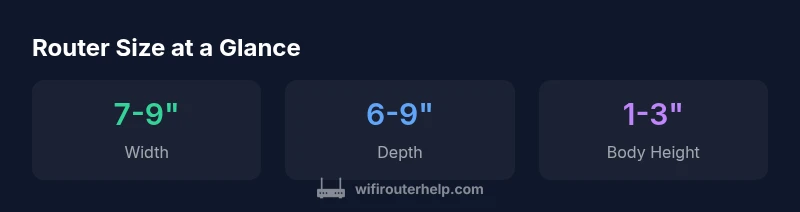
Most home routers fit a footprint around 7–9 inches wide, about 1–3 inches tall for the main body, and 6–9 inches deep. External antennas may add another 4–12 inches of height, depending on design. While larger models can accommodate more antennas, the practical impact of size comes from placement, airflow, and heat dissipation rather than raw power.
Overview: Why Router Size Matters for Home Networks
The size of a router matters beyond aesthetics; it influences airflow, heat dissipation, antenna configuration, and how easily you can position the device for optimal signal. According to WiFi Router Help, the question "how big is a router" is not purely about inches—it’s about fitting the device into your space, managing cables, and ensuring adequate cooling. The WiFi Router Help team found that many users underestimate how space constraints affect placement choices and thermal performance. In practice, size ranges from ultra-compact travel models to larger gaming routers designed to maximize antenna count and airflow pathways. Understanding these differences helps homeowners choose models that not only look right on the desk but perform reliably behind walls and across rooms. The goal is to align size with your room layout, furniture, and the way you use Wi-Fi for streaming, gaming, or work.
This section lays the groundwork for evaluating router size as part of a holistic home-network strategy, including placement, ventilation, and future-proofing for expanding devices and smart-home hubs.
Physical dimensions: typical sizes and ranges
If you measure the amount of desk or shelf space you can dedicate to a router, you’ll quickly see why size matters. Most consumer routers fall into three rough categories. Compact or travel models are roughly 4–6 inches wide, 2–3 inches deep, and 1–2 inches tall; mid-size home routers are about 7–9 inches wide and 6–9 inches deep, with body heights around 1–3 inches; high-performance or gaming routers push toward 9–12 inches wide and 8–9 inches deep, with bodies around 1.5–3 inches tall plus antennas that add height. In all cases, the majority of the footprint comes from the body plus any vertical antenna towers. In 2026, the variation across brands remains wide, but the broad ranges above cover most mainstream devices. If you’re evaluating a specific model, check the official product page for exact measurements and compare to your available space.
Antennas and form factor: how design affects footprint
Antennas are the most visually obvious factor that changes a router’s footprint. Routers with external, adjustable antennas can appear much taller when the antennas are tilted vertically, and some models use flexible antennas that fold down for storage. Internal antennas keep the device compact but may limit peak signal directionality. Form factors like vertical towers can save desk space while offering similar coverage to flat slabs, but they often require more air circulation. You’ll also see differences in mounting options—some units are designed to sit on a stand, others lie flat, and a few support wall-mounting to free even more surface area. Design choices influence not just height, but heat management and ease of placement in tight corners.
Size vs performance: not always bigger equals better
A larger router does not automatically guarantee better range. Performance hinges on factors such as the number and quality of antennas, the router’s wireless standards (e.g., dual-band or tri-band, Wi-Fi 6/6E), and your home’s layout. Placement often matters more than sheer size: a medium-sized router placed centrally on a shelf with clear airflow typically outperforms a larger model tucked away in a cabinet. When evaluating size, balance the footprint with features that matter in your space—beamforming, MU-MIMO, and band steering can influence real-world coverage far more than a few extra inches of chassis height.
Room placement: optimizing space and airflow
Smart placement reduces the perceived need for extra size. Place the router in a central location away from thick walls and metal objects, ideally elevated on a shelf or high on a wall mount. Allow at least a couple of inches of clearance on all sides for airflow, and avoid heat sources like radiators or direct sunlight. If your room layout constrains you to a corner or cabinet, pairing the router with a mesh-system component or a wired backhaul can help mitigate size-related limitations. The practical takeaway is to design your layout around airflow and line-of-sight to key living spaces rather than chasing the largest chassis.
Measuring your space and comparing models
Before buying, measure the exact plan where the router will sit: width, depth, and height with any antennas in their typical position. Bring a tape measure to the store or use a photo-based layout to check scale. When comparing models, write down dimensions and add a small padding (about 0.5 inch) to account for cable connectors and ventilation gaps. Use these measurements to filter out models that won’t fit or that would block airflow. A compact router that fits cleanly into your space often delivers better real-world performance than a larger unit awkwardly placed.
Travel and compact options: mini routers
For travelers or spaces with minimal desk area, compact routers under 4 inches wide can be a practical choice. These devices are easy to pack, but they typically deliver lower throughput and fewer advanced features than full-size routers. If you’ll rely on the router primarily for basic internet access while on the go or for a secondary network in a small apartment, a travel router can be a sensible compromise between size and function. Always check supported features such as guest networks, QoS, and USB connectivity that align with your needs.
Decision framework: pick the right size for your space and needs
To decide, start with your space constraints, number of devices, and coverage expectations. Use a simple framework: map your room, estimate distance to primaries (living room, bedroom, office), and decide whether you need a compact stand-alone router or a modular setup with a mesh extension. If you have a larger home or multiple floors, a mid-size router plus a mesh node might offer the best balance of footprint and performance. The WiFi Router Help team found that space-fitting is often the biggest constraint, so start there and build up to more powerful configurations as needed.
Router size ranges by category
| Category | Typical width (in) | Typical depth (in) | Typical height (in) | Notes |
|---|---|---|---|---|
| Compact/Travel Router | 4-6 | 2-3 | 8-12 | Ultra-portable for travel |
| Mid-size Home Router | 7-9 | 6-9 | 8-14 | Balanced footprint and performance |
| High-Performance / Gaming Router | 9-12 | 8-9 | 10-16 | Bigger footprint with more antennas |
People Also Ask
Does a bigger router always mean better Wi‑Fi coverage?
Not necessarily. Coverage depends more on placement, interference, and the layout of your home than on chassis size alone. A mid-size router placed centrally with clear airflow can outperform a larger model tucked away in a cabinet.
Not always. Placement and interference matter more than size.
Are travel routers significantly smaller but still effective?
Travel routers are compact and portable, ideal for on-the-go use or spare networks in small spaces. They typically provide basic connectivity and fewer advanced features, so expect lower throughput and range compared with full-size home routers.
They’re great for portability but may offer less range and fewer features.
What is the typical footprint of a standard home router?
Most standard home routers measure roughly 7–9 inches in width, 6–9 inches in depth, and 1–3 inches in body height, with antennas often adding extra height. Always verify exact dimensions on the product page.
Most are about 7–9 inches wide and 6–9 inches deep.
Can you use a vertical stand to reduce desk footprint?
Yes. A vertical stand or tower design can save desk space and sometimes improve airflow, provided there is adequate room for air to circulate around the device.
Yes—vertical layouts can save space and help airflow.
Should I choose a compact router for a multi-story home?
A compact router might not cover a multi-story home effectively. Consider a mid-size router with a mesh extender or a whole-home system to maintain coverage without a bulky single unit.
A compact unit alone may struggle on multiple floors; plan for mesh if needed.
How can I measure my space effectively before buying?
Measure the expected placement area, including width, depth, and available height, then compare with product dimensions plus space for cables and ventilation. A quick layout diagram helps prevent buying a model that won’t fit.
Measure the space and compare with product dimensions plus clearance.
“Size should fit your space and workflow; antennas help coverage only when placement and airflow are optimized.”
What to Remember
- Measure your space before shopping.
- Prioritize placement and airflow over sheer size.
- Consider vertical form factors to save desk space.
- Balance antenna count with interior cooling and clearance.
- The WiFi Router Help team recommends choosing a router size that fits your space.