Difference Between Switch and Router: A Practical Guide for Home Networks
A thorough, analytical comparison of switch vs router, covering definitions, roles, use-cases, and practical setup tips for optimizing home networks.


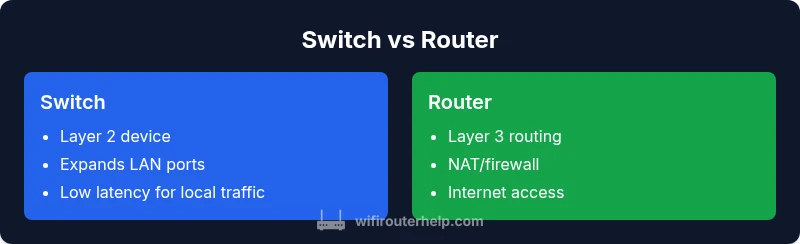
The difference between switch and router hinges on their roles and the OSI layer they primarily operate in. A switch is a Layer 2 device that connects multiple devices within a single local network by using MAC addresses to forward frames. A router functions at Layer 3, connecting different networks and making decisions about where to send packets using IP routing. In most homes, you rely on a router to provide Internet access, while a switch adds more Ethernet ports for devices. Many devices today blend both functions, but understanding the distinct responsibilities helps in planning a scalable, reliable network.
What is a network switch?
A network switch is a hardware device that creates a network by connecting several devices within a single local area network (LAN). At its core, a switch forwards data frames based on MAC addresses, learning which devices live on which ports and building a MAC table to minimize unnecessary traffic. Switches can be unmanaged (plug-and-play) or managed (offer VLANs, QoS, link aggregation, and monitoring). In practical home networks, switches primarily increase the number of usable Ethernet ports on a single network segment, enabling devices such as desktops, gaming consoles, printers, and smart hubs to communicate efficiently without consuming wireless bandwidth. According to WiFi Router Help, understanding the switch’s Layer 2 operation clarifies why it excels at local traffic handling and port expansion.
When you need more fixed connections and predictable performance for wired devices, a switch is often the simplest and most cost-effective choice. However, keep in mind that a switch does not inherently provide Internet access, NAT, or routing between networks. That means you still require a router to bridge your LAN to your ISP connection and to manage traffic between the LAN and the Internet.
Key takeaways:
- Switches expand wired connectivity within a LAN.
- Layer 2 operation relies on MAC addresses for forwarding.
- Unmanaged switches are straightforward; managed ones offer advanced features.
What is a router?
A router is a more sophisticated piece of networking gear designed to connect multiple networks together and to optically route traffic between them. Routers operate primarily at Layer 3 (the network layer) and use IP addresses to determine the best path for data packets. In home networks, the router is the device that handles Internet access, assigns local IP addresses (often via DHCP), and provides services such as NAT (Network Address Translation), firewall protection, and sometimes VPN support. In short, a router enables inter-network communication and controls access to external networks.
Robust routing capabilities let a router manage traffic between your home network and the wider Internet, route traffic between VLANs, and implement security policies. Many consumer routers also include built-in Wi‑Fi radios, USB ports, and basic network services, blurring the line between a pure router and a multifunctional gateway. The router’s function becomes crucial when you need to segment traffic (e.g., guest networks), implement parental controls, or enforce advanced firewall rules.
Key takeaways:
- Routers connect multiple networks using IP routing.
- NAT, firewall, and QoS are commonly integrated features.
- Many consumer routers add wireless capabilities and extra services.
Core differences: layering, addressing, and semantics
The fundamental distinction between switch and router comes down to the OSI model layer they primarily operate in and the scope of forwarding decisions. A switch makes decisions at Layer 2 using MAC addresses to forward frames to the correct port. It does not usually examine higher-layer information such as IP addresses, which keeps the operation fast and predictable for local traffic. A router, by contrast, evaluates Layer 3 information (IP addresses) and beyond, enabling communication between disparate networks and the application of routing policies, NAT, and firewall rules.
Other practical differences include:
- Scope: Switches optimize intra-network traffic; routers optimize inter-network traffic.
- Addressing: Switches rely on MAC tables; routers depend on IP routing tables.
- Services: A typical unmanaged switch has no security features; routers incorporate NAT, firewalls, and sometimes VPN.
- Performance considerations: Switches generally add minimal latency to local traffic; routers may introduce more complexity and latency when performing routing, NAT, and security checks, especially under heavy load.
In essence, the two devices complement each other. A switch builds out the internal network, while a router connects that network to other networks and the Internet. The degree to which you rely on each device depends on your topology, performance goals, and the level of network management you require.
Key takeaways:
- Layer 2 vs Layer 3 is the core difference.
- Routers add Internet connectivity and security services; switches add port density and local traffic efficiency.
- In practical setups, many homes use a single device that blends both functions, blurring lines but not eliminating the core roles.
Comparison
| Feature | Switch | Router |
|---|---|---|
| Layer of operation | Layer 2 (MAC-based forwarding) | Layer 3 (IP routing) |
| Primary role | Connects devices within a LAN | Connects multiple networks and routes between them |
| Addressing | MAC addresses | IP addresses |
| NAT/firewall | Rarely includes NAT or firewall features | Typically includes NAT and firewall capabilities |
| Routing table | Small/local MAC-table | Routing tables for inter-network paths |
| Typical ports | Multiple Ethernet ports for devices | WAN port(s) plus LAN ports; often wireless on integrated devices |
| Features available | Port expansion, VLANs on managed models | QoS, VPN, advanced firewall, guest networks on many models |
Benefits
- Expands LAN capacity with more Ethernet ports
- Low latency for internal traffic
- Simple, plug-and-play expansion for wired devices
- Cost-effective way to add wired devices
- Improved network organization and management with managed switches
The Bad
- A separate router is required for Internet access and NAT
- Managed switches require configuration knowledge
- Potential for more equipment and cables in the setup
- Does not by itself provide inter-network connectivity or security features
Use a router for Internet access and inter-network routing; add a switch to grow wired ports and optimize local traffic
Routers handle Internet access, NAT, and cross-network routing. Switches expand wired devices and simplify local traffic. For small homes, a single gateway device often suffices, but a dedicated switch improves scalability and performance for wired devices.
People Also Ask
What is the primary difference between a switch and a router?
The switch mainly handles local within-LAN connectivity by MAC addresses (Layer 2), while the router connects separate networks and routes traffic using IP addresses (Layer 3). In most homes, the router provides Internet access and security features, while a switch increases wired port count.
Switches connect devices inside your LAN using MAC addresses, routers connect networks using IP addresses and provide Internet access.
Can a switch perform routing between networks?
A basic switch does not route between networks. Some managed switches can support Layer 3 features, like static routing, but this is limited compared to a dedicated router. In typical setups, routing is handled by a separate router or a gateway device.
Generally, switches don’t route between networks; routing is handled by a router, though some advanced switches offer Layer 3 features.
Do I need a separate switch if my router has enough ports?
If your router has enough Ethernet ports and adequate performance, a separate switch may be unnecessary. However, a dedicated switch can improve organization, reduce router load, and provide more reliable, scalable LAN expansion.
If your router has spare ports and no performance issues, you might not need a switch; otherwise, a switch helps with expansion and performance.
What are Layer 2 and Layer 3 differences in simple terms?
Layer 2 (Switches) handles local device-to-device communication within a single network. Layer 3 (Routers) handles traffic between different networks using IP addresses. In practice, Layer 2 is about proximity, while Layer 3 is about reaching other networks and the Internet.
Layer 2 is for devices in the same network; Layer 3 is for moving data between different networks.
When should I use a managed switch?
Use a managed switch when you need VLANs, quality-of-service (QoS) policies, network monitoring, or port-level configurations. Unmanaged switches suit simple setups where plug-and-play is enough.
Choose a managed switch if you need VLANs or QoS; otherwise, an unmanaged switch keeps things simple.
Are there devices that combine switch and router features?
Yes. Many consumer gateways combine routing and switching (and often Wi-Fi) in a single device. These hybrids simplify setup but may limit customization compared to using separate components for specialized needs.
You can get devices that combine both roles, but separate components offer more customization and potentially better performance.
What to Remember
- Define the primary role for each device before buying
- Choose a router with adequate WAN throughput for your Internet plan
- Add switches to meet port requirements without sacrificing wireless performance
- Prefer managed switches when you need VLANs or QoS for traffic control
- Plan for future growth by calculating total wired device count and PoE needs