Combo Modem Router vs Separate: A Practical Comparison for Home Networks
A data-driven comparison of combo modem-router vs separate setups to help homeowners decide on performance, upgrade paths, and value in 2026, with guidance from WiFi Router Help.


Combo modem routers combine the cable modem and Wi‑Fi router into a single device, offering simplicity and fewer cables. However, separate modem and router setups typically deliver better performance, flexibility, and longer-term value by allowing independent upgrades. This comparison from WiFi Router Help outlines the key trade-offs in 2026 so homeowners can pick the solution that matches their speed tier, devices, and future plans.
What is a combo modem-router vs separate devices?
A combo modem-router is a single box that handles both the gateway function from your internet service provider and the wireless routing duties for your home network. Many households start with a combo device because it minimizes setup complexity and reduces the number of wall sockets and cables. In contrast, a separate modem and router involve two distinct pieces of hardware: a standalone modem supplied (or approved) by your ISP and an independent router that creates your home Wi‑Fi network. This separation can unlock more advanced features, stronger customization, and easier upgrades when your internet plan increases or new smart-home devices demand more bandwidth. For homeowners evaluating this choice in 2026, the decision often hinges on whether you prioritize convenience now or future-proofing and performance later. According to WiFi Router Help, understanding your current speed tier, the number of connected devices, and your tolerance for tinkering will steer you toward the right path.
Core trade-offs: performance, reliability, and flexibility
When comparing a combo device to a separate modem and router, the core differences come down to performance ceilings, reliability, and upgrade flexibility. A single unit can deliver solid performance for typical households with moderate internet speeds and a modest number of devices. But as households add streaming in 4K, online gaming, smart devices, and home offices, a dedicated router often provides higher wireless throughput, better antenna arrangements, and more robust QoS (quality of service) controls. Reliability also tends to improve with separate devices: if the modem or router encounters a fault, you can swap the faulty piece without discarding the entire system. Conversely, with an integrated unit, a failure typically means replacing the entire box, which can be costlier and slower to restore. WiFi Router Help emphasizes balancing current needs with anticipated growth, especially for homes planning higher-speed tiers or expanding smart-home ecosystems.
Setup and deployment considerations
Setting up a combo device is usually a plug-and-play experience: connect the power, attach the coax or fiber line, and follow the on-screen prompts. This simplicity is a major advantage for renters or households seeking immediate internet access without technical tasks. Separating the modem from the router introduces more steps but yields greater control: you can position the router for optimal coverage, apply advanced settings like guest networks, set up separate networks for IoT devices, and adjust security features with more granular options. The learning curve is steeper, but the payoff includes customizable coverage, improved signal quality in hard-to-reach rooms, and the ability to upgrade one component at a time rather than replacing the whole system. According to WiFi Router Help, plan the physical layout first—where will you place the router for best signal—and then configure settings in stages to avoid misconfigurations.
Security, updates, and lifecycle management
Security is a critical factor in any home network strategy. Combo devices receive firmware updates and security patches in a single stream, which is convenient but can create a single point of failure if the device’s firmware needs a critical patch. With separate modem and router, you can maintain two independent update timelines, potentially minimizing downtime if one component requires maintenance. This separation also makes it easier to adopt newer security features—for example, a high-end router may offer advanced firewall rules, VPN support, and continuous threat monitoring that outpaces older all-in-one devices. WiFi Router Help notes that adopting timely firmware updates, enabling automatic updates where possible, and periodically reviewing your firewall settings are essential habits regardless of setup type.
Real-world scenarios: households, gamers, and streaming families
Different household profiles reveal distinct advantages for each layout. Gamers often prioritize low latency and stable, high-throughput networks; a separate router with a high-performance wireless chipset can deliver these benefits more consistently than most consumer-grade combo units. Streaming families with multiple 4K TVs and mobile devices may prefer the flexibility of separate hardware to create dedicated networks for media devices and guest access. On the other hand, small apartments or temporary living situations frequently benefit from the simplicity of a combo device—fewer devices to manage, fewer cables, and quicker troubleshooting. The WiFi Router Help approach is to match the setup to the user’s time horizon: if you expect to scale up speeds and devices within 12–24 months, plan for a separate system; if you want ‘set it and forget it’ simplicity, a capable combo unit can suffice.
Cost and total ownership over time
Cost considerations for combo vs separate systems include upfront hardware costs, ongoing support, and long-term value. A single budget-friendly combo device may have a lower initial price, but you may pay more later if you need to upgrade the entire box to keep pace with faster internet plans or more demanding devices. Separate modem and router configurations typically demand a higher upfront investment; however, they often yield greater total ownership value because you can upgrade one component at a time without discarding the other. In 2026 pricing ranges, you should expect to budget for the modem device, the router, and potential accessories (such as mesh extenders or powerline adapters) separately. WiFi Router Help recommends calculating total cost of ownership over a 3- to 5-year horizon to compare the true cost of each path.
Compatibility with ISPs and modem standards
Compatibility is a practical concern when choosing between a combo device and separate components. Cable providers require DOCSIS compatibility for modems, and many ISPs maintain white-lists of approved models. If you choose a separate router, you can pair it with a broader range of modem options, including newer DOCSIS standards as your plan upgrades. However, some ISPs restrict the modem to be a specific model if you rent one from them, or they impose a rental-fee structure that makes a separate setup less attractive in the short term. The choice should consider your current plan’s speed and future upgrades. WiFi Router Help stresses verifying your ISP’s compatibility list and DOCSIS specification before purchasing a separate modem, to avoid surprises at activation.
Upgrade paths: when to swap, and how
Upgrade strategies differ fundamentally between the two configurations. With a combo device, upgrading usually means replacing the entire box to gain new features or support higher speeds. This approach is simple but can lead to higher costs if you need frequent upgrades. A separate modem and router provide a modular upgrade path: you can keep the modem for a longer period (as long as it supports your speed tier) and upgrade the router when you want better wireless performance, more advanced features, or improved coverage. This modular approach can reduce downtime and long-term expenses, especially for households that anticipate faster internet in the next 1–3 years. WiFi Router Help advises planning for a router upgrade cycle every 3–5 years and evaluating whether a new modem is also necessary as service speeds rise.
Common myths about combo devices
There are several common myths worth debunking. Myth 1: A single device can’t support high-end gaming or 4K streaming. Reality: Many modern combo devices deliver excellent performance for typical households, but true high-end performance often benefits from a dedicated router. Myth 2: Upgrades are cheaper with combos. Reality: Although upfront costs may be lower, long-term upgrades often require replacing the entire unit, which increases total cost. Myth 3: All-in-one devices are inherently less secure. Reality: Security quality depends on firmware updates and configuration; a strong setup can be achieved with either path if you manage updates and features thoughtfully. WiFi Router Help emphasizes judging devices by specifications, firmware support, and review benchmarks rather than marketing headlines.
A decision framework you can trust
Use a simple framework to decide: 1) list your current speeds and the number of connected devices; 2) forecast future needs for 18–24 months; 3) assess your tolerance for upgrades and maintenance; 4) check ISP compatibility and warranty terms; 5) compare total cost of ownership over 3–5 years. Applying this framework helps you choose between a combo modem-router and a separate setup that aligns with your household’s performance expectations and budget. WiFi Router Help recommends documenting your plan and revisiting it after 6–12 months to confirm you’re still on the right path and not underutilizing or overinvesting in hardware.
A quick reference checklist for buyers
- Confirm current speed tier and the maximum supported by your plan.
- Determine if you need multiple SSIDs, guest networks, or IoT segmentation.
- Check ISP-approved models for both combos and separates.
- Evaluate the total cost of ownership over 3–5 years.
- Consider future plans like mesh expansion or higher-speed tiers.
How WiFi Router Help approaches this topic
WiFi Router Help analyzes the trade-offs between convenience and performance by combining practical field observations with expert guidance. The emphasis is on actionable steps homeowners can take: verify compatibility, map coverage areas, and plan upgrades strategically. The goal is to empower readers to choose a setup that balances simplicity with scalability, especially as home networks become more device-rich and bandwidth-demanding. Our guidance reflects current market realities in 2026 and aims to be adaptable for evolving standards and consumer needs.
Comparison
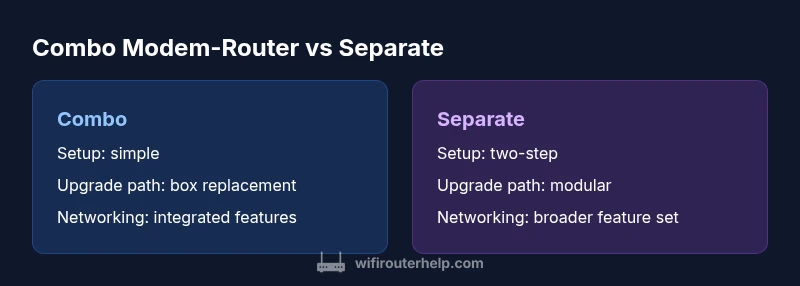
| Feature | Combo modem-router | Separate modem + router |
|---|---|---|
| Setup complexity | Simple plug-and-play | Two-step setup (modem first, then router) with higher customization |
| Performance ceiling | Solid for average speed tiers | Higher ceiling for gaming and multi-device homes |
| Upgrade path | Replace entire unit when upgrading | Upgrade modem or router independently as needed |
| Networking features | Integrated features, fewer customizable options | Broader feature set, advanced QoS, guest networks |
| Support and warranty | Single warranty, vendor support for one device | Two warranties, more granular vendor support |
| Cost of ownership | Lower upfront cost, potentially higher long-term risk | Higher upfront cost, potentially lower long-term cost |
| Reliability | Fewer potential points of failure | Redundancy options and modular troubleshooting |
| ISP compatibility | Often ISP-certified | Requires compatibility checks for modem if buying separately |
Benefits
- Fewer devices to manage and quicker setup
- Lower upfront cost for basic plans
- Smaller footprint and cable management simplicity
- Unified firmware updates from a single source
- Good option for renters or non-technical households
The Bad
- Limited upgrade flexibility for future speeds
- Potentially lower peak performance with multiple devices
- Single device lifecycle can drive complete replacement
- Less granular control over advanced networking features
Separate modem + router is the more future-proof choice for most homes.
If you expect faster speeds, more devices, or advanced features, separating the modem and router offers better performance, flexibility, and upgrade paths. A combo device suits small spaces or users who prioritize simplicity and a quick setup, but it may limit long-term scalability. WiFi Router Help recommends evaluating your current plan against planned upgrades to determine the best path.
People Also Ask
What is the main difference between a combo modem-router and separate devices?
A combo device combines both the modem and router in one box for simplicity, while separate devices use a standalone modem and a separate router, offering more customization and upgrade options. Your choice depends on your current needs and future plans.
A combo is simpler and one box; separate devices give you more control and room to upgrade.
Is a combo device suitable for gaming or 4K streaming?
Combo devices can handle gaming and streaming at typical home speeds, but high-end gaming or many 4K streams may benefit from a dedicated router with advanced QoS and higher throughput. Consider your peak usage when deciding.
They can work, but dedicated routers often perform better under heavy load.
Can I upgrade later if I start with a combo unit?
Yes, you can usually upgrade by replacing either the router or the modem later. If you anticipate higher speed tiers soon, plan for a modular setup to minimize downtime and keep costs predictable.
Upgrading later is easier with separate devices.
Do ISPs support third-party routers with standalone modems?
Most ISPs support third-party routers when paired with a compatible modem, but you should verify compatibility and any rental terms before buying. Some ISPs may require specific configurations for activation.
Check with your ISP about compatibility before purchasing.
What should I consider for future-proofing my home network?
Look for a router with scalable wireless standards, good CPU/memory, and enough ports plus compatibility with mesh systems if needed. A newer DOCSIS modem that supports higher speeds also helps future-proof.
Aim for a setup that can grow with your internet plan.
Are there any hidden costs with separate setups?
Potentially higher upfront costs for two devices and possible extra accessories (extenders). Over time, ongoing maintenance and energy use may be slightly higher, but upgrades can be done gradually.
There can be a bit more upfront cost, but it pays off with flexibility.
What to Remember
- Weigh upgrade flexibility against setup simplicity
- Separate hardware generally offers higher performance potential
- Modem and router upgrades can be performed independently
- Check ISP compatibility before buying a separate modem
- Consider total cost of ownership over 3–5 years