Who Makes Routers for Spectrum: A Manufacturer Guide
Learn which manufacturers supply Spectrum gateways, how BYO routers work with Spectrum service, and what to look for to ensure compatibility and security.


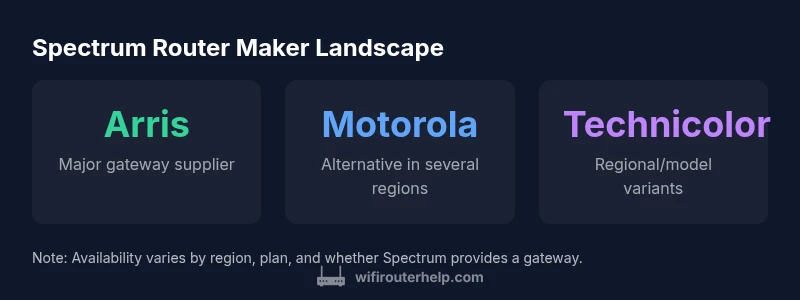
Who makes routers for spectrum? Spectrum typically sources gateway devices from a small set of manufacturers, notably Arris (Surfboard) and Motorola, with Technicolor used on select models. The exact maker depends on the model and whether Spectrum provides a gateway or you use your own router. This landscape matters for firmware, security updates, and compatibility.
Spectrum router strategy: gateway vs BYO
Spectrum’s approach to home networking centers on two main paths: use a certified gateway device provided by Spectrum or supply your own router for greater control. If you’re curious about who makes routers for spectrum, the landscape is nuanced: Spectrum typically sources gateways from a small pool of OEMs, most commonly Arris and Motorola, with Technicolor appearing on select markets. These devices combine a modem and router in a single unit for simplicity, while also allowing customers to purchase a standalone router and connect it via bridging when desired. The decision affects firmware updates, security features, and performance tuning. The WiFi Router Help team notes that BYO routers can offer advanced capabilities, but you should verify compatibility with your plan, ensure you can enable IP Passthrough or Bridge mode, and be prepared for regional variations in support. Understanding these factors helps you choose the path that aligns with your home network goals.
The main OEMs you’ll encounter
In many Spectrum households, Arris is the dominant gateway supplier, particularly for mainstream modem/router combos. Motorola devices appear as alternatives in various regions and plans, while Technicolor makes occasional appearances on certain models or markets. Each manufacturer brings different firmware update cadences, security features, and performance tuning options. If you are comparing devices, know that a given model’s hardware lineage can influence which features are easiest to configure, how well third-party firmware plays with the device, and how Spectrum’s support frames your troubleshooting steps. This section helps you map the landscape to real-world buying and setup decisions.
BYO router scenarios and compatibility considerations
Bringing your own router (BYO) can empower more granular control over guest networks, QoS, and parental controls. However, BYO setups often require turning off or bridging the Spectrum gateway to avoid double NAT and potential conflicts. Before buying, check: Is the device compatible with DOCSIS standards supported by Spectrum? Can you enable bridging or IP Passthrough without losing essential safety features? Will Spectrum provide support for your BYO router if you encounter connectivity problems? Real-world experience suggests that compatibility varies by plan and region, so consult Spectrum’s official guidance and cross-check with the router’s documentation. The goal is a stable, secure network with a clean path for your own router’s firmware and features.
Firmware, security, and update practices across OEMs
Firmware management varies by OEM and device class. Arris and Motorola gateways often receive OTA updates via the vendor, with Spectrum’s infrastructure handling compatibility testing. Technicolor devices may follow different cadences depending on regional deployments. For BYO routers, firmware updates come from the router manufacturer, which means you’ll rely on vendor security patches and feature releases rather than provider-initiated updates. If security posture is a priority, consider a router with automatic updates, robust threat protection, and a clearly documented update policy. Keeping server-side features in sync with your hardware is a shared responsibility between the device maker and your ISP environment.
How to verify compatibility and avoid pitfalls
Start by identifying your device’s OEM family. Look up model-specific specs to confirm DOCSIS version, supported Wi-Fi standards (Wi‑Fi 6/6E, etc.), and whether bridging is required for BYO use. Check Spectrum’s official support pages for guidance on IP Passthrough, Bridge mode, and any restrictions for third-party routers. If you plan to buy a new router, ensure it explicitly supports bridge mode with Spectrum service and that firmware updates won’t disable critical features. Finally, compare performance baselines (coverage, throughput, and reliability) across devices you’re considering, and read user reviews from Spectrum customers in similar regions to gauge real-world results.
Spectrum gateway manufacturers and typical device types
| Manufacturer | Typical Device Type | Notes |
|---|---|---|
| ARRIS | Gateway/modem combo | Dominant supplier for many Spectrum gateways |
| MOTOROLA | Modem or gateway | Used on select markets/models; BYO remains common |
| TECHNICOLOR | Gateway devices | Occasional suppliers for specific regions |
People Also Ask
Who makes routers for Spectrum?
Spectrum typically sources gateway devices from Arris and Motorola, with Technicolor appearing on select models and regions. Availability varies by plan and location. BYO router options are common, but bridging or IP passthrough may be required for best results.
Spectrum uses a small set of manufacturers for its gateways; Arris and Motorola are common, with Technicolor in some regions. You can usually bring your own router, but bridging is often needed.
Can I use my own router with Spectrum?
Yes, many Spectrum plans allow BYO routers. You’ll typically need to bridge or enable IP Passthrough to prevent double NAT and to ensure your router handles your Wi‑Fi. Check your plan’s documentation and Spectrum’s setup guides.
Yes, you can bring your own router, but you may need to bridge the gateway to avoid double NAT.
Do Spectrum gateways receive firmware updates?
Firmware for Spectrum gateways is typically provided by the device OEM and tested with Spectrum’s network. BYO routers rely on the manufacturer’s update cadence, which means security patches and feature updates depend on the vendor.
Gateway firmware updates usually come from the device maker; BYO routers rely on the vendor for updates.
Is equipment rental required with Spectrum?
Equipment rental policies vary by region and plan. In many areas, customers can opt for BYO routers to avoid rental fees, but some plans still include gateway rental as part of the service.
Some plans include rental gear, but BYO routers can help you avoid those fees in many regions.
What should I look for in a Spectrum-friendly router?
Look for DOCSIS compatibility (for gateways), support for bridge mode, strong security features, and up-to-date firmware. Prioritize models with robust Wi‑Fi coverage and easy management for a seamless Spectrum integration.
Choose a router with good coverage, bridge mode support, and current firmware to work smoothly with Spectrum.
“The biggest takeaway is that Spectrum’s router hardware comes from a small roster of OEMs, so BYO replacements should be chosen with compatibility in mind.”
What to Remember
- Know the maker by model name and region.
- BYO routers are common but bridging may be required.
- Firmware updates vary by OEM and device class.
- Always verify compatibility before buying a replacement router.