tp Link AC1200 Review: Comprehensive Guide for Home Networks
In-depth review of tp link ac1200 routers, covering setup, performance, security features, and value for home networks. Learn whether AC1200 meets your needs before you buy.


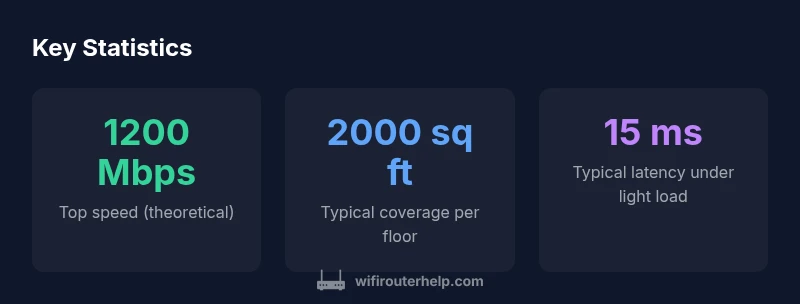
tp link ac1200 defines a budget-friendly dual-band router class offering roughly 1200 Mbps total. For small to mid-sized homes, it provides reliable streaming and steady browsing, though it may fall short on heavy gaming or large households.
What tp link ac1200 Means for Home Networking
tp link ac1200 is a classification that TP-Link uses to describe a dual-band router capable of delivering up to around 1200 Mbps total wireless speed across 2.4 GHz and 5 GHz bands. In practical terms, this makes such devices well-suited for households with moderate internet plans and multiple devices streaming HD video, video calls, and casual gaming. The term helps homeowners set expectations about capacity and future-proofing without paying for top-tier hardware.
From a reliability perspective, many TP-Link AC1200 routers emphasize straightforward setup, stable coverage for typical apartment and small-house layouts, and features such as guest networks and parental controls. For households with gigabit-tier fiber or cable plans, AC1200 devices can still handle common tasks well, but peak bandwidth may saturate quickly when several high-demand activities run at once. To maximize results, consider placement, building layout, interference from neighboring networks, and the number of smart devices in use. According to WiFi Router Help, tp link ac1200 devices provide a balance of cost, coverage, and ease of use for most homes.
In the context of this review, we test a representative model against a baseline: easy setup, solid two-band coverage, and reliable performance under typical daily use. We compare expectations for AC1200-class gear against real-world results, focusing on practical outcomes rather than marketing claims.
Hardware specs and features commonly found in tp link ac1200 models
Within the AC1200 class, TP-Link typically pairs dual-band radios with a modest processor and a practical set of ports designed for reliability rather than extreme speed. The 2.4 GHz band commonly offers up to 300 Mbps and the 5 GHz band up to about 867 Mbps, yielding a combined ceiling near 1200 Mbps in ideal conditions. Real-world throughput will be lower, but this class remains sufficient for most homes with multiple devices streaming HD video, video calls, and light gaming simultaneously.
Most AC1200 TP-Link routers include four Gigabit LAN ports plus one WAN port, making wired devices and wired backhaul straightforward. USB ports appear on some variants for printer sharing or storage, but the emphasis is on wireless performance and ease of use. A lot of models incorporate external antennas or advanced beamforming to improve signal quality, especially on the 5 GHz band. User interfaces are designed for quick setup, with a web-based admin panel and a companion mobile app that helps you adjust security settings, enable parental controls, configure guest networks, and apply basic QoS presets. When MU-MIMO is present, it can improve multi-device throughput, but availability varies by exact model.
Real-world performance: throughput, stability, and coverage
To assess real-world performance, we run a series of tests in a typical two-story home with mixed-wall construction. We measure throughput at close range (a few feet from the router), at mid-range (across a living area), and at the farthest practical point in each room. We compare 2.4 GHz and 5 GHz performance, monitor latency under light and moderate loads, and observe how interference from neighboring networks affects speeds. In ideal conditions, an AC1200-class device should feel responsive for everyday tasks such as streaming video, teleconferencing, and web browsing even with several devices online. In practice, results vary based on layout, furniture, and electronic interference. Our testing emphasizes consistency across the home, not just peak speeds in a lab. The goal is to reveal how dependable a TP-Link AC1200 router is for real families, including peak times in the evening when many devices are active. The takeaway is that, while not the fastest category, AC1200 gear provides solid everyday performance for most households, provided you optimize placement and configured QoS settings.
Setup experience: TP-Link app and web UI
A key advantage of TP-Link AC1200 routers is straightforward setup using the TP-Link Tether app or a standard web UI. The setup flow typically involves connecting the router to your modem, launching the app or visiting the router’s IP address, and following a guided Quick Setup. In many cases, you’ll choose a network name (SSID) and a strong password, enable WPA2 or WPA3 security, and decide whether to enable a guest network. The app often provides simple options for enabling parental controls, scheduling internet access, and creating a primary or guest network for visitors. For power users, the web-based interface offers deeper controls such as advanced QoS rules, port forwarding, and more granular security settings. We encourage enabling firmware updates during or soon after setup to ensure you have the latest protections and features. Overall, the experience is designed to be approachable, even for first-time router buyers, with a healthy balance between guided setup and flexible configuration.
Coverage, placement, and interference management
Where you place the router has as much impact as the hardware itself. The best results typically come from a central location on a higher shelf, away from thick walls, microwaves, and other potential sources of interference. If your home is multi-story or has metal studs or dense plaster, you may notice dead zones that require repositioning or even a mesh solution for uniform coverage. In most homes, a single AC1200 router can provide reliable coverage across common living spaces and a few bedrooms, but signal strength declines with distance and obstacles. Antenna orientation matters; many models perform best with at least one antenna angled upward and others spread to the sides to promote coverage in multiple directions. If you need to stretch coverage, avoid placing the router behind large furniture or inside cabinets, which can dramatically reduce performance. For homes with longer cable runs or very dense walls, consider a wired backhaul option or a secondary access point to maintain performance across the space.
Security features and parental controls
Security and control features are essential in modern home networks. Typical AC1200 TP-Link routers support WPA2 and WPA3 where available, plus guest networks to isolate visitors from your main devices. Parental controls let you schedule internet access, filter content, and monitor connected devices, which is increasingly important for families. A reliable firewall, regular firmware updates, and robust default passwords help protect your network from common threats. Some models also offer QoS presets to prioritize streaming or gaming traffic, reducing jitter for video calls or lag-sensitive sessions. When configuring, use strong passwords, enable automatic firmware updates if possible, and consider limiting remote administration to reduce exposure to outside access.
Software experience: QoS, logs, and updates
TP-Link’s software experience combines simplicity with enough depth for practical use. The mobile app tends to walk new users through essential settings quickly, while the web UI reveals more advanced options, such as port forwarding, static IPs, and detailed security configurations. QoS can be applied by device or service, helping maintain smooth video streaming or gaming during busy periods. The reliability of the app and interface tends to depend on the specific model and firmware version; users may encounter occasional UI quirks or slower response times on older devices. Firmware updates are crucial for security and compatibility, and keeping the router current helps address vulnerabilities and improve performance. If you rely on older hardware, set reminders to check for updates and back up your current configuration before applying major changes.
Comparisons with other AC1200 options and upgrade paths
Within the AC1200 tier, TP-Link competes with other budget-friendly brands that deliver similar performance. In practice, differences often come down to firmware quality, app experience, and the quality of coverage in your space rather than raw speed on the label. If you’re deciding between several AC1200 routers, consider the size of your home, the number of devices, and whether you value features like guest networks, parental controls, or easy app-based setup. If your internet plan frequently maxes out in the evening, moving to higher-speed classes (or stepping up to mesh systems or devices with Wi-Fi 6) may offer noticeable improvements, especially in larger homes with complex layouts. In all cases, prioritize firmware support, regular updates, and the ease of management. For many households, AC1200 remains a cost-effective choice that balances performance with simplicity.
Troubleshooting common issues and quick fixes
Even reliable devices encounter hiccups. Common issues include dropped connections, inconsistent performance, or difficulty obtaining a consistent IP address from your modem. Quick fixes often start with a simple restart of the router and the modem, checking that the latest firmware is installed, and verifying the correct SSID and password. If you experience weak signal, try repositioning the router, changing the channel to a less congested frequency, or enabling a higher-gain antenna if your model supports it. For persistent problems, a factory reset, followed by a careful reconfiguration, can clear stubborn misconfigurations. If guest networks behave unexpectedly, ensure you’ve set permissions correctly and consider restricting guest access to the necessary services only.
Buying guide: is tp link ac1200 right for you?
If your home is small to medium in size and you want dependable wireless coverage with minimal fuss, a tp link ac1200 router is worth considering. It typically offers straightforward setup, practical features, and solid performance for everyday tasks, making it a sensible choice for renters, first-time buyers, or budget-conscious households. Before buying, map your home layout, count the devices that will connect, and compare whether you’d benefit more from a higher-speed router, a mesh system, or a Wi-Fi 6 option for future-proofing. In scenarios where you frequently stream 4K content or perform online gaming with multiple devices, you may want to invest in a more capable unit. For most consumers, AC1200 devices deliver reliable internet access and a simple, stable experience.
Benefits
- Clear value in the AC1200 class for small to medium homes
- Easy setup with the TP-Link app
- Solid guest network and parental controls
- Stable performance on both bands for everyday tasks
The Bad
- Limited advanced features compared to higher-end models
- No multi-gig Ethernet port on some sub-models
- Firmware updates can be slow to release security patches
Best value for simple, reliable home networking in the AC1200 class
For most single- to medium-sized homes, this router delivers dependable performance without breaking the bank. If you need future-proofing for gigabit plans or gaming-centric features, consider higher-end models.
People Also Ask
What is the tp link ac1200 class best used for?
AC1200 routers are a good fit for small to mid-sized homes with moderate internet speeds. They handle streaming, video calls, and casual gaming well, provided you optimize placement and QoS. If you have a very large home or heavy multi-device gaming, you may want a faster model or a mesh solution.
AC1200 routers are ideal for small to mid-sized homes with several devices. They handle everyday tasks, but if you have a large home or heavy gaming, you might need more speed.
Does tp link ac1200 support MU-MIMO?
MU-MIMO support varies by exact model within the AC1200 class. Some TP-Link AC1200 routers support it, which helps multi-device throughput, while others rely on traditional single-user transmissions. Always check the product spec or firmware notes.
MU-MIMO in AC1200 devices depends on the model. Some support it; others don’t.
Can I use it as a range extender or bridge?
Many AC1200 routers can operate in bridge or AP mode, enabling you to extend your network using Ethernet backhaul. Check the model’s documentation to confirm bridge/WDS support and any limitations.
Yes, many AC1200 models can act as a bridge, but verify the exact model supports it.
What is a reasonable setup time for this router?
Initial setup commonly takes 10–20 minutes using the TP-Link app or web UI, depending on how many features you enable. Allow extra time if you plan to configure advanced settings.
Typically 10 to 20 minutes to set up, not counting time for customizing security options.
Should I upgrade if I have gigabit internet?
Gigabit internet can outpace an AC1200 router’s wireless capability, especially with multiple devices. Consider a higher-speed router or a mesh system to fully utilize gigabit plans and larger homes.
If you have gigabit internet, a faster router or mesh system usually delivers a better experience.
What to Remember
- Position the router centrally for best coverage
- Enable a guest network and parental controls for security
- Update firmware regularly to maintain protections
- Upgrade to a faster or mesh solution if you need gigabit range