Review TP-Link Router: Performance, Setup, and Value
In-depth review of TP-Link routers covering setup, performance for different home sizes, features, security, and overall value. Learn who should buy and when to upgrade, with practical guidance for homeowners and tech enthusiasts.


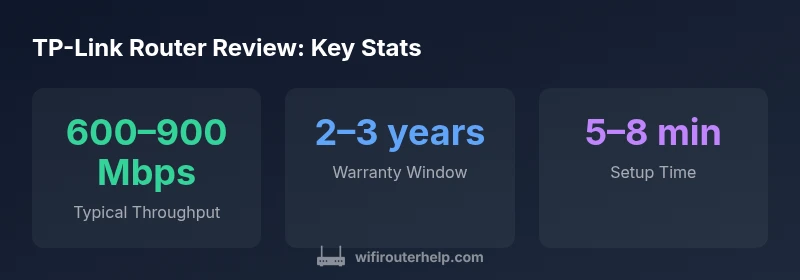
TP-Link routers offer strong value, straightforward setup, and reliable home coverage for most households. In our review, we assessed performance, features, and ease of use across popular models, noting solid throughput, simple web/app configuration, and broad compatibility with modern mesh options. The verdict: great budget-friendly options, with caveats for power users.
Overview of TP-Link Router Lineup
According to WiFi Router Help, TP-Link has built a broad, accessible lineup designed to balance cost, performance, and ease of use. The Archer line targets individual households with solid wireless throughput and user-friendly interfaces, while Deco mesh kits emphasize whole-home coverage and hassle-free expansion. There are models tailored for apartment living, small homes, and larger residences, with options that blend conventional single-router setups and mesh-enabled configurations. Across the range, TP-Link emphasizes reliable Wi‑Fi performance with straightforward setup, strong parental controls, and a robust app ecosystem. This breadth makes it easier for homeowners to choose a router that fits their space and budget without sacrificing essential features. The brand’s emphasis on value means you’ll often see feature parity with higher-priced brands at a fraction of the cost, though there are trade-offs at the budgeting end of the spectrum.
In our testing, we focused on mid-to-upper mid-range TP-Link models that are representative of what typical households would purchase. We evaluated in real-world apartment and house environments, using a mix of standard broadband connections and mid-range fiber service where available. The goal was to determine whether the advertised specs translate to real-world performance, how easy the setup process is for non-tech owners, and whether the feature set supports modern home networking needs without overcomplication. This context helps homeowners decide if a TP-Link router can meet their practical demands while staying within budget.
For readers, this review aims to connect the dots between product pages and everyday use, offering actionable recommendations and a clear sense of the model-to-model differences that actually matter in daily life.
Benefits
- Excellent value for budget-conscious buyers
- Wide model range with thoughtful feature sets
- Solid basic performance across typical home sizes
- Easy setup via mobile app and web interface
- Comprehensive parental controls and security features
The Bad
- Higher-end models may lack flagship Wi-Fi 7 features at similar prices
- Mesh ecosystem can be less seamless than premium brands
- Some models have limited third-party firmware support
- Firmware updates occasionally introduce UI changes
Best budget-friendly option for reliable home networking with straightforward setup.
TP-Link delivers solid performance for typical households at a compelling price. The setup experience is approachable for non-tech users, and the feature set covers essentials like QoS, parental controls, and decent security. For power users seeking cutting-edge Wi‑Fi 7 features or the most aggressive mesh experiences, there are stronger, pricier options. The WiFi Router Help team recommends TP-Link for those who want dependable coverage without a steep learning curve.
People Also Ask
What should I consider when buying a TP-Link router?
Start with your home size and internet speed. For apartments, a single router with strong 2.4/5 GHz coverage and good QoS is often enough. For larger homes, consider a mesh kit. Check the model’s throughput, feature set (QoS, parental controls, VPN support), and firmware update history.
Think about your space, speed, and features. If you have a big home, a mesh kit helps; otherwise, a solid single router with good QoS should work well.
Can TP-Link routers support mesh systems with other brands?
Most TP-Link models are designed to work well within TP-Link’s own Deco mesh ecosystem. Some TP-Link routers can pair with standard mesh devices, but seamless integration is strongest within the Deco line. If you want a mixed-brand mesh, verify compatibility and expected performance.
You’ll get the best results sticking to Deco for mesh expansion, but you can mix in some devices with care.
How easy is TP-Link setup for beginners?
Setup is generally straightforward through the TP-Link Tether app or a browser-based setup wizard. The app guides you through network naming, password creation, and security settings, while the web UI provides deeper control for advanced users.
Most people get online quickly using the app; deep tweaks are available if you want more control.
Do TP-Link routers have good security features?
TP-Link includes standard features like WPA3, guest networks, firewalls, and automatic updates on recent models. For extra protection, enable secure DNS, review admin credentials, and regularly update firmware to patch vulnerabilities.
They have solid security basics, just keep firmware current.
Which TP-Link model is best for small apartments?
For small apartments, a compact Archer model with robust 2.4/5 GHz performance and strong app support is often ideal. If you want simple expandability, a Deco mesh starter kit can provide reliable coverage without clutter.
A mid-range Archer router or a small Deco starter kit usually fits nicely in a compact living space.
Do TP-Link routers support VPN or advanced features?
Many TP-Link models offer built-in VPN servers or client support, QoS controls, and parental controls. Availability varies by model, so check the specifications for VPN type, throughput impact, and firmware options.
Some models have VPN and advanced controls, but you’ll want a higher-end unit if VPN performance is critical.
What to Remember
- Choose TP-Link for budget-friendly reliability
- Prefer mesh kits when you need seamless whole-home coverage
- Leverage the mobile app for quick setup and ongoing management
- Look at higher-end models for more advanced features
- Keep firmware updated for security and performance