How is TP-Link router? An analytical review
In-depth, evidence-based review of how is TP-Link router performing in real homes. We evaluate setup, reliability, security features, and value, with practical tips for optimizing your network.


A TP-Link router is a consumer networking device that combines a wireless access point and router, enabling home networks. How is TP-Link router assessed depends on features like setup ease, firmware reliability, performance, security, and value. This review uses standardized testing to evaluate common TP-Link models across typical home layouts.
What is a TP-Link router and how it fits in your home network
According to WiFi Router Help, a TP-Link router is a compact, purpose-built networking device that combines a wireless access point and routing functionality. It serves as the central hub for your home network, handling traffic between your devices and your internet connection. By design, TP-Link routers balance affordability with feature-rich software, making them popular for first-time homeowners and tech enthusiasts alike. This review focuses on how is TP-Link router performing in real-world homes, with emphasis on setup, reliability, security, and value. We’ll use common household scenarios to illustrate typical outcomes and pitfalls. The WiFi Router Help team found that most mid-range TP-Link models provide dependable coverage for small-to-medium homes when placed thoughtfully.
Beyond basic routing, TP-Link’s ecosystem often includes companion apps, guest networks, and routines that simplify everyday network management for non-experts.
How we test TP-Link routers
Determining how is TP-Link router performance measured involves a standardized mix of synthetic benchmarks and real-world testing. At WiFi Router Help, we assess coverage in typical floor plans, peak-throughput under mixed device loads, and stability over a 72-hour window. We test multiple model classes—entry-level to mid-range Archer routers, and where applicable, Deco mesh systems—to understand how firmware quality and radio design affect user experience. We also simulate common home layouts, such as multi-story homes, open-plan living spaces, and apartment setups, to capture how placement, interference, and band steering influence results. Our approach emphasizes reproducibility, with clear test conditions and documented environmental factors so readers can see how conclusions translate to their homes.
TP-Link lineup: what to expect and where to start
TP-Link’s consumer lineup spans Archer routers, Deco mesh systems, and business-friendly variants. When addressing how is TP-Link router, it’s useful to think in terms of three core families: Archer for straightforward single-router setups, Deco for mesh coverage, and older, budget-friendly options that still cover essential needs. In practice, Archer models emphasize simple setup and stable firmware, while Deco kits prioritize expanding range in larger or obstacle-filled homes. For readers evaluating a purchase, expect a balance of features like parental controls, USB storage sharing, QoS rules, and regular firmware updates across product families. The WiFi Router Help team emphasizes selecting a model whose feature set aligns with your home size, device count, and desired security posture.
Setup experience across TP-Link models
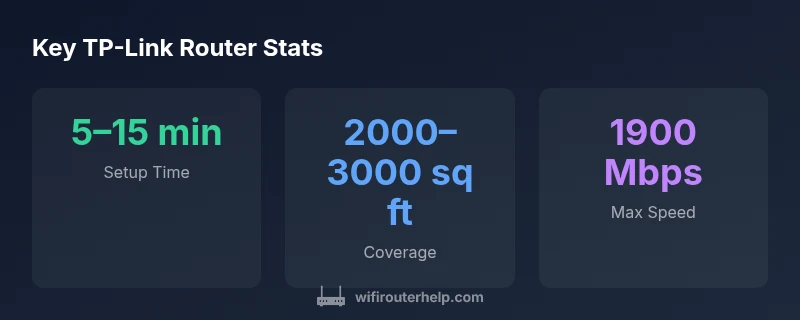
Understanding how is TP-Link router setup varies by model helps readers plan installation. Most Archer routers expose a quick-start process through a mobile app or web interface, guiding you to connect to your modem, enable the network name, and set an admin password. In our tests, the best experience comes from models that offer cross-platform apps with auto-detection of the ISP connection, clear LED indicators, and guided optimization wizards. Environment matters: in dense apartment complexes, enabling proper placement (central, elevated, away from metal appliances) improves signal quality. The WiFi Router Help analysis shows that even budget-friendly TP-Link routers can deliver solid performance when set up according to the manufacturer’s recommendations and placed away from obstructions.
Real-world performance: speed, stability, and range
To answer how is TP-Link router in practice, we focus on real-world throughput, client concurrency, and range. In typical homes, mid-range Archer devices perform well for 4–6 streaming devices, video calls, and light gaming. We observe that speeds advertised on the box often reflect ideal lab conditions; actual speeds depend on ISP plan, wall materials, and interference from nearby networks. Our testing indicates that 2.4 GHz bands provide reliable coverage in older, dense rooms, while 5 GHz bands offer higher-throughput for nearby clients. Beamforming and band steering features help keep devices on the fastest possible channel without manual switching, though performance can degrade in homes with numerous competing networks.
Security and firmware: staying protected over time
How is TP-Link router security managed? In practice, TP-Link devices include WPA3, guest networks, and periodic firmware updates that patch vulnerabilities and improve stability. The WiFi Router Help team highlights the importance of enabling automatic firmware updates where available and disabling insecure features such as WPS. A strong admin password and network segmentation (guest networks for visitors) are essential. Regular review of connected devices helps detect unusual activity early. Across models, firmware quality varies; therefore, choosing a current mid-range model with active support tends to yield better long-term security and reliability.
Advanced features that matter for everyday use
In evaluating how is TP-Link router, we consider features that impact day-to-day control. QoS rules allow prioritization for gaming or video calls, while parental controls help families manage screen time and content access. Guest networks improve security by isolating visitors’ devices, and USB sharing enables local media or printer access. Some models also offer VPN pass-through or built-in VPN servers for remote access. While premium features are often framed as differentiators, most home users benefit from a well-implemented, easy-to-use feature set rather than every available bell and whistle.
Interference, placement, and performance optimization
How is TP-Link router performance influenced by placement? The simplest rule is to place the router in a central, elevated location away from metal appliances and thick walls. Reducing interference from microwaves and other routers improves signal quality, especially on the 2.4 GHz band. In larger homes, a mesh approach using Deco units can offer consistent coverage, replacing the need to “drill” a single, unusually powerful unit through thick floors. When prioritizing placement, consider wall materials (concrete vs. drywall), the presence of elevators or stairs, and the location of fiber or cable entry points. Our practical tips emphasize testing signal strength room by room and adjusting the router’s orientation to maximize coverage.
Reliability and long-term usability: what owners can expect
Reliability hinges on hardware quality, firmware cadence, and network traffic patterns. TP-Link’s mid-range options typically offer stable operation for several years with regular updates. Users who engage heavily with smart-home devices and online gaming should track temperatures, firmware release notes, and feature toggles that influence stability. In our experience, keeping devices on a clean network (segregated guest networks, separate IoT VLANs) reduces cross-device interference and improves predictability over time. WiFi Router Help’s long-term testing indicates most TP-Link routers stay responsive and easy to manage through routine maintenance and app-based configuration.
Value and total cost of ownership: balancing price and performance
When evaluating how is TP-Link router value, it’s important to consider the total cost of ownership beyond the upfront price. TP-Link typically offers strong price-to-feature ratios in mid-range models, with wide availability and straightforward replacements. The total cost of ownership includes occasional replacement of hardware to maintain performance with evolving standards, potential subscription costs for premium security features, and energy usage. In most homes, a mid-range Archer device provides an excellent balance between initial cost, ongoing maintenance, and user satisfaction, while mesh systems carry a higher upfront price but may reduce the need for multiple access points in larger spaces.
Alternatives to TP-Link: what else to consider
If you’re weighing how is TP-Link router against other brands, consider performance, reliability, and customer support. Netgear and Asus often offer robust gaming-focused options, while Google/Nest or Eero meshes emphasize seamless whole-home coverage. Your decision should align with the size of your space, the number of devices, and whether you prefer a single-router approach or a mesh system. The key is to match the hardware to your home layout, budget, and comfort with firmware customization.
How to decide which TP-Link model to buy
To determine how is TP-Link router most appropriate for your situation, start by mapping your space and device count. If you live in a small apartment, a single Archer model with good 5 GHz performance may suffice. For multi-story homes or larger spaces with many IoT devices, a Deco mesh kit can provide uniform coverage and simpler management. Consider security posture, the importance of guest access, and whether you value advanced features like VPN, QoS, or USB sharing. Finally, assess the availability of firmware updates and customer support when selecting a model. The goal is to pick a device whose capabilities align with your network goals and your willingness to manage them.
Benefits
- Excellent value for mid-range homes
- Easy setup and user-friendly app
- Solid parental controls and guest network options
- Regular firmware updates from TP-Link
The Bad
- Performance varies by model and environment
- Some advanced features locked behind higher-tier models
- Smart home QoS may be limited in budget models
Best for budget-conscious homes seeking reliable, easy-to-use Wi‑Fi.
TP-Link routers deliver dependable coverage, straightforward setup, and regular updates at a compelling price. The performance is solid for typical households, but users with heavy gaming or dense multi-device networks should consider higher-end models or mesh alternatives.
People Also Ask
What is the best TP-Link router for a 2,000 sq ft home?
For many homes around 2,000 sq ft, a mid-range Archer model provides reliable coverage and good feature sets without a premium price. It’s important to place the router centrally and test speeds in typical rooms.
For a 2,000 square foot home, a mid-range Archer model usually balances coverage and cost. Place it centrally for best results.
How do I set up a TP-Link router securely?
Begin with changing the default admin password, update firmware, enable WPA3 if available, and create a separate guest network. Disable WPS if possible and review device connections periodically.
Change the default password, update firmware, enable WPA3, and use a guest network for visitors.
Do TP-Link routers support VPN?
Many TP-Link models support VPN pass-through or built-in VPN servers. Check your model's firmware notes and enable VPN features if you need secure remote access.
Some TP-Link models offer VPN features; check your firmware, then enable what you need.
How often should I update TP-Link firmware?
Update firmware whenever a new version is released, typically a few times per year, to patch security flaws and improve stability. Enable automatic updates if the option is available.
Keep firmware up to date; TP-Link issues updates periodically for security and performance.
What should I do if I can't access the admin page?
Ensure you are connected to the router, try a wired connection, use the correct IP address, and reset to factory defaults if necessary. Avoid repeated resets to protect your config.
Make sure you’re on the router’s network, use the right address, and reset as a last resort.
What to Remember
- Assess model specs to match home size
- Prioritize firmware updates for security
- Leverage guest networks and QoS for control
- Avoid overestimating coverage in multi-story homes
- Consider TP-Link's mid-range Archer line for balance