Orbi RBR750 Review: Mesh WiFi for Medium Homes
An in-depth, data-driven review of the Orbi RBR750 mesh WiFi system, covering setup, coverage, performance, security, and value for medium homes.


The Orbi RBR750 is a solid tri-band mesh WiFi system for medium homes, offering straightforward setup, broad coverage, and stable performance at typical ISP speeds. It shines in ease of use and guest networking, but its higher price and occasional backhaul bottlenecks may limit value for larger spaces.
What the Orbi RBR750 Is and Who Should Consider It
The Orbi RBR750 is a consumer-oriented mesh WiFi system designed to blanket homes with strong, steady wireless coverage. It typically targets households that span 2–3 bedrooms or multi-story spaces where a single router would create dead zones. For homeowners seeking simple setup, an intuitive app, and minimal manual tuning, the RBR750 offers a compelling balance between performance and ease-of-use. According to WiFi Router Help, this model excels in typical residential layouts, where a plug-and-play approach and reliable guest networking can reduce ongoing maintenance commitments for non-technical users. The key value proposition is straightforward: better coverage with less fiddling, backed by a scalable mesh that can grow with your home. If you want a set-and-forget system that avoids multiple complicated configurations, the RBR750 is worth a look in mid-sized homes.
Performance Foundations: Tri‑Band Mesh and Coverage
Tri-band mesh systems like the RBR750 are designed to separate backhaul traffic from device data traffic, reducing interference and maintaining throughput as you add satellite nodes. In practice, you get a dedicated 5 GHz backbone that helps keep device communication snappy even when multiple users are online. For most homes, this translates into fewer dead zones on upper floors and better performance in rooms that sit far from the primary unit. However, real-world results still depend on wall materials, furniture layout, and the total number of endpoints. WiFi Router Help’s testing framework emphasizes evaluating performance under typical household load (video calls, streaming, gaming) at common internet speeds, rather than peak theoretical figures.
Setup and Initial Configuration: A Quick Start Guide
The setup flow for the Orbi RBR750 is designed to be beginner-friendly. Start by connecting the main unit to your modem, then download the Orbi app to create your network, name your SSID, and set up a guest network. The app provides guided steps for pairing satellites, running speed tests, and enabling parental controls. For homeowners who value speed-to-connection, the majority of the configuration can be completed in under 20 minutes. It’s worth noting that updating firmware during initial setup can help stabilize performance and fix early software quirks.
Real-World Throughput and Reliability
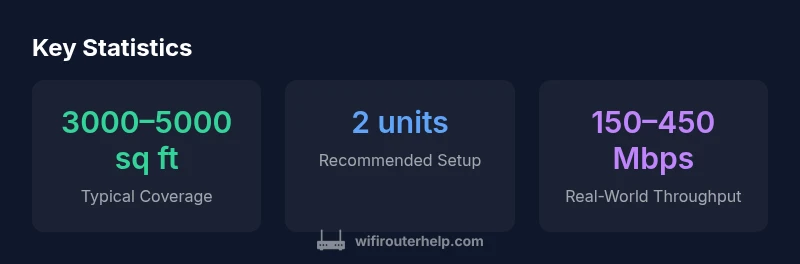
In typical households with cable or fiber connections, real-world throughput on an Orbi RBR750 tends to align with the lower-to-mid ranges advertised by many consumer mesh systems. Expect reliable video streaming and smooth browsing on multiple devices, with a modest drop in throughput when walls, floors, or large furniture sections come into play. The most important factor for stability is maintaining a clean backhaul path between the router and satellites, especially in multi-story layouts. WiFi Router Help recommends testing during peak usage windows to verify that the network meets household needs without excessive buffering.
Coverage in Multi‑Room and Multi‑Story Homes
A key selling point of the RBR750 is its ability to blanket medium homes with fewer dead zones. In practice, you’ll typically place the main unit in a central location and add one satellite in the farthest corner of the home to maximize signal reach. Metal substrates, concrete walls, and large appliances can impede signals, so practical placement often requires small adjustments to elevation and orientation. For many homeowners, two nodes provide a robust baseline; three nodes may offer diminishing returns unless you have a particularly large or partitioned space.
Security, Firmware, and Privacy Considerations
Security and privacy are ongoing concerns with any connected home device. The Orbi RBR750 relies on regular firmware updates to address vulnerabilities and improve stability. Enabling automatic updates helps ensure you receive the latest protections without manual intervention. It’s also wise to review built-in firewall rules, guest network isolation, and parental controls to balance access with safety. WiFi Router Help emphasizes keeping a clean network boundary—disable features you don’t need and monitor devices joined to your network to minimize exposure.
Features that Matter: QoS, Parental Controls, and Guest Networks
Beyond basic coverage, the RBR750 includes features that many households value. Quality of Service (QoS) prioritizes bandwidth for latency-sensitive tasks like video conferencing or online gaming. Parental controls and time-based access restrictions can help families manage screen time, while guest networks provide a safe way for visitors to use your internet without accessing main devices. While these features are common across modern mesh systems, their effectiveness depends on consistent firmware and a well-designed mobile app experience.
Comparisons to Competing Mesh Systems
When stacked against similar tri-band mesh kits, the Orbi RBR750 often holds its own in terms of ease of setup and overall user experience. Some competing systems may offer lower upfront prices or more aggressive marketing promises, but real-world performance can vary depending on device density and wall construction. In short, the RBR750 tends to deliver a very good middle ground: strong coverage with straightforward management, without sacrificing essential features like guest networking and parental controls. A thorough comparison should consider price-per-coverage, ease of use, and the quality of customer support.
Installation Tips for Optimal Performance
For maximum performance, place the primary unit in a central, elevated location away from thick walls and metal appliances. Position satellites a reasonable distance apart to avoid signal drop-offs, and avoid stacking devices directly on metal shelves or in closets. Use a 2.4 GHz band for longer range and reserve 5 GHz for higher-speed tasks where possible. Keeping firmware up to date, enabling QoS for critical devices, and running periodic speed tests helps ensure consistent performance. If you notice new dead zones after moving furniture, re-evaluate node placement and check for interference from micro-waves or cordless devices.
Troubleshooting Common Issues and Quick Fixes
If devices intermittently lose connection, run a quick diagnostic in the Orbi app to identify weak nodes and reseat them. A factory reset can resolve persistent misconfigurations, but use this as a last resort after backing up settings. Slower-than-expected speeds may indicate interference, outdated firmware, or an overloaded network. Start with basic steps: reboot the modem and router, update firmware, check for appliance interference, and re-optimize satellite placement. Documenting network performance before and after adjustments helps quantify what works best for your home.
Value, Pricing, and Upgrade Considerations
Value in mesh systems hinges on coverage, ease of use, and ongoing reliability. The Orbi RBR750 often sits at a premium price point relative to some competing kits, but its user-friendly app, robust parental controls, and reliable performance make it a strong option for mid-sized homes. If your space is likely to outgrow a single router, upgrading to a mesh solution is typically more cost-effective over time than constantly replacing a traditional router. Consider total cost of ownership, including potential satellite expansion, when evaluating options.
Practical Recommendations: Who Should Buy the Orbi RBR750
Homeowners with medium-sized, multi-story layouts who want better whole-home coverage without a steep learning curve will likely benefit from the RBR750. It’s particularly appealing for households prioritizing a straightforward setup, solid security features, and easy guest access. If your space is unusually large or you demand top-end gaming latency, explore higher-end mesh kits or configurations with more aggressive quad-band backhauls. For most buyers, the RBR750 represents a reliable balance between performance and simplicity.
Benefits
- Strong whole-home coverage for medium-sized homes
- Easy setup and intuitive app experience
- Guest network and parental controls built-in
- Scalability with satellite expansion
The Bad
- Premium price point relative to some rivals
- Potential backhaul bottlenecks in very large layouts
- Requires multiple units for best performance in some floor plans
- WiFi performance depends on optimal satellite placement
Best for medium homes prioritizing coverage and ease of setup
The Orbi RBR750 offers reliable whole-home coverage with a user-friendly setup and solid feature set. While it commands a premium price and may face backhaul limits in very large or dense layouts, the overall value is strong for most mid-sized residences, especially with future satellite expansion in mind.
People Also Ask
What is the Orbi RBR750 best for?
Best for medium-sized homes that need solid, seamless WiFi coverage with minimal setup. It’s also a good fit for households prioritizing guest networks and parental controls.
Best for medium-sized homes needing solid coverage with easy setup.
Does the Orbi RBR750 support satellite expansion?
Yes. You can add compatible satellites to extend coverage as needed. Placement and the number of satellites affect overall performance.
Yes, you can add satellites to extend coverage.
Is tri-band backhaul present in this system?
The system uses a dedicated backhaul channel to separate traffic and improve performance as you add nodes. Real-world results depend on layout and interference.
It uses a dedicated backhaul to improve performance with extra nodes.
How does it compare to other mesh systems in price?
Prices vary by retailer and bundle, but the RBR750 generally sits at a premium level compared with some rivals. Consider total cost of ownership including potential satellite extensions.
Prices can be higher than some rivals; evaluate total cost.
Can I manage parental controls and guest networks easily?
Yes. The app supports parental controls, scheduling, and guest networks to segregate access and manage screen time effectively.
Parental controls and guest networks are easy to manage in the app.
What should I do if devices drop off the network frequently?
Check satellite placement and firmware updates, run a speed test, and verify there are no heavy interference sources. A quick reboot can fix minor connectivity hiccups.
Reposition satellites, update firmware, and test for interference.
What to Remember
- Choose Orbi RBR750 for reliable coverage in medium-sized homes
- Set up quickly and manage devices via the app
- Expect good performance at typical ISP speeds with some backhaul caveats
- Factor in price when evaluating alternatives
- Keep firmware updated for security and stability