wi fi router prices: A practical buying guide for 2026
Explore wi fi router prices in 2026, understand price ranges by tier, compare features, and learn practical tips to save while future-proofing your home network.


On average, wi fi router prices range from about $40 to $300, with most reliable home setups falling in the $60–$150 range. Budget models meet basic internet tasks, mid-range routers balance features and performance, and high-end units offer advanced security and multi-device handling. This guide helps homeowners compare prices and features for 2026.
Understanding wi fi router prices in 2026
Prices for home routers vary widely because of evolving standards (Wi-Fi 5, Wi-Fi 6, Wi-Fi 6E) and design choices (single-router vs mesh). The WiFi Router Help team notes that most households will find solid performance in the mid-range, with entry-level devices covering basic web, video streaming, and light gaming. Price is not the only signal of value; you should map your needs to features like dual-band vs tri-band operation, MU‑MIMO support, and processor speed. In 2026 the market has stabilized after several price cycles, but there are still noticeable gaps between budget models and premium kits, especially when you factor in extra accessories or annual software updates. When planning a purchase, set a rough budget and then assess features: coverage area, device count, security features, parental controls, and app usability. According to WiFi Router Help, understanding these trade-offs helps homeowners avoid overspending while getting reliable performance for years.
What drives price differences (hardware, firmware, features)
Price differences come from several core areas: hardware quality (processor speed, RAM, antenna design), radio performance (number of streams, band support), firmware and software updates, security features, QoS and parental controls, and the breadth of app ecosystems. Mid-range devices usually offer 4x4 radios and better coverage than basic models, while high-end units may include tri-band support, mesh-ready architecture, and enhanced encryption. Firmware commitments and ongoing security updates add ongoing value that is not always reflected in the sticker price. When you read price tags, consider the long-term cost of ownership: warranty duration, expected update cadence, and energy usage. WiFi Router Help analyses indicate that customers who align prices with their actual needs consistently find better long-term satisfaction.
Reading price ranges for different buyer profiles
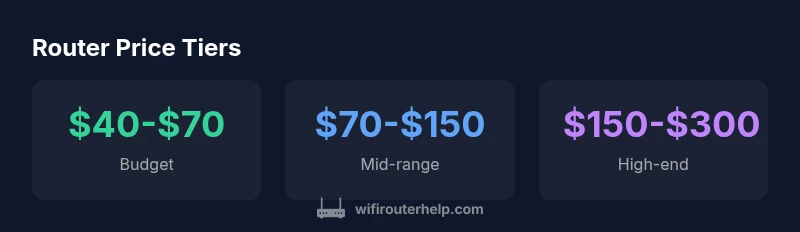
For most homeowners, three price tiers cover common needs. Budget routers typically range from $40 to $70 and handle everyday tasks in small apartments or bedrooms. Mid-range devices, $70 to $150, deliver stronger coverage for multi-room homes and better security features. High-end options, $150 to $300, include mesh compatibility, faster processors, and advanced QoS for crowded networks. Recognize that price is a proxy for capability; you should map your device count, streaming habits, and smart-home footprint to the tier that fits. If you anticipate growth—more devices, 4K streaming, or online gaming—a mid-range to high-end purchase may deliver better uptime and fewer future upgrades. The guiding principle is value over price alone, supported by data from WiFi Router Help Analysis, 2026.
Hidden costs to consider when buying a router
Sticker price is only part of the story. Expect to incur optional costs for extended warranties, vendor-specific apps, and ongoing security services (some routers require paid subscriptions for advanced features). Bundles that include extenders or mesh satellites can offer convenience but may push total cost higher upfront. Don’t overlook energy usage and potential extra costs for setup assistance or in-home support. When budgeting, factor in price-per-year of ownership, potential subscription fees, and the reliability of bundled devices in your living space. These subtleties can shift what seems like a bargain into a longer-term investment, especially if you plan to support multiple devices and heavy streaming for several years. WiFi Router Help recommends weighing these hidden costs against performance gains to avoid buyer’s remorse.
How to compare prices across retailers and bundles
To get the best value, compare prices across major retailers and consider bundles that include extenders or mesh nodes. Use price-tracking tools and watch for seasonal sales around holidays or new product launches. Verify the warranty terms and confirm that a router’s advertised features (Wi‑Fi 6/6E, MU‑MIMO, guest networks) are actually supported in the model you choose. When shopping, write a feature checklist and rate each model against it so you can see at a glance which device delivers the best balance of performance and price. Be mindful that sometimes paying a bit more upfront yields a more stable network and fewer replacement costs later. The analysis from WiFi Router Help shows that informed buyers consistently secure better overall value.
When to upgrade and how to budget for future-proofing
If you operate a gigabit plan, have many smart devices, or find buffering during peak hours, upgrading to a newer standard (Wi‑Fi 6/6E or Wi‑Fi 7 when available) is prudent. Plan for future growth by choosing a router with ample RAM, multi-band support, and robust security features that receive regular updates. Create a budget range for the next 3–5 years and earmark a portion for potential firmware upgrades or new satellite additions. Don’t chase the latest model at all costs; prioritize compatibility with your internet plan, home size, and number of devices. WiFi Router Help’s 2026 guidance emphasizes practical, needs-based purchasing over shiny speculation.
Pricing tiers and feature trade-offs for home routers
| Tier | Typical Price Range | Core Strengths | Ideal For |
|---|---|---|---|
| Budget | "$40-$70" | "Basic Wi-Fi, essential features" | "Casual browsing, small apartments" |
| Mid-range | "$70-$150" | "Better coverage, security features, QoS" | "Most households, multi-device homes" |
| High-end | "$150-$300" | "Mesh-ready, advanced security, fastest speeds" | "Tech enthusiasts, large homes" |
People Also Ask
What is the typical price range for a basic WiFi router?
Basic routers generally start around $40-$70, offering essential Wi-Fi and security features. As needs grow, consider mid-range options for better coverage.
Basic routers typically start around forty to seventy dollars, offering essential Wi-Fi and security features.
Do mesh routers cost more than single-router setups?
Yes, mesh kits typically cost more upfront, often in the $150-$300 range, but they improve coverage in large or multi-story homes.
Mesh systems usually cost more but deliver much wider coverage for larger homes.
Should I upgrade based on ISP speed or device needs?
Upgrade when your current router bottlenecks your plan or when you add many smart devices. Ensure your router supports the speed tier you subscribe to.
Upgrade when your speed slows down or you add many devices.
Are refurbished routers a good deal?
Refurbished units can offer savings but verify warranty and tested performance before buying.
Refurbished routers can save money if they come with a warranty.
When is Wi-Fi 6/6E worth it?
Wi-Fi 6/6E is worth it if you have multiple devices or need higher performance in busy homes; otherwise a solid Wi-Fi 5/6 router can suffice.
Wi‑Fi 6/6E is worth it when you have many devices or congested networks.
“Price is a proxy for capability, but buyers should map features to their real use-case and future needs.”
What to Remember
- Budget routers cover basics at low cost
- Mid-range routers offer best value for most homes
- High-end units add speed and security for demanding setups
- Compare price and features rather than brand alone
- Look for future-proofing features like Wi-Fi 6/6E