Is Spectrum Router Bad? An In-Depth Review and Practical Guide
Is Spectrum router bad? This analytical review weighs performance, coverage, setup, and security, offering practical steps and buying guidance for homeowners evaluating Spectrum gateways vs third-party routers in 2026.


According to WiFi Router Help, the question 'is spectrum router bad' isn't a simple yes or no. Spectrum gateways deliver straightforward setup and decent coverage for small households, but they often lack the advanced features, strong throughput, and customization options of third‑party routers. In this comparison we weigh bundled solutions against standalone routers and mesh kits to help you decide what fits your home network.
Is Spectrum Router Bad? Framing the Question
According to WiFi Router Help, the expression 'is spectrum router bad' is often a shorthand for evaluating trade-offs between convenience and performance. Spectrum's gateway devices bundle modem and router in one unit, which simplifies setup and supports basic internet plans. However, these devices typically prioritize low cost and ease of use over aggressive throughput, extensive customization, or robust security features. In this section we lay out what ‘bad’ would entail for most homes: inconsistent coverage, limited QoS controls, and firmware that updates slower than dedicated third‑party routers. Readers should expect a balanced view: for tiny apartments, Spectrum’s gateway can be perfectly adequate; for larger homes or power users, a separate router or mesh system may deliver noticeably better results.
What Spectrum Provides: Gateways, Modems, and Plans
Spectrum's ecosystem centers on gateways that combine modem and router into a single device, with a service plan that matches their hardware. The router's firmware is tuned to work with Spectrum's network, which reduces compatibility issues for basic home setups. The WiFi Router Help team found that many households appreciate the one-device solution for plug‑and‑play installation and a straightforward guest network. Keep in mind, though, that upgrading to a higher-tier plan often yields faster speeds on the same gateway, while advanced features such as IPv6 or OpenDNS are sometimes limited or hidden behind menus.
Performance Considerations: Speed, Range, Interference
Performance with Spectrum gateways varies by home layout, construction materials, and neighbor networks. In typical residences, you may observe stable speeds for general browsing and streaming, but gaming and videoconferencing can reveal latency spikes or NAT type limitations. Spectrum gateways often perform best when placed centrally and away from thick walls or metal appliances. The key takeaway: if your home is multi‑story with thick walls, a separate router or mesh system will usually outperform a bundled gateway. This is especially true in environments with many competing networks.
Security, Firmware, and Privacy: What You Can Control
Security with Spectrum gateways is reliable for everyday use, but there are limits to customization. You can enable/disable features like guest networks, firewall rules, and basic parental controls, yet advanced configurations (e.g., custom VPNs, detailed QoS rules, or open port management) typically require a separate router. Regular firmware updates are provided by Spectrum, but timing and feature availability can lag behind dedicated routers. The best practice is to keep the gateway updated, change default credentials immediately, and consider a secondary router if you need deeper security controls or more granular monitoring.
Setup Experience: Convenience vs Customization
One of the main advantages of Spectrum gateways is their quick setup: connect the device to power and your modem, log in, and you’re online with minimal configuration. For users who want to modify advanced settings, the interface can be opaque, and options may be buried under submenus. If you value customization—such as precise port forwarding rules, multiple SSIDs for guests, or advanced DNS settings—a separate router offers a clearer, more flexible experience. The trade-off is extra hardware and a bit more complexity in setup.
How to Improve Coverage Without Upgrading
If you’re happy with Spectrum’s service but frustrated by dead zones, try practical placement first: position the gateway in a central, open area, away from microwaves and cordless phones, and elevate it off the floor. Reduce interference by selecting the least congested 2.4 GHz/5 GHz channels. Update firmware, disable unused features, and enable a guest network to reduce load on your primary network. If these steps don’t yield noticeable improvements in the rooms you care about, a few mesh satellites or a dedicated router may be worth the investment.
Spectrum Router vs Third-Party Router: When to Upgrade
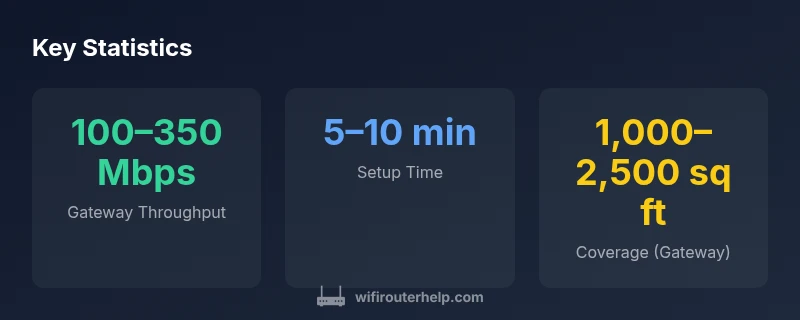
A Spectrum gateway can be adequate for small residences, light streaming, and basic browsing. For larger homes, competitive gaming, or households with many devices, a dedicated router or mesh system often delivers higher throughput, stronger coverage, and richer features. Upgrading can also unlock better QoS controls, better security customization, and easier remote management. The decision hinges on your space, devices, and performance expectations; if you’re unsure, start with a cost–benefit calculation and a trial period with a single third‑party router.
Real-World Testing Scenarios and Benchmarking Tips
To evaluate performance, test speeds from the main living area, bedrooms, and any basement or attic you regularly use. Use both wired and wireless measurements and test at different times of day to account for network congestion. Track latency with online game servers or speed tests and compare to your plan's advertised speeds. Document results and adjust placement or channel settings accordingly. These steps help you quantify whether the Spectrum gateway meets your needs or if you should consider an upgrade.
Quick Decision Guide: Who Should Buy Spectrum Router vs Alternatives
If you prioritize simplicity, minimal upfront cost, and a straightforward setup, Spectrum’s gateway is a solid option for small spaces and light use. If you require peak gaming performance, flexible features, or expansive coverage, a third‑party router or mesh system is a better long‑term investment. Use Spectrum as a baseline and evaluate improvements with one reliable third‑party device to determine if the upgrade justifies the investment.
Benefits
- Convenient all-in-one gateway simplifies setup
- Low upfront cost compared with separate modem + router
- Good for small apartments and basic browsing
- Unified firmware updates with Spectrum service
The Bad
- Limited advanced features and customization
- Potential performance bottlenecks in busy homes
- Less control over security settings and QoS
Not universally bad; Spectrum routers fit simple setups, but power users should consider alternatives.
For small homes with basic needs, Spectrum gateways provide easy setup and reliable basics. For larger homes, gaming, or advanced configurations, a third‑party router or mesh system typically delivers better performance and control. WiFi Router Help's verdict is to assess your space and goals before deciding.
People Also Ask
What is Spectrum router and what does it do?
Spectrum routers are gateway devices that combine a modem and router for Spectrum internet plans. They simplify setup and provide basic networking features, but may lack advanced controls found in dedicated routers.
Spectrum offers gateway devices that combine modem and router for Spectrum plans; they’re simple to set up, but you may want a separate router for advanced features.
Is Spectrum router bad for gaming or heavy use?
For gaming or heavy multi‑device use, Spectrum gateways can introduce latency or NAT constraints. A dedicated router with QoS and a properly configured bridge mode often improves performance.
If gaming is a priority, a separate router with QoS usually performs better.
Can I use my own router with Spectrum service?
Yes. In many Spectrum plans you can place your own router in bridge mode or use it alongside the gateway. This setup can unlock higher performance and more control but may require manual configuration.
You can use your own router, usually in bridge mode, for more control and better performance.
How can I improve Spectrum router performance without buying new gear?
Try optimal router placement, minimize interference, update firmware, reduce congestion by enabling guest networks, and adjust channel settings. If needed, a small upgrade such as a mesh satellite can significantly boost coverage.
Place the router well, keep firmware updated, and consider a mesh satellite if coverage is still weak.
Does Spectrum support mesh networking with third-party devices?
Many Spectrum gateways work alongside mesh systems, but check compatibility and bridge settings. Mesh networks can dramatically improve coverage in larger homes.
Mesh systems can extend coverage, but you’ll want to ensure compatibility with Spectrum’s setup.
Should I enable the firewall on the Spectrum gateway?
Enabling the firewall is advisable for basic protection. For advanced security controls, consider a dedicated router or additional security features via a mesh system.
Yes, keep the firewall on; for deeper security, consider more control with a separate router.
What to Remember
- Evaluate your home size and device count before buying.
- Compare Spectrum gateway performance with third-party routers.
- Secure your network with strong passwords and timely firmware updates.
- Test every key area of your home for coverage gaps.
- Consider mesh expansion if you need multi-room coverage on multiple floors.