What Router Is Better Than Spectrum? An Objective Comparison
Meta description: Learn how to choose a router that beats Spectrum's built-in device. Compare Spectrum's router vs third-party options, with setup tips, buying guidance, and real-world scenarios.


The question what router is better than spectrum often boils down to home size, internet plan, and features. In most homes, a modern third-party router with Wi‑Fi 6/6E and a mesh option outperforms Spectrum's built‑in router for range, speed, and control. If you live in a small apartment with light usage, Spectrum's router may still suffice.
what router is better than spectrum: a practical framework
According to WiFi Router Help, evaluating whether a router is better than Spectrum's built-in device requires a practical framework: match features to your usage, consider future-proofing, and verify compatibility with your plan. Start by identifying three questions: How many devices are consistently online at once? Do you have coverage gaps in upstairs rooms or far corners? Is your internet speed delivered by Spectrum sufficient for your needs, or would upgrades justify higher performance? When you ask what router is better than spectrum, you should also consider whether you want a simple plug and play experience or a device that grows with your home. This framework helps separate marketing promises from real-world performance, and it emphasizes the value of a device that can be managed easily and updated regularly.
According to the same guidance, two broad paths emerge: stay in Spectrum’s ecosystem with an upgraded router provided by the provider or opt for a third-party router and sometimes enable bridge mode. The former is often simplest but can lock you into limited features; the latter offers better control, more robust security options, and future-proofing through modular upgrades. A practical first step is to list critical needs: coverage for a multi-story home, gaming or video streaming priorities, guest networks, and parental controls. With this checklist, you can compare models and features more objectively and avoid overpaying for capabilities you rarely use.
wordCount”:220}, {
Key Differences Between Spectrum Router and Third-Party Solutions
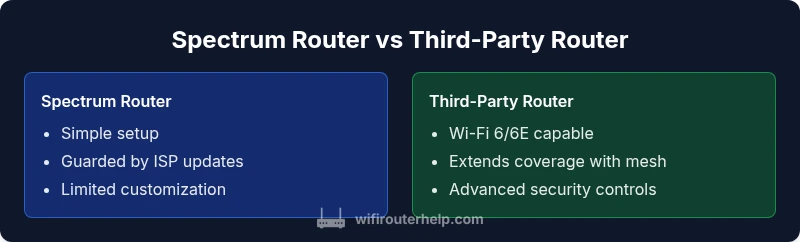
The Spectrum router that comes with your service is designed to be easy to use and broadly compatible with the provider’s network. However, third-party routers typically offer richer features and better long-term value. One key difference is control. Spectrum’s router uses a closed ecosystem with simplified apps and limited customization. Third-party devices, by contrast, provide advanced QoS rules, port forwarding, detailed device monitoring, and robust parental controls. Another major difference is firmware updates and security. Independent routers tend to receive frequent firmware updates from manufacturers, improving bug fixes and security patches, whereas ISP-provided gear may lag behind. A third-party router also generally supports a wider range of Wi-Fi standards, including Wi-Fi 6 and 6E, offering higher throughput and better handling of multiple devices. Finally, expandability matters. If you anticipate adding smart home devices or a mesh network, third-party routers are almost always more scalable. In sum, what router is better than spectrum depends on your need for control, security, and growth potential, balanced against ease of use and potential setup complexity.
wordCount”:210}, {
Coverage, Speed, and Reliability: How to gauge performance
When evaluating performance, focus on real-world coverage, not just theoretical max speeds. A modern third-party router often delivers stronger signals in edge rooms and hallways because of better antennas, smarter channel selection, and the option to deploy mesh nodes in larger homes. Wi-Fi standards matter: Wi-Fi 6/6E devices can support more simultaneous connections with less signal degradation in busy networks. In practice, you should test signal strength in every room where connectivity is critical, document weak spots, and adjust placement or add mesh nodes as needed. Reliability hinges on quiet channels and stable firmware; a router with active monitoring and automatic updates tends to stay reliable longer than older or ISP-provided devices. If you’re unsure how Spectrum’s plan maps to hardware performance, use a simple speed test pipeline across multiple rooms and times of day to identify persistent bottlenecks.
wordCount”:210}, {
Mesh vs Traditional Routers: Which setup fits your home
Mesh systems offer tangible benefits for larger or multi‑story homes, especially when you have many smart devices or guests during peak usage. A traditional single-router setup can still perform well in compact spaces if the router has strong beamforming and multiple bands. The decision often comes down to space, device density, and budget. Mesh networks eliminate dead zones by placing nodes strategically, but they require careful placement and may introduce more points of failure if nodes lose backhaul connectivity. If you have a small apartment with a single living area, a high‑quality Wi‑Fi 6 router may be sufficient. For larger homes with thick walls or several floors, a mesh solution, combined with a modern router, tends to offer the best balance of coverage and manageability.
wordCount”:210}, {
Security and Privacy: Why a third-party router can be safer
Security and privacy are central reasons to upgrade beyond Spectrum’s router. Third-party routers typically offer advanced features like automatic firmware updates, more granular firewall rules, and enhanced VPN support for home users. They also enable you to disable remote management from the internet by default, reducing exposure to external threats. Another benefit is better default privacy controls and clearer data handling practices for those who care about telemetry. By selecting a device from a reputable vendor and keeping firmware current, you can reduce the risk of common home network attacks. However, keep in mind that any router is only as secure as its configuration, so enable features such as WPA3, guest networks, and strong admin passwords. WiFi Router Help emphasizes starting with a baseline security setup and updating devices regularly to protect your home network.
wordCount”:210}, {
Setup, Bridge Mode, and Compatibility: How to Make a Switch
Switching from Spectrum’s router to a third-party device does not have to be intimidating. The core idea is to avoid double NAT and ensure your router can work with your plan. Bridge mode on the Spectrum gateway often turns it into a mere modem, allowing your new router to handle routing duties. Some providers require you to disable router features through the admin panel; others support bridged operation automatically once you connect a new device. Compatibility considerations include whether the new router supports your internet plan’s speeds and spectrum channels, as well as whether you need a separate modem or a gateway that combines modem and router capabilities. If you plan to use a mesh system, verify that you can add nodes without losing control over guest networks and parental controls. Prepare by noting your current device count, typical usage patterns, and the rooms requiring reliable connectivity. These steps keep setup practical while avoiding common misconfigurations.
wordCount”:210}, {
How to Choose: A Step-by-step Buying Guide
A pragmatic buying guide starts with mapping your home and usage. Step 1 is to estimate the number of devices and whether you frequently stream high-definition video, play online games, or run smart home hubs. Step 2 is to pick a Wi-Fi standard that matches your devices and plan; Wi-Fi 6/6E is generally forward-looking and supports dense networks. Step 3 is to decide between a traditional single-router design and a mesh system, based on space and wall materials. Step 4 is to prioritize security and firmware update cadence; look for features like WPA3, automatic updates, and robust parental controls. Step 5 is to budget sensibly. While a third-party router may require a larger upfront investment, it often pays off through improved performance and longer-term value. Finally, test the setup in your home and adjust placement, channel selection, and QoS rules to optimize performance. This approach aligns with the best practices recommended by WiFi Router Help and helps avoid common misconfigurations.
wordCount”:210}, {
Common Scenarios and Actionable Steps
If you live in a two-story home with a mix of rooms and several devices, plan a mesh approach for full coverage, starting with a main router and a satellite in the farthest bedroom or basement. For a townhouse with compact spaces, a high-performance Wi-Fi 6 router placed centrally can deliver excellent performance with fewer devices. For renters or frequent movers, a flexible, scalable setup with a mesh system provides the most adaptability. In all cases, implement strong security defaults, enable guest networks, and routinely review connected devices. As you work through these scenarios, keep a running checklist for signal strength in critical zones and adjust your network’s channels and QoS settings to prioritize essential activities like work videoconferencing, gaming, or streaming. The practical takeaway is to tailor your router choice to how your household uses the network, not just how fast the plan promises.
wordCount”:210}, {
Common Pitfalls to Avoid
Avoid common pitfalls such as assuming a more expensive router automatically means better performance. The right model depends on your home layout and device needs. Don’t skip firmware updates; missing updates can undermine security and performance gains. Another pitfall is overcomplicating your network with too many features; a clean, well‑balanced setup often yields the best reliability. Finally, neglecting proper placement and cable management can cripple a top-tier router’s potential. Start with a modest, centralized placement, test in multiple rooms, and expand or simplify the network as needed. By following these guidelines, you can maximize the benefits of a router that is better than Spectrum’s solution while maintaining a straightforward, manageable home network.
Comparison
| Feature | Spectrum Router (ISP-provided) | Third-Party Router (WiFi Router Help recommended) |
|---|---|---|
| Coverage range | Moderate to good in compact homes | Strong and scalable with mesh options |
| Wi-Fi standard and performance | Depends on model; often limited | Wi-Fi 6/6E capable; higher client capacity |
| Security and updates | Basic firewall; limited firmware updates | Regular firmware updates; advanced controls |
| Management and customization | Simple app; limited controls | Advanced QoS, guest networks, detailed analytics |
| Expandability | Limited add-ons | Easy to expand with mesh nodes |
Benefits
- Better coverage with mesh options when needed
- More control over security features and firmware updates
- Improved performance for busy networks with many devices
- Future-proofing through modular upgrades
- Easier integration with existing home networks and devices
The Bad
- Higher upfront cost compared to ISP router
- Slightly more setup time and ongoing management
- Possible need for bridge mode and potential double NAT challenges
- Could require more troubleshooting knowledge for initial setup
Third-party routers generally outperform Spectrum's router for most homes
For larger spaces or device-dense networks, a modern Wi‑Fi 6/6E router or mesh system offers noticeably better coverage, speed, and control. Spectrum's router can be a fine starter option for small spaces, but the long-term value and flexibility usually favor a third-party solution.
People Also Ask
Is Spectrum's router enough for a small apartment?
For very small spaces with light usage, Spectrum's router can be adequate. However, even in small spaces, a modern third-party router may offer more reliable coverage and better security features.
For a small apartment, Spectrum's router might be enough, but a newer router often gives better coverage and security.
Can I replace Spectrum's router without changing my service?
Yes, you can typically replace Spectrum's router by using bridge mode or placing Spectrum in a passthrough role. Check your account or call support to ensure bridge mode is enabled without service disruption.
Yes, you can replace Spectrum's router by enabling bridge mode in most cases.
What is bridge mode and do I need it?
Bridge mode disables routing on the Spectrum device and passes the internet to your own router. It is often recommended when using a third-party router to prevent double NAT and to simplify management.
Bridge mode turns off the Spectrum router’s routing so your own router handles it.
What features should I look for in a new router?
Look for Wi‑Fi 6/6E support, robust QoS, strong security features, easy firmware updates, USB connectivity if needed, and mesh compatibility for future expansion.
Choose a router with Wi‑Fi 6/6E, good security, and easy updates.
Will a mesh system improve gaming performance?
A mesh system can improve gaming performance by providing more uniform coverage and reducing latency in distant rooms. It helps maintain stable connections across devices.
Yes, mesh can help with gaming by giving you steadier coverage in every room.
Is a third-party router more secure than Spectrum's?
Security depends on configuration. Third-party routers often offer more control and more frequent firmware updates, which can improve protection when properly managed.
A third-party router can be more secure if you enable updates and strong settings.
What to Remember
- Define space and usage before choosing
- Prioritize Wi‑Fi 6/6E and mesh for large homes
- Bridge Spectrum router if you choose third-party hardware
- Prioritize security features and firmware updates
- Test and optimize placement after setup