How Much Do Modems and Routers Cost in 2026?
Explore realistic price ranges for modems, routers, and combo kits in 2026, plus rental vs purchase guidance and money-saving tips from WiFi Router Help.


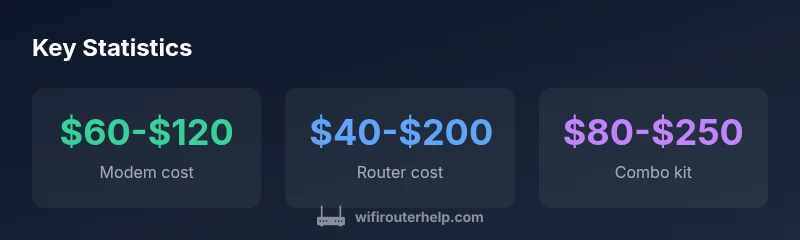
In 2026, a budget modem costs about $60-$120, a router about $40-$200, and a combined modem-router kit around $80-$250. Renting from an ISP adds $5-$15 per month. According to WiFi Router Help analysis, these ranges reflect differences in features like WiFi 6/6E, security options, and warranty. For a clearer plan, read the full guide below.
Understanding Cost Drivers for Modems and Routers
When evaluating how much does a modem and router cost, the first thing to understand is what drives price. Hardware families vary by technology generations (WiFi 4/5/6/6E), maximum advertised speeds, and the number of simultaneous streams they support. A modem's price depends mainly on DOCSIS standard (2.0, 3.0, 3.1), channel bonding, and compatibility with your internet plan. A router's price reflects WiFi standard (802.11ac vs ax), data rates, antenna design, MU-MIMO support, and smart features like QoS, guest networks, and parental controls. You’ll also see price differences due to firmware support, warranty length, and brand premium. Finally, buying a kit (modem+router) often carries a bundled discount, but you may trade flexibility for savings. This section summarizes typical value ranges and how to interpret them, based on WiFi Router Help Analysis, 2026.
Upfront Costs by Configuration
Prices vary by configuration:
- Modem only: typically in the $60-$120 range, depending on DOCSIS standard and compatibility.
- Router only: typically in the $40-$200 range, with higher prices for WiFi 6/6E and advanced features.
- Modem+Router combo kit: commonly $80-$250, often with a bundled discount but less flexibility. If you already own one piece, you can mix-and-match to save upfront costs. These ranges reflect typical retail and do not account for special offers or refurbished options, as reported by WiFi Router Help Analysis, 2026.
Rental vs. Purchase: The Long View
ISP rental can be convenient but adds ongoing costs. If a rental is $5-$15 per month, you’ll pay roughly $120-$180 over two years, and more over three years. Buying upfront means a higher initial outlay but zero ongoing modem/router fees, aside from occasional replacement costs and potential firmware updates. A break-even analysis is highly dependent on usage, but for light to moderate households, buying often pays off within 1-2 years, depending on the exact hardware and warranty terms. WiFi Router Help Analysis, 2026 indicates the general tipping point is highly usage-dependent.
Compatibility and Buying Options
Compatibility matters more than you might think. Cable modems must match your ISP's DOCSIS standard (3.0/3.1); routers should support your desired WiFi standard and speed tier. If you have fiber, you’ll often get a gateway device provided by the ISP, which blends modem and router functionality but can limit third-party customization. When shopping, verify channel bonding,‑bridge/ router mode options, security features, and support windows. These practical checks help you avoid overpaying for features you won’t use, while ensuring future-proofing within your budget.
Hidden Costs and Value-Added Features
Beyond sticker price, consider potential add-ons: extended warranty, premium customer support, security subscriptions, and firmware update guarantees. Some brands offer free lifetime firmware updates, while others charge per year for enhanced security or advanced parental controls. Shipping, taxes, and return policies also affect total cost. If a feature is software-based (e.g., advanced QoS or VPN features), confirm whether it requires a paid plan or is included with the base device. WiFi Router Help Analysis, 2026 highlights that these value-added items can swing overall cost by 10-20% over a device’s lifetime.
Budgeting Strategies and Tips
To manage costs effectively:
- Compare bundles vs buying separately and watch for seasonal sales.
- Consider refurbished or open-box devices from reputable retailers, with warranty.
- Check for promo codes or student/military discounts.
- Prioritize essential features (stable 1 Gbps or higher, modern WiFi 6) and defer premium features if they don’t fit your needs.
- Factor in future-proofing: a router with WiFi 6/6E and decent CPU can extend usefulness as speeds grow.
Real-World Scenarios: Small Apartment, Home Office, Gaming
- Small apartment: a compact modem/router combo with WiFi 6 can cover 2-3 rooms and save upfront cost.
- Home office: prioritize stable Mbps throughput, reliable security, and Quality of Service (QoS) to prioritize work devices.
- Gaming: emphasize low latency and robust 5 GHz performance; consider a separate, high-quality router with a strong 2.4/5 GHz band to handle multiple devices.
How to Verify Price When Shopping
Always compare MSRP vs street price and check retailer price history. Look for retailer rebates, mail-in offers, and bundle discounts. Confirm whether price includes accessories (cables, setup guides) and whether extended warranties are included or optional. A careful price check helps you avoid overspending on features you don’t need.
Cost ranges for common modem and router configurations
| Option | Typical upfront cost | Monthly cost (if rented) | Notes |
|---|---|---|---|
| Modem (standalone) | 60-120 | 0 | Buy to own; DOCSIS compatibility matters |
| Router (standalone) | 40-200 | N/A | Buy to own; WiFi standard impacts cost |
| Modem + Router (combo) | 80-250 | N/A | All-in-one kit; bundled discount possible |
| Rental (modem+router) | 0 upfront | 5-15 | Monthly rental from ISP; long-term cost higher |
People Also Ask
What is the typical upfront cost to buy a modem and router together?
Typical upfront costs for a modem and router together range from about $100 to $320, depending on the features and speed tier. A combo kit often offers a bundled discount but may limit upgrade flexibility. Consider your needs and future speed plans when deciding.
In most cases, expect around $100 to $320 upfront for a modem and router combo, with bundles offering discounts but less flexibility.
Is it cheaper to rent or buy a modem and router?
Renting typically costs $5-$15 per month, adding up over 2-3 years. Buying upfront avoids monthly fees but requires a larger initial investment. For many households, buying pays off within 1-2 years, depending on usage and warranty.
Renting can cost more over time, while buying upfront usually pays off within a couple of years for most households.
Do I need a separate modem and router if I have fiber internet?
With fiber, many providers supply a gateway that combines modem and router functions. You can use a separate router to gain more control and features, but ensure compatibility and bridge mode are supported. Evaluate whether the gateway meets your needs before buying separate devices.
If you have fiber, you often get a gateway; you can add a separate router if you want more control or features.
Can I reuse my old modem with a new router?
Yes, you can pair an existing modem with a new router, provided the modem is compatible with your ISP’s service and the router supports your speed tier. This is a common way to balance cost and performance.
You can reuse your old modem with a new router if they’re compatible with your service.
What should I compare besides price when buying a modem and router?
Compare WiFi standards (WiFi 6/6E), speed ratings, number of bands, security features, warranty, update policy, and ease of setup. Future-proofing and compatibility with your ISP should guide your decision as much as price.
Look at WiFi standards, security, warranty, and update policies, not just the price.
“Smart budgeting for home networking means mapping features to your actual needs and avoiding pay-for-what-you won’t use.”
What to Remember
- Clarify your needs before buying
- Consider total cost over time, not just upfront
- Check ISP compatibility and bridge mode options
- Weigh rental vs purchase based on usage
- Look for bundles or refurbished deals to save