How Does Router Cost Break Down for 2026? A Practical Guide
Discover how does router cost break down across entry, mid, and premium models, what features drive price, and how to estimate total ownership costs.


How much does a home router cost? In practice, how does router cost vary, and what should you expect to pay? Typical consumer routers span about $60–$250, with entry-level units around $60–$100 and feature-rich models often $150–$250. Price mostly tracks Wi‑Fi standard, coverage, ports, and security features, not just brand, per WiFi Router Help analysis, 2026.
Understanding the Cost Landscape for Routers
Prices reflect more than branding; they encode performance, coverage, security, and future-proofing. When you ask how much you should pay for a router, the answer depends on how you use your network, the size of your home, and your internet plan. In this section, we break down the cost landscape and set expectations for 2026. We also discuss how different usage scenarios—from casual browsing to heavy gaming and smart-home ecosystems—alter the price-to-performance equation. The WiFi Router Help team has analyzed consumer pricing trends and found that the biggest price levers are Wi‑Fi standard (Wi‑Fi 5, 6, 6E), band count, throughput, and hardware features like MU‑MIMO, beamforming, USB ports, and security options.
Price Bands Explained
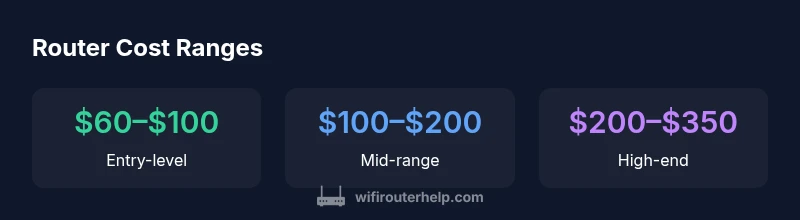
Entry-level: $60–$100
These routers cover basic web browsing and HD streaming on a modest mix of devices. They typically offer single- or dual-band operation, limited MU-MIMO, and essential security features. If your home is small and your devices few, this tier can be cost-effective.
Mid-range: $100–$200
Expect better range, more stable connections across multiple devices, supported MU-MIMO, and dual-band or tri-band configurations. You’ll usually get more robust security options, USB ports, and better QoS for video calls and gaming.
High-end: $200–$350
Tri- or quad-band models with Wi‑Fi 6 or 6E, advanced QoS, more ports, VPN support, and mesh-friendly design. These units are future-proof and better for large homes or heavy workloads. For many households, this tier delivers noticeable improvements in latency and stability.
What Drives Router Cost? Key Features and Specs
Router pricing is driven by a combination of wireless standard (whether the device supports Wi‑Fi 5, 6, or 6E), the number of bands, and the hardware features that enable better range, speed, and reliability. Features such as MU‑MIMO, beamforming, and Band Steering improve performance but add cost. USB ports, advanced security options (including built-in VPN and threat protection), guest networks, and parental controls can push price higher, especially in mid- to high-end models. Finally, design considerations like mesh compatibility, number of antennas, and ease of setup influence the final sticker price. In 2026, buyers should expect a clear correlation between feature sets and cost, with Wi‑Fi 6/6E devices commanding premium prices for real-world benefits.
Estimating Your True Cost for a Home Network
To estimate your real router cost, start with your home size and device count. A small apartment with 5–8 devices may be comfortable with an entry- or mid-range model, while a multi-story home or smart-home setup with dozens of devices benefits from a higher tier. Consider your internet plan’s speed and the maximum throughput you actually need; a faster plan may require a capable router to avoid bottlenecks. Budget for future-proofing: if you anticipate growth in devices or a move to faster internet, factor in a modest premium for a Wi‑Fi 6/6E device. Finally, add a small buffer for accessories (extenders or a NAS) if you expect to expand.
Practical Buying Strategies to Maximize Value
- Define your needs before shopping to avoid overpaying.
- Prioritize essential features (security, coverage, manageable QoS) over flashy specs.
- Look for warranties and reputable return policies, especially on higher-priced units.
- Watch for sales around holidays or back-to-school seasons to maximize value.
- Consider a budget for future upgrades rather than chasing the latest model every year.
Maintenance, Lifespan, and Lifecycle Costs
Routers typically last 4–6 years with regular firmware updates and good physical care. When evaluating cost of ownership, include ongoing firmware updates, potential replacement parts, and electricity usage. Higher-end models may offer longer support cycles, which adds value beyond the upfront price. Efficient, well-supported devices reduce total ownership costs by avoiding hurried replacements and security gaps.
Real-World Scenarios: Cost in Different Homes
In a small apartment, a $60–$100 entry-level router often suffices, delivering reliable streaming for a handful of devices. In a mid-sized home with many smart devices, a $100–$200 mid-range router will typically yield stronger coverage and better performance. For large homes or demanding setups (gamers, home offices, mesh networks), investing in $200–$350 high-end devices yields noticeable improvements in latency and stability. Real-world pricing varies by vendor and promotions, so planning around seasonal sales helps maximize value.
Price bands with feature highlights
| Category | Typical Range | Key Features | Best For |
|---|---|---|---|
| Entry-level | $60–$100 | 2.4 GHz; basic security; USB (optional) | Casual browsing & light streaming |
| Mid-range | $100–$200 | Dual-band/tri-band, MU-MIMO, better QoS | Small homes, multi-device use |
| High-end | $200–$350 | Wi‑Fi 6/6E, tri-band, VPN, robust security | Power users, gaming, smart homes |
| Premium | >$350 | Mesh-ready, USB-C, enterprise features | Large homes, heavy workloads |
People Also Ask
What factors influence router pricing the most?
Router pricing is primarily driven by wireless standard, number of bands, throughput, and hardware features. Security options and USB ports can tilt costs upward. Real-world value comes from how well these features meet your needs.
Pricing mainly depends on wireless standard, bands, and performance features. Security options and ports add value depending on your setup.
Is it worth buying a higher-priced router for a small apartment?
In many cases a mid-range router offers better coverage and stability in a small apartment than an entry-level model. If you only have a few devices and a modest plan, an entry-level device might be sufficient. Assess actual coverage needs before upgrading.
For a small apartment, a mid-range router often beats entry-level. Consider your coverage needs before deciding.
Do routers go on sale, and when?
Yes. Routers frequently go on sale around major shopping holidays and back-to-school periods. Signing up for retailer alerts and price-watch tools can help you time purchases for the best value.
Routers go on sale during big shopping events. Set price alerts to snag a good deal.
Should I upgrade now or wait for a new standard?
If your current router struggles with coverage, stability, or supports older standards, upgrading now to Wi‑Fi 6/6E makes sense. Waiting for a new standard like Wi‑Fi 7 should be weighed against your immediate needs and the cost delta.
If your current setup is slow or unreliable, upgrade. Waiting for a new standard depends on your needs.
What is the difference between a dual-band and tri-band router?
Dual-band routers operate on two frequency bands (2.4 and 5 GHz). Tri-band adds an additional 5 GHz band, which can help with heavy traffic and many devices. The extra band improves performance in busy homes but at a higher price.
Dual-band covers two bands; tri-band adds another 5 GHz lane for busy networks.
How long should a router last before needing replacement?
Most routers last 4–6 years with regular firmware updates. Performance and security benefits from newer standards may justify earlier replacement for high-demand setups.
Typically 4–6 years, depending on usage and updates.
“Router cost is a proxy for performance and future-proofing; invest in features you will actually use, not just the latest trend.”
What to Remember
- Define your needs before shopping to avoid overpaying.
- Price reflects features, not brand alone.
- Consider total cost of ownership beyond sticker price.
- Prioritize essential features like security and coverage.
- Shop during sales and check warranty for value.