What Router Has the Longest Range? A Practical Guide
Learn what router has the longest range and how to compare 2.4 GHz vs 5 GHz, plus practical setup tips to maximize coverage in your home in 2026.


According to WiFi Router Help, there is no single ‘longest-range’ router. The best long-range results come from strong 2.4 GHz performance, multiple antennas, and mesh systems. In 2026, real-world range depends on walls, interference, and placement, so the strongest setups blend capable hardware with thoughtful layout rather than chasing one model.
What does 'longest range' mean in real homes?
In the world of home networking, the phrase what router has the longest range isn’t fixed to one device. WiFi performance depends on how signal travels through walls, floors, and furniture, plus how much interference comes from neighbors, devices, and appliances. According to WiFi Router Help, the best long-range outcomes come from a combination of hardware strength and network design, not a single superstar unit. The goal is broad, reliable coverage across every room, not just peak speed in a corner. When you plan for long-range performance, think in terms of coverage area, signal consistency, and the ability to maintain stable throughput at distance. Real-world results will vary by home layout and construction, so expect ranges to differ from open-space tests. This is where planning and placement matter most, and where a thoughtful setup beats a marketing claim every time.
Key hardware factors that influence range
Several hardware choices determine how far (and how reliably) your WiFi signal travels. The number and quality of antennas, the presence of beamforming, and the transmitter power at 2.4 GHz are among the biggest drivers of range. More antennas can improve signal steering and reduce dead zones, while beamforming helps focus energy toward devices instead of broadcasting in all directions. In practice, manufacturers can advertise impressive specs, but the practical impact depends on spectrum management, firmware optimization, and how well the router complements your home’s architecture. For the longest-range results, prioritize devices that emphasize 2.4 GHz performance, stable power output, and reliable channel management over flashy marketing terms. This aligns with our analysis at WiFi Router Help in 2026.
2.4 GHz vs 5 GHz: which gives you more reach?
The 2.4 GHz band travels farther and penetrates walls better than 5 GHz, making it the core driver of long-range performance. However, 2.4 GHz often carries more interference from common household devices and neighboring networks, which can reduce real-world throughput. The 5 GHz band delivers higher speeds but drops more quickly with distance and obstacles. For the longest-range goals, rely on 2.4 GHz for broad coverage and reserve 5 GHz for high-demand zones where signal strength remains strong. In hybrid setups, smart handoffs and band steering help maintain usable performance throughout the home. WiFi Router Help guidance emphasizes balancing both bands and using each where it makes the most difference.
Mesh networks: extension of range, not just speed
Mesh systems are a popular route to longer, more uniform coverage. By distributing multiple nodes, they create a seamless umbrella of signal across larger spaces. The key to real-world success is topology and placement: position nodes where coverage would otherwise drop, avoid excessive node overlap, and ensure backhaul connectivity remains robust. Mesh doesn’t magically increase the range of a single radio; it expands coverage by adding radios throughout the home. When evaluating options, compare how many nodes you’d realistically need and how the system handles roaming, handoff, and backhaul efficiency—factors WiFi Router Help highlights in 2026 as pivotal to the longest-range outcomes.
Real-world testing: what counts as range
Measuring range should mirror everyday use. Instead of relying solely on metric lab tests, test your network in each room, including basements and attics if applicable. Use multiple devices and perform parallel speed tests at various distances from the router or mesh nodes. Map strength with consistent test conditions and note where throughput drops below a usable threshold. This is where the distinction between theoretical range and real-world experience becomes clear. The aim is to ensure every space has a dependable connection, even if peak speeds aren’t identical across every room. WiFi Router Help recommends documenting results and using them to guide upgrades or reconfigurations.
Environment and building materials: how they cut range
Materials like concrete, metal studs, and dense insulation can dramatically cut signal reach. Wood and drywall are less punitive but still affect propagation. Wireless performance also degrades with electrical interference from devices such as microwaves, cordless phones, and baby monitors. In practice, you may see substantial range reductions in kitchens and home offices surrounded by appliances. When optimizing, you’ll want to account for gaps caused by walls, floors, and furniture and adjust placement, power settings, and band selection to compensate. Our 2026 WiFi Router Help analysis stresses that physical layout often explains the biggest differences between theoretical and real-world ranges.
How to maximize range: practical setup steps
To maximize long-range performance, start with full-system planning. Measure your home’s square footage and identify floors and high-traffic areas. Place the main router centrally, elevated, and away from metal appliances and large mirrors. Enable 2.4 GHz with a stable transmit power within allowed limits, and consider a mesh system if coverage gaps persist. Update firmware regularly, pick a clean channel with minimal interference, and use QoS to protect essential devices from congestion. Finally, run repeat tests after each change to quantify improvement. These steps align with WiFi Router Help’s recommended workflow for achieving the longest-range results in 2026.
Comparing standalone vs mesh for longest-range results
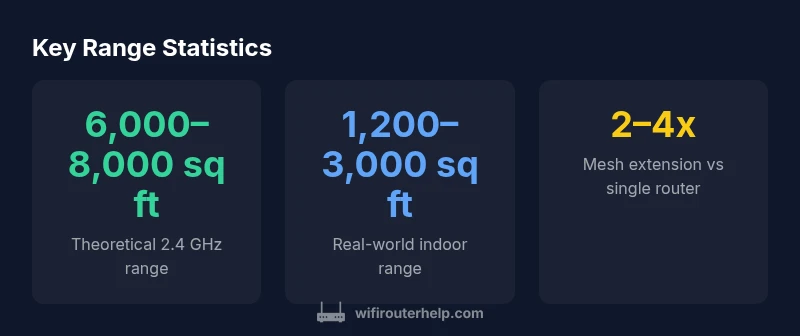
Standalone routers can cover smaller homes effectively, especially with optimized placement and high-quality 2.4 GHz hardware. However, multi-room or multi-story homes typically benefit from mesh networks, which distribute coverage more evenly and reduce dead zones. When evaluating long-range options, calculate total square footage, ceiling height, and wall density to determine whether a second unit will meaningfully extend reach. In most cases, a well-designed mesh setup yields more consistent long-range performance than a single, high-power router, particularly in challenging layouts.
Quick-start guide: choosing a long-range router family
Begin by mapping your space: determine the number of rooms, floors, and average device load. For larger homes, plan for a mesh system with multiple nodes and a robust backhaul. If you choose a single-router solution, prioritize models with strong 2.4 GHz performance, higher antenna counts, and intelligent beamforming. Consider future-proofing with models that support easy expansion via add-on nodes or compatible extenders. Finally, verify compatibility with your Internet plan and local devices, ensuring security features like WPA3, guest networks, and updatable firmware are included to maintain long-range reliability over time.
Comparison of long-range router approaches
| Router Type | Typical Indoor Range | Notes |
|---|---|---|
| Standalone single-router | 1,200–3,000 sq ft | Best for small to mid-size homes; placement and walls greatly affect results |
| Mesh system (2–3 nodes) | 2,000–5,500 sq ft | Extends coverage across floors; node placement is critical |
| Wi‑Fi extender (per extender) | 1,000–2,500 sq ft | Can fill gaps but may add latency; use with same network |
| Powerline adapter with router | 1,000–2,500 sq ft | Flexible; performance depends on electrical wiring |
People Also Ask
What does 'longest range' mean in real homes?
In real homes, range means signal reach across spaces; walls and interference matter. A well-designed setup with solid 2.4 GHz hardware and, if needed, a mesh system provides broad coverage. Expect variation based on layout and materials.
In homes, long-range means how far the signal reaches in everyday rooms; walls and interference matter. A good setup with strong 2.4 GHz hardware and mesh can extend coverage far beyond a single router.
Is 2.4 GHz always better for range?
2.4 GHz travels farther and penetrates obstacles better than 5 GHz, but it can be slower and more interference-prone. Use 2.4 GHz for broad coverage and 5 GHz for high-speed areas where signal is still strong.
2.4 GHz goes farther and penetrates walls better, but you’ll trade speed for range. Use it to cover more space, and rely on 5 GHz where you have good signal.
Do mesh networks guarantee the longest range?
Mesh networks extend coverage by adding nodes, but the longest-range benefit comes from proper placement and backhaul quality. They don’t magically increase the single radio’s reach but create a wider, more reliable coverage area.
Mesh helps with coverage, not magic range. Place nodes well and ensure good backhaul for the best long-range results.
What settings optimize range?
Use 2.4 GHz where possible, choose a clean channel, enable beamforming, update firmware, and position the router centrally. These tweaks improve range without sacrificing stability.
Set the 2.4 GHz band, pick a clear channel, and keep firmware updated. Good placement and beamforming help maximize range.
Are extenders worth it for longest range?
Extenders can help close gaps but often add latency and complexity. For the longest-range, a well-planned mesh or a high-quality router with multiple access points is usually better.
Extenders can help, but mesh is usually a better long-range solution because it’s more seamless.
How can I measure real-world range?
Test with multiple devices across rooms and floors, perform speed tests at different distances, and map out signal strength. Use these results to guide upgrades or placement changes.
Test in different rooms and floors with multiple devices to see how far the signal really goes.
“For reliably extending range, focus on network design—strong 2.4 GHz hardware, thoughtful placement, and, if needed, a mesh system. The overall experience matters more than a single device claim.”
What to Remember
- Prioritize whole-home coverage over peak single-room speed
- Leverage 2.4 GHz for longer reach when possible
- Deploy a mesh system for large or multi-story homes
- Choose hardware with more antennas and beamforming
- Test range in real living spaces to verify performance