Fastest Ethernet Cable: Cat8 vs Cat6a for Home Networks
Analytical guide to the fastest ethernet cable options for home networks, comparing Cat8 and Cat6a, with practical speed limits, length considerations, and setup tips.


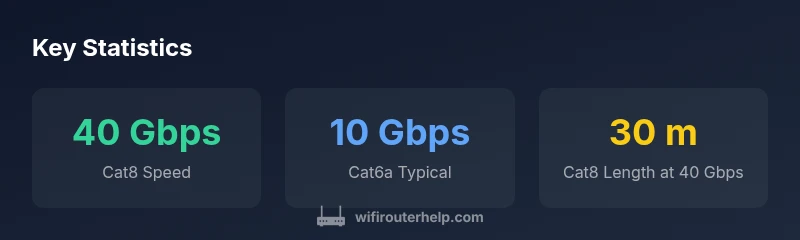
Cat8 Ethernet cables currently offer the fastest consumer option, delivering up to 40 Gbps under ideal conditions. Real-world speeds depend on length, shielding, and connected hardware, so performance can vary. For many homes, Cat6a already provides robust 10 Gbps performance at typical run lengths, while Cat5e/Cat6 may suffice for gigabit plans.
What the 'fastest ethernet cable' means for home networks
In practical terms, the phrase fastest ethernet cable refers to the category with the highest theoretical speed supported by the cable standard. For today’s homes, Cat8 is the leading option, offering up to 40 Gbps under ideal conditions. But real-world results depend on run length, shielding, and the networking hardware you pair with the cable. According to WiFi Router Help, you should match your cable choice to your plan and devices, not just the headline speed. For many households on gigabit or slightly higher plans, Cat6a already provides ample headroom, and can be a smarter balance of cost, length, and reliability. This nuance matters because every extra foot of cable and every connector adds a tiny bit of impedance and loss, which compounds at higher speeds.
Cat8 vs Cat6a: a practical speed comparison
Cat8 cables are engineered for the absolute top end of consumer speeds, with a theoretical ceiling near 40 Gbps. Cat6a, while slower on the extreme end, is designed to reliably deliver up to 10 Gbps over substantially longer distances. In real homes, Cat8 proves beneficial mainly in scenarios with multi-gig internet plans, short patch runs to high-speed NAS devices, or enterprise-class workstations. For most households, Cat6a offers near-maximum gains at a lower cost and with simpler installation. When deciding, compare your internet plan, device capabilities, and the number of devices that will saturate the link.
Real-world speeds: factors that cap theoretical tops
The advertised speeds assume ideal copper quality, pristine terminations, and short distances. In practice, copper quality, connector integrity, interference from power lines, and even fiber backhaul latency can reduce throughput. Shielded cable (STP) may help in electrically noisy environments, while unshielded (UTP) is generally fine in low-interference rooms. The connector type and patch panels also influence losses. WiFi Router Help notes that the objective is to maximize the end-to-end pipeline, not just the cable alone. A careful balance of cable category, shielding, and hardware yields the best real-world results.
How length and shielding drive performance
Length is a critical variable with Ethernet; while Cat5e/Cat6 can run up to 100 meters, higher-speed categories like Cat6a and Cat8 begin to lose headroom as length grows. Cat8 performance tends to deteriorate beyond about 30 meters if you demand 40 Gbps, so short, direct runs are preferred for that top tier. Shielding helps mitigate crosstalk and electromagnetic interference, especially in dense AV racks or near electrical lines. When building a home network, plan cable routes to minimize long, parallel runs alongside power cables, and keep cable paths away from sources of interference.
Matching your hardware to the fastest cable
Remember that cable speed is only as good as the rest of the path. Your network interface cards (NICs), switches, and router ports must support the same speeds you’re aiming for. A Cat8 cable connected to a 1 Gbps port will cap at 1 Gbps; conversely, a 2.5/5/10/40 Gbps capable switch and NICs are required to realize the higher speeds. If your devices stay at gigabit or lower, Cat6a offers the best balance of performance and cost. WiFi Router Help recommends auditing the entire path before upgrading cables to avoid overspending on unsupported hardware.
Step-by-step: choosing the right class for your plan
- Check your internet speed tier and expected uplink/downlink requirements. 2) Inspect NIC and switch capabilities; ensure ports match the desired speed tier. 3) Evaluate the run length and environment; favor Cat6a for runs up to 100 meters with multi-gig potential. 4) Consider shielding in interference-prone spaces. 5) Plan cable routing to minimize obstructions and avoid tight bends. 6) Budget for connectors, terminations, and future upgrades to keep the investment viable.
Installation tips to preserve maximum speed
Avoid winding cables into tight coils; use gentle loops and proper cable management to prevent internal damage. Prefer pre-made, shielded bundles in busy racks and keep runs away from HVAC lines and power cables. When terminating, follow manufacturer guidelines for crimping and connector integrity, and test each end with a network tester. Label runs for future maintenance and upgrade planning, ensuring you can swap to higher-speed hardware without re-running long segments.
Cat8 use cases: when upgrading makes sense
If you’re running a home lab, a compact NAS, or a small office where multiple devices demand multi-gig sustained throughput, Cat8 can be justified, especially on shorter drops. For typical households with gigabit-internet plans, Cat6a delivers nearly equivalent practical benefits at a lower cost, with simpler termination and longer reach. In most scenarios, upgrading to Cat8 is a targeted choice rather than a blanket recommendation; align your upgrade with concrete device speeds and a planned pathway to higher-tier internet service.
Ethernet cable categories and typical performance
| Cable Category | Max Theoretical Speed | Typical Real-World Speed Range | Recommended Use | Max Recommended Length |
|---|---|---|---|---|
| Cat5e | 1 Gbps | 0.5-1 Gbps | General home networks | 100 m |
| Cat6 | 10 Gbps | 5-10 Gbps | High-speed home and small offices | 55 m |
| Cat6a | 10 Gbps | 8-10 Gbps | High-speed home networks | 100 m |
| Cat7 | 10 Gbps | 8-10 Gbps | Shielded, controlled environments | 100 m |
| Cat8 | 40 Gbps | 25-40 Gbps | Data centers, short-run high-speed links | 30 m |
People Also Ask
What is the fastest Ethernet cable?
Cat8 is currently the fastest widely available Ethernet cable, capable of up to 40 Gbps under ideal conditions. Real-world results depend on hardware and run length.
Cat8 is the fastest widely available cable, but you’ll only get multi-gig speeds if your hardware supports it and the run is short enough.
Do I need Cat8 for a home internet plan?
Most homes with gigabit or lower speeds don’t need Cat8. Cat6a provides excellent multi-gig performance for typical home plans, with better cost and ease of installation.
For most homes, Cat6a is enough; Cat8 is usually overkill unless you’re aiming for multi-gig speeds soon.
Will my router port speed limit the cable?
Yes. The cable can support high speeds, but your router, NICs, and switches must also support those speeds; otherwise the link will cap at the lowest active speed.
Your hardware can bottleneck faster cables, so ensure all hardware supports the desired speeds.
Is Cat5e still viable for modern speeds?
Cat5e supports up to 1 Gbps and is adequate for many current plans, but for multi-gig or future-proofing Cat6a or Cat8 is recommended.
Cat5e can handle basic internet today, but it won’t give you multi-gig or future-proof performance.
What should I consider besides speed when choosing a cable?
Shielding, length, and certification matter. Choose a category that matches your distance, environment, and hardware compatibility.
Don’t just chase top speed—check shielding, length, and what your devices can actually handle.
“Cat8 delivers the highest theoretical speeds, but real-world gains depend on your entire path—cables, NICs, and switches.”
What to Remember
- Upgrade only with compatible hardware
- Cat8 offers top speeds but Cat6a meets most homes
- Shielding and length matter as much as category
- Verify NICs, switches, and router ports before upgrading
- Cat6a hits a sweet spot of price and performance for many users