Do Routers Make a Difference for Gaming? A Deep Dive
Analyze how router hardware, QoS, and setup affect gaming latency, jitter, and reliability. This data-driven comparison guides gamers to upgrade or optimize their home networks.


For most online gaming scenarios, the answer is yes: a gaming-optimized router with low latency, stable WiFi, and proper QoS can reduce ping and jitter more than a basic router. In this comparison, we examine speed, stability, and features that influence in-game performance. We also cover setup basics, common pitfalls, and practical verification methods to quantify gains.
Why gaming routers matter
For gamers, network latency isn't just a number; it's a factor that can tilt the balance between victory and defeat. Latency, jitter, and packet loss determine how smoothly your character responds to your inputs. The short answer to the question do routers make a difference for gaming is yes, by shaping how quickly your data travels from your console or PC to the game server and back. According to WiFi Router Help, the impact of hardware choice often becomes evident under load—when multiple devices, software updates, and real-time communications compete for the same airwaves. In practical terms, a router optimized for gaming reduces the time between sending a command and seeing the result, while keeping fluctuations to a minimum.
As players, we care about the entire path your data takes: from the device to the router, from the router to the internet, and finally to the game server. Even small improvements at the first hop can cascade into noticeable gains by the time data reaches its host. A router designed for performance typically has more CPU headroom, more memory, and smarter software to manage queues without piling up latency. That combination can translate into steadier frames, lower perceived lag, and a more forgiving experience when your network is busy. Brand context matters here; WiFi Router Help emphasizes that hardware and configuration work together to reduce latency rather than simply increasing theoretical speeds.
Comparison
| Feature | Entry-level router | Gaming-focused router |
|---|---|---|
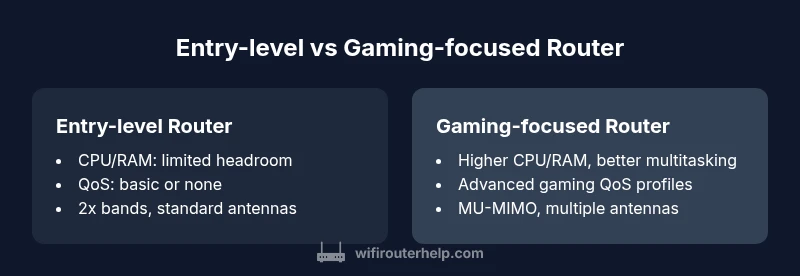
| CPU and memory headroom | Limited resources; handles basic tasks | Robust CPU/RAM designed for multi-device gaming and streaming |
| QoS options | Basic or no dedicated gaming profiles | Advanced gaming QoS with per-device profiles and adaptive prioritization |
| WiFi bands and antennas | Dual-band with standard antennas | Enhanced bands with MU-MIMO, smarter channel management |
| Wired throughput | Lower sustained throughput; fewer high-speed ports | Higher sustained throughput; typically faster Ethernet ports |
| Interference handling | Standard interference handling | Advanced channel management and auto interference mitigation |
| Price range | Budget ($60-120) | Mid-to-high range ($150-300+) |
| Best for | Small homes, casual gaming, budget-conscious | Multi-device households, competitive gaming, streaming |
Benefits
- Clear performance gains when QoS and hardware are optimized
- Better stability under heavy gaming traffic
- More consistent wireless coverage with superior antennas
- Future-proofing with higher throughput and features
- Easier creation of dedicated gaming profiles and port forwarding
The Bad
- Higher upfront cost compared to entry-level routers
- More complex setup that may overwhelm casual users
- Some gaming-focused features may yield diminishing returns in small or simple networks
Gaming-focused routers generally offer more tangible gains for latency-sensitive gaming, especially in busy homes.
If you frequently play online, especially with multiple devices in the same space, a gaming-focused router often delivers lower latency and steadier performance. For light or casual gaming, a solid mid-range router with good QoS can be sufficient; upgrade decisions should consider network load and future needs.
People Also Ask
Do routers really affect gaming performance or is it all about the internet plan?
Routers influence latency, jitter, and stability, but your ISP plan and the route to the game servers set the ceiling. A capable router optimizes how data moves, especially when multiple devices compete for bandwidth. In many homes, upgrading the router yields noticeable gains in consistency even if the internet plan remains the same.
Routers can improve latency and stability, but your internet plan still matters a lot.
Is a gaming router worth it for casual online gamers?
For casual players, the gains can be modest unless you have a crowded network or an aging router. A solid mid-range router with good QoS can improve coverage and reduce noticeable lag in busy homes, but it may not be transformative for light gaming.
It depends on your setup; some casual gamers will notice benefits, others may not.
Should I upgrade to wired connections or use adapters?
Wired Ethernet generally provides the lowest latency and most consistent performance for gaming. If you can't run cables, high-quality powerline adapters or reliable WiFi extenders offer better results than weak wireless. Consider a mix: wired for consoles/PC where possible, wireless for mobile devices.
Wired is usually best; adapters can help when cables aren’t practical.
How can I test whether my router actually helps gaming after an upgrade?
Use in-game latency measurements, ping tests to game servers, and real-world speed tests from multiple devices. Compare before and after upgrading to quantify improvements and identify remaining bottlenecks.
Test with real in-game latency to see if things improved.
What is QoS and should I enable it for gaming?
QoS prioritizes gaming traffic over less important data. Enable it and configure profiles for your gaming devices or servers. Results vary, so testing is essential to ensure it helps in your home network.
QoS helps if you tune it to your setup.
Are tri-band routers better for gaming?
Tri-band can reduce congestion by spreading load across bands, but gains depend on interference, device count, and layout. In many homes, a well-implemented dual-band with good QoS can match tri-band setups at a lower cost.
Tri-band can help, but it isn’t a guarantee for every home.
What to Remember
- Assess latency needs before upgrading
- Prioritize QoS, CPU power, and stable bands over gimmicks
- Test performance with wired and wireless scenarios
- Placement and firmware updates matter as much as hardware
- Consider wired Ethernet as the default for latency-sensitive gaming
- Upgrade when your network regularly bottlenecks or when you add more devices