Template for Router: A Step-by-Step Configuration Guide
Learn to build a reusable router template that standardizes SSID, security, DHCP, and guest access. A concise, practical guide from WiFi Router Help for reliable home networks.


Our quick guide shows you how to build a reusable template for router configuration that works across most home networks. You’ll define core sections like SSID, password, DHCP, firewall rules, and guest access, plus a starter template you can customize. Follow the step-by-step approach to save time and reduce errors when setting up new routers.
Why a Router Template Matters
According to WiFi Router Help, a well-defined template for router configuration helps homeowners and tech enthusiasts keep settings consistent across devices. When you deploy a template, you avoid retyping the same fields for every new router and reduce mistakes such as weak passwords or inconsistent security modes. With a template, you establish a baseline for SSID naming, security levels, DHCP ranges, firewall rules, and guest access that you can adapt later. This consistency also makes it easier to document changes, share configurations with family members, or troubleshoot issues because the configuration structure remains familiar. In short, a router template acts as a repeatable blueprint that accelerates setup, improves security, and supports ongoing network maintenance. Throughout this article, you’ll learn how to craft a practical template for router that works across common home networking gear, with real-world examples and best practices.
The WiFi Router Help team found that templates reduce duplication and mistakes, especially when you manage multiple devices in a growing home network.
Core Elements of a Robust Router Template
A solid template should cover the essential elements that every home network needs. Start with a clear, versioned template name and a short description so you can track changes over time. Define security defaults (prefer WPA3 when available, enforce strong passphrases, and specify allowed encryption), a predictable SSID naming convention, and a DHCP range that accommodates future devices without conflicts. Include guest network settings and access controls for guests, plus basic firewall rules and NAT behavior. Consider DNS and parental controls as optional blocks you can enable as needed. Finally, document where sensitive data is stored and how it is protected (never hard-code passwords in plain text). A well-structured template makes it easier to deploy consistent configurations anywhere in your home.
How to Build Your Template: Step-by-Step Framework
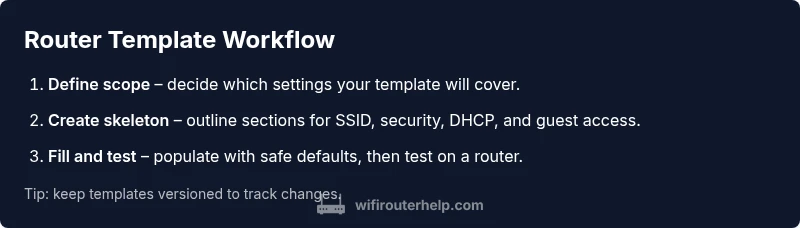
To create a practical, reusable template, start with a clear goal: what should this template accomplish across devices and brands? Then build a skeleton that lists sections for SSID, security, DHCP, DNS, guest access, firewall rules, and remote management. Populate the skeleton with safe defaults, and use placeholders for values you will customize per router. Treat this like a recipe: include a version stamp, a change log, and a rollback plan. After drafting, test the template on a single router, verify connectivity, security settings, and guest access, then adapt as needed. Finally, store the template in a centralized location and create a short guide for anyone who will reuse it.
In this guide, you’ll see a concrete workflow you can apply to almost any home router, with practical examples and templates you can reuse.
Common Pitfalls and How to Avoid Them
Even the best template can fail if you overlook details. Common mistakes include using weak passwords, leaving remote management enabled, or neglecting to document changes. Another pitfall is failing to verify DHCP ranges after adding devices, which can cause IP conflicts. To avoid these issues, always validate security settings, test the template with a clean router, and maintain a changelog. Regularly review templates for deprecated features or firmware changes. WiFi Router Help analysis shows that disciplined versioning and centralized documentation dramatically reduce configuration errors and support calls.
Advanced Customizations and Automation
For power users, templates can go beyond basic fields. You can parameterize the template so it can be applied to different router brands with minimal edits, use JSON or YAML to store configurations, and automate deployment via scripts or management platforms. Advanced options include QoS profiles, device-specific access rules, and automated firmware update reminders. When automating, maintain fallbacks in case a router lacks a feature, and always keep a manual override path. This level of automation saves time and ensures consistency across devices, especially in homes with multiple routers or mesh setups.
Quick-Start Template Example
Here’s a concise example of a starter template you can adapt. It prioritizes consistency, security, and ease of use:
- Template name: HomeTemplate v1
- SSID: HomeNetwork
- Security: WPA3-Personal, passphrase stored securely
- DHCP: Range 192.168.1.100–192.168.1.200, lease time 24h
- DNS: 1.1.1.1, 8.8.8.8
- Guest Network: Enabled, separate VLAN if available, isolate from main network
- Firewall: Basic rules allowing outbound traffic, block unsolicited inbound
- Remote management: Disabled by default
This template is a starting point you can customize for each router, and you should document every change in a versioned log. The goal is to provide a consistent foundation that keeps your home network secure and easy to manage.
Conclusion: Start Small, Scale Freely
A template for router configuration isn't a one-and-done project; it's a living document you grow over time. Start with a minimal but solid baseline, then add optional sections as your network evolves. Remember to test, document, and version every change. The WiFi Router Help team recommends treating templates as living blueprints that adapt to devices, firmware updates, and changing security needs.
Tools & Materials
- Laptop or PC with network access(Needed to edit templates and apply settings through the router's admin interface)
- Ethernet cable(For reliable, initial router configuration without Wi‑Fi dependency)
- Router manual or vendor knowledge base(Reference for exact UI labels and supported features per model)
- Text editor(Use to draft templates in JSON/YAML or plain text for sharing)
- Documentation template (PDF/Markdown)(Optional, to log changes and version history)
Steps
Estimated time: 40-60 minutes
- 1
Define scope and goals
Decide which settings your template will cover (SSIDs, security, DHCP, guest access, firewall rules) and the router brands you intend to support. This keeps the template focused and reusable.
Tip: Write down non-negotiables (e.g., WPA3, guest network isolation) before drafting. - 2
Create a skeleton template
Draft a skeleton that lists each section and placeholders for values you will customize per router. Use clear labels and a version field for tracking changes.
Tip: Use a consistent naming convention for all keys to simplify parsing later. - 3
Fill in required fields
Populate the template with safe defaults for your home network. Avoid embedding plain passwords; reference secure storage practices instead.
Tip: Test with a controlled device first to prevent accidental exposure of credentials. - 4
Document and version
Add a short changelog and a version tag. This helps you roll back if a change causes issues and makes collaboration easier.
Tip: Maintain a central, access-controlled repository for templates. - 5
Test across a router
Apply the template to a test router. Verify connectivity, security settings, DHCP operation, and guest access behavior before broader use.
Tip: Simulate a device addition by temporarily changing DNS settings to ensure resilience. - 6
Roll out and iterate
Deploy the template to other devices as needed and capture feedback for refinements. Keep the template lean and modular for easy updates.
Tip: Schedule regular reviews to incorporate firmware changes and new features.
People Also Ask
What is a router template and why do I need one?
A router template is a reusable blueprint for configuring a router. It standardizes settings like SSID, security, DHCP, and guest access, saving time and reducing misconfigurations when setting up multiple devices.
A router template is a reusable setup plan that keeps your settings consistent, saving time and preventing mistakes when you add new routers.
Can I reuse templates across different router brands?
Yes, with a flexible skeleton and brand-specific blocks. The template should accommodate model differences and include placeholders for features that vary by brand.
Yes. Use a flexible template with brand-specific sections and placeholders for your different routers.
What should be included in a basic router template?
A basic template includes SSID naming, security settings, DHCP ranges, DNS, guest network options, and essential firewall rules. It should also document versioning and storage location.
A basic template covers network name, security, addressing, guest access, firewall basics, and how you store the template.
How do I test a router template safely?
Apply the template to a single test router, verify connectivity, security, DHCP operation, and guest access. If issues arise, revert to a previous version and adjust the template.
Test on one router first, check connectivity and security, then revert if needed.
Where should I store and version templates?
Store templates in a centralized, access-controlled repository. Use a simple versioning scheme so you can track changes and roll back when necessary.
Keep templates in a central, secure place with clear versioning.
What if my router doesn't support a feature in the template?
Provide a safe fallback or optional block that only activates on compatible devices. Document any feature gaps so users know what to expect.
If a feature isn’t supported, use a fallback and note it in the docs.
Watch Video
What to Remember
- Define a clear scope before drafting templates
- Use a versioned, centralized template for consistency
- Test templates on a single router first
- Document changes and maintain a changelog
- The WiFi Router Help team recommends adopting templates for reliability and security