Difference Between Router and Wifi: A Practical Guide
A practical, analytical guide to the difference between router and wifi, including how they work, setup tips, and what matters for home network performance.


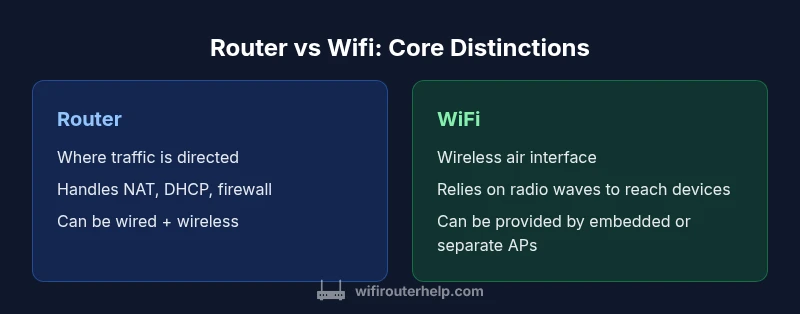
The difference between router and wifi is that a router is a device that directs traffic between networks and to the internet, while wifi is the wireless technology that carries data over the air to your devices. In most homes, a single device acts as both router and wifi access point, but technically wifi is the air interface, not a standalone piece of hardware. Understanding this distinction helps prevent setup confusion and improves network planning.
Key Definitions: Router vs Wifi
At its core, a router is a network device that connects multiple networks and directs data packets between them. In a typical home, the router aggregates traffic from your internet service provider and forwards it to your devices, using features like NAT, DHCP, and a firewall. Wifi, on the other hand, refers to the wireless technology that allows devices to connect without cables. In practice, most households use a device that combines both functions into one box, but the two concepts remain distinct: one is a hardware role, the other is a wireless communication method. According to WiFi Router Help, the difference between router and wifi often gets blurred because many consumer products embed both roles in a single unit. Understanding the distinction helps you plan coverage, troubleshoot hotspots, and prioritize upgrades in a scalable way. When you hear someone say “I need better wifi,” they’re usually referring to the wireless signal, not the routing logic behind it. This distinction matters for decisions about placement, channel use, and whether you should invest in a separate access point or a mesh system.
The Two Roles and How They Complement Each Other
A router creates the local network and connects it to the internet, typically providing ethernet ports for wired devices and security features like NAT and a firewall. Wifi is the broadcast medium that delivers that network to wireless devices within range. In most homes, the router and the wifi access point are integrated into a single device, but the concepts remain separate: routing is about paths and policies, while wifi is about radio access and signal quality. By recognizing that distinction, you can more easily identify where problems originate—whether the issue is with the routing table or with wireless interference—and choose the right fix, whether that means adjusting QoS rules or repositioning a router antenna.
Common Misconceptions: How Confusion Affects Performance
Many users conflate wifi with the router itself or assume any wifi issue means the router is at fault. In reality, wifi performance is heavily influenced by interference, channel selection, distance, and device capabilities. WiFi is susceptible to walls, appliances, and neighboring networks—factors that don’t directly implicate routing logic. As a result, addressing wifi problems often requires tweaking placement, upgrading to a newer wifi standard (like 802.11ax), or adding mesh nodes, rather than replacing the router alone. The difference between router and wifi becomes especially important when diagnosing slow speeds, dead spots, or unstable connections.
How Placement Impacts Both Roles
Placement is critical for both routing efficiency and wifi coverage. A central location minimizes cable length for wired devices and reduces dead zones for wireless devices. Even with a modern router, poor placement can bottleneck performance because wifi signals degrade with distance and obstructions. Conversely, a suboptimal router can hamper even the strongest wifi signal if it struggles with NAT throughput or concurrent connections. For optimal home network performance, treat routing and wifi as two intertwined aspects that benefit from deliberate placement, regular firmware updates, and a plan for coverage expansion if needed.
Data and Statistics: What the Data Tells Us
WiFi Router Help analysis shows that many homes rely on a central router to manage traffic while delivering wireless access to devices across living spaces. The data also indicates that users frequently underestimate the role of placement and channel selection in achieving reliable wifi performance. While the hardware quality matters, practical improvements often come from proper configuration and strategic expansion. Based on WiFi Router Help research, a balanced approach—optimizing both router settings and wifi coverage—yields the most noticeable gains in everyday use.
Practical Setup Scenarios: Simple, Intermediate, and Advanced
For simple setups, you can usually rely on a single combined router/wifi device placed near the center of your living space. This approach favors ease of use and small, straightforward networks. For larger homes, consider a dedicated wifi access point or a mesh system to extend coverage without creating bottlenecks in routing performance. In more advanced configurations, you may separate the routing function onto a dedicated router and deploy separate wifi access points to optimize signal quality in hard-to-reach rooms. The underlying principle is that the difference between router and wifi becomes a design choice about coverage, scalability, and maintenance rather than a single device limitation.
Troubleshooting with Clear Roles in Mind
When things go wrong, identify the layer: if devices can’t reach the internet, inspect routing, NAT, and DHCP settings; if devices can’t maintain a stable wireless connection, inspect wifi channels, distance to access points, and interference. By keeping router and wifi concerns separate in your mind, you can apply targeted fixes such as enabling QoS for mixed traffic, updating firmware, or repositioning antennas. This diagnostic mindset makes it easier to resolve issues without unnecessarily replacing hardware.
Security Considerations for Both Roles
Both routing and wifi require attention to security. A properly configured router blocks unauthorized access through a firewall, uses strong NAT rules, and enforces updated firmware. Wifi security hinges on using strong encryption (WPA3 where available), rotating passwords, and disabling WPS on older devices. The difference between router and wifi becomes a framework for applying layered defenses: secure the routing layer to protect the network and secure the wireless layer to protect device traffic. Regular firmware updates help ensure both layers stay resilient against evolving threats.
Comparison
| Feature | Router | WiFi (wireless technology) |
|---|---|---|
| What it is | Device that routes traffic between networks and to the internet | Wireless communication method that carries data via radio waves to devices |
| Primary function | Creates a local network, manages NAT, DHCP, and firewall rules | Provides wireless access to the local network; enables mobility for devices |
| Hardware relationship | Often bundled in a single device with wired ports | Relies on a radio interface and can be part of the same box or separate access point |
| Performance focus | Throughput, routing efficiency, firewall/load handling, number of wired ports | Signal strength, interference management, coverage area, client density |
| Best use case | Small to medium homes needing wired and wireless in one box | Larger homes or multi-room setups requiring broad wireless coverage |
Benefits
- Clarifies network roles and simplifies troubleshooting
- Allows modular upgrades (separate router and access points)
- Flexible scaling with mesh systems or multiple APs
- Potential for stronger performance with dedicated devices
The Bad
- Increases upfront cost and setup complexity
- More devices to manage and maintain
- Requires planning for placement and cabling in some cases
Routers and wifi are complementary; for most homes a single device suffices, but larger or performance-focused networks benefit from separating roles.
In practice, start with an all-in-one router-wifi for simplicity. If you experience dead spots or high device density, upgrade by adding dedicated access points or a mesh system while keeping routing capabilities intact.
People Also Ask
What is the difference between a router and WiFi?
A router is a device that directs traffic between your home network and the internet, while WiFi is the wireless technology that carries the network signal to devices. In most setups, a single device combines both roles, but the concepts are distinct and important for planning coverage and troubleshooting.
A router directs traffic; WiFi delivers the signal through the air. Most setups use a box that does both, but knowing the difference helps you fix problems faster.
Can I have wifi without a router?
Yes, you can use a standalone access point or a modem that includes wifi; however, you still need a device to route traffic to and from your internet service. In practice, most homes rely on a router to manage local traffic.
You can have wifi without a separate router if you have an access point, but you still need some device to route traffic to the internet.
Do I need to upgrade both router and wifi at the same time?
Not necessarily. Start with your weakest link. If your router is old but wifi coverage is fine, upgrading the router may help; if coverage is poor, consider adding access points or a mesh system while keeping a decent router.
You don't always upgrade both at once—fix the bottleneck first, then expand as needed.
What upgrade path works best for a large home?
For large homes, a dedicated wifi access point or a mesh network tends to outperform a single router. Keep the central router for routing efficiency and add APs or mesh nodes strategically to eliminate dead zones.
In big homes, use a central router plus additional access points or a mesh system for best coverage.
How often should I update firmware?
Regular firmware updates improve security and performance. Check for updates monthly or when security advisories are released. Enable automatic updates if available.
Update firmware regularly to stay secure and get the latest performance fixes.
Is wifi a hardware or software concept?
Wifi is a wireless standard and technology, not a single device. It can be implemented in hardware (within a router) or as an external access point. The key is the wireless interface rather than the device itself.
Wifi describes the wireless signal, while hardware implements that signal.
What’s the simplest upgrade path for a slow network?
Check placement and channel selection first, then upgrade to a newer wifi standard or add a mesh system if coverage is lacking. If speeds are slow at the router, consider a hardware upgrade.
Start with placement, then consider upgrading wifi standards or adding mesh if needed.
How does mesh compare to a single router?
A mesh system provides broader, more reliable coverage by distributing wifi signals across multiple nodes. A single router is simpler and often cheaper but may struggle in large or multi-floor homes.
Mesh gives better coverage across large homes, while a single router is simpler and cheaper.
What to Remember
- Define router vs wifi to avoid setup confusion
- Optimize placement and channel use before replacing hardware
- Consider mesh or multiple access points for larger homes
- Keep firmware updated for security and performance
- Treat routing and wifi settings as separate, but co-dependent