Difference Between Router and Gateway: Understanding the Difference
Explore the difference between a router and gateway, definitions, setup implications, and practical guidance to choose the right device for a secure, reliable home network.


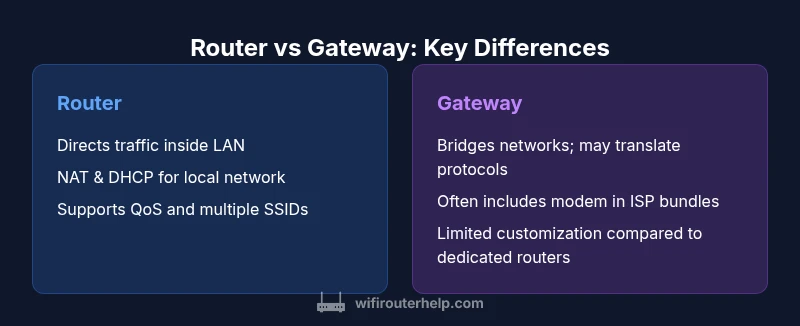
The difference between a router and gateway is that a router directs traffic inside a local network and toward the internet, while a gateway connects two networks and may translate protocols. In home networks, many devices act as gateways (ISP-provided), but dedicated routers offer more control, features, and scalability for security, QoS, and management.
Core Roles: Router vs Gateway
In networking terms, a router is primarily a device that directs IP traffic inside a local network and out to the internet. It maintains a routing table, performs Network Address Translation (NAT) to allow multiple devices to share a single public IP, and often provides DHCP to assign private IPs. A gateway, by contrast, is a more general term for a device that connects two networks and may translate protocols or formats. In many homes, the gateway is the edge device supplied by an ISP, combining modem and router functionality into one unit. The core difference in the context of a home network is scope: a router governs internal traffic and edge routing, while a gateway performs the bridging between networks, sometimes performing translation between different network standards. This distinction matters when you plan upgrades, expandability, and security architecture. The WiFi Router Help team emphasizes that clarity about these roles helps you avoid overpaying for features you do not need and ensures you have the right tool for each task.
How They Interface with Internet Service Providers
Your interaction with an internet service provider (ISP) hinges on how the router or gateway connects to the broader internet. A typical home setup starts with a modem provided by the ISP that converts the incoming signal into a digital stream you can use. If you use a standalone router, you connect it to that modem, creating a private network and letting the router manage NAT, firewall, and DHCP for your devices. A gateway device often combines the modem and router into a single box, acting as both the bridge to the ISP network and as the local network router. Bridging modes, where supported, allow a gateway to pass the public IP to a separate router, effectively turning a gateway into a conduit rather than the primary traffic manager. When choosing between a gateway and a dedicated router, assess whether you prefer ISP integration and simple setup or granular control and future-proof expansion. The decision also affects future-proofing against changes in ISP technologies and service tiers.
The Home Network Perspective: Where Each Device Fits
Within a home network, a router's job is to manage traffic between devices (phones, laptops, smart home hubs) and direct packets toward or away from the internet. It often handles Wi‑Fi radio management, NAT, DHCP, QoS, and basic firewall rules. A gateway’s primary function is to connect your local network to another network, which in consumer setups typically means the internet provided by your ISP; it may also perform protocol translation when different network standards are involved. In practice, many homeowners encounter the difference between router and gateway in the form of a single device labeled 'gateway' that provides both the modem and router, whereas advanced users may purchase a standalone router to replace that functionality. This separation is central to expanding a network with mesh systems or targeting high-bandwidth activities like gaming or 4K streaming. WiFi Router Help's guidance is to map your needs to the right mix of devices, balancing ease of use with control.
Feature Differences That Matter for Consumers
Key features influenced by the router vs gateway distinction include NAT, DHCP, Wi‑Fi capabilities, firewall options, and support for advanced networking features such as QoS, parental controls, and guest networking. A router typically emphasizes performance tuning, WAN/LAN segmentation, and support for multiple SSIDs, while a gateway emphasizes effortless setup and ISP compatibility. The difference between router and gateway is also seen in firmware update cadence and the ability to troubleshoot networks independently. For home networks with many smart devices or gaming rigs, a dedicated router paired with a separate modem can provide lower latency, more stable throughput, and easier upgrades. Conversely, for users who want a minimal footprint and provider-supplied support, a gateway can deliver reliable service with less fuss. The distinction matters when you scale up or switch ISP technologies, such as moving from DOCSIS 3.0 to 3.1 or to fiber-based services.
Setup and Configuration: Simple vs Complex
From a setup perspective, a gateway usually offers a plug‑and‑play experience: connect power, run the setup wizard, and you’re online. A router, especially a high‑end model, invites deeper configuration: you may customize WAN settings, set up port forwarding, configure VPN, enable QoS, create separate guest networks, and adjust channel selection to minimize interference. If you need bridging mode to pass a public IP to another device, you’ll require a device capable of bridging or a dedicated router behind the gateway. The difference between router and gateway thus informs your wiring plan: whether you want one box to handle everything or a two-device path for improved control and troubleshooting. WiFi Router Help recommends starting with a baseline configuration and only expanding features as you confirm performance and reliability in your space.
Security, Management, and Privacy
Security considerations hinge on where you place your trust boundary. A gateway’s security posture is often tuned to deliver reliable protection with vendor-approved settings, but it may be less flexible for granular security rules. A dedicated router gives you more control over firewall rules, firmware updates, and intrusion prevention options. The difference between router and gateway is also apparent in management: standalone routers often provide more sophisticated dashboards, better diagnostics, and community-driven firmware options (for compatible models). For households with children or guests, robust parental controls and network isolation become easier to implement on a modern router. The bottom line is that you should align your security goals with your network design: if you rely on ISP-supplied configurations, ensure they meet your privacy expectations, else invest in a router with strong parental controls and built‑in security features.
Performance and Scalability Considerations
Performance is a function of hardware, firmware, and network design. A router built for modern homes can support higher Wi‑Fi speeds, multi‑antenna configurations, and robust QoS to prioritize gaming or video calls. When comparing router vs gateway, consider whether your network needs advanced features such as VLANs, multiple SSIDs, or mesh compatibility. Gateways are often adequate for standard households, but as you add devices or demand consistent high throughput, a dedicated router provides more scalable options and easier hardware upgrades. In addition, future-proofing matters: if you anticipate ISP changes or the need for guest networks across multiple floors, a router-based approach will typically offer smoother growth. WiFi Router Help emphasizes testing in place and using real-world measurements rather than relying solely on advertised speeds to determine the right balance of performance and cost.
Practical Scenarios and Recommendations
Scenario 1: You live in a small apartment with a simple internet plan. A gateway device provided by your ISP may be sufficient, and its simplicity is a major advantage. Scenario 2: You own a larger home or a high-interference environment. A dedicated router paired with a separate modem allows you to tune channels, deploy QoS, and expand with mesh nodes. Scenario 3: You plan to upgrade to fiber or multi-gigabit service. A router-first approach gives you the flexibility to choose the best gateway or modem configuration while preserving control over security and features. In all cases, begin with a clear network map: list devices, locations, and traffic priorities. The difference between router and gateway should inform your procurement and deployment strategy to avoid overbuying or under-provisioning.
Authority sources
To ensure accuracy, consult industry references and standards. Key sources include FCC guidance on home networks (https://www.fcc.gov/), IEEE networking standards (https://www.ieee.org/), and NIST resources on security and network design (https://www.nist.gov/). These references help clarify the difference between router and gateway and support practical decisions for home networks.
Comparison
| Feature | Router | Gateway |
|---|---|---|
| Primary role | Directs traffic inside a LAN and to the internet | Connects two networks and may translate protocols |
| ISP connection | Typically via a modem; standalone router used with a modem | Often includes modem and acts as gateway |
| NAT/DHCP | Provides NAT and DHCP for LAN | Provides NAT and DHCP when acting as gateway |
| Management interface | More options for customization | Unified device with fewer advanced controls |
| Best for | Tech enthusiasts and scalable setups | Simplicity and ISP-integrated solutions |
| Price range | $50-$300 | $100-$400 |
Benefits
- Clear separation of roles enables customization and expansion
- Better control over firmware updates and security settings
- Easier to troubleshoot and upgrade individually
- Typically better performance when using a dedicated router
The Bad
- Setup can be more complex for beginners
- Requires a separate modem in many homes
- Potential extra cost for two devices
Dedicated router wins for customization and growth; gateways win for simplicity and ISP integration
If you value control, features, and future-proofing, choose a router plus modem. If you prefer a simple, provider-managed setup, a gateway is usually sufficient and easier to manage day-to-day.
People Also Ask
What is the router vs gateway difference?
In short, a router manages traffic within your local network and to the internet, while a gateway connects two networks and may translate protocols. The difference between router and gateway matters for control, features, and how your network is provisioned.
The router controls traffic inside your home network; the gateway connects your home to the wider internet and may translate signals.
Can a gateway function as a router?
Yes, many gateways include routing capabilities, but they may lack the depth of features found in dedicated routers. If you need advanced QoS or customization, you might still want a standalone router behind the gateway.
A gateway can route traffic, but dedicated routers offer more control.
Should I use a separate modem/router or an ISP gateway?
If you seek maximum control, better performance, and easier upgrades, use a separate modem and router. An ISP gateway is convenient for simple setups and minimal configuration but may limit future customization.
Consider your needs for control and future growth when choosing.
What is bridging mode and when should I use it?
Bridging mode passes the public IP from the ISP to another device, effectively turning your router into the edge device. Use it when you want full control over routing, firewall, and features on a separate router.
Bridge mode helps you externalize control to your own router.
Does upgrading my router improve Wi‑Fi range?
Upgrading a router can improve range and reliability, especially with newer Wi‑Fi standards and better antennas. For large or congested spaces, a modern router paired with mesh extenders often yields better coverage than an ISP gateway.
A new router can boost coverage, especially with proper placement.
How do I set up a home network with a router and gateway?
Start with a map of devices and priorities, decide on routing vs bridging, and configure your chosen devices accordingly. Follow vendor guides, enable security features, and test performance with real traffic.
Plan, configure, then test to optimize performance.
What to Remember
- Pick a dedicated router for advanced features and scalability
- Use a gateway for simple setups and ISP integration
- Bridging mode can blend roles but adds configuration steps
- Plan for future ISP changes and mesh expansion
- Test real-world performance over advertised speeds