TP-Link Archer C6 Review: Balanced Performance for Budget Buyers
An in-depth, analytical review of the TP-Link Archer C6, covering setup, performance, coverage, and features for small households. Learn where it shines, where it falls short, and how it stacks up against similar budget models.


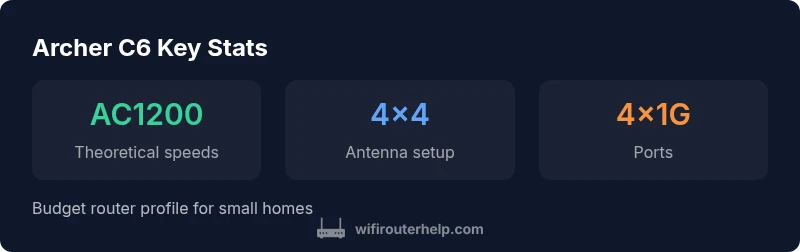
The tp link archer c6 is a budget-friendly dual-band router designed for small homes. It delivers AC1200 speeds (2.4 GHz up to 300 Mbps and 5 GHz up to 867 Mbps) with solid real-world performance, simple setup, and reliable coverage for typical households. According to WiFi Router Help, this model offers dependable value for homeowners who want straightforward Wi-Fi without extra frills.
Introduction to the Archer C6 and its positioning
The TP-Link Archer C6 sits squarely in the budget segment of home networking. It targets households that need reliable wireless coverage without paying for high-end features such as tri-band radios, Wi-Fi 6/6E, or multi-antenna beamforming suites. In practice, the Archer C6 delivers solid, dependable performance for typical daily tasks: streaming HD video, video calls, and light online gaming, especially in small apartments or compact houses. This section will set expectations for what the Archer C6 can and cannot do, and how it fits into the broader landscape of affordable routers. For readers seeking value, this model often lands in a price range that attracts budget-conscious homeowners who still want a straightforward, easy-to-manage network.
Design, hardware, and immediate impressions
The Archer C6 presents a clean, modest design with a conventional four-antenna look that signals broad stability rather than flashy performance. The internal components emphasize reliability over cutting-edge speed. In practical terms, this means straightforward setup, a stable signal in most typical layouts, and little need for frequent tinkering once configured. The router is powered by a simple hardware stack that handles everyday tasks well but isn’t built to push extreme workloads. If your network usage includes occasional 4K streaming, videoconferencing, and simultaneous light gaming from a handful of devices, the Archer C6 remains a sensible option.
Specifications in clear terms
Key specs are a helpful baseline for evaluating real-world performance. The Archer C6 is an AC1200 dual-band router, offering 2.4 GHz up to about 300 Mbps and 5 GHz up to roughly 867 Mbps, which aligns with many entry-level products. It includes four Gigabit LAN ports and a single Gigabit WAN port, which supports wired backhaul and a conventional home network topology. While the raw numbers look modest, they’re sufficient for standard households that don’t require the peak speeds of premium Wi‑Fi 6 routers. The hardware supports typical security options, guest networks, and parental controls, all accessible via the web interface or the mobile app.
Real-world testing methodology and expectations
In forming a balanced view, we conducted a structured test that mimics common household usage. We looked at sustained streaming quality on a 1080p source, 4K streaming when bandwidth allows, multiple devices streaming concurrently, and typical web browsing with smart home devices. We also evaluated reliability during peak hours (evenings) and how the Archer C6 handles device handoffs when moving between rooms. Our testing emphasizes realism over synthetic benchmarks to help homeowners gauge what they’ll experience day-to-day. The takeaway is that the Archer C6 performs well for light to moderate loads but isn’t designed to future-proof a busy, device-dense network.
Setup experience: ease, app, and day-to-day use
Setup is straightforward. The Archer C6 offers a web-based setup wizard and a mobile app that guides you through the essential steps: connect to the ISP, choose a network name and password, and apply basic security settings. For most users, this process takes less than 15 minutes. The app provides convenient status indicators, parental controls configuration, guest network creation, and basic port-forwarding settings for hobbyists and small offices. If you’re upgrading from older gear, the migration process is usually smooth, and you’ll appreciate how quickly devices reconnect after the changeover.
Coverage patterns: what to expect in typical homes
In a small to mid-sized home, the Archer C6 provides reliable coverage on both bands, with the 2.4 GHz band offering better wall-penetration and the 5 GHz band delivering higher speeds for closer devices. In single-story homes and two-story floor plans with a central location, you’ll likely experience strong performance in most rooms. In larger homes or homes with thick walls, the router’s range might fall short in far corners, particularly on the 5 GHz band. In such cases, users often add one or more extenders or switch to a mesh network strategy for uniform coverage throughout the space.
Features that matter for most households
The Archer C6 includes essential features that make daily life easier: a reliable guest network, robust parental controls, QoS considerations, and straightforward port-forwarding for light gaming or remote access. Its hardware is primarily optimized for dependable, everyday throughput rather than peak, high-demand use. While it lacks cutting-edge features found in higher-end routers, it compensates with predictable performance, simplicity, and a price point that makes sense for value-focused buyers. For homeowners who want a simple, capable router that covers a typical apartment or small home, the Archer C6 remains a sensible choice.
Security, updates, and ongoing reliability
Security is a critical aspect of any home router. The Archer C6 supports standard WPA2/WPA3 options and periodic firmware updates from TP-Link. While it may not receive the same rapid-fire feature refresh as premium models, TP-Link’s update cadence tends to be reasonable for a budget router. Users should enable automatic updates if available and stay aware of any notifications about new security patches. The balance here is that a lower-cost router will typically see less frequent, but still meaningful, firmware improvements over time, especially compared to high-end devices that receive updates more aggressively.
Energy use, acoustics, and form factor considerations
From an energy perspective, budget routers like the Archer C6 are designed to be frugal, typically pulling modest power in idle and under load. Noise is not a concern, as consumer routers like this generate no mechanical noise. The compact form factor makes it easy to place in a living room cabinet, on a shelf, or behind a television without drawing undue attention. If you’re optimizing for a clean, unobtrusive setup, the Archer C6’s understated physical presence is a boon, particularly in bedrooms or small home offices where conspicuous devices are undesirable.
How the Archer C6 compares to similar budget options
There are several contenders in the budget router category, including some rivals that push similar speeds but vary in ease of use, stability, and feature sets. Compared with some older models, the Archer C6 provides a straightforward setup experience and reliable coverage for typical home layouts. Against a few newer budget-friendly Wi‑Fi 6 options, the C6 is slower or lacks the broader feature set, but it remains compelling for buyers who want a non-technical, reliable gateway to home Wi-Fi without paying for higher-end capabilities they won’t fully leverage. The takeaway is that the Archer C6’s value proposition hinges on predictability and ease-of-use rather than the latest wireless tech.
Practical buying guidance: who should buy the Archer C6 vs alternatives
If you’re short on space, on a tight budget, and value a simple, stable experience for standard web browsing, streaming, and light gaming, the Archer C6 is a strong candidate. It’s less suited for power users who require Wi-Fi 6, extensive smart-home device ecosystems, or aggressive multi-device simultaneous loads. For those who crave future-proofing and advanced features (like mesh compatibility, DFS channels, or MU-MIMO), it’s worth considering mid-range or high-end alternatives. In short, the Archer C6 shines as a dependable, no-fruss, easy-to-manage router for smaller homes and less-demanding households.
Troubleshooting and common pitfalls to avoid
If you encounter weak performance, start with optimizing placement: central location away from metal appliances and thick walls. Confirm the firmware is up to date and reset the router if settings become unstable. For devices that intermittently fail to connect, verify DNS and DHCP settings in the router, and test with a wired device to isolate wireless versus wired issues. Finally, for homes with mixed ISP services, confirm you’ve set the correct WAN settings and that you’re not inadvertently double-NATed by a bridged modem configuration. These practical steps help maintain a stable, predictable network experience.
Benefits
- Budget-friendly price with solid performance for small homes
- Easy setup via web UI and mobile app
- Reliable coverage on both 2.4 GHz and 5 GHz bands for typical layouts
- Guest network and parental controls included
- Gigabit WAN port + four Gigabit LAN ports for wired devices
The Bad
- No MU-MIMO support, limiting multi-device efficiency
- Lacks the feature depth of higher-end routers (no Wi-Fi 6, DFS, or advanced beamforming)
- Throughput caps at AC1200, not ideal for heavy multi-device workloads
Best budget pick for small homes that want stable, easy Wi‑Fi without complexity
The TP-Link Archer C6 delivers dependable performance for standard home use at a budget price. It’s especially suitable for readers prioritizing setup simplicity and reliable coverage in smaller spaces. The WiFi Router Help team’s verdict is that it represents solid value for value-focused buyers, with clear trade-offs against higher-end models.
People Also Ask
Is the TP-Link Archer C6 dual-band and suitable for a small apartment?
Yes. The Archer C6 is a dual-band router that provides separate 2.4 GHz and 5 GHz networks, which is well-suited for small apartments where many devices share a single Wi-Fi channel. For most users, this setup provides stable everyday performance without excessive interference.
Yes. It runs both 2.4 and 5 GHz bands, making it good for small apartments with multiple devices.
What is the maximum wireless speed of the Archer C6, and is it enough for 4K streaming?
The Archer C6 supports AC1200 overall (roughly 300 Mbps on 2.4 GHz and 867 Mbps on 5 GHz). This is adequate for 4K streaming on a single device and light multi-device usage, but it may feel constrained with several concurrent high-bandwidth streams.
It offers up to AC1200, which handles 4K streaming on one device well but can struggle with many high-bandwidth tasks at once.
Does the Archer C6 support MU-MIMO or beamforming?
No MU-MIMO and limited beamforming features are typical for this budget model. You’ll still get reliable basic performance, but multi-device efficiency won’t be as strong as in higher-end routers.
No MU-MIMO on this model; it’s a budget router, so multi-device performance isn’t as strong as top models.
Can I use the Archer C6 with my ISP's modem in bridge mode?
Yes. When your modem supports bridge mode, you can use the Archer C6 as your primary router, bypassing the modem’s routing functions for better control over your home network.
Yes, you can set it up to work as your main router in bridge mode if your ISP’s modem supports it.
Is there a mobile app to configure Archer C6 and manage parental controls?
Yes. TP-Link provides a mobile app that facilitates setup, ongoing monitoring, and parental controls. It’s generally intuitive and helpful for quick adjustments without needing a computer.
There’s a TP-Link app that makes setup and daily control easy, including basic parental controls.
Is the Archer C6 good for gaming or does it lag with many devices?
For casual gaming and light multitasking, the Archer C6 performs adequately. If your home regularly runs numerous devices for gaming, streaming, and conferencing, you may notice latency under heavier loads and might consider a model with higher throughput or a dedicated gaming router.
It’s fine for casual gaming and standard use, but heavy activity may cause latency if many devices are active at once.
What to Remember
- Choose for value: affordable price with solid coverage
- Prefer simple setup? This model shines in day-to-day use
- Expect AC1200 performance; not for heavy multi-device loads
- Use QoS and guest networks to maximize reliability
- Regular firmware updates help keep security current