eero router vs extender: a practical, evidence-based comparison
A comprehensive, analytical comparison of the eero router vs extender, covering performance, coverage, setup, security, and value to help homeowners decide the best path for reliable home WiFi.


In most homes, a dedicated eero router offers stronger, more consistent performance than a standalone extender. A mesh setup with multiple nodes yields the best coverage, while a single extender can fix dead spots but may introduce latency and handoff delays. See the full comparison.
What is the core question in the eero router vs extender debate?
According to WiFi Router Help, the decision between an eero router and an extender hinges on how you use the network, the size and layout of your home, and your tolerance for tinkering. An eero router acts as the central node of a WiFi network; it creates a base that can be expanded with additional beacons or extenders positioned strategically. In some cases, a single eero router provides excellent performance for small spaces, but as you add floors and thick walls, coverage gaps emerge. The discussion around 'eero router vs extender' centers on how to balance coverage, throughput, and management overhead. While an extender can bridge dead zones by repeating the signal, it often creates duplication, potential interference, and handoff delays. A true mesh system, built from multiple eero nodes, tends to deliver more seamless roaming and uniform speeds than a flat network with an extender attached to the same SSID. The WiFi Router Help team emphasizes evaluating your home's layout, furniture, and typical usage (streaming, gaming, work-from-home) to decide whether you start with a router or leap into a mesh deployment. This article uses practical tests, common layouts, and best practices to compare the two options and guide your setup decisions.
wordCount":""}
Core design differences and the implications for everyday use
Understanding the difference between a single router and a mesh network is foundational to the eero router vs extender decision. A traditional router disperses a signal from a central point, with coverage limited by architectural barriers, interference, and device density. An extender or beacon, when used with a stand-alone router, repeats the signal to reach farther corners but often creates a second network or a confusing single SSID with inconsistent handoffs. In contrast, a true eero mesh uses multiple nodes that coordinate to present a unified network. This architecture enables smoother roaming as you move through spaces, reduces latency spikes in busy zones, and generally sustains higher effective speeds across larger areas. The critical nuance here is that the performance delta between a router-first approach and a mesh-first approach grows as you scale: a small apartment may be fine with a router, while a multi-story home with thick walls generally benefits from a mesh strategy that includes at least two or more nodes. For the reader evaluating
},
Comparison
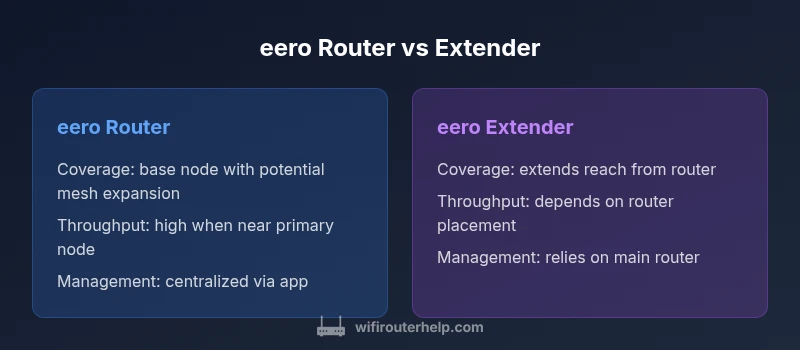
| Feature | eero router | eero extender |
|---|---|---|
| Coverage and roaming | Typically strong with a single, well-placed router | Improved when paired with a compatible eero beacon but roaming can be inconsistent without proper placement and network tuning |
| Throughput and latency | High with direct connection to devices near the router | Potentially lower due to signal repetition and path length; performance varies with placement |
| Setup complexity | Simple: install router, connect devices, adjust app settings | Moderate: requires pairing with the main router and optimizing placement |
| Management and updates | Unified management via the eero app for all devices | Extenders rely on the main router’s management; updates hinge on the system design |
| Cost and scalability | Lower initial cost for a single unit; scalability depends on rooms and floors | Costs rise with additional extenders and potential need for a complementary router |
| Best use case | Small to medium homes or where there is minimal future expansion | Larger homes with multiple floors or many dead zones; best when used as part of a mesh network |
Benefits
- Stronger, more reliable coverage with mesh nodes
- Seamless roaming and uniform performance in multi-room layouts
- Centralized app-based management and easier firmware updates
- Scalability to cover larger homes without sacrificing quality
The Bad
- Higher upfront cost for multiple nodes
- Requires careful placement for optimal performance
- Potentially more complex to troubleshoot than a single router
- Firmware updates depend on mesh ecosystem stability
A mesh-based approach with multiple eero nodes generally beats a single router or a simple extender for most mid-to-large homes.
The WiFi Router Help team recommends starting with a mesh setup if your space has multiple floors or thick walls. If you live in a small apartment or have a simple layout, a modern eero router may suffice, but be prepared to upgrade to a mesh system as your coverage needs grow.
People Also Ask
What is the key difference between an eero router and an extender?
An eero router serves as the primary network hub, while extenders boost coverage by repeating the signal. Mesh systems with multiple nodes provide the most seamless roaming and uniform speeds, especially in larger homes.
The main difference is that the router is the base network; the extender only expands coverage. For best roaming, a mesh with several nodes works best.
Can I mix an eero extender with a non-eero router?
Technically possible, but it can create a non-uniform network with separate SSIDs and limited roaming. For best results, use compatible devices or a complete eero mesh.
You can mix, but it often leads to a bumpy experience. A single ecosystem gives the smoothest roaming.
Is a single eero router enough for a small apartment?
For small apartments with an open layout, a single eero router may be sufficient. If walls or dense furniture create barriers, consider adding a mesh node.
In small spaces, one eero router is often enough, but watch for dead zones.
Do extenders slow down my internet connection?
Extenders can reduce throughput due to two-hop transmission and additional interference. A well-placed mesh node typically preserves more of your single-router speed.
Yes, extenders can slow things down if not placed right or if you’re pushing high speeds.
How do I optimize placement for best performance?
Place routers and nodes midway between the main service and dead zones, away from walls and appliances that cause interference. Elevate devices off the floor and use the eero app to test signal strength.
Put devices in open spaces, not behind furniture, and check coverage with the app.
What factors affect WiFi performance beyond router vs extender?
Interference from neighbors, building materials, device count, and streaming or gaming workloads all influence performance. A mesh system mitigates some of these factors but won’t fix a poorly planned network.
Interference and material matter a lot; plan capacity and placement.
What to Remember
- Assess home layout before buying any hardware
- Prefer mesh nodes for multi-floor homes
- Place extenders thoughtfully to minimize latency
- Use the eero app for centralized management and updates
- Plan for future growth rather than substituting a router with extenders