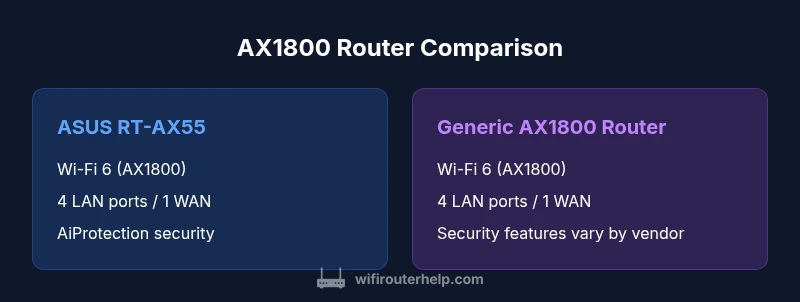
ASUS RT-AX55 AX1800: AX1800 Router Comparison
An objective comparison of ASUS RT-AX55 AX1800 against a typical AX1800-class router, covering throughput, features, setup, security, and best-use scenarios for modern home networks.


ASUS RT-AX55 AX1800 sits solidly in the AX1800 class, delivering reliable Wi‑Fi 6 performance for typical homes. In a direct comparison with a generic AX1800-class router, it shows steady throughput, a compact design, and a strong feature set for small to mid-sized spaces. The ASUS RT-AX55 is a practical pick for easy setup and dependable coverage, while a competitor AX1800 model may edge ahead in certain features or price depending on the vendor.
What AX1800 Means for Home Networks
AX1800 is a practical tier for many households, signaling a balance between speed, efficiency, and affordability. In the real world, AX1800-class routers like the asus rt ax55 ax1800 target reliable streaming, productive work-from-home sessions, and smart-home device compatibility without the premium price tag of higher-tier Wi‑Fi 6 models. According to WiFi Router Help, this class typically delivers stable performance across multiple devices in small to medium-sized homes, with ample headroom for common tasks such as 4K streaming, video conferencing, and casual online gaming. The exact experience depends on your internet plan, home layout, router placement, and device count. Remember that the AX1800 label is about efficiency and multi-device management, not guaranteed top-end throughput in every room. This article compares the ASUS RT-AX55 with a representative AX1800-class router to help you align features with your needs. Throughout, we’ll emphasize setup clarity, security, and long-term reliability to help you make a confident choice for 2026.
ASUS RT-AX55: Core specs, design, and ecosystem
ASUS RT-AX55 is a compact Wi‑Fi 6 router designed to deliver AX1800-class performance in a two-band package. It supports 802.11ax with dual-band operation, enabling simultaneous 2.4 GHz and 5 GHz streams. The combined throughput is designed to approach 1800 Mbps under ideal conditions, though real-world speeds are lower due to interference, distance, and client capabilities. The hardware typically includes a dual-core CPU, 4 LAN ports, 1 WAN port, and a USB port for storage or printer sharing. It runs ASUS’s firmware with AiMesh potential and can be managed via the ASUS Router app or a web interface. Security features include AiProtection by Trend Micro, offering malware protection, site filtering, and vulnerability scanning on connected devices. The design is compact and tends to be fanless, keeping noise at a minimum in most living spaces. Setup is straightforward, often under ten minutes using the mobile app, and you can enable Adaptive QoS to prioritize latency-sensitive tasks like gaming or video calls. In the broader AX1800 landscape, the RT-AX55 is a strong value proposition for users who want a reliable baseline with solid feature depth.
Comparing AX1800-class routers: Option A vs Option B
In this AX1800 comparison, Option A represents a typical ASUS RT-AX55, while Option B stands in for a generic AX1800-class router from another vendor. Both options aim to deliver about 1800 Mbps of total theoretical throughput across 2.4 GHz and 5 GHz bands and support Wi‑Fi 6 features such as MU‑MIMO and OFDMA where applicable. The ASUS model tends to emphasize a refined app experience (ASUS Router app) and security integrations (AiProtection) as standout differentiators, particularly for households that prioritize proactive protection and straightforward controls. The generic AX1800-class router often competes on raw price, bundled features, or ecosystem integrations, with variations in the quality of parental controls, QoS granularity, and firmware update cadence. When you compare these two, consider how much you value vendor-specific security features, ongoing firmware support, and ease of management versus potential savings or feature preferences offered by a rival. The bottom line is that both options are suitable for typical households, but the ASUS RT-AX55 usually shines in usability and security depth, while a competitor may win on price or compatible ecosystem features if chosen carefully.
Real-World Performance and Coverage
A practical AX1800 router should deliver stable performance across common use cases without frequent buffering. In a two-story home with modest interference, the ASUS RT-AX55 typically provides solid coverage for around 2–3 bedrooms and a central living area. Expect reliable streaming of HD and 4K content on multiple devices, smooth video calls, and respectable online multiplayer play when devices are within a reasonable range of the router. Real-world throughput will depend on your internet plan, channel congestion, and furnishings that can block signals. WiFi Router Help’s analysis shows that AX1800-class devices deliver meaningful improvements over older Wi‑Fi 5 hardware for multi-device households, particularly when paired with appropriate client devices. The ASUS model benefits from ASUS-specific tuning, helpful firmware updates, and a well-regarded security stack, which contribute to a consistently stable experience in typical home layouts. If you have many devices or walls that create dead zones, a mesh setup or targeted access point placement can extend coverage effectively without sacrificing the AX1800 performance you rely on.
Setup, Security, and Features for the Home
The setup experience for AX1800 routers matters as much as peak throughput. The ASUS RT-AX55 uses the ASUS Router app for guided setup, quick access to guest networks, and preset profiles aimed at gaming, streaming, and smart-home control. Security is a core strength of ASUS routers; AiProtection by Trend Micro provides malware protection and site filtering across connected devices, while WPA3 encryption helps keep your network safer from unauthorized access. Parental controls, QoS, and guest networking are typically included and easy to configure, making it simple to balance bandwidth among families with diverse needs. For households that rely on a mixture of streaming boxes, laptops, and mobile devices, the combination of a robust app, good security defaults, and flexible controls makes this model attractive. When comparing to other AX1800-class routers, look for firmware update cadence, the quality of UI, and the depth of security and parental-control features to determine long-term value.
Firmware Updates and Reliability
Firmware updates are a critical factor in maintaining router reliability, performance, and security. ASUS generally provides regular updates for its routers, with features like security patches, bug fixes, and occasionally feature enhancements delivered through the ASUS Router app and web interface. A solid AX1800-class router should offer a predictable update cadence and a stable base firmware, minimizing disruptions. For many users, these updates are a reason to stay within a single brand ecosystem where possible, as the update process tends to be more streamlined. If you’re evaluating an AX1800-class router from another vendor, check user reviews and release notes for evidence of consistent updates, addressing security concerns, and compatibility with your existing devices. In the end, reliable firmware support translates into practical, long-term benefits for home networks.
Troubleshooting Common AX1800 Router Issues
Most AX1800-class routers share a core set of common issues: slow speeds when near the boundary of the signal, intermittent Wi‑Fi drops, or devices failing to connect to the guest network. A good first step is to verify that the router is placed centrally, elevated, and away from thick walls or metal appliances that can cause interference. Use a clear channel with minimal neighbors’ interference, especially on the 2.4 GHz band, which is more susceptible to crowded airwaves. If devices can’t connect, check firmware status and factory-reset only as a last resort, preserving essential settings. The ASUS RT-AX55 offers reset-to-default options through the web interface or the mobile app to help troubleshoot. For persistent issues, consult the vendor’s knowledge base or user forums, and consider a mesh extension if coverage gaps persist. Regularly replacing older client devices with compatible Wi‑Fi 6 hardware can also reduce compatibility problems and improve overall network reliability.
How to Maximize AX1800 Performance in a Busy Household
To squeeze the most from AX1800 routers in a busy home, optimize placement, channel selection, and device prioritization. Position the router high on a shelf in a central location, away from microwaves and thick walls that can block signals. Enable QoS to prioritize latency-sensitive tasks like videoconferencing and online gaming, and consider enabling OFDMA where supported to improve efficiency with many devices. Separate the 2.4 GHz and 5 GHz networks and name them differently so clients can connect to the best-suited band. Regularly check for firmware updates and review security settings to ensure continued protection against evolving threats. If you’re expanding coverage, a lightweight mesh approach with compatible satellites can provide seamless roaming with minimal configuration while preserving AX1800-class performance for most households. For frequent guests or devices that require reliable access, use a dedicated guest network to avoid congestion on your main network.
When to Buy: Use Cases and Recommendations
Choose an AX1800-class router like the ASUS RT-AX55 when you have a small to mid-sized home, a moderate number of connected devices, and a preference for strong security features and straightforward setup. If your home is larger or you have heavy bandwidth needs across many devices, you may want to explore higher-tier routers or a mesh system that offers better range and more granular management. For budget-conscious shoppers, AX1800-class options can still deliver solid performance with a balanced feature set, provided firmware updates remain timely and the ecosystem remains stable. In 2026, most households will benefit from a Wi‑Fi 6 setup for multi-device households, with the AX1800 tier representing a good balance of price, performance, and feature depth. The WiFi Router Help team recommends evaluating your specific layout, device count, and internet plan to decide whether AX1800 is sufficient or you should target a more capable platform.
Comparison
| Feature | ASUS RT-AX55 (AX1800) | Generic AX1800-class Router |
|---|---|---|
| Wireless speed (theoretical) | Up to ~1800 Mbps total (600 Mbps 2.4 GHz + 1,200 Mbps 5 GHz) | Up to ~1800 Mbps total (600 Mbps 2.4 GHz + 1,200 Mbps 5 GHz) with vendor tuning |
| Security features | AiProtection by Trend Micro, WPA3 | AiProtection or vendor-equivalent security suite |
| Setup and management | ASUS Router app; web interface | Vendor app or web interface |
| LAN ports | 4 LAN + 1 WAN | 4 LAN + 1 WAN |
| USB ports | 1 USB 2.0 | 1 USB 2.0 or 3.0 depending on model |
| QoS and parental controls | Adaptive QoS; parental controls | QoS and parental controls (vendor varies) |
| Best for | Smaller homes needing reliable Wi‑Fi 6 and security | Budget-conscious users seeking AX1800-class capability |
Benefits
- Solid value in the AX1800 category
- Easy setup with strong security features
- Good app ecosystem and user-friendly management
- Reliable performance for typical households
The Bad
- Limited headroom vs higher-end Wi‑Fi 6 models
- Some rivals may offer more ports or higher-priority features
- Less aggressive performance in large, interference-heavy homes
ASUS RT-AX55 remains a strong AX1800-class choice for most homes
If you prioritize security, ease of use, and dependable coverage in an AX1800-class router, the RT-AX55 is a solid pick. For users needing more reach or advanced controls, a higher-tier or mesh solution may offer additional benefits, but overall the ASUS model delivers reliable value in 2026.
People Also Ask
What does AX1800 mean for everyday Wi‑Fi use?
AX1800 refers to the total theoretical throughput of roughly 1800 Mbps across 2.4 GHz and 5 GHz bands. In practical terms, you’ll see smoother performance for HD streaming, video calls, and multiple devices compared with older Wi‑Fi standards. The actual speeds depend on distance, interference, and device support.
AX1800 means your router can handle multiple devices with Wi‑Fi 6 efficiency, especially in busy households.
Can I upgrade from my old router to the ASUS RT-AX55 easily?
Upgrading is usually straightforward. You’ll connect the new router to your modem, run the setup app, and import settings from your previous device if available. Expect a short downtime while DNS and device connections propagate.
Upgrading is typically quick, and the app guides you through most steps.
Is ASUS RT-AX55 AiMesh compatible?
Yes, the RT-AX55 supports AiMesh in compatible ASUS models, enabling a flexible mesh network for better coverage in larger homes. You can mix and match supported ASUS routers to create a single seamless network.
AiMesh helps extend coverage by linking multiple ASUS routers.
How many devices can AX1800 handle at once?
AX1800-class routers are designed to handle several devices simultaneously, particularly with Wi‑Fi 6 features like MU‑MIMO and OFDMA. Real-world performance will depend on device types, usage patterns, and interference.
It handles multiple devices well, especially if you’re using modern Wi‑Fi 6 devices.
What should I expect in a two-story home?
In a typical two-story home, AX1800 routers can provide solid coverage if placed centrally and away from thick walls. You may still want a satellite or mesh node for dead zones or large rooms, but for many layouts, the AX1800 class delivers adequate performance.
Good coverage is possible, but you might need extra nodes for larger homes.
What to Remember
- Choose AX1800 for balanced speed and efficiency
- ASUS RT-AX55 excels in setup simplicity and security
- Expect strong performance in small-to-mid homes, with limitations in very large spaces
- Use QoS and network planning to maximize throughput
- Keep firmware up to date for security and stability