How Much for a Router: 2026 Pricing Guide for Home WiFi
Explore 2026 router pricing for budget to premium models, what drives cost, and how to choose a router that fits your home WiFi needs without overspending.


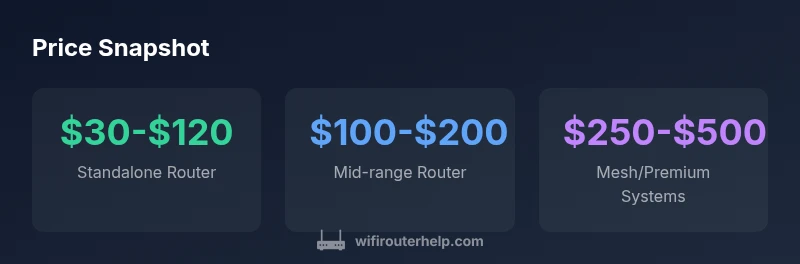
If you’re wondering how much for a router, expect a broad price spread in 2026: budget standalone models typically run $30–$120, mid-range units $100–$200, and premium mesh or gaming systems can range from $200–$500. Prices vary by Wi‑Fi standard (AC/AX/6E/7), features like QoS and security, and whether you’re buying a single unit or a multi-room mesh kit. This guide helps you map needs to costs with practical budgeting ranges.
Price Bands and What They Mean
According to WiFi Router Help, prices for routers are best understood in tiers that align with home size and usage patterns. If you ask yourself, how much for a router for a compact apartment, you’ll likely find budget models quite adequate. For larger homes or households with many devices, investing in a mid-range or mesh system pays off over time through reliability and coverage. In 2026, the line between budget and premium has shifted: features like better security, higher Wi‑Fi throughput, and easier setup are now common in mid-range units. A straightforward way to think about it is: the more rooms you need to cover and the more devices you support, the more value you’ll get from investing in features that prevent bottlenecks and dead zones.
What Drives the Price
Router pricing is driven by several interrelated factors. The Wi‑Fi standard (AC, AX, 6E, 7) and the number of bands directly influence price, as do supported speeds and hardware acceleration for encryption. Extra features like advanced QoS, parental controls, guest networks, USB ports, and built-in VPNs add to cost. Mesh compatibility and ease of expansion also push price higher, but they can dramatically improve coverage for larger homes. Build quality, warranty length, and brand reputation matter too, especially when you compare budget and premium options. As you navigate, ask: does this model meet my security needs and future-proofing goals without overpaying?
Budget Scenarios: Realistic Setups
To illustrate practical costs, consider three common scenarios. In a small apartment with a couple of devices, a budget standalone router in the $30–$80 range suffice. For a family home with multiple devices, streaming, and occasional gaming, a mid-range router around $100–$200 balances performance and price. For larger homes or tech enthusiasts who want seamless roaming, a mesh system or premium router in the $250–$500 range is often worth the upgrade. Think in terms of total cost of ownership: a higher upfront price may reduce the need for frequent replacements and support calls.
How Much to Budget for Your Setup
Budgeting starts with measuring your space and device count. If you have a small space and light usage, target the lower end of the range. For households with many smart devices, 4K streaming, and remote work, plan for mid-range or mesh systems. It’s wise to reserve a 10–20% buffer for accessories (cables, extenders) and potential warranty extensions. When you compare options, consider long-term costs: a cheaper router that requires frequent upgrades can end up costing more over time. If you’re unsure, invest in a model that supports future standards (like AX or 6E) and easy firmware updates.
The Role of Standards (Wi‑Fi 5/6/6E/7) and Speed
Standards governance is a core driver of price. Wi‑Fi 6/6E support generally commands higher prices but provides better performance, especially in crowded networks. Wi‑Fi 7 hype is driving premium prices for cutting-edge users, though real-world gains depend on compatible devices. When budgeting, consider your current devices and future plans. If you don’t own many Wi‑Fi 6 devices, a solid Wi‑Fi 5/6 router might be more cost-effective today, with the option to upgrade later. In short, price reflects both capability and compatibility.
Buying Tips to Avoid Overpaying
Here are actionable tips to keep costs in check. Know the essential features you need (mesh coverage, security, QoS) and resist impulse buys during sales if the feature set isn’t aligned with your use case. Compare promised speeds to real-world performance in reviews, not just advertising. Look for routers with robust firmware support and easy security updates. Consider refurbished or open-box options from reputable sellers with good return policies. Finally, factor in ongoing costs like extended warranties or subscription-based security services when evaluating total price.
Where to Shop and When to Buy
Seasonal sales can dramatically affect router pricing. Plan around major shopping events (back-to-school, Black Friday, post-holiday clearance) to maximize value. Online retailers and big-box stores often run bundles that include cheaper accessories or accessories that simplify setup. If you want a mesh system, buying the core unit first and expanding later is a flexible approach. Always verify compatibility with your modem and ISP, as some ISPs require specific models for optimal performance. Reading user reviews can prevent overpaying for features you won’t use.
Common Myths About Router Costs
A common myth is that the most expensive router always delivers the best home WiFi. In reality, the best value often lies in tailoring features to your needs—coverage area, device count, and usage patterns. Another myth is that you must have the newest Wi‑Fi standard to stay current. While newer standards offer improvements, many households benefit from solid Wi‑Fi 5/6 devices if they fit the space and usage profile. Finally, “cheap means insecure” is outdated: reputable budget models offer strong security updates and support when chosen wisely.
Router price guide by model type
| Model Type | Typical Price Range | Key Features | Best For |
|---|---|---|---|
| Standalone Router | $30–$120 | Dual-band, basic security | Budget-first homes |
| Mid-range Router | $100–$200 | Gigabit WAN/LAN, MU-MI, QoS | Small to medium homes |
| Premium Router | $200–$500 | Tri-band, advanced security, VPN | Power users |
| Mesh System (3-pack) | $250–$500 | Seamless roaming, whole-home coverage | Large homes |
People Also Ask
What factors most influence router price?
The price is driven by Wi‑Fi standard, number of bands, speed, security features, mesh capability, ports, and warranty. Higher-end standards and expanded features raise the cost, but they also deliver better performance in busy households.
Prices depend on standards, bands, and features like mesh and security. Higher-end specs cost more but can pay off with reliability.
Is it better to buy a separate router or a modem-router combo?
Separate routers offer more feature choices and easier upgrades, while modem-router combos can be convenient but are limited by ISP compatibility. For most users, a standalone router paired with a compatible modem provides better long-term value.
Standalone routers give you more control and upgrade options; combos are simpler but can lock you into a single vendor.
Are mesh systems worth the price for large homes?
If you struggle with dead zones or multiple floors, mesh systems provide seamless coverage and easy expansion. For small spaces, a strong single router may suffice and be more cost-efficient.
If you have a large home or many devices, mesh can be a smart long-term investment.
What is the best budget router in 2026?
Budget routers typically fall in the $30–$120 range and cover essential needs like streaming and light gaming. Prioritize security updates and firmware support to maximize value.
Look for a budget model with reliable firmware updates and solid security.
Do router prices drop during sales?
Yes. Expect price drops during major sales events and before new model launches. Planning ahead and setting price alerts can help you capture the best deals.
Sales happen seasonally, so plan ahead and watch for discounts.
“Choosing the right router is about aligning your home network goals with features that matter most, not just chasing the newest model.”
What to Remember
- Define your budget before shopping.
- Match features to your real needs, not marketing claims.
- Consider mesh for large homes to avoid dead zones.
- Plan for future devices by prioritizing security and firmware support.
- Look for sales and bundles to maximize value.