Is a 4G Router Good for Gaming? A Comprehensive Review
Explore whether a 4G router can satisfy gaming needs, with practical tests, optimization tips, and guidance on when to use mobile broadband versus wired options.


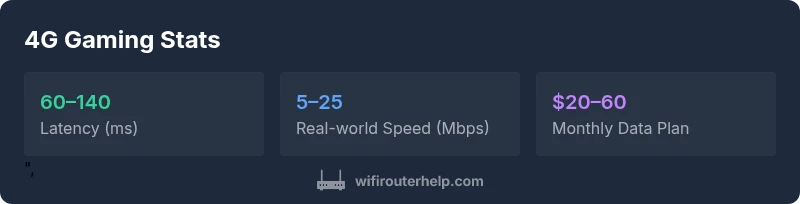
When comparing mobile broadband to fixed connections, is 4g router good for gaming? For most households, a 4G router is not ideal as the primary gaming link due to higher latency, jitter, and data caps. It can support casual or backup gaming if you have strong signal, a router with gaming QoS, and a plan that won't throttle during peak times.
Is is 4g router good for gaming? What the question really asks
The short answer hinges on expectations. A 4G router delivers internet access through a cellular connection, which means latency and packet routing are tied to cell tower load and backhaul quality. For any gamer, latency (round-trip time) is a critical metric; a mobile link can be adequate for turn-based games but often falls short for fast-paced shooters or competitive titles. According to WiFi Router Help, the core question to answer before deploying a 4G router for gaming is not just raw speed, but how consistent that speed remains during peak hours and how the router steers traffic for low-latency apps. If you’re exploring this because you lack a wired option, use the 4G setup as a temporary or backup line rather than a daily primary connection, and only after validating a stable signal at your gaming desk. This framing helps readers understand that the decision is situational, not universal.
Latency, jitter, and the gaming bottleneck
Latency is the most consequential factor for gamers on any network. Even small increases can throw off aim in shooters, disrupt real-time strategy synchronization, and cause fuzzy voice chat during parties. 4G networks experience jitter as towers hand off connections and as the network contends with other users sharing the same backhaul. For gaming, jitter translates into inconsistent frame times and sporadic lag spikes. A 4G router can mitigate some issues with features like prioritized QoS, multiple antennas, and band steering, but it cannot eliminate the fundamental variability of a mobile link. If you play fast-paced games, expect occasional lag under heavy cell-network load, and plan accordingly by having a backup wired option or a higher-capacity data plan that minimizes throttling risk.
Coverage, signal quality, and plan constraints
Coverage is a foundational constraint. Even in urban areas, indoor signal strength can vary widely between rooms and floors due to walls, metal fixtures, and distance from the nearest cell tower. A high-quality SIM-enabled router with external antennas or a signal booster can improve indoors, but you’ll still contend with data caps or throttling policies set by the mobile carrier. For gaming, these constraints matter more during peak hours or when you reach monthly data thresholds. WiFi Router Help recommends mapping signal strength throughout your home and testing game traffic in the exact spots where you sit to game, rather than relying on a single signal reading from the living room.
QoS, features, and how they help gaming
Quality of Service (QoS) is essential for routing priority toward game traffic. Look for routers that offer per-application QoS, port-forwarding flexibility for gaming services, and low-latency mode that minimizes buffering. Band steering and MU-MIMO can keep multiple devices from competing for bandwidth during a session. Also consider routers with a dedicated gaming profile, which helps the router automatically optimize routes for latency-sensitive apps. While QoS can help, it cannot erase network-level congestion; the best results come from a router that combines solid signal reception, good firmware, and intelligent traffic management.
Practical steps to optimize a 4G setup for gaming
Start with a wired-like configuration where possible: connect game consoles or PCs directly to the router via Ethernet if the device supports it, enable QoS for gaming traffic, and assign a static local IP to your gaming device. Place the router near a window/outer wall to improve signal pickup, and pair with an external antenna or a signal booster if supported. Consider a data plan that offers unlimited or high caps, and enable carrier-aware features such as “don’t throttle gaming traffic” if available. For portable gaming in a car or cafe, ensure the router’s battery life and heat management won’t interrupt sessions, and test latency in real-world scenarios before committing to long sessions.
How 4G compares to wired broadband and 5G home for gaming
Wired broadband remains the gold standard for gaming due to its predictable latency and consistent speeds. 5G Home can closely rival fixed lines in many markets, with much lower latency than 4G and higher peak speeds, though it also depends on coverage. A 4G setup shines as a backup option or for mobile households with no fixed line, or in temporary gaming hotspots where wiring is impractical. The key is to set realistic expectations about latency, data usage, and reliability. If you’re evaluating a 4G route as your primary option, test under typical gaming loads, compare to a wired benchmark, and plan for contingencies if the signal degrades.
Testing methodology for 4G gaming readiness
A credible evaluation uses real-world gaming sessions alongside synthetic tests. Track latency (ping), jitter, packet loss, and bandwidth during peak times and after data caps are reached. Run multiple sessions on different days to capture variability. Use traceroutes to spot routing bottlenecks and test both online multiplayer and solo offline modes to gauge consistency. Document the conditions—signal strength, time of day, and device location—so you can compare scenarios later. This approach ensures you have evidence beyond a single speed test when deciding whether to game on a 4G router.
Common myths and misunderstandings about 4G gaming
One common myth is that any 4G connection is inherently unstable for gaming. In reality, some 4G networks and routers handle gaming traffic very well under favorable conditions. Another misconception is that data caps do not affect gaming sessions; in practice, data throttling or overage charges can interrupt long gaming marathons. A third myth is that newer routers automatically fix latency issues; firmware and network conditions play a large role. By debunking these myths, readers learn to differentiate between problem symptoms and network realities.
Authority sources and what they say
For readers who want external validation, credible sources discuss mobile network performance and gaming implications. The FCC outlines how mobile broadband usage can impact latency and data plans. Academic and industry studies emphasize the importance of signal quality, backhaul, and QoS in delivering playable experiences on non-traditional internet connections. To support practical decisions, consult at least a couple of primary references and compare their findings with your own field tests.
Practical takeaways for different gamer types
Casual gamers benefit from the backup role of a 4G router, especially when a fixed line is interrupted. Competitive players should avoid dependent gaming solely on mobile broadband unless a robust plan and network conditions guarantee low latency. Families with limited wired options may use 4G to supplement home internet, but keep expectations tempered and maintain a wired primary path where possible. Finally, travelers or remote locations can leverage 4G as a reliable stopgap if testing shows acceptable latency and consistent signal, particularly during non-peak times.
Benefits
- Provides mobile backup internet when fixed broadband is down
- Potentially cheaper for light usage compared to building out fiber in remote areas
- Routers with gaming QoS can improve latency for casual titles
- Can support many devices simultaneously when signal is strong
The Bad
- Significant latency and jitter compared to wired connections
- Data caps and throttling can interrupt long gaming sessions
- Indoor signal quality varies widely and often requires boosters
- Not ideal for competitive gaming or high-refresh-rate titles
Best as a backup or for light, casual gaming rather than a primary gaming connection
A 4G router can support casual gaming and mobility needs when fixed broadband isn’t available. For competitive play or long sessions, wired options or 5G Home generally offer a more reliable experience. The WiFi Router Help team recommends using 4G as a supplement, with realistic expectations and proper QoS.
People Also Ask
Can a 4G router provide lag-free gaming?
Not typically for competitive play, due to higher and variable latency. It can support casual games if signal quality is good and QoS is enabled. Test under your real gaming conditions before deciding.
A 4G router can handle casual gaming if you have good signal and enable QoS, but it usually isn’t lag-free for competitive titles.
What most affects 4G gaming performance?
Signal strength, tower congestion, backhaul quality, and data caps drive performance. A strong, stable signal with smart QoS helps, but you’ll still face variability during peak times.
Performance mainly depends on signal strength and network congestion; QoS helps, but variability remains.
Do I need a special SIM card or plan for gaming?
No special SIM is required, but a plan with sufficient data and minimal throttling is important. Unlimited or high-cap data plans reduce the chance of throttling during long gaming sessions.
You don’t need a special SIM, just a plan that won’t throttle gaming traffic.
Is 4G faster than 5G for gaming?
5G typically offers lower latency and higher peak speeds than 4G, improving gaming performance in many scenarios. However, real-world results depend on coverage, network load, and device capability.
In most cases, 5G will outperform 4G for gaming, but it depends on your location and network.
How can I minimize lag on a 4G setup?
Prioritize gaming traffic with QoS, connect devices via Ethernet when possible, ensure strong signal, and consider a plan with high data caps or no throttling. Avoid peak-hour testing if you can.
Use QoS, wired connections when you can, and choose a good data plan to reduce lag.
Will gaming on a 4G router trigger data throttling?
Yes, some plans throttle after reaching a data cap or during heavy usage. To minimize surprises, pick an unlimited or high-cap plan and monitor data usage during gaming sessions.
There can be throttling after a data cap; plan carefully and monitor usage.
What to Remember
- Test your 4G setup in your actual gaming spot before committing
- Prioritize routers with built‑in QoS and gaming profiles
- Expect higher latency and potential data caps; use as backup only
- Choose unlimited or high-cap data plans to minimize throttling risk
- Use wired Ethernet when possible for best stability