Does Your Router Work with a SIM Card? A Practical Guide
Discover if your router can run on a SIM card, how to enable mobile WAN, setup steps, data plan considerations, and practical tips for reliable home networking.


Yes—routers with a built-in SIM card slot can use a mobile data connection as their primary or backup WAN. After inserting a SIM and activating a data plan, you configure the APN and WAN settings in the router’s admin panel; in many cases, Ethernet remains an optional fallback. This setup is ideal for mobile homes, remote locations, or disaster recovery, but performance depends on carrier coverage and the device’s modem.
Understanding SIM-capable routers
A SIM-capable router is a device that can accept a SIM card and connect to cellular networks (4G/LTE or 5G) to provide internet to devices on your home network. Unlike traditional routers that rely on a fixed broadband line, these devices integrate a modem, a SIM interface, and often multiple WAN options. There are two common implementations: embedded SIM (eSIM) slot or a removable physical SIM card that accepts standard micro or nano SIM sizes (via an adapter). Some models include an integrated 4G/5G modem, while others rely on detachable USB modems. When you turn on the device, it negotiates with the mobile network just like a smartphone, assigns IP addresses to connected devices, and can support features such as NAT, firewall, QoS, and guest networks. It’s important to verify that the router supports the bands your carrier uses and whether the device can operate in your country. In many setups, you’ll also be able to combine a SIM WAN with Ethernet WAN for automatic failover or load balancing.
How SIM cards power WAN for routers
When a router uses a SIM card, the cellular network becomes its wide area network (WAN). The data travels over carrier towers to the router’s onboard modem, and from there to your devices via Wi‑Fi or Ethernet. This is particularly valuable in locations with poor fixed-line service, during outages, or for mobile setups such as RVs or temporary offices. In most cases, you insert a valid SIM, power on the device, and activate a data plan with the chosen carrier. APN settings may be required to route traffic through the provider’s network; some routers auto-detect APN, while others require manual entry. The speed you get depends on the SIM’s plan, signal strength, network congestion, and the modem’s category (for example, CAT 6/12 for 4G or 5G NR for faster speeds). Note that some networks restrict tethering or simultaneous connections; it’s essential to confirm terms before choosing a plan.
Choosing the right hardware for SIM
Look for a few critical features: a dedicated SIM slot or eSIM, a capable modem (ideally supporting 4G and 5G bands used by your region), and robust wired backup options (Ethernet WAN) in case cellular is unavailable. Battery life is less relevant for home use but matters for portable setups. The router should support dual-band Wi‑Fi, strong antenna options, and good heat management. Some models are designed specifically for mobile use and include satellite-like indicators for signal strength and coverage. If you plan to travel with the router, consider compact form factor and power options (AC and DC). Also, verify firmware update policies and whether the device supports the latest security standards and NAT types. Finally, ensure the device supports the APN format required by your carrier and whether it locks the SIM card to a single provider.
Setup steps: from SIM to internet
- Install the SIM card and power on the router. 2) Access the admin interface via a browser or app. 3) Navigate to the WAN or Mobile settings and select Mobile as the primary WAN. 4) Enter the APN, username, and password if required by your carrier. 5) Save your settings and reboot if necessary. 6) Enable Wi‑Fi and test connectivity from a connected device. 7) If Ethernet is available, you can configure it as a failover or load-balanced WAN to improve reliability. Finally, consider enabling data usage monitoring to avoid excessive charges. If you encounter issues, verify SIM recognition, check SIM unlock status, and ensure the router’s firmware is up to date.
APN settings and data plans: what to know
APN settings tell the router how to reach the carrier’s data network. In many regions, you’ll use standard APNs supplied by the carrier; some carriers require a username/password. If your provider offers an eSIM, the activation procedure may differ slightly. For data plans, choose a tier that matches your anticipated usage—graphic streaming and online gaming will eat data quickly. If you’re using a shared family plan, monitor usage per device with built-in QoS or parental controls. Roaming can be expensive, so if you’re traveling, ensure your plan includes international or roaming data. Many carriers also impose a cap on tethering, which you’ll want to verify before relying on the SIM WAN for constant connectivity.
Performance, coverage, and bandwidth considerations
Cellular WAN performance depends on signal strength, network congestion, and the modem’s capabilities. Indoor signals can be boosted with external antennas or placement near windows, while exterior antennas often require mounting. Band support matters: faster 5G networks require a modem that supports the appropriate NR bands. Data speeds on 4G can range widely, from practical uploads to streaming near HD quality. Many routers support QoS to prioritize video calls or gaming; ensure your firmware enables this feature and that you configure it properly. In terms of latency, cellular networks typically have higher ping than fixed broadband, especially during peak hours. If you need consistent performance, a dual-WAN setup with a reliable fixed connection as a backup can provide resilience.
Use cases: when a SIM router shines
SIM-based routers are ideal for mobile scenarios and scenarios where fixed broadband is unreliable. They work well as home backup during outages, in rural areas with limited DSL or cable infrastructure, or for temporary spaces like a construction site or a pop-up shop. RV owners and travelers appreciate the ability to maintain internet access without chasing satellite devices. For small offices, a SIM WAN can be a cost-effective way to keep a network online while you wait for fiber upgrades. A well‑configured SIM router can support guest networks, VPNs, and secure remote access, making it a practical extension of your home or small business network.
Troubleshooting common issues
First, verify the router recognizes the SIM card and that the carrier’s service is active. If the device shows 'no SIM' or 'invalid SIM,' check SIM orientation, contact the carrier to unlock or provision the SIM, and confirm the device isn’t blocked. Ensure APN details are correct; misconfigurations can prevent data from flowing. If pages load slowly, verify signal strength and consider rebooting both the router and the modem. If you’re not seeing any traffic, check that the WAN is set to Mobile and that the Ethernet WAN isn’t stealing the primary connection. Finally, keep the firmware up to date to avoid known bugs that affect SIM-based WAN.
Cost considerations and budgeting
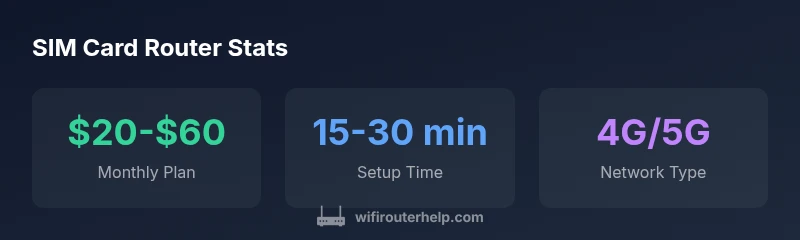
Cellular data plans vary by region and data allotment. A typical consumer plan might range from about $20 to $60 per month, depending on data caps and throttling policies; business or travel-focused plans may be higher. Initial hardware costs for SIM-capable routers vary by features and performance; expect to budget for a device with a modern modem, at least dual-band Wi‑Fi, and external antenna options if you need better reception. Data overages can be surprising, so enable data tracking and set alerts to avoid exceeding your limit. If you’re using the router as a backup, weigh the monthly cost against the risk of downtime with fixed broadband.
Security and privacy with cellular WAN
Even with a cellular WAN, you still benefit from standard router security. Use strong encryption (WPA2 or WPA3), enable a firewall, and keep firmware updated. Consider segmenting IoT devices on a separate guest network to minimize exposure. Some carriers offer built-in threat protection or VPN options; check compatibility with your router. Also, be mindful of SIM-specific security concerns, such as SIM swapping risks and incorrect APN configurations that could expose your network. Regularly review connected devices and monitor traffic for unusual patterns, especially if you rely on mobile broadband as your primary home Internet.
Overview of SIM-capable router options
| Router Type | SIM Slot | Best Use Case |
|---|---|---|
| Dedicated SIM Router (4G/5G) | Yes | Mobile hotspot or backup internet |
| Broadband-router with SIM modem | Yes | Hybrid setups and RVs |
| Standard router (no SIM) | No | Not compatible without adapter |
People Also Ask
Does every router support a SIM card?
No. Only routers with a built-in SIM slot or an external 4G/5G modem support SIM cards. Check product specs for compatibility.
Not all routers support SIM cards; look for 'SIM' in the hardware specs.
What data plans work with SIM routers?
You can use consumer mobile data plans or dedicated IoT/M2M SIMs. Ensure the provider allows tethering and check APN settings.
Use a mobile data plan with enough data; some SIMs restrict tethering.
How do I configure APN on a SIM router?
Access the router’s admin page, go to WAN/Mobile settings, and enter the APN, username, and password as required by the carrier.
Open your router's settings and input APN details.
Can SIM routers be used as home backups?
Yes, many users deploy SIM routers as failover when fixed broadband is down. They can automatically switch to mobile data.
They can act as a backup internet source.
Are there speed limits on SIM-based connections?
Speeds depend on carrier network, plan, and modem. Expect variability and potential throttling.
Speeds vary a lot.
What about roaming data costs?
Roaming charges apply when traveling; enable roaming cautiously and choose plans with international data.
Roaming can be expensive; choose a suitable plan.
“SIM-based routing offers flexible internet access, but you must manage data plans and coverage to avoid surprises.”
What to Remember
- Verify SIM slot and modem compatibility before buying
- Expect cellular speeds to track coverage and plan limits
- Choose a data plan with adequate data and roaming options
- Configure APN and WAN settings for reliable failover