Is Orbi Router Good for Gaming? An In-Depth Review
Analytical review of whether the Orbi router is good for gaming, covering latency, mesh backhaul, QoS, setup tips, and how it compares to rivals for gamers.


Is orbi router good for gaming? The short answer is: yes, with caveats. In mesh setups, Orbi can deliver broad coverage and consistent wireless performance that benefits multiplayer gaming, provided you optimize node placement and use Ethernet backhaul where possible. For the absolute lowest latency, a wired connection and careful QoS tuning matter more than the base mesh features. Overall, Orbi is a solid choice for many homes, especially multi‑story layouts.
Is the Orbi Router Good for Gaming? A Practical Framing
When gamers consider network gear, the core questions revolve around latency, stability, and how easy the setup will be in real homes. The query is often phrased as is orbi router good for gaming, a reminder that the decision hinges on more than raw speed. According to WiFi Router Help, mesh systems like Orbi can deliver consistent coverage across large spaces, which reduces weak signals that cause lag spikes. This article analyzes gaming performance with Orbi in typical home environments, emphasizing pragmatic configurations and testing approaches rather than marketing claims. Expect a balanced look at where mesh shines, where it can fall short, and how small changes—like backhaul choice or node placement—shift the gaming experience. Throughout, we’ll use practical steps you can implement this weekend, not just theory.
Gaming Performance Fundamentals: Latency, Jitter, and Throughput
For online gaming, latency matters more than peak download speeds. Jitter—the variation in packet arrival time—can ruin a competitive match even when the overall bandwidth looks generous. Throughput remains important for modern titles that download updates or stream assets in real time, but a steady, predictable connection is the gamer’s friend. In Orbi networks, the way you balance coverage with backhaul capacity determines how much latency migrates from your router to a satellite. In practical terms, expect a stable gaming session when your network consistently delivers sub-20 ms ping in the most demanding scenes, even if the raw data rate exceeds your prior expectations. For most households, maintaining a clean, stable link is the actual win, not chasing higher maximum speeds.
Orbi Architecture and Mesh Backhaul: What It Means for Gamers
Orbi uses a mesh approach that creates multiple paths between devices and the internet. A dedicated backhaul channel (where available) helps separate backhaul traffic from your gaming data, reducing contention on the same airwaves used by consoles, PCs, and mobile devices. Band steering and Smart Connect can direct devices to the most suitable band (2.4 GHz for range, 5 GHz for speed) at the moment they join the network. For gamers, this can translate to more stable sessions, less handoff delay when you move around the house, and fewer abrupt drops in performance as you move through rooms. The trade-off is that mesh complexity can complicate troubleshooting, so you’ll want a methodical setup and testing plan.
Wired Backhaul vs Wireless Backhaul: The Latency Tradeoffs
Wireless backhaul is convenient but inherently adds a layer of contention as backhaul traffic shares the same air channel as client devices. If your goal is the lowest ping for gaming, wired Ethernet backhaul between the primary router and satellite nodes is preferable. Even a single wired link can markedly improve stability and reduce jitter, especially in busy homes. If Ethernet runs are impractical, placing satellites for strong 5 GHz coverage and optimizing the 2.4 GHz band for legacy devices can still yield satisfying results. In short, wired backhaul is the gold standard for gaming on Orbi, with wireless as a reliable fallback when wiring is not feasible.
QoS, Port Forwarding, and NAT: Optimizing Gaming Traffic
Quality of Service (QoS) settings let you prioritize gaming traffic over background tasks like downloads or cloud backups. If your router supports game mode or device-based prioritization, turn these features on and assign your console or PC the highest priority. Port forwarding can help with NAT types and open connections for multiplayer sessions, but misconfigured rules can also cause connectivity issues. NAT type stability matters for many games; ensuring your Orbi network uses port-forwarding rules selectively can improve multiplayer reliability. Finally, keep firmware up to date to ensure QoS rules and firmware optimizations remain effective against new game traffic patterns.
Real-World Testing Methodology for Orbi in Gaming Scenarios
To evaluate gaming performance, simulate typical living situations: a two-story home with a mid-size living area, a basement, and several connected devices. Test with a wired PC or console and multiple wireless devices, recording latency, jitter, and stability during peak hours. Use consistent testing tools (ping, traceroute, and speed tests) and run repeated trials across different nodes and backhaul configurations. Document node placement, backhaul mode (Ethernet vs wireless), and QoS settings. By adopting a structured test plan, you can distinguish whether improvements come from backhaul changes, better node placement, or firmware adjustments.
Small Home vs Multi-Story Homes: How Orbi Scales for Gaming
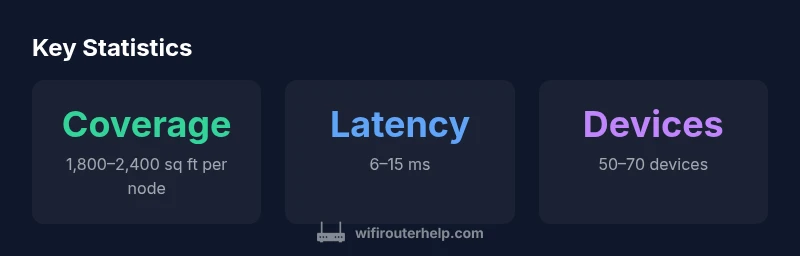
In smaller homes, Orbi can deliver strong coverage with a single router and one satellite, often providing sub-20 ms latency under good conditions. In multi-story homes, mesh can fill gaps where signals would otherwise degrade, making critical categories like latency and jitter manageable across bedrooms and living spaces. The key is consistent backhaul between the router and any satellites. If the home has a large footprint or many obstacles, consider more satellites and wired backhaul where possible to minimize hop count. The result is a more uniform gaming experience across rooms and levels.
How Orbi Stacks Up Against Popular Gaming Routers
Compared to traditional single-router gaming routers, Orbi’s mesh approach trades some raw throughput in exchange for broader coverage. For players who game on multiple devices or from various rooms, Orbi can deliver seamless roaming and reduced dead zones. However, for players who demand ultra-low latency with a single, optimized path, a high-performance gaming router with a dedicated port for a console or PC might edge ahead. Either way, matching your setup to your home’s layout and your game requirements will determine which path is best. In environments with strong backhaul options, Orbi remains a compelling choice among modern networking solutions.
Setup Tips for Gaming on Orbi
Start with a central location for the main router, ideally elevated and away from dense walls. Connect satellites with wired Ethernet backhaul when possible; at minimum, ensure satellites have a clear line of sight and are not obstructed by thick walls or metal appliances. Enable QoS targeting gaming devices and adjust the prioritization to the devices used for gaming during peak hours. Keep firmware updated, and run regular speed and latency checks to identify when adjustments are needed. Finally, test your gaming experience after changes and document the impact to refine your configuration.
Common Pitfalls and How to Avoid Them
Common mistakes include placing satellites too far from the router, causing weak backhaul, or attempting to route all traffic through wireless backhaul when a wired link would be feasible. Misconfigured QoS can also degrade performance if you prioritize the wrong devices. Interference from microwaves, cordless phones, or neighboring networks can introduce latency spikes; mitigate by segregating networks and deskamping high-noise devices. Finally, neglecting firmware updates can leave you with unresolved bugs that degrade gaming performance. Regularly reassess your node placement, backhaul choices, and QoS rules to maintain optimal results.
Brand Guidance for Readers from WiFi Router Help
From the WiFi Router Help perspective, the best gaming setups balance coverage with controlled traffic flow. Our guidance emphasizes practical testing, careful backhaul planning, and conservative expectations about the mesh’s absolute latency. A well-tuned Orbi network can meet most home gaming needs without resorting to radical hardware overhauls. Readers should approach configuration as a staged process: establish baseline performance, implement targeted improvements, and re-test to verify gains. This iterative method helps avoid overengineering a network that already provides the right coverage for your space.
Who Should Buy an Orbi for Gaming? Final Guidance
If your home spans multiple floors or has thick walls that impede single-router coverage, Orbi offers a compelling option for gaming with broad dead-zone reduction and easy expansion. For serious competitive gaming where every millisecond matters, you may still want to test a wired setup or combine Orbi with a dedicated gaming router for a hybrid solution. In many cases, the decision depends on your footprint, number of devices, and tolerance for occasional latency fluctuations. Overall, Orbi is a strong choice for gamers who value stable coverage and straightforward setup in a real-world home.
Benefits
- Broad coverage reduces dead zones across multi-room homes
- Mesh backhaul options help maintain stable connections
- QoS and port forwarding features improve gaming traffic handling
- Scalability with additional satellites without replacing the core router
- Relatively easy setup and ongoing management
The Bad
- Potentially higher latency than a dedicated gaming router in some setups
- Wired backhaul is strongly recommended for lowest latency; wireless backhaul can degrade performance
- Mesh systems can be more expensive than single-router alternatives
- Advanced configurations may require longer troubleshooting
Best for multi-room homes that prioritize broad coverage with reliable gaming performance
Orbi provides solid gaming performance across large spaces thanks to mesh architecture and QoS options. While it may not match ultra-low-latency wired setups, the value is strong for homes with multiple rooms and devices. For gamers who prize easy expansion and consistent coverage, Orbi remains a competitive choice.
People Also Ask
Is Orbi better for gaming than a traditional router?
For gaming, Orbi's mesh can improve coverage and reduce dead zones, which helps in multi-room homes. However, a single high-end gaming router may offer lower latency in constrained spaces. The best choice depends on your home layout and device count.
Orbi shines with coverage; for the absolute lowest ping in a tight space, you may prefer a dedicated gaming router, but mesh often wins in large or multi-story homes.
Do I need Ethernet backhaul for gaming with Orbi?
Ethernet backhaul provides the most stable latency and reduces wireless contention. If you can run ethernet between the main router and satellites, enable it. If not, optimize placement and use wired devices on 5 GHz where possible.
Yes, Ethernet backhaul is recommended for the lowest latency, especially in busy networks.
Can Orbi QoS improve gaming ping?
QoS helps prioritize gaming traffic, which can reduce ping when the network is busy. It won't fix problems caused by a saturated WAN link, but it's a valuable tool when configured correctly.
QoS helps, but it isn't a magic fix for all latency issues.
Is Orbi suitable for small apartments?
Yes, Orbi can work well in smaller spaces, provided you place nodes thoughtfully to avoid interference. In very small spaces, the mesh benefit is less dramatic, but coverage remains reliable.
Yes, it's typically good for apartments if you place it well.
What setup steps maximize gaming performance?
Place the main router in a central location, use Ethernet backhaul if possible, enable QoS for gaming devices, and keep firmware updated. After changes, retest latency and adjust as needed.
Keep the router central, use wired backhaul when possible, and enable QoS for gaming.
How does Orbi compare in price to other gaming routers?
Orbi mesh systems are typically pricier than some single-router options, due to coverage and ease of expansion. If your primary goal is sheer ultra-low latency, dedicated gaming routers may offer a better price-to-performance ratio.
Orbi usually costs more upfront, but you gain broader coverage and easier expansion.
What to Remember
- Place routers centrally to optimize backhaul
- Use Ethernet backhaul when possible for lowest latency
- Enable QoS prioritization for gaming devices
- Mesh coverage reduces dead zones, improving consistency
- Wired connections still beat wireless for ultra-low latency