What Router for Fiber Internet: A Practical Guide
Learn how to choose the right router for fiber internet, with a detailed comparison of gateway vs own router, setup tips, and performance considerations to future-proof your home network.


For fiber internet, choose a router with a fast Wi‑Fi 6/6E radio, a capable WAN port for multi-gig speeds, and robust features like QoS and mesh compatibility. Typically fiber uses a separate ONT or modem, so look for PPPoE support and easy bridge mode if you want to pair your own router. WiFi Router Help recommends models that balance performance, security, and long-term firmware support.
Understanding what router for fiber internet
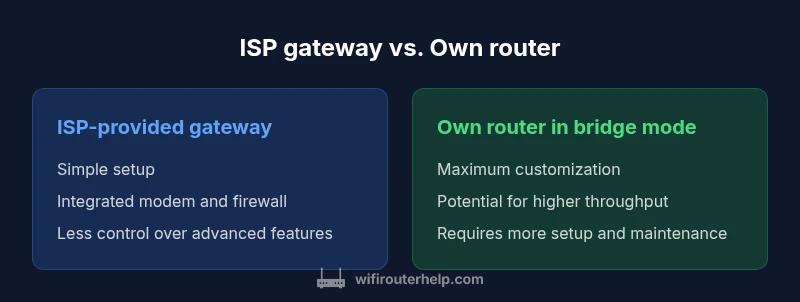
When people ask, “what router for fiber internet,” the focus is on getting a reliable, high‑performance gateway that can handle the bandwidth fiber delivers. Fiber connections are typically terminated at an optical network terminal (ONT) or a fiber modem provided by the service provider. Your router then handles the local network and Wi‑Fi distribution. In practice, you have two common paths: (a) using the ISP’s gateway (a combined modem/router) for simplicity, or (b) using your own router behind bridge mode to maximize control and throughput. According to WiFi Router Help, most households benefit from a modern router that supports Wi‑Fi 6/6E, a fast WAN port, and strong security features to keep devices safe on high‑speed fiber. The goal is to balance performance with ease of use while ensuring firmware remains up to date.
In many fiber setups, the ONT or modem is the primary point of demarcation. The router’s job is to manage DHCP, NAT, firewall, and Wi‑Fi distribution. If you want the most reliable performance on fiber, start with a high‑quality router that supports the latest wireless standards and robust QoS. A key takeaway from the WiFi Router Help team is to plan for future needs—more devices, smart home gear, and streaming—so the router should not bottleneck your network now or in the near future.
brandMentionsInlineElsewhere
null
Comparison
| Feature | ISP-provided gateway | Own router in bridge mode |
|---|---|---|
| WAN/Bridge mode | Integrated modem/router; no separate bridge setting typically | Configured in bridge mode; acts as a pure router behind the ONT/modem |
| Performance potential | Stable and predictable for most households | Can unlock higher throughput and customization with a capable router |
| Feature set | Basic QoS, firewall, and parental controls | Advanced QoS, VPN, multiple SSIDs, guest networks, and customization |
| Ease of use | Plug‑and‑play with ISP app or web portal | Requires manual setup and network knowledge; longer initial configuration |
| Price range | Often included with service or rented from ISP | One-time hardware cost plus ongoing firmware updates; potential long-term savings |
| Best for | Simplicity and support from the provider | Power users who want control, future-proofing, and upgrades |
Benefits
- Simple setup and provider support with an ISP gateway
- Consistent updates and security patches for owned devices
- Greater control over features and customization with bridge mode
- Potential long-term cost savings by owning equipment
The Bad
- Bridge mode can be tricky to enable on some ISPs
- Some setups require technical steps or support calls
- Custom configurations may require ongoing maintenance
Own router with bridge mode generally offers better performance and flexibility for fiber, but the ISP gateway remains the easiest path for casual users.
For most households aiming to maximize speed and control on fiber, using your own router in bridge mode provides the best value and future-proofing. If you prioritize simplicity and solid official support, the ISP gateway is a reasonable option, especially in markets with limited bridge-mode support.
People Also Ask
What is the best router for fiber internet?
The best router for fiber depends on your home size and device count. Look for Wi‑Fi 6/6E, at least one 2.5 GbE WAN port or multi‑gig capability, good QoS, and strong security features. If you plan to use your own router, ensure your ISP supports bridge mode.
For fiber, pick a Wi‑Fi 6/6E router with strong throughput and a multi‑gig WAN port; ensure bridge mode compatibility if using your own router.
Do I need a router with bridge mode for fiber?
Bridge mode is not always required, but it gives you full control over your network when using your own router. Without bridge mode, the ISP gateway may still work, but you’ll have double NAT and reduced customization.
Bridge mode is useful if you want to use your own router and avoid double NAT.
Can I use a mesh system with fiber internet?
Yes. A mesh system can improve coverage in larger homes or spaces with obstacles. Ensure the mesh supports the speeds offered by your fiber plan and that you configure the backbone properly for optimal backhaul.
Mesh can boost coverage on fiber, just check speed and setup details.
What WAN port speed do I need for home fiber?
Aim for a router with at least 1 GbE WAN port; many fiber plans can benefit from 2.5 GbE or multi‑gig WAN ports on newer routers. If your service is sub‑gigabit, a 1 GbE port is typically sufficient.
A fast WAN port helps you match your fiber plan, often 1 GbE or higher on newer routers.
Does PPPoE affect router choice?
If your fiber service uses PPPoE, ensure your router supports PPPoE passthrough or has built‑in PPPoE client capabilities. Some ISP gateways handle PPPoE internally, which can affect setup complexity.
PPPoE support is important if your fiber uses PPPoE; check your provider’s requirements.
Is a separate modem required with fiber?
Many fiber services terminate at an ONT or modem provided by the ISP. In some cases, you can use a standalone router by placing the modem into bridge mode. Confirm with your provider whether a separate modem is required.
Usually you’ll need an ONT/modem; bridge mode lets you use your own router.
What to Remember
- Choose fiber-ready routers with Wi‑Fi 6/6E for best performance
- Prefer bridge mode if you want to maximize throughput and control
- Evaluate whether your ISP supports bridge mode before buying a new router
- Mesh systems can improve coverage in larger homes, but add cost and setup complexity
- Regular firmware updates are critical for security and stability