N300 WiFi Range Extender Review: Budget Coverage and Tips
In-depth review of the N300 wifi range extender, evaluating setup, performance, and value for small homes. Learn when to buy, how it compares to mesh systems, and practical placement tips.


According to WiFi Router Help, the n300 wifi range extender is a budget-friendly option that can extend coverage to dead zones in small-to-mid homes. It typically offers modest throughput and basic features, making it a solid entry point for price-conscious users. For larger homes or high-demand tasks, consider higher-speed extenders or mesh systems.
What is an N300 WiFi Range Extender?
An n300 wifi range extender is a compact networking device designed to pick up your existing wireless signal from a router and rebroadcast it to reach dead spots. In practice, 'N300' refers to a theoretical maximum rate around 300 Mbps on the 2.4 GHz band, though real-world speeds are likely much lower due to interference and distance. For many homes, this class of extender provides a simple, budget-friendly way to eliminate weak corners without replacing your entire network. According to WiFi Router Help, these devices excel when budget, space, and ease of use are priorities, and they work best in small apartments or single-story homes where the internet plan itself is modest. Setup is often straightforward via WPS or a browser-based dashboard, and many units plug directly into a wall outlet, reducing clutter. However, the single-band nature and limited throughput mean the extender will struggle with multiple devices or high-bandwidth tasks at distance. For this reason, users should manage expectations and pair it with a modern router for maximum reliability.
Realistic performance expectations
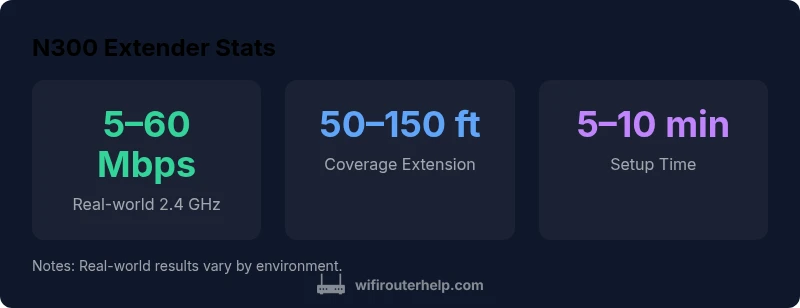
Don't expect gigabit speeds from an N300 extender; the 2.4 GHz band is subject to interference from Bluetooth devices, microwaves, and neighbors' networks. In practice, real-world throughput may range from a few Mbps near devices to tens of Mbps at the edge of your extended zone. In small spaces with only light browsing and HD video streaming, you may notice meaningful improvement, especially if your existing signal is weak. For households with multiple devices, streaming in 1080p, or online gaming, the extender's limits often become apparent, with noticeable buffering or latency.
Setup and management: ease, security, and compatibility
Most N300 extenders support standard encryption (WPA2/WPA3) and work with any router that uses common wifi bands. Setup is typically simple: press WPS on router and extender, or connect to the extender's default SSID and use a browser to configure. If your router uses a captive portal or guest network, you may need to place the extender in the main network to ensure consistent access. Some units provide a mobile app that helps with placement and firmware updates. Remember to update firmware, configure a unique admin password, and consider disabling WPS if your router supports stronger security. Also, consider the extender's placement: avoid metal appliances and place halfway between the router and the dead zone, at about mid-wall height.
Real-world deployment tips and placement
Placement is critical: aim for line-of-sight or minimal obstructions between the router and extender, ideally within 20–40 feet (6–12 meters) depending on walls. Elevate the device on a shelf rather than tucking it behind furniture. If possible, use an Ethernet backhaul to connect the extender to the router (when supported) for more stable performance. Finally, run a quick speed test at multiple points to verify coverage and adjust placement as needed.
Alternatives: mesh networks and higher-speed extenders
For larger homes or high-demand users, mesh networks offer seamless coverage, though typically at a higher upfront cost. Higher-speed extenders (for example, models offering 600–1200 Mbps bridging) provide better performance at the price of more complex setup. Price ranges vary widely by brand and features, but you can expect budget options in the lower tens of dollars and mid-range kits in the hundreds. Compare total cost of ownership and consider the desired user experience when choosing between a new mesh system or a faster single-band/dual-band extender.
Practical deployment guidelines and best practices
- Map your current coverage using simple room-by-room tests to locate dead zones. - Place extenders halfway between the router and the area needing coverage, at roughly mid-wall height. - Minimize interference by avoiding microwave ovens, cordless phones, and metal obstacles. - Enable automatic firmware updates if available and set a strong, unique admin password. - If your router supports it, use a backhaul Ethernet connection for a more stable link.
Authority sources and further reading
For context and deeper guidance, consult external sources that discuss WiFi extension strategies, interference management, and privacy implications. This section links to government and academic resources as well as major tech outlets to help you make an informed decision.
Benefits
- Budget-friendly price point
- Simple setup via WPS or web admin
- Fits on a shelf or plug-in
- Extends 2.4 GHz coverage where needed
The Bad
- Limited throughput compared to dual-band or tri-band extenders
- Single-band operation (2.4 GHz) reduces performance on crowded networks
- Diminishing returns in large homes or with thick walls
- Potential for setup problems on non-WPA networks
Best for basic coverage in small spaces on a tight budget
The N300 extender delivers essential expansion without breaking the bank. It’s best for light-use setups and smaller homes; if you need robust streaming or gaming across a wide area, consider higher-speed extenders or mesh.
People Also Ask
What is an N300 WiFi range extender and how does it differ from a router?
An N300 WiFi range extender is a device that picks up your existing wireless signal and rebroadcasts it to improve coverage. It typically operates on the 2.4 GHz band and offers lower maximum throughput than newer routers or mesh systems. It is not a replacement for your router, but a supplement to extend range.
An N300 extender helps you reach weak WiFi areas by rebroadcasting your signal; it won’t replace your main router, but it can extend coverage.
Is an N300 extender suitable for streaming or gaming?
For streaming or gaming, an N300 extender is usually borderline. It can support light HD streaming or casual gaming if positioned well, but constant high-demand tasks across many devices will likely struggle due to limited throughput.
It can handle light streaming if placed well, but expect limits for heavy gaming or multiple devices.
Can I use an N300 extender with any router?
Most N300 extenders are designed to work with typical home routers, but performance depends on the router’s bands and security settings. In general, they will work with modern Wi-Fi networks, but compatibility with guest networks or captive portals may vary.
Mostly yes, but check compatibility with your router’s security settings and guest networks.
How do I set up an N300 extender?
Setup is typically quick: connect to the extender’s default network, press WPS on both devices if available, or open the extender’s dashboard via a browser to configure SSID and password. Update firmware and adjust security settings afterward.
Connect, press WPS or log in to the extender’s dashboard, then configure SSID and password.
What’s the difference between N300 and higher-speed extenders?
N300 extenders offer basic coverage on the 2.4 GHz band with lower throughput. Higher-speed extenders provide faster performance on either 2.4 GHz and 5 GHz bands and are better for busy networks and larger homes.
N300 is basic; faster extenders give you more bandwidth and better coverage on multiple bands.
How do placement and interference affect performance?
Placement dramatically affects performance. Place the extender halfway between the router and dead zones, ideally in open space and away from microwaves or metal obstacles. Interference can drastically reduce real-world speeds.
Good placement matters: keep it clear of interference and test spots to optimize coverage.
What to Remember
- Expect modest real-world speeds
- Place midway between router and dead zones
- Choose this only if budget and simplicity are priorities
- Ensure security settings are updated
- Test placement and adjust for best coverage