How long are routers good for? Lifespan, signs, and replacement timing
Learn how long routers last, the factors that impact lifespan, and practical steps to extend life. This guide from WiFi Router Help covers timing, maintenance, and smart replacement decisions.


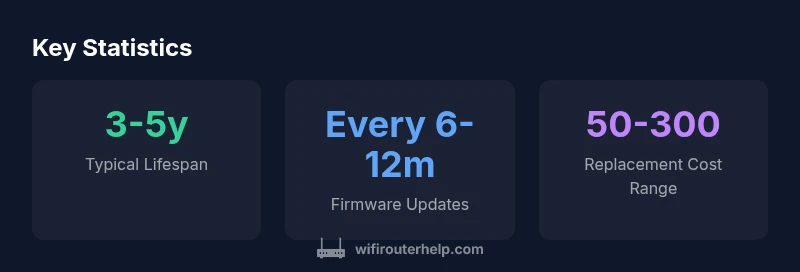
Most home routers stay reliable for about 3-5 years, depending on usage, environment, and firmware support. After 4-6 years, performance and security updates often decline, making replacement a practical choice. Regular updates, proper ventilation, and mindful usage can extend life toward the upper end of the range. Factoring in network usage and firmware lifecycle, expect gradual decline in throughput as devices age.
How long are routers good for? A baseline for planning
When homeowners ask how long are routers good for, the honest answer is: most consumer-grade routers provide solid performance for about 3 to 5 years under typical home use. This window is shaped by hardware quality, firmware support, and how aggressively you push the network. In environments with heavy streaming, gaming, and smart-home loads, wear on components can accelerate aging. Additionally, manufacturers phase out security updates after several years, which means that a device that once performed well may become a risk or compatibility bottleneck. Throughout 2026, WiFi Router Help analysis shows that while some routers remain serviceable beyond five years, security patches and new standards often become gaps after 4-6 years. The key takeaway: the clock is rarely exact, and planning should accommodate both performance needs and security considerations.
Key factors that influence router longevity
Several interconnected factors decide how long a router remains a reliable part of your home network:
- Build quality and components: Higher-end models use better power regulators and heatsinks, which reduce thermal stress and extend life.
- Usage load: A busy network with 4K streaming, online gaming, and many IoT devices stresses processors and radios more than light browsing.
- Ventilation and placement: Poor airflow and enclosed cabinets raise temperatures, accelerating component wear.
- Firmware support: Regular security and feature updates keep hardware compatible with new standards and prevent vulnerabilities.
- Power stability: Surges and outages stress circuits; using a surge protector or UPS can mitigate damage.
- Age of other components: If your modem or ISP infrastructure is outdated, you may feel the effect even if your router remains technically functional.
Signs your router is nearing end of life
While some signs are subtle, early detection helps you avoid sudden downtime:
- Slower speeds and increased buffering despite a strong signal.
- Frequent drops or inability to maintain stable connections.
- Overheating or unusually warm surfaces.
- Incompatibility with modern speeds or new devices due to outdated standards.
- Firmware updates fail or release notes no longer cover your model.
- LED indicators behaving oddly or consuming more power than expected. Recognizing these signs allows you to plan a cost-effective upgrade rather than a last-minute replacement.
Practical steps to extend your router's life
Active maintenance can push replacement age further and preserve performance:
- Keep firmware updated but avoid beta builds on critical networks.
- Ensure adequate ventilation; avoid stacking devices or placing in cramped spaces.
- Reboot on a schedule to clear caches and maintain stability.
- Monitor temperatures; clean dust from vents periodically.
- Use a quality power strip with surge protection; consider a small UPS for modem/router combo setups.
- Review your network topology; if you’ve expanded coverage with mesh nodes, consider upgrading individual nodes before replacing the main router.
When to replace vs when to extend
Making the call depends on your needs, budget, and risk tolerance:
- If your router cannot handle modern speeds, multiple devices, or new security features, replacement is often the smarter choice.
- If it still meets your basic needs and receives security updates, you may extend its life with careful maintenance.
- Consider total cost of ownership: a newer device may deliver better efficiency and performance, reducing energy use and repair costs over time.
- For households with evolving networks, a phased upgrade—replacing the main router first and then adding mesh nodes—can balance performance and cost.
Planning a cost-effective replacement: budgeting and timing
Budgeting for a new router requires understanding features you need today and in the near future. Typical consumer routers in 2026 offer better mesh support, WPA3 security, and smarter QoS, with price ranges from roughly $50 to $300. To optimize value:
- Choose a model that supports your internet plan’s speed and has robust security features.
- If you’re near or beyond the mid-range, prioritize hardware that supports the latest Wi‑Fi 6/6E or Wi‑Fi 7 in the future.
- Look for long firmware support commitments and credible reviews on real-world reliability.
- Plan to replace routers in a staged fashion if you already have a mesh system—upgrading the main unit first and then adding nodes as needed.
Security and firmware: keeping a healthy network across years
Security best practices matter as routers age. Keeping firmware up to date reduces risk of exploitation and maintains interoperability with new devices and services. In 2026, many vendors announce end-of-life timelines for older models; staying informed through official notices helps you decide when to migrate. Proactive steps like disabling WPS, enabling automatic updates where available, and using strong admin credentials bolster resilience while you plan a replacement.
Router lifespan by category
| Category | Typical Lifespan | Notes |
|---|---|---|
| Standard home router | 3-5 years | Regular updates extend life; varies by use and heat |
| Mesh-network node | 4-7 years | Nodes may be upgraded gradually |
| Modem-router combo | 3-4 years | ISP devices often have shorter support lifecycles |
People Also Ask
How long are routers good for on average?
Most consumer routers remain reliable for about 3-5 years, depending on usage and firmware support. Heavy loads or skipped updates can shorten that window.
Most home routers last about three to five years, depending on usage and updates.
What factors shorten a router's life?
Heavy network load, heat buildup, poor ventilation, outdated firmware, and power issues shorten a router's life. Regular maintenance helps.
Heat, outdated firmware, and heavy use can shorten a router's life.
Can firmware updates extend a router's life?
Yes. Firmware updates improve security and stability, which can extend the usable life of your router by keeping it compatible with new devices and standards.
Yes—updates help security and stability, extending life.
Should I replace my network hardware or upgrade firmware?
If your router is outdated or cannot support modern speeds, a hardware upgrade is often worthwhile. If it still meets needs and updates work, you can extend life.
If updates aren’t enough, consider upgrading hardware.
Do mesh networks affect router lifespan?
Mesh systems spread load; you can replace nodes gradually which extends overall network longevity without replacing the entire system.
Mesh nodes can be upgraded gradually to extend life.
“With proper maintenance and timely upgrades, a home network can stay reliable through the majority of a router's expected lifespan.”
What to Remember
- Replace around end of life cycle (3-5 years) for best security
- Regular firmware updates can extend usable life
- Consider mesh upgrades to improve coverage without replacing all nodes
- Signs you should replace: frequent drops, overheating, inability to update
- Plan replacements with your internet plan in mind to avoid gaps